Calcite-components: Bug: calcite-button width=full not working inside calcite-dropdown
Summary
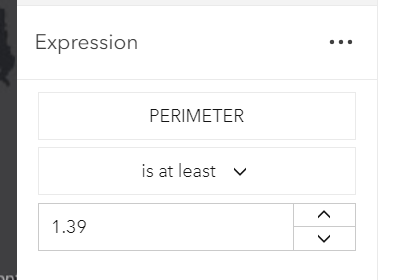
Upgraded from beta.38 to beta.39, now the calcite-button inside calcite-dropdown is not wide enough anymore. Using calcite-button outside of calcite-dropdown is fine.
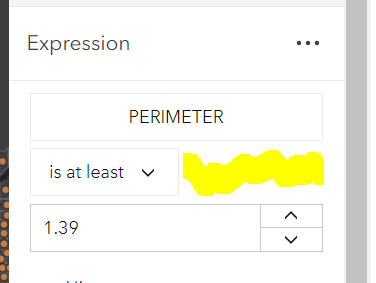

the dropdown seems to have the correct width

button CSS
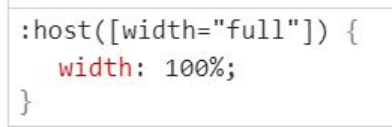
Actual Behavior
Expected Behavior
Reproduction Steps
beta 39
https://codepen.io/jcfranco-the-scripter/pen/abNRJoK?editors=1000
beta 38
https://codepen.io/jcfranco-the-scripter/pen/ZEWqeEX?editors=1000
Relevant Info
 AdelheidF
All 10 comments
@AdelheidF I added repro cases to the description. 😄
 jcfranco
on 18 Sep 2020
jcfranco
on 18 Sep 2020
@driskull Can you take a look? I think the dropdown + popper changes may have affected it.
jcfranco
on 18 Sep 2020
@asangma or @macandcheese do you think you could take this one? I'm not sure the best way to update the css display. Seems like it might need to use some flexbox.
 driskull
on 18 Sep 2020
driskull
on 18 Sep 2020
Yeah I can take a look and see what changed.
 macandcheese
on 18 Sep 2020
macandcheese
on 18 Sep 2020
The only thing that changed is that now the button is put into another container. but having both containers as display:inline-block won't work
driskull
on 18 Sep 2020
Ok, little bit of flexbox solved it... to confirm, a user will still need to wrap the dropdown in a 100% width container like in your above examples (would no longer need to set 100% width on the dropdown):
<style>
  .test-width-container {
    border: 1px dashed blue;
    display: flex;
    width: 100%;
  }
  .test-width-container calcite-dropdown {
    border: 1px dashed red;
  }
</style>

<div class="test-width-container">
  <calcite-dropdown>
    <calcite-button width="full" slot="dropdown-trigger">Scale S small</calcite-button>
    <calcite-dropdown-group group-title="View">
      <calcite-dropdown-item icon-start="list-bullet" active>List</calcite-dropdown-item>
      <calcite-dropdown-item icon-start="grid">Grid</calcite-dropdown-item>
      <calcite-dropdown-item icon-start="table">Table</calcite-dropdown-item>
    </calcite-dropdown-group>
  </calcite-dropdown>
</div>
<div class="test-width-container">
  <calcite-dropdown>
    <calcite-button slot="dropdown-trigger">Scale S small</calcite-button>
    <calcite-dropdown-group group-title="View">
      <calcite-dropdown-item icon-start="list-bullet" active>List</calcite-dropdown-item>
      <calcite-dropdown-item icon-start="grid">Grid</calcite-dropdown-item>
      <calcite-dropdown-item icon-start="table">Table</calcite-dropdown-item>
    </calcite-dropdown-group>
  </calcite-dropdown>
  some text
</div>

macandcheese
on 19 Sep 2020
Is working again with 1.0.0-next.7
AdelheidF
on 21 Sep 2020
@driskull or @macandcheese, adding flex-grow: 1[1] for this issue caused a regression in the Field Maps web app with how some of our overflow buttons are positioned (see https://github.com/ArcGIS/field-apps-web/issues/1209).
These buttons are inside a flex layout, so they're now expanding to fill out the available space of the container instead of hugging their content. Since the default value for the flex-grow style is 0, it's unexpected to see the buttons grow within a flex layout on their own.
For now, my workaround is to do:
<calcite-dropdown style="flex-grow: 0;" ...>
Thoughts on if this should be considered a regression in Calcite? If so, should I create a new issue?
[1] https://github.com/Esri/calcite-components/pull/1013/files#diff-717513f97b6ede6d16b1ad91d26a20deb137955e0743cfebf03b776d4c46a789R4
 nwhittaker
on 5 Nov 2020
nwhittaker
on 5 Nov 2020
@nwhittaker can you open a new issue so we can track this? And link this issue so if it's determined a change is needed on our end we don't undo this fix. Thanks!
macandcheese
on 6 Nov 2020
@nwhittaker can you open a new issue so we can track this?
Added https://github.com/Esri/calcite-components/issues/1232 for this.
nwhittaker
on 6 Nov 2020
Related issues
jcfranco
·
4Comments
 kMcPherson1
·
4Comments
kMcPherson1
·
4Comments
 joeyHarig
·
5Comments
joeyHarig
·
5Comments
 ethanbdev
·
4Comments
ethanbdev
·
4Comments
 bstifle
·
5Comments
bstifle
·
5Comments
Most helpful comment
Is working again with
1.0.0-next.7