Calcite-components: Enhancement: [Slider] support RTL / Mirrored
While working on the video component, I discovered we don't currently support flipping the slider orientation for dir=rtl
After discussion in https://github.com/Esri/calcite-components/issues/721 - maybe this is really a mirrored prop instead?
 macandcheese
All 10 comments
This issue has been automatically marked as stale because it has not had recent activity. It will be closed if no further activity occurs. Thank you for your contributions.
![github-actions[bot] picture](https://avatars.githubusercontent.com/in/15368?v=4&s=40) github-actions[bot]
on 24 Nov 2020
github-actions[bot]
on 24 Nov 2020
Valid
macandcheese
on 24 Nov 2020
Is there any update on when this might be able to be implemented/looked into?
 dhatcher
on 1 Jun 2021
dhatcher
on 1 Jun 2021
Hi @dhatcher. This is scheduled for the current sprint, so we're looking at having it land by 6/7.
 jcfranco
on 1 Jun 2021
jcfranco
on 1 Jun 2021
Apologies, I didn't get a chance to wrap this up by today. I'll push it to the next spring (starts today) and will shoot for this week.
jcfranco
on 7 Jun 2021
FYI, I've got PR coming up soon. A couple of questions popped up from this:
- does
mirroredonly affect the component visually or does it also invert keyboard interaction? how should we deal with the histogram + slider use case? Based on https://material.io/design/usability/bidirectionality.html#mirroring-layout, talking to some teams that work w/ data visualization + sliders and some good ol' fashioned googling, charts/graphs shouldn't be mirrored, which makes the histogram use case incompatible w/ this property. Some options for dealign with the slider + histogram use case are:
a. ignoremirrored
b. hide the histogram
c. mirror it and leave to the userFor each of these, we could additionally display a warning message or throw an error if we want to prevent this scenario.
@Esri/calcite-design-representatives WDYT?
jcfranco
on 2 Jul 2021
I'll defer to @macandcheese and team here since I'm newer to the conversation. To me, slider's UI in rtl means minValue => maxValue appears as maxValue <= minValue on the scale (for single and range use cases):
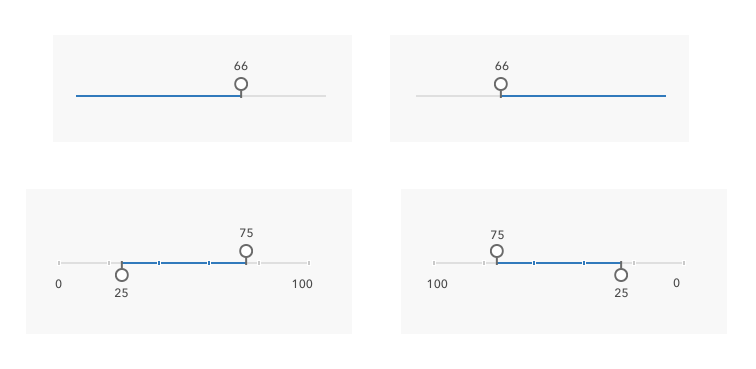
So yes, I think of the keyboard interaction being inverted. (ie., decrementing/incrementing slider value up or down, left/right arrow keys.)
And a. seems good to me - to ignore mirrored property with histogram use case (but I admit I'm probably missing some context there).
 caripizza
on 3 Jul 2021
caripizza
on 3 Jul 2021
@caripizza that makes sense to me. maxValue <= minValue in RTL
 bstifle
on 6 Jul 2021
bstifle
on 6 Jul 2021
Moving to the next milestone. This should land this week.
jcfranco
on 6 Jul 2021
Installed.
Slider now has a mirrored property for end-users to opt-in. This prop will be ignored if there is a histogram associated with it.
jcfranco
on 10 Jul 2021
Related issues
 joeyHarig
·
5Comments
joeyHarig
·
5Comments
 kMcPherson1
·
4Comments
kMcPherson1
·
4Comments
 driskull
·
3Comments
driskull
·
4Comments
bstifle
·
5Comments
driskull
·
3Comments
driskull
·
4Comments
bstifle
·
5Comments
Most helpful comment
I'll defer to @macandcheese and team here since I'm newer to the conversation. To me, slider's UI in rtl means

minValue=>maxValueappears asmaxValue<=minValueon the scale (for single and range use cases):So yes, I think of the keyboard interaction being inverted. (ie., decrementing/incrementing slider value up or down, left/right arrow keys.)
And
a.seems good to me - to ignoremirroredproperty withhistogramuse case (but I admit I'm probably missing some context there).