Calcite-components: Component Date Range
From the previous issue:
Date Range
Frequently a UI will need to ask the user for a start and end date. Wrapping two calcite-date components inside a calcite-date-range will do the legwork of ensuring dates don't overlap:
<calcite-date-range>
  <calcite-date slot="start" value="2017-06-01" min="2016-06-01"></calcite-date>
  <calcite-date slot="end" value="2017-06-01" max="2019-06-01"></calcite-date>
</calcite-date-range>
Events:
calciteDateRangeChangeemitted with standard event properties plusdetails: {startDate: "2018-03-05", endDate: "2018-03-05"}
Design
Designs by @bstifle, worked on in collab with @macandcheese and me:
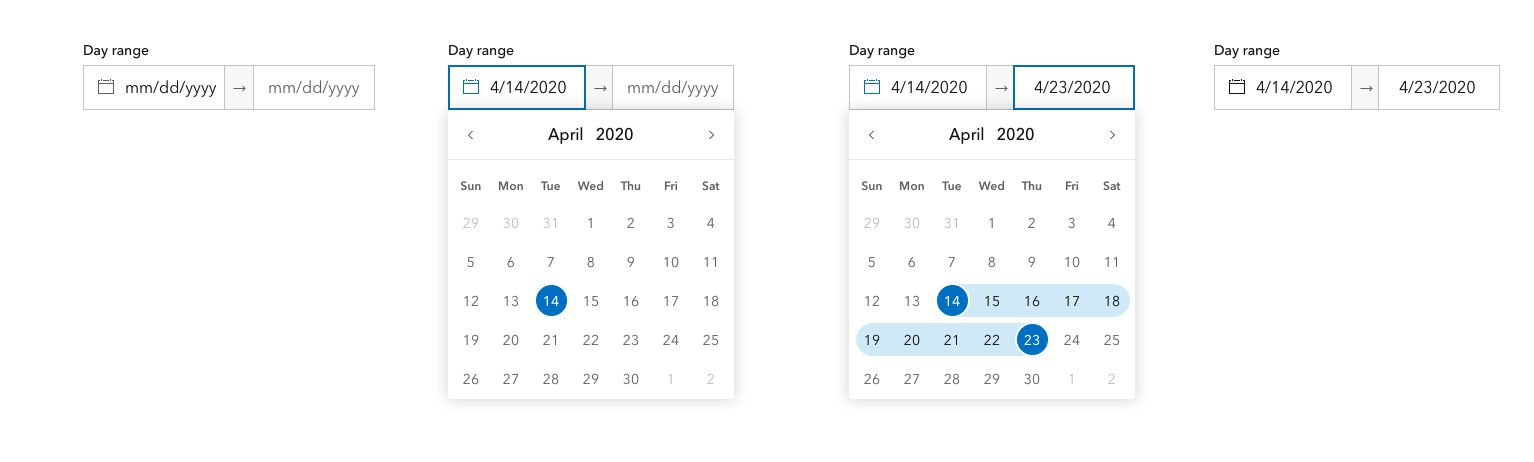
possible variable options for date or time:
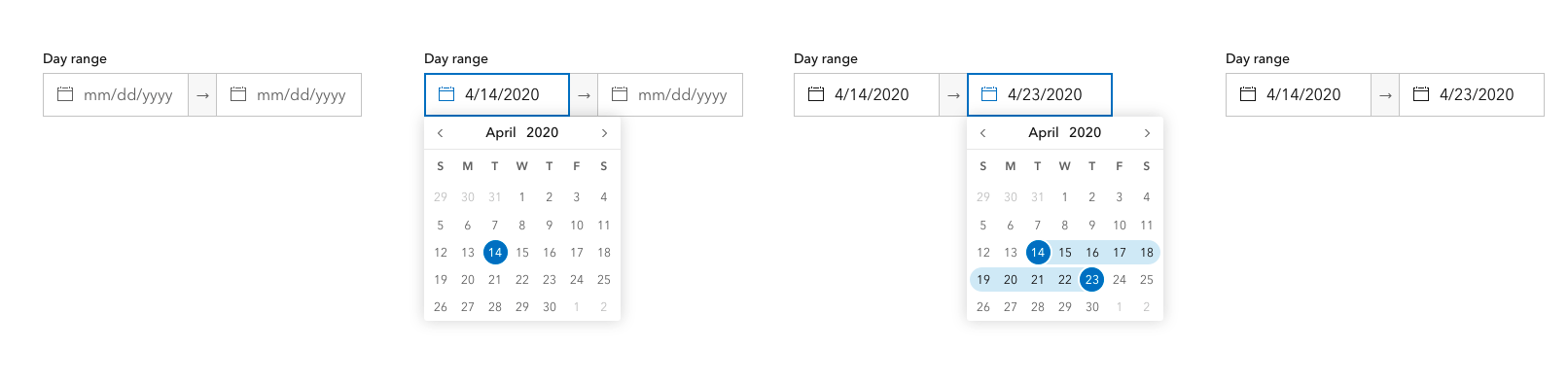

Possible narrow/panel usage:
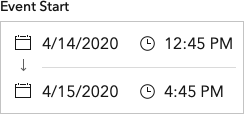
Unsure of the use case for having time associated with a range, but something we're looking for feedback and uses cases on. @Esri/calcite-components.
CC'ing @bpatterson88
This issue is an enhancement to the single date selection: #58
 julio8a
All 20 comments
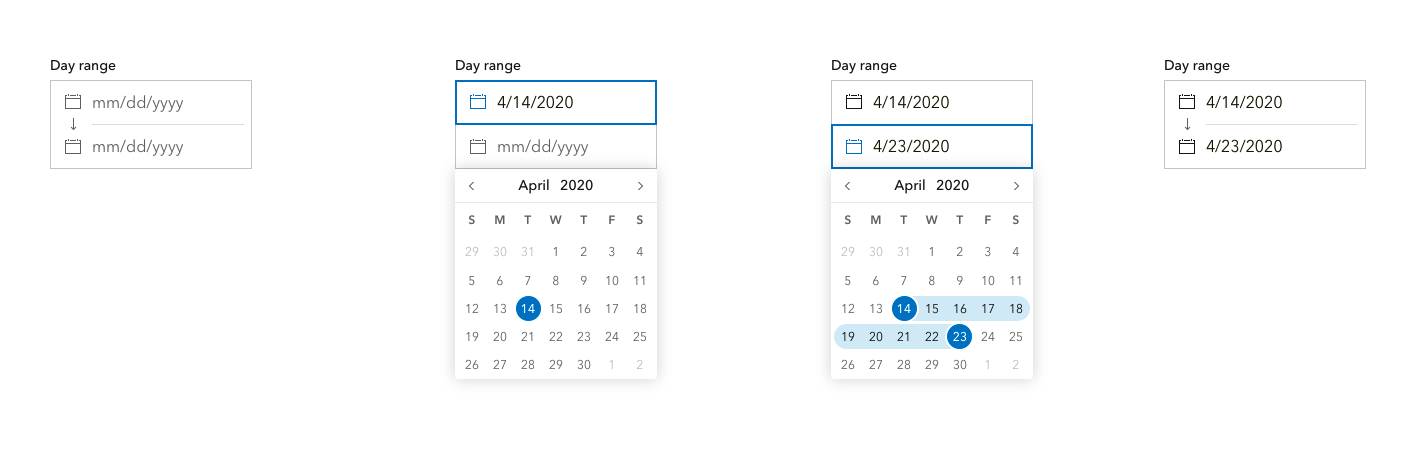
Stacking design
 bstifle
on 1 May 2020
bstifle
on 1 May 2020
Oh this is very clever @bstifle
 paulcpederson
on 1 May 2020
paulcpederson
on 1 May 2020

bstifle
on 1 May 2020
Very nice stacked UI.
It'd be useful to configure the calendar to show at all times, or only when an input is focused. And, at the risk of stating the obvious, the user needs to be able to manually key in dates into the date input.
 bpatterson88
on 1 May 2020
bpatterson88
on 1 May 2020
yep done and done! there's an "always open" calendar
bstifle
on 1 May 2020
Is the above API still valid? - I feel like that was for a design with two individual calendar components. Would a range prop on a single calcite-date component work here?
 macandcheese
on 2 May 2020
macandcheese
on 2 May 2020
@macandcheese no, I think it will work more like slider. As in we use min-value and max-value rather than value. We may need a range boolean as well so we can show range selection if you have no initial values.
<calcite-date
  range
  min-value="2020-08-12"
  max-value="2020-08-17"
  stacked
/>
Nothing selected:
<calcite-date range/>
I think time will be handled via a time boolean prop + enabling passing time via the values:
<calcite-date
  value="2020-08-12T12:23"
  time
/>
Ok, yeah I think that's what I was saying, ha - not having a <calcite-date-range> component like in the original post. time makes sense as a prop as long as calcite-time is still a valid standalone component (https://github.com/Esri/calcite-components/issues/407) for time selection without date.
macandcheese
on 2 May 2020
Yeah, sorry my "no" was to "is this a valid API", we are in alignment for sure 👨👦
paulcpederson
on 2 May 2020
Hey all, we're really looking forward to these date and time range options for ArcGIS Monitor. We've been working through some usage workflows for "scrubbing" through time and would like to ask if an option could be provided for time selection to only allow hour selection (defaulting minutes to 0)? Our use case is the user wishes to choose a specific date and time to begin their search - hour resolution is perfectly acceptable and it's actually desirable to be snapped to the top of the hour. Lower resolutions would simply get in the way.
 evanmosby
on 23 Jul 2020
evanmosby
on 23 Jul 2020
Hey @evanmosby - do you have any mockups of what this might look like? For "scrubbing" do you mean a user using a slider to "move" though time?
For time selection, I think a "disabled" state for each segment (hour, minute, am/pm) makes sense, where it's visually present and set via prop but not user editable (slightly greyed out and without incrementing arrows)..
In fact it's already planned :) 👍
https://github.com/Esri/calcite-components/issues/407#issuecomment-622119064
macandcheese
on 23 Jul 2020
@macandcheese - that sounds good. Primary desire here would be to keep the clicks to a minimum for cases that don't require it.
We're still in fairly early stages and just started another design pass. TBH, we've been sorta waiting on this component to do anything serious, but started looking at the overall flow again. Right now we daisy chained the existing date pickers together (@codylawson found #722 as part of that) to get things working. I can share more once we've updated.
RE: "Scrubbing" Yes, that's exactly it, I think we're expecting to implement this ourselves, but the idea is to allow the user to "jump" forward or backward in time by the range or a fraction. Monitor has time series data collected at fairly high resolution that can be stored for years, so users need to scan up and down to explore as needed. The Date Range component will help the user express that range and we're exploring if we can have some chart events with AmCharts to "infinitely scroll", or just add some left and right arrows to advance the time range.
Hope that helps!
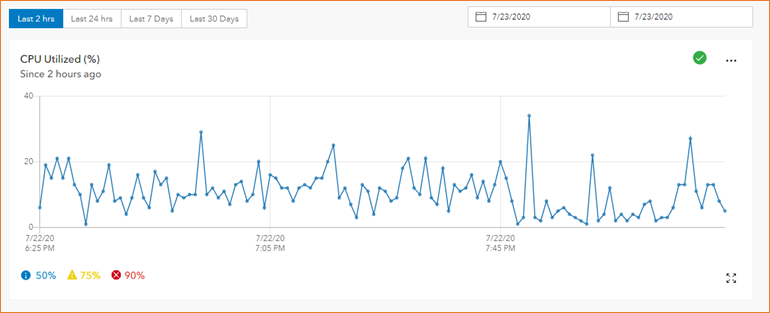
evanmosby
on 24 Jul 2020
Adding @rpanichakit9541 as I think he may take a crack at the range work.
@macandcheese is this API good? I think this is where we left off:
<calcite-date
  range
  min="2016-06-01"
  max="2019-06-01"
  start="2017-06-01"
  end="2017-06-08"
  onCalciteDateRangeChange((e) => console.log(e.detail.start, e.detail.end))
/>
Yeah I think that's a clean way to handle opting in to a range, would we want to have defaults in case those weren't present?
macandcheese
on 14 Oct 2020
I think for value in date we currently default to today. We could probably open both calendars to today if nothing is selected?
paulcpederson
on 14 Oct 2020
@paulcpederson - I've posted a PR for this here https://github.com/Esri/calcite-components/pull/1136 . Would you mind reviewing it when you get a chance? This is my first experience with Stencil, so thank you for your patience ahead of time 😄
 rpanichakit9541
on 17 Oct 2020
rpanichakit9541
on 17 Oct 2020
This issue has been automatically marked as stale because it has not had recent activity. It will be closed if no further activity occurs. Thank you for your contributions.
![github-actions[bot] picture](https://avatars.githubusercontent.com/in/15368?v=4&s=40) github-actions[bot]
on 26 Nov 2020
github-actions[bot]
on 26 Nov 2020
I apologize for the delay on this one. Got pulled away to some other tasks, but planning to circle back around to look at the rest of the outstanding PR https://github.com/Esri/calcite-components/pull/1136#issuecomment-716717094 feedback on this one this week.
rpanichakit9541
on 30 Nov 2020
@julio8a this was installed and is ready for verification on master
Thanks @rpanichakit9541
paulcpederson
on 9 Dec 2020
Woah! awesome. Verified. thx!
julio8a
on 10 Dec 2020
Related issues
 joeyHarig
·
5Comments
joeyHarig
·
5Comments
 capeoples
·
5Comments
capeoples
·
5Comments
 rslibed
·
3Comments
rslibed
·
3Comments
 ethanbdev
·
4Comments
ethanbdev
·
4Comments
 jcfranco
·
3Comments
jcfranco
·
3Comments
Most helpful comment
Stacking design