Calcite-components: Component: Combobox
In a recent meeting we discussed some of the behavior around "select" and "dropdown" type elements discussed in:
- https://github.com/ArcGIS/calcite-app-components/issues/12#issue-453130840
- Multiselect/Filter Select From https://github.com/ArcGIS/calcite-components/issues/2#issuecomment-500260665
- https://github.com/ArcGIS/calcite-components/issues/46
In the end we settled on implementing something like the multiple select/filter dropdown @macandcheese proposed in https://github.com/ArcGIS/calcite-components/issues/2#issuecomment-500260665

The purpose of this component would be to allow a use to pick an item or set of items from a list
In order to accommodate various use cases we should incorporate the following options.
- Permanently open (with user defined height) or open on select - for charting components
- Show/hide chips - for charting components
- Chip position (inline, after list, hidden)
- Filterable or not filterable - for long lists
- Add arbitrary values - for tag lists
Similar to other components that implement form controls I would REALLY like this to look like:
<calcite-super-select>
  <select name="tags" multupile>
    <option value="Test">
    <option value="Foo">
    <option value="Bar">
  </select>
</calcite-super-select>
I also think this could be called something more reasonable like <calcite-combo-select>
Proposed API
Aria role: Listbox. https://developer.mozilla.org/en-US/docs/Web/Accessibility/ARIA/Roles/listbox_role
/**
 * @slot - A slot for adding `calcite-select-option`s that will appear inside the component.
 */
CalciteSelect { // could this wrap a native <select> element?
  // default title displayed when no value is selected.
  @Prop({reflect: true}) defaultTitle!: string;

  @Prop({ reflect: true }) disabled = false;
  @Prop({ reflect: true }) loading = false;

  // Ability to select multiple or single values.
  // Multiple will display the select as a list without the menu.
  @Prop({ reflect: true }) multiple = false;

  @Prop({ reflect: true }) theme: "light" | "dark" = "light";

  // Version 2 props:
  // @Prop({ reflect: true }) filter = false; // V2
  // @Prop({ reflect: true }) chips = false; // V2
  // @Prop({ reflect: true }) chipValues = []; // V2
  // @Prop({ reflect: true }) chipPosition = "inline" | "after" | "list"; // V2

  @Method()
  async setFocus() {}

  @Event() calciteSelectChange: EventEmitter;
}

/**
 * @slot icon - A slot for adding content that will appear on the leading side of the option.
option.
 */
CalciteSelectOption { // could this wrap a native <option> element?
  @Prop({ reflect: true }) value!: string;
  @Prop({ reflect: true }) title!: string;
  @Prop({ reflect: true }) selected: boolean = false;

  @Event() calciteSelectOptionChange: EventEmitter;
}
Example
<calcite-select>
  <calcite-select-option value="1" title="hello" selected></calcite-select-option>
  <calcite-select-option value="2" title="hi">
    <calcite-icon slot="icon" icon="x">
  </calcite-select-option>
  <calcite-select-option value="3" title="parent">
    <!-- nesting is allowed for indentation like a list item -->
    <calcite-select-option value="4" title="child"></calcite-select-option>
  </calcite-select-option>
</calcite-select>
 patrickarlt
All 42 comments
Thanks for opening - working with Mike on finalizing designs for this. Dependent on https://github.com/ArcGIS/calcite-components/issues/47.
 macandcheese
on 18 Jun 2019
macandcheese
on 18 Jun 2019
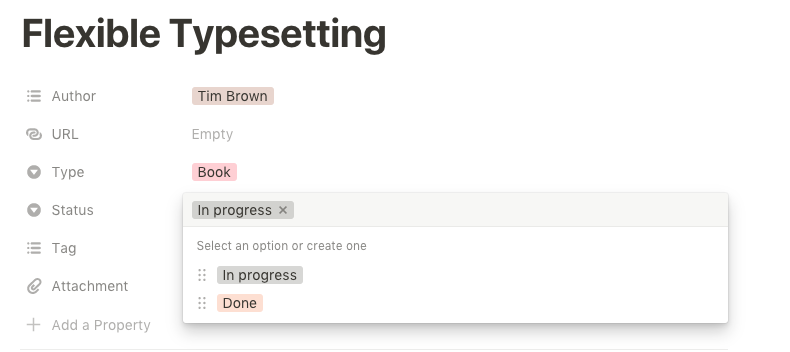
In ArcGIS Online, the current tags widget requires the user to type something first to get the autocompleted tags. There is feedback that users want to see a list of existing tags, and then decide whether to create a new tag. This will help reduce unnecessary/repeated tags.
The tags widget in in Notion seems to be a good reference:

 jimmieego
on 25 Jul 2019
jimmieego
on 25 Jul 2019
Chips will be a requirement for this https://github.com/Esri/calcite-components/issues/47
macandcheese
on 21 Aug 2019
We have a need for this component as well with a few modifications:
Modifications
- The select option should have a slot to take custom content on the leading and trailing side.
- This will allow for a thumbnail or control on either side of the option.
- The select box on the dark theme should be dark as well as the dropdown
- The
selectedvisual state could be defined by a background color and/or a border on the item instead of a dot.
Notes

Our use case doesn't need multiple but it wouldn't hurt to have it.
It would also be good to just have the dropdown part of the component available for use within the calcite-value-list and calcite-pick-list or these components could be deprecated.
cc @asangma
 driskull
on 31 Dec 2019
driskull
on 31 Dec 2019
Permanently open (with user defined height) or open on select - for charting components
I think we could have the permanently open as its own component that this one uses internally.
Maybe calcite-select-menu uses calcite-select-list internally?
Or it could just be an option like proposed. Maybe like appearance: "list" | "menu"?
driskull
on 31 Dec 2019
Added API to top.
driskull
on 31 Dec 2019
dzine

 asangma
on 8 Jan 2020
asangma
on 8 Jan 2020
Should we leave the "summary" portion out for now? I see it in both the examples that @janett-baresel included in https://github.com/Esri/calcite-app-components/issues/383.
asangma
on 8 Jan 2020
Thanks for updating the api @driskull.
re: chips
Per recent discussion in the sync meeting, we thought it would be good to separate out the chips requirement. It could be its own component that interacts with this select component or something else. @macandcheese cool cool?
asangma
on 9 Jan 2020
Yes, agreed! in fact they already have an open issue :) - https://github.com/Esri/calcite-components/issues/47.
Lots of use cases for chips to exist on their own - in tandem with tree nav selected items, marketplace type filtering experiences, "user tags with avatars", etc. Should support icon, image, "click to close", etc.,
This component would just leverage those I think.
macandcheese
on 9 Jan 2020
@asangma if we get some text and thumbnail, it would already be good. We can see how we can extend the summary part inside SV if its out of scope for you right now.
 janett-baresel
on 10 Jan 2020
janett-baresel
on 10 Jan 2020
Edit: saw summary in attached screenshots. I think we already provide "title" and "subtitle" slots in accordion title etc, we could provide it here but with less strict style overrides to allow the font used in examples attached.
Sounds like we need a "selected-appearance-type" attribute to allow selection between dot, check, border, or outline (probably something useful for other components too like dropdown and tree nav that have a selected state, down the road), in a standardized way across components.
macandcheese
on 10 Jan 2020
Sounds like we need a "selected-appearance-type" attribute to allow selection between dot, check, border, or outline
I think a slot would be better so we can handle the color ramp use case.
driskull
on 10 Jan 2020
Would that be handled by slot for thumbnail?
Or does the selected outline ring change based on color ramp?
I just meant being able to choose the manner in which a selected item is highlighted. Could be a "none" option for those that want greater customization but I think we want to give folks matching styles to the other "selected items" in components if they don't need that.
macandcheese
on 10 Jan 2020
Couple more gotchas:
Looks like we'll need options to,
"remove from list when selected" - once an item becomes an appended chip, remove it from the filterable list of choices (and reciprocally, return to list when chip is dismissed), and,
"create chip from string" - and then emit that in an event for an app to use.
Based on our wonderfully consistent tags and category options currently on the Content page in Online:

macandcheese
on 10 Jan 2020
Requirements from the Developers site tags component
- Generally follow the WCAG guidelines for combobox
- Display of the component should be a text box with chips for the selected items.
- Chips display a "X" icon to deselect the item represented by that chip.
- A list of available options should appear when the input is focused.
- Keyboard navigation can be used in the list to select items (up down enter)
- If the input in empty and the user hits delete the last selected item is selected
- Chips can be navigated and deselected by keyboard (left right enter delete)
- When a chip is removed by keyboard the next chip is selected
- Add an options so users can hit "Enter" and add a new item to the available options. This is selected by default.
There are lots of detailed interactions in the WCAG document above which we implemented for the developers site. For example hitting Esc in the text box clears the selection, focus never leaves the text box, tons of ARIA attributes ect...
patrickarlt
on 11 Jan 2020
"Lookup" terminology here seems useful, this differentiation and nomenclature makes sense to me if we want something better than "super select"
macandcheese
on 13 Jan 2020
We spoke briefly at the end of the meeting about the name of this component. Super select may not be the best descriptor. What about calcite-combobox or perhaps calcite-tag-manager? Any ideas?
 pr3tori4n
on 13 Jan 2020
pr3tori4n
on 13 Jan 2020
Of the above, I prefer combobox or "lookup" from above linked example. Tag manager sounds perhaps too specific to a workflow.
macandcheese
on 13 Jan 2020
I just meant being able to choose the manner in which a selected item is highlighted. Could be a "none" option for those that want greater customization but I think we want to give folks matching styles to the other "selected items" in components if they don't need that.
You're right. that sounds good.
driskull
on 14 Jan 2020
What about calcite-combobox or perhaps calcite-tag-manager? Any ideas?
Why not just call it a calcite-select which is an enhanced selection component that does more than a native select element?
driskull
on 14 Jan 2020
@patrickarlt @macandcheese @asangma I wanted to bring up a thought I had on the API in regards to implementing the list values. I think the assumption up until now has been that it would be done via slotted content. We could go that route, but I wanted to bring up the option of having the data supplied as rich data (an array of objects). The combobox could then render the list internally in its own render function.
My reasoning behind this is that the combobox needs the list data in a rich data format in order to effectively do the filtering. Using slotted content would mean we'd have to parse that HTML. It would also be easier to manage the display of which items and parents are selected or partially selected if the combobox had control over the rendering of the list.
If this is difficult to visualize, we could setup a meeting to share screens, or I could proceed in this fashion and we could review in the PR stage.
pr3tori4n
on 14 Jan 2020
option of having the data supplied as rich data (an array of objects).
I think this would be inconsistent with the way other components work. If we can do it using child components that would be ideal.
driskull
on 14 Jan 2020
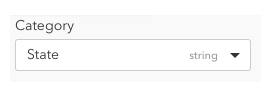
One requirement we have for Calcite-Select is to show Field Type as in this example
 subgan82
on 15 Jan 2020
subgan82
on 15 Jan 2020
@patrickarlt keyboard stepping works with tab and shift-tab at the moment. Is it necessary for the arrow keys to mimic that behavior as well?
pr3tori4n
on 15 Jan 2020
Is it necessary for the arrow keys to mimic that behavior as well?
I think so. Its a requirement of the listbox role which is what we're pretty much going for.
https://developer.mozilla.org/en-US/docs/Web/Accessibility/ARIA/Roles/listbox_role
ARIA: listbox role
The listbox role is used for lists from which a user may select one or more items which are static and, unlike HTML
driskull
on 15 Jan 2020
Can we call this component calcite-select or calcite-listbox?
driskull
on 15 Jan 2020
It seems like we have two components that we're discussing here:
- An autocomplete/combobox component which main use cases are for selecting tags or values from data by typing and showing an autocomplete menu below.
- An enhanced Select component with the ability to display custom HTML in the menu and options. as well as nesting indentation. Would also handle multiple selection as well. Potentially the ability to filter items. (not sure if this is necessary)
Should we close this issue and split them up into separate issues?
driskull
on 16 Jan 2020
I agree with @driskull and think we should separate this out into two issues and close this one. I think it's causing some cunfuzedness.
asangma
on 16 Jan 2020
I think that's fine, so long as "1" also supports nested items and their selection. I'd suggest also having a "native select" option with a custom styled input and natively rendered <options> (https://www.carbondesignsystem.com/components/select/code/)
macandcheese
on 16 Jan 2020
I'd suggest also having a "native select" option with a custom styled input and natively rendered
That might be a 3rd component then. Because it wouldn't be able to do the nesting or custom HTML if the native select is used as the menu.
driskull
on 16 Jan 2020
Maybe I'm being dense here... What's the difference between the "1" and "2" options above? One has option items that are limited to plain text, and the other allows custom html in option items? And both can have nested children, where a parent item can either select itself and all children or be selected independently?
macandcheese
on 17 Jan 2020
Is this correct?
<calcite-select> - populates input with a single selected plain text item - renders native option elements, no nesting
<calcite-multi-select>/<calcite-lookup> - uses chips to indicate selection of one or multiple plain text items - renders plain text, styled options, can be nested supports filtering
<calcite-something> - allows for custom HTML for each option - single item selectable, supports filtering
macandcheese
on 17 Jan 2020
I think its more like this:
<calcite-select> (populates input with a single selected plain text item - renders native option elements, no nesting)
<calcite-combobox/calcite-autocomplete> (uses chips to indicate selection of one or multiple plain text items - renders custom slots of plain text, can be nested)
<calcite-custom-select> - allows for custom HTML for each option - single item selectable
Autocomple/combobox
https://material-ui.com/components/autocomplete/#combo-box
Selects
https://material-ui.com/components/selects/
I think 2 & 3 could be the same component if we can decide on the single UI to allow selection.
https://esri.github.io/calcite-app-components/?path=/story/components-calcite-pick-list--basic
Combobox
- Many potential items to select, may perform network query to find matches (think tags)
- In multiple mode: allows typing in an input box to filter/query for results
- Shows selected results in the input box area like tags
Custom select
- Limited number of items to select
- In multiple mode: Displays results as a list like a native select. Selected items are shown in place, not in the top box.
- In single mode, shows selected result like a native select
@julio8a can we setup another meeting for these? There are two different sets requirements here.
driskull
on 17 Jan 2020
@asangma could something like this:
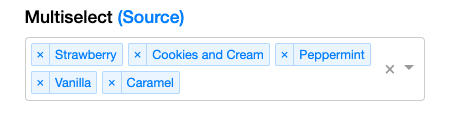
replace this:

Both do multiple select in two different UIs and I'm not sure if that is justified.
https://jedwatson.github.io/react-select/
It would be nice if we had it all ironed out about when a dev would use...
- A
calcite-select - A
calcite-combobox - A
calcite-pick-list - A
calcite-value-list - etc.
driskull
on 17 Jan 2020
- Phase 1 for this component: just a text list with multiple selection. Can have hierarchy with parent/children. Includes chips #47
- Phase 2: Allow a slot for leading or trailing graphics.
 julio8a
on 23 Jan 2020
julio8a
on 23 Jan 2020
Along with multiple selection, it would be nice to have aggregate selections, such as:
- Select all
- Deselect all
- Select _only_ this item
This would help support the Dashboards category filtering feature, which could use this component.
 bpatterson88
on 31 Jan 2020
bpatterson88
on 31 Jan 2020
@bpatterson88 do you have any UI examples of that? Use case makes sense and can imagine what it might look like but could be helpful to add here. Thanks
macandcheese
on 6 Feb 2020
This is a screenshot from the upcoming 8.1 release of Dashboards. You can see the UI to select All or Clear selection in the top right.
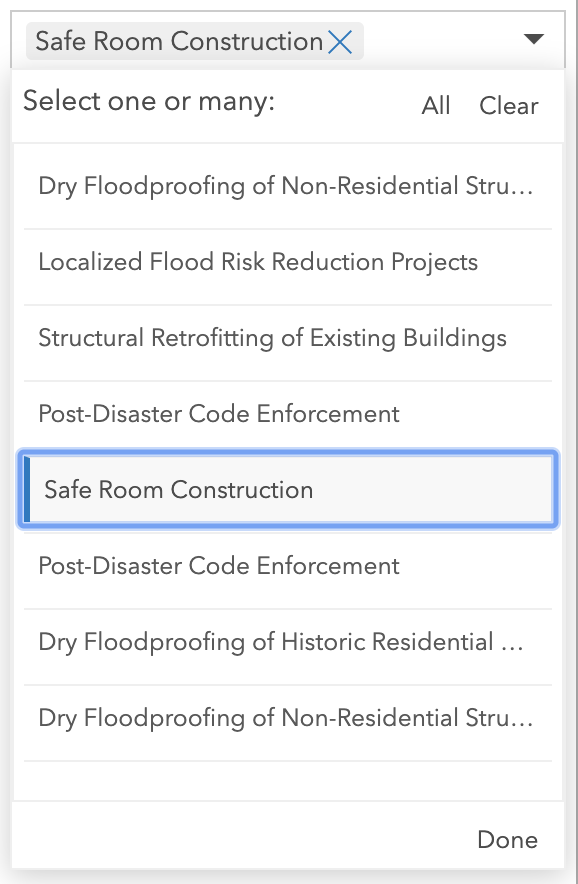
The screenshot from Google Data Studio shows the "select _only_ this item" use case. A bit more niche than select all / clear.

bpatterson88
on 15 Feb 2020
Here is an in progress mockup for Dashboards. In most cases the dropdown input will be no wider than about 300px, so we need an additional filtering input _outside_ of the chip area. Otherwise there won't be enough space for the user to filter the list.

bpatterson88
on 4 Mar 2020
use case to consider as this is being worked on:
https://devtopia.esri.com/WebGIS/arcgis-app-components/issues/54

 dhrumil83
on 10 Mar 2020
dhrumil83
on 10 Mar 2020
Installed
driskull
on 31 Mar 2020
Related issues
 AdelheidF
·
4Comments
AdelheidF
·
4Comments
 bstifle
·
3Comments
bstifle
·
3Comments
 joeyHarig
·
5Comments
joeyHarig
·
5Comments
 nwhittaker
·
5Comments
nwhittaker
·
5Comments
 ethanbdev
·
4Comments
ethanbdev
·
4Comments