Cacti: Spikekill `percent` is converted from percent to decimal twice, making it 1/100 of the true size
Describe the bug
When the Spikekill script is run, it retrieves the value of percent from one of the following:
- the object creation call,
- the
settingsdatabase table, or - the
settings_userdatabase table.
The database stores the values in standard percent formatting, so 90% would be stored as '90'. Spikekill converts this value to decimal format, so 90% would be treated as '.9'. Then, it does so a second time, so that 90% is now '.009'. Values obtained from the object creation call are not divided a second time, so their treatment remains correct.
To Reproduce
This happens every time Spikekill is run and percent is not specified when creating the class object. Therefore, when run from the CLI, Spikekill will always treat the percent correctly (because the CLI hook script digs up the database value and passes it), and when run from the GUI, Spikekill will always divide the percent once too many times (because the GUI hook script does not pass the value, so Spikekill digs up the database value).
Expected behavior
The value of percent should not be divided twice when it is retrieved from the database by the Spikekill script.
Screenshots
This section of code says, 'if percent was not specified when creating the class object, then grab it either from the user settings or the global settings, and divide it by 100 ; store it into the class object'.
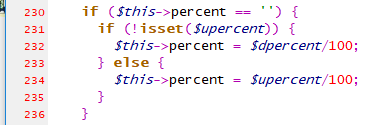
Then, this section of code says, 'if the class object has percent value, divide it by 100'.

Therefore, the value is divided by 100 twice when retrieved from the database, while only divided once if the value is passed while creating the class object.
Desktop (please complete the following information)
n/a
Smartphone (please complete the following information)
n/a
Additional context
None
 riversdev0
All 3 comments
From the logs:
When running Spikekill from the GUI, where the user has a personal setting of 100%:
2020/07/14 12:51:05 - SPIKEKILL CactiUser:admin, File:wan-rt02_traffic_in_72.rrd, Method:Variance, AvgNan:last, Kills:5, Outliers:3, Percent:0.01
When running Spikekill from the GUI, where the user has no personal setting, and the global setting is 1000%:
2020/07/14 12:52:57 - SPIKEKILL CactiUser:admin, File:wan-rt02_traffic_in_72.rrd, Method:Variance, AvgNan:last, Kills:5, Outliers:3, Percent:0.1
When running Spikekill from the CLI, with no percent parameter specified on command line, where the global setting is 1000%:
2020/07/14 12:54:52 - SPIKEKILL OsUser:root, File:wan-rt02_traffic_in_72.rrd, Method:Variance, AvgNan:last, Kills:5, Outliers:5, Percent:10
When running Spikekill from the CLI, specifying the --percent=2000 parameter:
2020/07/14 12:55:04 - SPIKEKILL OsUser:root, File:wan-rt02_traffic_in_72.rrd, Method:Variance, AvgNan:last, Kills:5, Outliers:5, Percent:20
It's a shame we can't offer out titles, otherwise you would definitely be 'SpikeKiller' ;-)
Keep up the good work.
 netniV
on 15 Jul 2020
netniV
on 15 Jul 2020
It's a shame we can't offer out titles, otherwise you would definitely be 'SpikeKiller' ;-)
Keep up the good work.
Nice GitHub.com RFE @netniV
 TheWitness
on 15 Jul 2020
TheWitness
on 15 Jul 2020
Related issues
 josun-33
·
4Comments
josun-33
·
4Comments
 interduo
·
8Comments
interduo
·
8Comments
 anarkia1976
·
3Comments
anarkia1976
·
3Comments
 Initarts
·
6Comments
anarkia1976
·
3Comments
Initarts
·
6Comments
anarkia1976
·
3Comments
Most helpful comment
It's a shame we can't offer out titles, otherwise you would definitely be 'SpikeKiller' ;-)
Keep up the good work.