I accidently(?) upgraded to 1.2.0 when it was created.
I would like to jump in to 1.1.38 stable.
So how to downgrade?
I did a git checkout origin/master.
The installer gets an error:
Error: Invalid Cacti version 1.2.0, cannot upgrade to 1.1.38.
I could not continue or ommit the error.
 interduo
All 8 comments
Just replace the files and manually drop the columns create in the install/updates/1_2_0.php file.
 cigamit
on 23 Apr 2018
cigamit
on 23 Apr 2018
Also update the version table to 1.1.38 so that you avoid the installer. Normally, you should not do this but that is the way to go for now.
 netniV
on 24 Apr 2018
netniV
on 24 Apr 2018
I am stucked at error:
Invalid Cacti version 1.2.0, cannot upgrade to 1.1.38.
On installer with no button and no action. Is this the end of the end of the world?:)
How to debug this?
interduo
on 25 Apr 2018
update version set cacti_version = '1.1.38';
^^^ Use that with caution though. You should also revert any changes made to the DB by the install/upgrades/1_2_0.php file. Otherwise, you may find that 1.1.38 starts complaining about missing values for fields etc when creating new items.
netniV
on 25 Apr 2018
Aaaaa I forgot to change that. Thanks for that.
BTW Do You know when 1.2.x will be released?
interduo
on 25 Apr 2018
Once we have what we want to put in it? No specific date set at the moment that I am aware of. There are a number of changes we are trying to make for it and our free time is limited so it's shouldn't really be fixed (like it would be if this was our full time job).
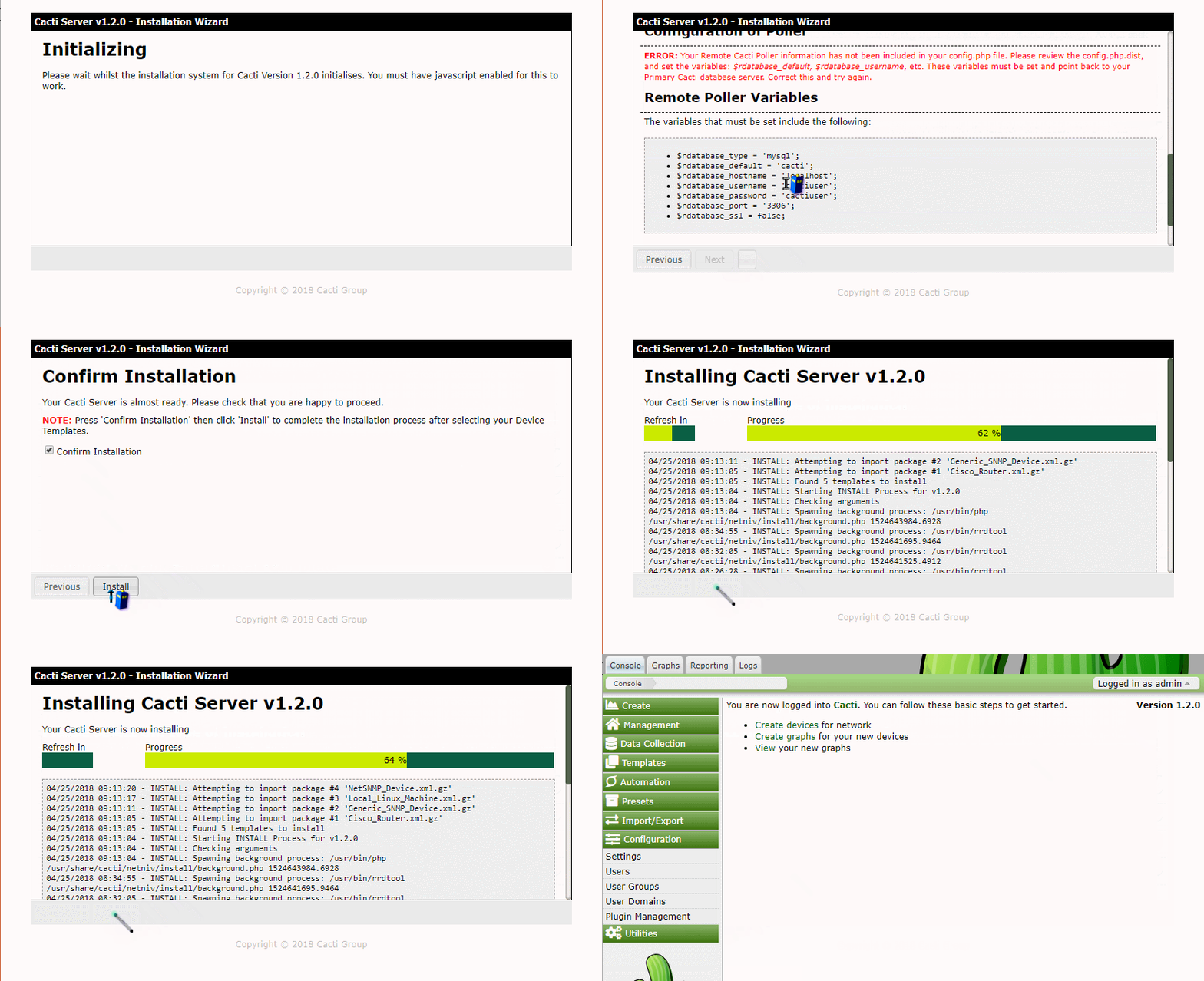
For example, I've just spent 4 days revamping the installation system to be nicer and work in the background so the UI remains responsive. It works for the most part, but there is still some elements to do such as:
require authmake UI ajax basedallow refresh to current stepimprove requirement sections
make headings collapsible with icon (warning: exclamation, success: tick)auto hide sections with no warnings
Add UTF8 table check stepAdd confirm install screen
make install/upgrade/downgrade button disabled without confirm tickadd big warnings if attempting to downgrade- put the settings being used on the Confirm Install screen,
- background install
import template packagesreport progress- create default device
- update poller configuration
- convert tables to utf8 if requested
Here is an example screenshot of what I've prepared but it's by no means what it will look like once all styling, mods and fixes have been applied to it. Once it's made into a pull request there are probably going to be a few changes requested to it.
netniV
on 25 Apr 2018
@netniV good work. Beautifully:)
 pautiina
on 25 Apr 2018
pautiina
on 25 Apr 2018
@pautiina You can grab a copy of this from the Installer branch of my repo. If you could give it a go, it'd be nice to see what your thoughts are.
netniV
on 28 Apr 2018
Related issues
interduo
·
6Comments
 anarkia1976
·
3Comments
anarkia1976
·
3Comments
 darius1706
·
5Comments
darius1706
·
5Comments
 b0b21
·
4Comments
anarkia1976
·
3Comments
b0b21
·
4Comments
anarkia1976
·
3Comments
Most helpful comment
Once we have what we want to put in it? No specific date set at the moment that I am aware of. There are a number of changes we are trying to make for it and our free time is limited so it's shouldn't really be fixed (like it would be if this was our full time job).
For example, I've just spent 4 days revamping the installation system to be nicer and work in the background so the UI remains responsive. It works for the most part, but there is still some elements to do such as:
require authmake UI ajax basedallow refresh to current stepimprove requirement sectionsmake headings collapsible with icon (warning: exclamation, success: tick)auto hide sections with no warningsAdd UTF8 table check stepAdd confirm install screenmake install/upgrade/downgrade button disabled without confirm tickadd big warnings if attempting to downgradeimport template packagesreport progressHere is an example screenshot of what I've prepared but it's by no means what it will look like once all styling, mods and fixes have been applied to it. Once it's made into a pull request there are probably going to be a few changes requested to it.