real-time 无法查看,提示权限拒绝!
Permission Denied
You are not permitted to access this section of Cacti.
If you feel that this is an error. Please contact your Cacti Administrator.
[返回 | 重新登录]
 Initarts
All 6 comments
Did you enable the Normal User permission?
 cigamit
on 6 Sep 2017
cigamit
on 6 Sep 2017
configuration file:
chown apache:apache /var/www/html/cacti
chmod -R 755 /var/www/html/cacti/
$database_type = 'mysql';
$database_default = 'cacti';
$database_hostname = 'localhost';
$database_username = 'cacti';
$database_password = 'password';
$database_port = '3306';
$database_ssl = false;
mysql>create database cacti;
mysql>grant all privileges on cacti.* to 'cacti'@'localhost' identified by 'password' with grant option;
mysql>use cacti;
mysql>source /var/www/html/cacti/cacti.sql;
mysql>grant select on mysql.time_zone_name to 'cacti'@'localhost' identified by'password';
mysql> flush privileges;
user admin
Initarts
on 6 Sep 2017
That's not an OS or database failed authorization message. It's a Cacti specific failed authorization message. If I understand the code correctly, the _Realtime Graphs_ realm (25), is accessible to the Normal User role. You need to make sure your account has that role like @cigamit mentioned above.
cacti/include/global_arrays.php:
$user_auth_roles = array(
    'Normal User'            => array(7, 19, 20, 22, 24, 25),
    'Template Editor'        => array(8, 2, 9, 10, 11, 12, 13, 14, 16, 17),
    'General Administration' => array(8, 3, 4, 5, 23, 1043),
    'System Administration'  => array(8, 15, 1, 18, 21, 101)
);
$user_auth_realms = array(
    8    => __('Console Access'),
    7    => __('View Graphs'),
    25   => __('Realtime Graphs'),
    20   => __('Update Profile'),
    24   => __('External Links'),
    1    => __('User Management'),
    15   => __('Settings and Utilities'),
    23   => __('Automation Settings'),
    2    => __('Data Input Methods'),
    13   => __('Data Queries'),
    3    => __('Sites/Devices/Data Sources/Data Collectors'),
    5    => __('Graphs'),
    4    => __('Trees'),
    1043 => __('Remove Spikes from Graphs'),
    9    => __('Data Source Profiles'),
    14   => __('Colors/GPrints/CDEFs/VDEFs'),
    10   => __('Graph Templates'),
    11   => __('Data Templates'),
    12   => __('Device Templates'),
    16   => __('Export Data'),
    17   => __('Import Data'),
    18   => __('Log Management'),
    19   => __('Log Viewing'),
    21   => __('Reports Management'),
    22   => __('Reports Creation')
);
 paulcalabro
on 6 Sep 2017
paulcalabro
on 6 Sep 2017
@paulcalabro
Thank you, this problem has been settled. You need to change some permissions on the user interface.
1.
Modify default configuration
Add the corresponding number according to your own requiremen
$user_auth_roles = array(
'Normal User' => array(1, 2, 3, 4, 5, 7, 8, 9, 10, 11, 12, 13, 14, 15, 16, 17, 18, 19, 20, 21, 22, 23, 24, 25, 1043),
'Template Editor' => array(1, 2, 3, 4, 5, 7, 8, 9, 10, 11, 12, 13, 14, 15, 16, 17, 18, 19, 20, 21, 22, 23, 24, 25, 1043),
'General Administration' => array(1, 2, 3, 4, 5, 7, 8, 9, 10, 11, 12, 13, 14, 15, 16, 17, 18, 19, 20, 21, 22, 23, 24, 25, 1043),
'System Administration' => array(1, 2, 3, 4, 5, 7, 8, 9, 10, 11, 12, 13, 14, 15, 16, 17, 18, 19, 20, 21, 22, 23, 24, 25, 1043)
);
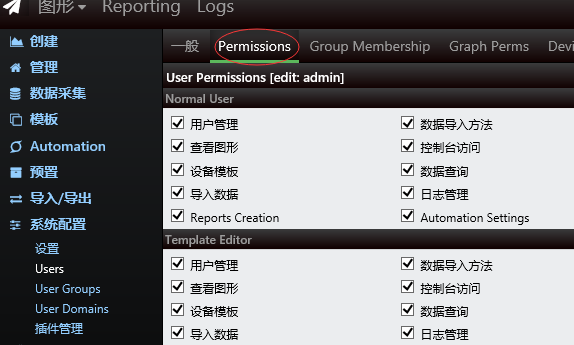
2.Graphical user interface management second items, which can be checked
Initarts
on 6 Sep 2017
Glad it's working for you now! Thanks for the info!
paulcalabro
on 6 Sep 2017
Initarts, it would be nice if someone could donate time to the Chinese translation for Cacti. We have Dutch and Spanish already. Need more completed translations. Your help would be appreciated.
cigamit
on 6 Sep 2017
Related issues
 josun-33
·
4Comments
josun-33
·
4Comments
 brenc
·
7Comments
brenc
·
7Comments
 anarkia1976
·
7Comments
anarkia1976
·
3Comments
anarkia1976
·
7Comments
anarkia1976
·
3Comments
 skyjou
·
5Comments
skyjou
·
5Comments
Most helpful comment
@paulcalabro
Thank you, this problem has been settled. You need to change some permissions on the user interface.
1.
Modify default configuration
Add the corresponding number according to your own requiremen
$user_auth_roles = array(
'Normal User' => array(1, 2, 3, 4, 5, 7, 8, 9, 10, 11, 12, 13, 14, 15, 16, 17, 18, 19, 20, 21, 22, 23, 24, 25, 1043),
'Template Editor' => array(1, 2, 3, 4, 5, 7, 8, 9, 10, 11, 12, 13, 14, 15, 16, 17, 18, 19, 20, 21, 22, 23, 24, 25, 1043),
'General Administration' => array(1, 2, 3, 4, 5, 7, 8, 9, 10, 11, 12, 13, 14, 15, 16, 17, 18, 19, 20, 21, 22, 23, 24, 25, 1043),
'System Administration' => array(1, 2, 3, 4, 5, 7, 8, 9, 10, 11, 12, 13, 14, 15, 16, 17, 18, 19, 20, 21, 22, 23, 24, 25, 1043)
);
2.Graphical user interface management second items, which can be checked
