Cacti: LDAP Authentication succeeds, but login fails due to bad session handling
OS Environment:
-- Ubuntu Server 20.04
-- Cacti 1.2.12
Issue:
After pulling the latest commit from 1.2.x starting from commit b8a31307f89fc1409024399045bbeba54f28265e to commit 896f24b0c62e10cfe13984a151bdc175dd609889 yesterday, I couldn't login my account using ldap, it just remained on the same login page, and I just thought maybe it is something related to the cookies, but still no luck after clearing all my cookies on my chrome browser. But I am not sure if this issue happens after the git pull.
And today I just googled "cacti cookies", and I got into this https://github.com/Cacti/cacti/issues/804 issue, and seems it's something related to the "Keep me signed in" option. So I just try to enable the "Keep me signed in", and it works now again. I have also tried to perform "Clear User Settings", "Clear Private Data", "Logout Everywhere" and delete the record according to my "user_id" from DB table "user_auth_cache", but none of them solve the issue, I still need to enable the "Keep me signed in" when logging in.
And the cacti log seems not showing any related error.
The log with "Keep me signed in" disabled.
2020-05-26 10:01:36 - AUTH LOGIN: LDAP User 'simon.pong' Authenticated
2020-05-26 10:01:36 - AUTH LOGIN: User 'simon.pong' Authenticated
The log with "Keep me signed in" enabled.
2020-05-26 10:02:25 - AUTH LOGIN: LDAP User 'simon.pong' Authenticated
2020-05-26 10:02:25 - AUTH LOGIN: User 'simon.pong' Authenticated
2020-05-26 10:02:25 - AUTH LOGIN: User 'simon.pong' Authenticated via Authentication Cookie
 simonpunk
All 22 comments
It is unlikely to be 804, as that was something from a long time ago. The issue may be that it isn't remembering the LDAP domain is selected in the drop down. Can you try switching off the LDAP domain and back to it before logging in to see if that works?
 netniV
on 26 May 2020
netniV
on 26 May 2020
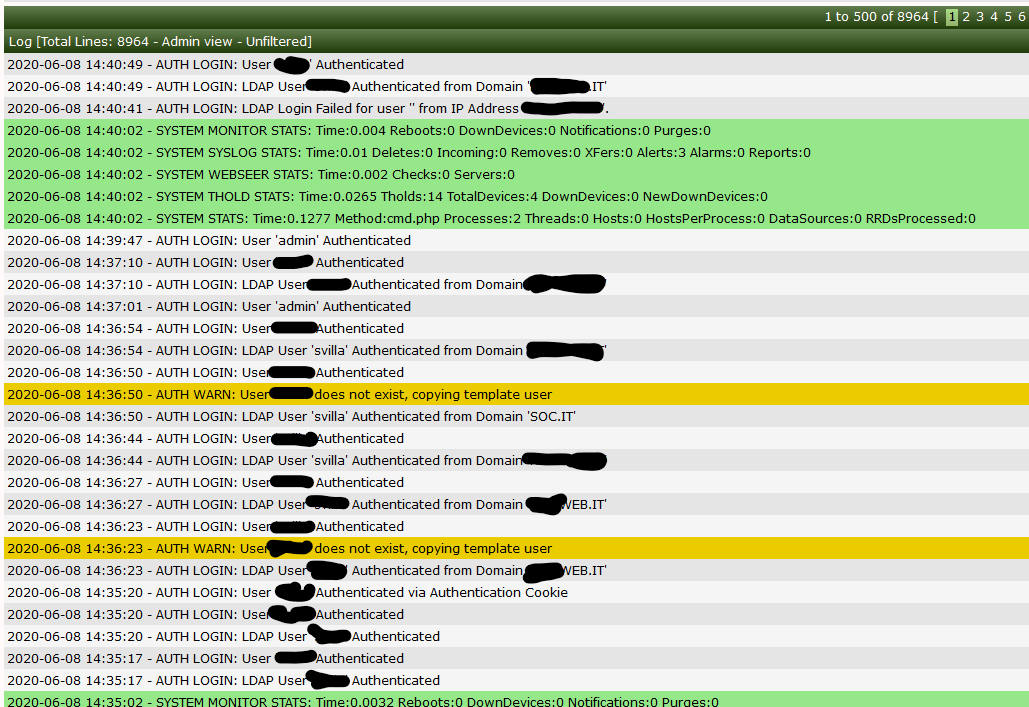
@netniV i have try with your suggesitions but it didn't work. The logs confirm that the user and domain have been recognized but continue to be sent back to the authentication interface after entering user / pass / domain.
 anarkia1976
on 8 Jun 2020
anarkia1976
on 8 Jun 2020
This may suggest an LDAP error. I do know that Microsoft have changed something with the AD LDAP service which I was going to investigate at some point. I am planning a revamp of the LDAP code to remove the separate options and integrate it fully into the domains list so there is a single place to enable authentication.
netniV
on 8 Jun 2020
That's weird, it's almost like there is a damaged table or something. If it were a 'loop' perse, there would be many more entries. It's almost like the session is not being maintained, which would either be a corrupt session table, the /var/lib/php/session directory being full, or not write permission to that folder.
 TheWitness
on 13 Jun 2020
TheWitness
on 13 Jun 2020
The other thing I'm thinking is that there is still a auth cache for the user. @anarkia1976, if you could try to do the following, for your account.
DELETE FROM user_auth_cache WHERE user_id = ?;
Replace ? with your user_id and see if this corrects the problem.
TheWitness
on 13 Jun 2020
Hi @TheWitness,
i have tested your suggestion but the result is the same. The only method to authenticate is to flag "Keep me signed in".
thanks
anarkia1976
on 25 Jun 2020
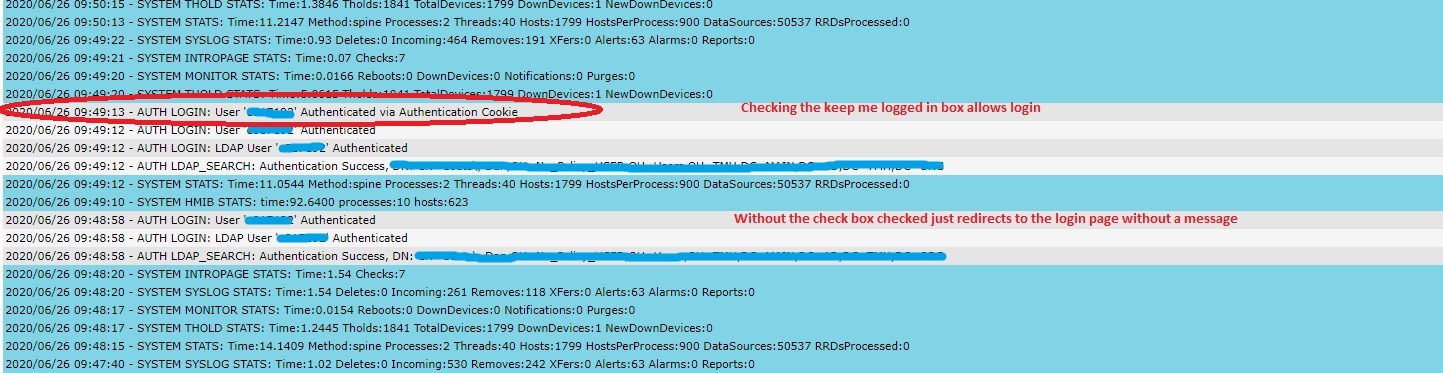
I have the same issue. I have to use the cookie to login
 jdcoats
on 26 Jun 2020
jdcoats
on 26 Jun 2020
If you guys have a problem replicating, I'm happy to setup a gotomeeting so you can see it for yourself and troubleshoot.
jdcoats
on 26 Jun 2020
@jdcoats, I know it's Saturday, but can you do it today?
TheWitness
on 27 Jun 2020
@thewitness Just getting home this evening. How about tomorrow?
jdcoats
on 28 Jun 2020
Sure, send an email to thewitness at cacti dot net and I'll send you my mobile. You can text me when ready.
TheWitness
on 28 Jun 2020
@TheWitness thanks again for your time today! I emailed you the changes.
jdcoats
on 28 Jun 2020
@jdcoats You're not going to like me, but I don't think we are quite finished yet ;)
Been discussing the changes and I thoroughly tested those over almost 2 years ago, but something since has changed. We are banding ideas around over what the root cause is, the removal of the session close/reopen is a band aid more than a fix (in my eyes) since it previously worked.
I suspect, though it is unconfirmed at the moment, that the changes to use a generic cacti_session_xx function has introduced the bug.
netniV
on 28 Jun 2020
OK, so I haven't been able to test this yet myself. But, copy your version of lib/ldap.php and then grab the latest lib/ldap.php.
Test the login, if it is successful, then try to apply the following patch and retest.
diff --git a/lib/ldap.php b/lib/ldap.php
index cb04d3dd8..e9792b5ec 100644
--- a/lib/ldap.php
+++ b/lib/ldap.php
@@ -371,6 +371,8 @@ class Ldap {

        /* set an error handler for ldap */
        set_error_handler(array($this, 'ErrorHandler'));
+
+       session_write_close()
    }

    function RestoreCactiHandler() {
@@ -379,6 +381,8 @@ class Ldap {

        /* set an error handler for Cacti */
        set_error_handler('CactiErrorHandler');
+
+       session_start();
    }

    function RecordError($output, $section = 'LDAP') {
Does this work for you? Or do you still get the loop?
netniV
on 28 Jun 2020
OK, so I believe that I have finally managed to track down the root cause and it was introduced by the cacti_session_xxx functions we made. I have now created a patch that should correct this, but also record when things fail.
netniV
on 28 Jun 2020
This should now be resolved.
netniV
on 28 Jun 2020
i get a 500 error after entering login creds with the current pull.
2020/06/28 15:38:54 - CMDPHP PHP ERROR Backtrace: (CactiShutdownHandler())
--
2020/06/28 15:38:54 - ERROR PHP ERROR: Uncaught Error: Call to undefined function cacti_session_open() in /var/www/localhost/htdocs/cacti/lib/ldap.php:385 Stack trace: #0 /var/www/localhost/htdocs/cacti/lib/ldap.php(713): Ldap->RestoreCactiHandler() #1 /var/www/localhost/htdocs/cacti/lib/ldap.php(152): Ldap->Search() #2 /var/www/localhost/htdocs/cacti/auth_login.php(155): cacti_ldap_search_dn('e017192') #3 /var/www/localhost/htdocs/cacti/include/auth.php(171): require_once('/var/www/localh...') #4 /var/www/localhost/htdocs/cacti/index.php(25): include('/var/www/localh...') #5 {main} thrown in file: /var/www/localhost/htdocs/cacti/lib/ldap.php on line: 385
Can you see what is in the error log? Mine is OK
netniV
on 28 Jun 2020
2020/06/28 15:38:54 - CMDPHP PHP ERROR Backtrace: (CactiShutdownHandler())
--
2020/06/28 15:38:54 - ERROR PHP ERROR: Uncaught Error: Call to undefined function cacti_session_open() in /var/www/localhost/htdocs/cacti/lib/ldap.php:385 Stack trace: #0 /var/www/localhost/htdocs/cacti/lib/ldap.php(713): Ldap->RestoreCactiHandler() #1 /var/www/localhost/htdocs/cacti/lib/ldap.php(152): Ldap->Search() #2 /var/www/localhost/htdocs/cacti/auth_login.php(155): cacti_ldap_search_dn('e017192') #3 /var/www/localhost/htdocs/cacti/include/auth.php(171): require_once('/var/www/localh...') #4 /var/www/localhost/htdocs/cacti/index.php(25): include('/var/www/localh...') #5 {main} thrown in file: /var/www/localhost/htdocs/cacti/lib/ldap.php on line: 385
Do another pull, that should be resolved in 99926932a
netniV
on 28 Jun 2020
RESOLVED! you nailed it! Thanks!
jdcoats
on 28 Jun 2020
Great!
TheWitness
on 2 Jul 2020
Related issues
 Initarts
·
6Comments
Initarts
·
6Comments
 josun-33
·
4Comments
anarkia1976
·
3Comments
josun-33
·
4Comments
anarkia1976
·
3Comments
 riversdev0
·
3Comments
riversdev0
·
3Comments
 darius1706
·
5Comments
darius1706
·
5Comments