Browser: Safari extension does not stay unlocked
Although Bitwarden is set to automatically lock the vault when the browser is closed, the vault inconsistently locks itself after a few seconds of inactivity (automatic lock setting seems to be ignored).
Currently using Bitwarden 1.16.4 which comes with extension v. 1.42.0. Safari 13.0.1 on macOS 10.14.6. The same issue can be reproduced on two different machines.
 jacopo-j
All 306 comments
Same here with exactly the same versions as mentioned above. If necessary I'm happy if I can provide logs/perform tests etc.
 stranljip
on 30 Sep 2019
stranljip
on 30 Sep 2019
Seems to work for me now with 1.16.5 from the App Store
stranljip
on 1 Oct 2019
@jacopo-j Can you try version 1.16.6 from the website please?
 kspearrin
on 1 Oct 2019
kspearrin
on 1 Oct 2019
I had the same problem with version 1.16.5 from the App Store, however version 1.16.6 from the website seems to be working correctly.
jacopo-j
on 1 Oct 2019
I think I talked too early; the extension did lock itself after some time of inactivity (and closed browser window)
jacopo-j
on 1 Oct 2019
I get the error again - with 1.16.5 from App Store as well as with the 1.16.6 from the website :-/ I cannot put my finger on the cause - sometimes it stays open for quite a while, sometimes it closes very fast.
stranljip
on 2 Oct 2019
It seems to be unrelated to hiding the window or to locking the screen.
stranljip
on 2 Oct 2019
@kspearrin any news on this? I think the issue should be re-opened since the problem persists.
jacopo-j
on 12 Oct 2019
@jacopo-j I have re-opened the issue while we continue to investigate.
kspearrin
on 14 Oct 2019
For what it's worth, I tried enabling "unlock with PIN" to see if I could at least temporarily have a better experience than re-entering my master password every few minutes, but that option also seems to be getting ignored.
 andschwa
on 19 Oct 2019
andschwa
on 19 Oct 2019
I just digged a little bit in the logs. It seems, that macOS deliberately kills the extension for some reason:
default 11:40:25.204027+0200    runningboardd   Finished acquiring assertion 442-169-6304 (target:xpcservice<com.bitwarden.desktop.safari(501)>)
default 11:40:25.204255+0200    runningboardd   [xpcservice<com.bitwarden.desktop.safari(501)>:81786] Ignoring resume because this process is not lifecycle managed
default 11:40:25.204531+0200    runningboardd   [xpcservice<com.bitwarden.desktop.safari(501)>:81786] Set darwin role to: UserInteractiveNonFocal
default 11:40:25.204801+0200    runningboardd   [xpcservice<com.bitwarden.desktop.safari(501)>:81786] Ignoring GPU update because this process is not GPU managed
default 11:40:25.281246+0200    distnoted   register name: com.apple.xctest.FakeForceTouchDevice object: com.bitwarden.desktop.safari token: f426a pid: 81786
error   11:40:25.375313+0200    tccd    Prompting policy for hardened runtime; service: kTCCServiceAppleEvents requires entitlement com.apple.security.automation.apple-events but it is missing for ACC:{ID: com.bitwarden.desktop.safari, PID[81786], auid: 501, euid: 501, binary path: '/Applications/Bitwarden.app/Contents/PlugIns/safari.appex/Contents/MacOS/safari'}, REQ:{ID: com.apple.appleeventsd, PID[465], auid: 55, euid: 55, binary path: '/System/Library/CoreServices/appleeventsd'}
default 11:41:35.913356+0200    runningboardd   [xpcservice<com.bitwarden.desktop.safari(501)>:81786] Death sentinel fired!
default 11:41:35.933033+0200    runningboardd   Invalidating assertion 442-169-6304 (target:xpcservice<com.bitwarden.desktop.safari(501)>) from originator 169
default 11:41:36.017708+0200    runningboardd   Removing process: [xpcservice<com.bitwarden.desktop.safari(501)>:81786]
default 11:41:36.018960+0200    runningboardd   Removing assertions for terminated process: [xpcservice<com.bitwarden.desktop.safari(501)>:81786]
error   11:41:36.057538+0200    runningboardd   RBSStateCapture remove item called for untracked item 442-169-6304 (target:xpcservice<com.bitwarden.desktop.safari(501)>)
@stranljip Where did you find this log?
kspearrin
on 21 Oct 2019
@kspearrin - you can find it in the console application - this is the frontend to the central logging system. I filtered it to the string 'com.bitwarden.desktop.safari' and clipped only the last few lines around the occurrence of the termination message. I haven't found the place where I can set the log level though. Digging through the net I found this - https://eclecticlight.co/2019/09/18/changing-security-makes-privacy-protection-confusing/ - I am not deep enough in macOS app development to decide whether or not it is relevant for the Bitwarden Safari extension. As always I would be happy to help you in order to produce more logs and function as tester.
stranljip
on 22 Oct 2019
Thanks. Does it consistently throw the same error messages each time the vault unexpectedly locks? If the extension is crashing, this locking behavior makes sense because it would be treated as a restart of the extension.
kspearrin
on 22 Oct 2019
Yep - always the same. Filtered on any:com.bitwarden.desktop.safari and message type:Error:
error   16:54:11.371093+0200    tccd    Prompting policy for hardened runtime; service: kTCCServiceAppleEvents requires entitlement com.apple.security.automation.apple-events but it is missing for ACC:{ID: com.bitwarden.desktop.safari, PID[12594], auid: 501, euid: 501, binary path: '/Applications/Bitwarden.app/Contents/PlugIns/safari.appex/Contents/MacOS/safari'}, REQ:{ID: com.apple.appleeventsd, PID[465], auid: 55, euid: 55, binary path: '/System/Library/CoreServices/appleeventsd'}
error   16:55:05.116086+0200    runningboardd   RBSStateCapture remove item called for untracked item 442-169-9153 (target:xpcservice<com.bitwarden.desktop.safari(501)>)
error   16:55:12.834743+0200    tccd    Prompting policy for hardened runtime; service: kTCCServiceAppleEvents requires entitlement com.apple.security.automation.apple-events but it is missing for ACC:{ID: com.bitwarden.desktop.safari, PID[12608], auid: 501, euid: 501, binary path: '/Applications/Bitwarden.app/Contents/PlugIns/safari.appex/Contents/MacOS/safari'}, REQ:{ID: com.apple.appleeventsd, PID[465], auid: 55, euid: 55, binary path: '/System/Library/CoreServices/appleeventsd'}
error   16:56:42.070168+0200    tccd    Prompting policy for hardened runtime; service: kTCCServiceAppleEvents requires entitlement com.apple.security.automation.apple-events but it is missing for ACC:{ID: com.bitwarden.desktop.safari, PID[12646], auid: 501, euid: 501, binary path: '/Applications/Bitwarden.app/Contents/PlugIns/safari.appex/Contents/MacOS/safari'}, REQ:{ID: com.apple.appleeventsd, PID[465], auid: 55, euid: 55, binary path: '/System/Library/CoreServices/appleeventsd'}
error   16:57:50.082014+0200    runningboardd   RBSStateCapture remove item called for untracked item 442-169-9177 (target:xpcservice<com.bitwarden.desktop.safari(501)>)
error   17:01:46.804713+0200    tccd    Prompting policy for hardened runtime; service: kTCCServiceAppleEvents requires entitlement com.apple.security.automation.apple-events but it is missing for ACC:{ID: com.bitwarden.desktop.safari, PID[12929], auid: 501, euid: 501, binary path: '/Applications/Bitwarden.app/Contents/PlugIns/safari.appex/Contents/MacOS/safari'}, REQ:{ID: com.apple.appleeventsd, PID[465], auid: 55, euid: 55, binary path: '/System/Library/CoreServices/appleeventsd'}
error   17:02:32.409499+0200    runningboardd   RBSStateCapture remove item called for untracked item 442-169-9199 (target:xpcservice<com.bitwarden.desktop.safari(501)>)
error   17:03:10.412121+0200    tccd    Prompting policy for hardened runtime; service: kTCCServiceAppleEvents requires entitlement com.apple.security.automation.apple-events but it is missing for ACC:{ID: com.bitwarden.desktop.safari, PID[13080], auid: 501, euid: 501, binary path: '/Applications/Bitwarden.app/Contents/PlugIns/safari.appex/Contents/MacOS/safari'}, REQ:{ID: com.apple.appleeventsd, PID[465], auid: 55, euid: 55, binary path: '/System/Library/CoreServices/appleeventsd'}
error   17:05:35.874696+0200    runningboardd   RBSStateCapture remove item called for untracked item 442-169-9206 (target:xpcservice<com.bitwarden.desktop.safari(501)>)
error   17:34:03.785037+0200    tccd    Prompting policy for hardened runtime; service: kTCCServiceAppleEvents requires entitlement com.apple.security.automation.apple-events but it is missing for ACC:{ID: com.bitwarden.desktop.safari, PID[13522], auid: 501, euid: 501, binary path: '/Applications/Bitwarden.app/Contents/PlugIns/safari.appex/Contents/MacOS/safari'}, REQ:{ID: com.apple.appleeventsd, PID[465], auid: 55, euid: 55, binary path: '/System/Library/CoreServices/appleeventsd'}
@stranljip Are you using the App Store or dmg version?
kspearrin
on 22 Oct 2019
atm I am using the dmg version installed via Homebrew. If you want, I can switch to the App Store version.
stranljip
on 22 Oct 2019
@stranljip Please keep using the dmg. I was going to send you some dev build of the dmg to see if we can eliminate the crashing.
kspearrin
on 22 Oct 2019
I tried building the extension by myself, but my current lack of knowledge about XCode blocks me very effectively ... :-/
stranljip
on 22 Oct 2019
@stranljip If you hop in our developer chatroom, I could try to help.
kspearrin
on 22 Oct 2019
I tested the last two days with a developer setup (thanks for the help @kspearrin!) and was not able to reproduce the error. I tried running with and without hardened runtime from XCode and also installed a self-compiled version with hardened runtime. The only thing I could still try is building the App w/o hardened runtime and install that, hoping that this somehow brings back the error and gives a clue that this may be the way to dig further. Big kudos to Kyle for dealing with this kind of stuff all the time ...
stranljip
on 24 Oct 2019
Despite trying, I could not find a way to reproduce the problem from the IDE. If anyone has anymore hints, I will gladly try to use them in order to reproduce the problem.
stranljip
on 7 Nov 2019
Problem is, that the bug now returned after a few days without experiencing it :-/
stranljip
on 7 Nov 2019
I actually found a crash report from this morning:
crash-report-bitwarden-safari.txt
The crashed thread is:
Thread 4 Crashed:: Dispatch queue: com.apple.NSXPCConnection.user.endpoint
0   com.bitwarden.desktop.safari    0x000000010c8d7070 closure #1 in SafariExtensionViewController.userContentController(_:didReceive:) + 208
1   com.bitwarden.desktop.safari    0x000000010c8e3c40 thunk for @escaping @callee_guaranteed (@guaranteed SFSafariTab?) -> () + 48
2   com.apple.SafariServices.framework  0x00007fff43291415 __60+[SFSafariApplication getActiveWindowWithCompletionHandler:]_block_invoke + 52
3   com.apple.CoreFoundation        0x00007fff372a81dc __invoking___ + 140
4   com.apple.CoreFoundation        0x00007fff372a807f -[NSInvocation invoke] + 305
5   com.apple.Foundation            0x00007fff3992d439 __NSXPCCONNECTION_IS_CALLING_OUT_TO_REPLY_BLOCK__ + 17
6   com.apple.Foundation            0x00007fff3992a3e0 -[NSXPCConnection _decodeAndInvokeReplyBlockWithEvent:sequence:replyInfo:] + 684
7   com.apple.Foundation            0x00007fff39c0bbd5 __88-[NSXPCConnection _sendInvocation:orArguments:count:methodSignature:selector:withProxy:]_block_invoke_3 + 216
8   libxpc.dylib                    0x00007fff6e9bfef4 _xpc_connection_reply_callout + 36
9   libxpc.dylib                    0x00007fff6e9bfe7c _xpc_connection_call_reply_async + 69
10  libdispatch.dylib               0x00007fff6e722578 _dispatch_client_callout3 + 8
11  libdispatch.dylib               0x00007fff6e739080 _dispatch_mach_msg_async_reply_invoke + 369
12  libdispatch.dylib               0x00007fff6e727980 _dispatch_lane_serial_drain + 263
13  libdispatch.dylib               0x00007fff6e728485 _dispatch_lane_invoke + 414
14  libdispatch.dylib               0x00007fff6e731a9e _dispatch_workloop_worker_thread + 598
15  libsystem_pthread.dylib         0x00007fff6e97b71b _pthread_wqthread + 290
16  libsystem_pthread.dylib         0x00007fff6e97b57b start_wqthread + 15
I've had this problem for at least 2 weeks but for about 5-6 days the safe doesn't seem to lock randomly anymore. The app version is the same as before.
 kennymc-c
on 11 Nov 2019
kennymc-c
on 11 Nov 2019
Yep - always the same. Filtered on
any:com.bitwarden.desktop.safariandmessage type:Error:error 16:54:11.371093+0200 tccd Prompting policy for hardened runtime; service: kTCCServiceAppleEvents requires entitlement com.apple.security.automation.apple-events but it is missing for ACC:{ID: com.bitwarden.desktop.safari, PID[12594], auid: 501, euid: 501, binary path: '/Applications/Bitwarden.app/Contents/PlugIns/safari.appex/Contents/MacOS/safari'}, REQ:{ID: com.apple.appleeventsd, PID[465], auid: 55, euid: 55, binary path: '/System/Library/CoreServices/appleeventsd'} error 16:55:05.116086+0200 runningboardd RBSStateCapture remove item called for untracked item 442-169-9153 (target:xpcservice<com.bitwarden.desktop.safari(501)>) error 16:55:12.834743+0200 tccd Prompting policy for hardened runtime; service: kTCCServiceAppleEvents requires entitlement com.apple.security.automation.apple-events but it is missing for ACC:{ID: com.bitwarden.desktop.safari, PID[12608], auid: 501, euid: 501, binary path: '/Applications/Bitwarden.app/Contents/PlugIns/safari.appex/Contents/MacOS/safari'}, REQ:{ID: com.apple.appleeventsd, PID[465], auid: 55, euid: 55, binary path: '/System/Library/CoreServices/appleeventsd'} error 16:56:42.070168+0200 tccd Prompting policy for hardened runtime; service: kTCCServiceAppleEvents requires entitlement com.apple.security.automation.apple-events but it is missing for ACC:{ID: com.bitwarden.desktop.safari, PID[12646], auid: 501, euid: 501, binary path: '/Applications/Bitwarden.app/Contents/PlugIns/safari.appex/Contents/MacOS/safari'}, REQ:{ID: com.apple.appleeventsd, PID[465], auid: 55, euid: 55, binary path: '/System/Library/CoreServices/appleeventsd'} error 16:57:50.082014+0200 runningboardd RBSStateCapture remove item called for untracked item 442-169-9177 (target:xpcservice<com.bitwarden.desktop.safari(501)>) error 17:01:46.804713+0200 tccd Prompting policy for hardened runtime; service: kTCCServiceAppleEvents requires entitlement com.apple.security.automation.apple-events but it is missing for ACC:{ID: com.bitwarden.desktop.safari, PID[12929], auid: 501, euid: 501, binary path: '/Applications/Bitwarden.app/Contents/PlugIns/safari.appex/Contents/MacOS/safari'}, REQ:{ID: com.apple.appleeventsd, PID[465], auid: 55, euid: 55, binary path: '/System/Library/CoreServices/appleeventsd'} error 17:02:32.409499+0200 runningboardd RBSStateCapture remove item called for untracked item 442-169-9199 (target:xpcservice<com.bitwarden.desktop.safari(501)>) error 17:03:10.412121+0200 tccd Prompting policy for hardened runtime; service: kTCCServiceAppleEvents requires entitlement com.apple.security.automation.apple-events but it is missing for ACC:{ID: com.bitwarden.desktop.safari, PID[13080], auid: 501, euid: 501, binary path: '/Applications/Bitwarden.app/Contents/PlugIns/safari.appex/Contents/MacOS/safari'}, REQ:{ID: com.apple.appleeventsd, PID[465], auid: 55, euid: 55, binary path: '/System/Library/CoreServices/appleeventsd'} error 17:05:35.874696+0200 runningboardd RBSStateCapture remove item called for untracked item 442-169-9206 (target:xpcservice<com.bitwarden.desktop.safari(501)>) error 17:34:03.785037+0200 tccd Prompting policy for hardened runtime; service: kTCCServiceAppleEvents requires entitlement com.apple.security.automation.apple-events but it is missing for ACC:{ID: com.bitwarden.desktop.safari, PID[13522], auid: 501, euid: 501, binary path: '/Applications/Bitwarden.app/Contents/PlugIns/safari.appex/Contents/MacOS/safari'}, REQ:{ID: com.apple.appleeventsd, PID[465], auid: 55, euid: 55, binary path: '/System/Library/CoreServices/appleeventsd'}
TCC is the security utility that manages Screen Capture, Automation etc...Looking at this error the application does not have the proper entitlements possibly sandboxing when using a Safari Extension or the application may not be probably signed (including frameworks).
 georgesnow
on 17 Nov 2019
georgesnow
on 17 Nov 2019
I should add ACC refers to an app controlling _another_ app. So the other possibility is the user denied the application from _sending_apple events to the other application.
This is a good basic/overview reference:
https://carlashley.com/2018/09/06/reading-tcc-logs-in-macos/
georgesnow
on 19 Nov 2019
@stranljip also the reason it was probably not reproducible in the “developer” setup is because Xcode will generate a developer certificate allowing you compile and run “your own code” to debug and test.
georgesnow
on 19 Nov 2019
@georgesnow - Kudos for your findings and the explanation! It lets me hope, that we get a working version in Safari again soon :-)
stranljip
on 19 Nov 2019
I’ve been seeing this thread and thinking that I was grateful to not have experienced the random locking. Then yesterday it happened.
I’m not aware of any changes made on my Mac.
Late 2011 MacBook Pro running OS X 10.13.6 and Bitwarden is from the Mac App Store.
I haven’t noticed the random locking on my late 2012 Mac Mini which is running the same version of Bitwarden, but is running Mac OS 10.15.2
 andrewkr
on 20 Nov 2019
andrewkr
on 20 Nov 2019
What version of safari are you running on 10.13 and 10.15?
georgesnow
on 20 Nov 2019
This is really a question for the developers, but is the safari extension accessing the same data as the main application? The extension app can get denied access to the vault/data. There is some I will say _annoying specifics_ about how safari and app extensions can interact with data from other apps.
georgesnow
on 20 Nov 2019
The safari extension uses NSUserDefaults to store data. It does not use the main application's data file.
kspearrin
on 20 Nov 2019
What version of safari are you running on 10.13 and 10.15?
On 10.15.1, Safari Version 13.0.3 (15608.3.10.1.4)
On OS X 10.13.6, Safari Version 13.0.3 (13608.3.10.10.1)
andrewkr
on 20 Nov 2019
The safari extension uses NSUserDefaults to store data. It does not use the main application's data file.
hmm generally... that's specific for user preference information (ie last opened file, save location, timeout for locking etc...).
In this case I am referring to the vault itself or is it connecting to bit wardens web backend to access the vault? I noticed the entitlements include network client/server permissions, and _user selected_ files. If the vault is being locally stored and being accessed. The user has to grant explicitly permissions to a file via something like an open dialog unless in System preferences the app is granted full disk permissions.
georgesnow
on 20 Nov 2019
so I was able to re-create the TCC error. I am not actually Bitwarden user and haven't used software but once maybe a year ago?
Anyway, I did a fresh install. I discovered if I tried to enable (literally just checking off the option in the preferences for Safari) for Safari extension after installing the app. I get the error when trying to use the button on the toolbar in Safari. I also noticed part of the error message was XPC I had to unlock the main application. Then re-enable the Safari extension. Then the safari extension worked.
georgesnow
on 20 Nov 2019
Same issue here. Safari 13.0.3. The vault will unexpectedly lock, even though the value us "on browser restart."
 TheDaveAbides
on 20 Nov 2019
TheDaveAbides
on 20 Nov 2019
@kspearrin I looked at the code again based on your response about NSUserDefaults. Is the main app sharing the same NSUserdefaults as the Safari Extension? I ask because with app extensions if they are "sharing" UserDefaults the main app and the extension need to be in an "app group". So this could be causing the TCC error because a "sandbox" app is attempting to access resources outside it container without permissions.
hopefully, I am helping here.
reference about app groups:
https://stackoverflow.com/questions/45607903/sharing-userdefaults-between-extensions
georgesnow
on 21 Nov 2019
Nothing is shared at all between the main app and the extension. The desktop app is just used to install the extension. Nothing more.
kspearrin
on 21 Nov 2019
Sorry Let me clarify I was referring to desktop version of Bitwarden (that’s built with electron/typescript). Not the target main app you have to build with the safari extension.
But from response I think you are implying they are considered completely separate instances. That goes back to safari extension attempting to access something outside the app container. And the only error catching I have seen is under the “downloadFile” command. And prompts for ns savep anel:
georgesnow
on 21 Nov 2019
Yes, I was referring to the desktop app as well. The extension app shares nothing with the desktop app other than its method of installation, which is now required by Apple.
kspearrin
on 21 Nov 2019
Since today my vault suddenly seems to lock randomly again after it went well for about 2 weeks.
kennymc-c
on 24 Nov 2019
I noticed the harden runtime on the GitHub repo had some of the harden runtime entitlements were removed. did it work previously? What is strange is why it takes so long before the app triggers the apple event.
georgesnow
on 25 Nov 2019
I thought that I'd let you know that I've had a happy run of about 10 days with the Safari extension staying unlocked.
I have had no system changes. I am still running Mac OS X 10.13.6 with Safari Version 13.0.3 (13608.3.10.10.1). That is all as it was 11 days ago when I last reported. It began behaving itself properly the day after my last report!
(I do have a new problem. I'll report that in a new case very soon.)
andrewkr
on 1 Dec 2019
Hi all, I seem to have the same problem. It especially seems to happen when I wake the mac from sleep, as I often get a notification window to say that "Bitwarden (Safari) quit unexpectedly". The crash report includes the following:
Thread 5 Crashed:: Dispatch queue: com.apple.NSXPCConnection.user.endpoint
0   com.bitwarden.desktop.safari    0x000000010d4fe070 closure #1 in SafariExtensionViewController.userContentController(_:didReceive:) + 208
1   com.bitwarden.desktop.safari    0x000000010d50ac40 thunk for @escaping @callee_guaranteed (@guaranteed SFSafariTab?) -> () + 48
2   com.apple.SafariServices.framework  0x00007fff43bad415 __60+[SFSafariApplication getActiveWindowWithCompletionHandler:]_block_invoke + 52
3   com.apple.CoreFoundation        0x00007fff37b9e0ec __invoking___ + 140
4   com.apple.CoreFoundation        0x00007fff37b9df84 -[NSInvocation invoke] + 305
5   com.apple.Foundation            0x00007fff3a248439 __NSXPCCONNECTION_IS_CALLING_OUT_TO_REPLY_BLOCK__ + 17
6   com.apple.Foundation            0x00007fff3a2453e0 -[NSXPCConnection _decodeAndInvokeReplyBlockWithEvent:sequence:replyInfo:] + 684
7   com.apple.Foundation            0x00007fff3a526bd5 __88-[NSXPCConnection _sendInvocation:orArguments:count:methodSignature:selector:withProxy:]_block_invoke_3 + 216
8   libxpc.dylib                    0x00007fff6f1d3ef4 _xpc_connection_reply_callout + 36
9   libxpc.dylib                    0x00007fff6f1d3e7c _xpc_connection_call_reply_async + 69
10  libdispatch.dylib               0x00007fff6ef32578 _dispatch_client_callout3 + 8
11  libdispatch.dylib               0x00007fff6ef49080 _dispatch_mach_msg_async_reply_invoke + 369
12  libdispatch.dylib               0x00007fff6ef37980 _dispatch_lane_serial_drain + 263
13  libdispatch.dylib               0x00007fff6ef38485 _dispatch_lane_invoke + 414
14  libdispatch.dylib               0x00007fff6ef41a9e _dispatch_workloop_worker_thread + 598
15  libsystem_pthread.dylib         0x00007fff6f18f71b _pthread_wqthread + 290
16  libsystem_pthread.dylib         0x00007fff6f18f57b start_wqthread + 15
 The-Big-V
on 7 Dec 2019
The-Big-V
on 7 Dec 2019
Update: same crash still happening with macOS 10.15.2 installed (Safari 13.0.4)
The-Big-V
on 12 Dec 2019
@kspearrin I had forgotten I believe I noticed this when working my own Safari extension that getting active window properly can cause this issue. I don't remember if it's cause because JavaScript sends message _before_ the extension has validated. Or if the extension attempts to send message to page that is not consider "active".
I tested implemented similar thing as NNW uses Ping/Pong method which I believe helped. Also I saw Avast uses overriding (which is more complex) but based on their code comments it addresses a similar issue.
you could take look at som other safari extension handlers:
georgesnow
on 16 Dec 2019
I also got this happen from a fresh reboot of macOS opened Safari unlocked Bitwarden. I left Safari open for about an hour. Bitwarden had been idle but not clicked on since. I had accessed other webpages in that time.
georgesnow
on 16 Dec 2019
I also found more logs that show up around the time the plugin (PID: 6560) gets killed.
My another Safari plugin Mate (PID: 6591) gets killed at the same time too along with Webkit WebContent (PID: 6561) and Webkit Networking (PID: 6562).
default 13:00:27.808334+0800    hidd    [HID] [MT] dispatchEvent Dispatching event with 4 children, _eventMask=0x4c _childEventMask=0x46 Cancel=0 Touching=1 inRange=1
default 13:00:27.832271+0800    hidd    [HID] [MT] dispatchEvent Dispatching event with 2 children, _eventMask=0x2 _childEventMask=0x2 Cancel=0 Touching=0 inRange=1
default 13:00:27.938656+0800    hidd    [HID] [MT] dispatchEvent Dispatching event with 2 children, _eventMask=0x23 _childEventMask=0x22 Cancel=0 Touching=1 inRange=1
default 13:00:28.098155+0800    kernel  Sandbox: 2 duplicate reports for com.apple.WebKit deny(1) mach-lookup com.apple.CoreDisplay.Notification
error   13:00:28.098161+0800    kernel  Sandbox: defaults(6629) System Policy: deny(1) file-read-data /Users/mariodian/Library/Containers/com.apple.VoiceMemos/Data/Library/Preferences
error   13:00:28.104728+0800    kernel  Sandbox: defaults(6629) System Policy: deny(1) file-read-data /Users/mariodian/Library/Containers/com.apple.Home/Data/Library/Preferences
error   13:00:28.104754+0800    kernel  Sandbox: defaults(6629) System Policy: deny(1) file-read-data /Users/mariodian/Library/Containers/com.apple.Safari/Data/Library/Preferences
error   13:00:28.108584+0800    kernel  Sandbox: defaults(6629) System Policy: deny(1) file-read-data /Users/mariodian/Library/Containers/com.apple.iChat/Data/Library/Preferences
error   13:00:28.108776+0800    kernel  Sandbox: defaults(6629) System Policy: deny(1) file-read-data /Users/mariodian/Library/Containers/com.apple.CloudDocs.MobileDocumentsFileProvider/Data/Library/Preferences
error   13:00:28.109225+0800    kernel  Sandbox: defaults(6629) System Policy: deny(1) file-read-data /Users/mariodian/Library/Containers/com.apple.mail/Data/Library/Preferences
error   13:00:28.113671+0800    kernel  Sandbox: defaults(6629) System Policy: deny(1) file-read-data /Users/mariodian/Library/Containers/com.apple.news/Data/Library/Preferences
error   13:00:28.117065+0800    kernel  Sandbox: defaults(6629) System Policy: deny(1) file-read-data /Users/mariodian/Library/Containers/com.apple.stocks/Data/Library/Preferences
default 13:00:28.131818+0800    defaults
The domain/default pair of (/Users/mariodian/Library/Preferences/com.apple.HIToolbox.plist, dummy) does not exist
default 13:00:28.149928+0800    hidd    [HID] [MT] dispatchEvent Dispatching event with 2 children, _eventMask=0x23 _childEventMask=0x43 Cancel=0 Touching=0 inRange=0
default 13:00:28.232039+0800    kernel  AGC:: [safari pid 6560 mux-aware] exiting, non-mux-aware app count 0, runtime: 0:04:29.826
error   13:00:28.232640+0800    kernel  Sandbox: com.apple.WebKit(6562) deny(1) process-info-dirtycontrol self
default 13:00:28.236386+0800    runningboardd   [xpcservice<com.apple.WebKit.Networking(501)>:6562] Death sentinel fired!
default 13:00:28.236541+0800    runningboardd   [xpcservice<andriiliakh.Instant-Translate.Mate-Translate-Safari(501)>:6591] Death sentinel fired!
default 13:00:28.237329+0800    launchservicesd QUITTING: pid=6562 asn=0x-0x2e47e45 foreground=0 wasFront=0
default 13:00:28.238739+0800    CommCenter  #I handleLSNotitifcation_sync: Application exited: <private>
default 13:00:28.239392+0800    launchservicesd QUITTING: pid=6591 asn=0x-0x2e4de4b foreground=0 wasFront=0
default 13:00:28.239856+0800    loginwindow -[PersistentAppsSupport applicationQuit:] | for app:com.apple.WebKit.Networking, _appTrackingState = 2
default 13:00:28.239952+0800    runningboardd   Invalidating assertion 283-141-102266 (target:xpcservice<com.apple.WebKit.Networking(501)>) from originator 141
default 13:00:28.240107+0800    runningboardd   [xpcservice<com.bitwarden.desktop.safari(501)>:6560] Death sentinel fired!
default 13:00:28.241395+0800    CommCenter  #I handleLSNotitifcation_sync: Application exited: <private>
default 13:00:28.242476+0800    loginwindow -[PersistentAppsSupport applicationQuit:] | for app:Mate Translate Safari (Safari), _appTrackingState = 2
default 13:00:28.242335+0800    runningboardd   Invalidating assertion 283-141-102317 (target:xpcservice<andriiliakh.Instant-Translate.Mate-Translate-Safari(501)>) from originator 141
default 13:00:28.243314+0800    launchservicesd QUITTING: pid=6560 asn=0x-0x2e46e44 foreground=0 wasFront=0
default 13:00:28.245213+0800    CommCenter  #I handleLSNotitifcation_sync: Application exited: <private>
default 13:00:28.246591+0800    loginwindow -[PersistentAppsSupport applicationQuit:] | for app:Bitwarden (Safari), _appTrackingState = 2
default 13:00:28.246529+0800    runningboardd   Invalidating assertion 283-141-102264 (target:xpcservice<com.bitwarden.desktop.safari(501)>) from originator 141
default 13:00:28.251102+0800    runningboardd   [xpcservice<com.apple.WebKit.WebContent(501)>:6561] Death sentinel fired!
default 13:00:28.251425+0800    launchservicesd QUITTING: pid=6561 asn=0x-0x2e48e46 foreground=0 wasFront=0
default 13:00:28.252904+0800    CommCenter  #I handleLSNotitifcation_sync: Application exited: <private>
default 13:00:28.253813+0800    runningboardd   Invalidating assertion 283-141-102268 (target:xpcservice<com.apple.WebKit.WebContent(501)>) from originator 141
default 13:00:28.253983+0800    loginwindow -[PersistentAppsSupport applicationQuit:] | for app:com.apple.WebKit.WebContent, _appTrackingState = 2
default 13:00:28.332217+0800    hidd    [HID] [MT] dispatchEvent Dispatching event with 2 children, _eventMask=0x63 _childEventMask=0x62 Cancel=0 Touching=1 inRange=1
default 13:00:28.341556+0800    runningboardd   Removing process: [xpcservice<andriiliakh.Instant-Translate.Mate-Translate-Safari(501)>:6591]
default 13:00:28.341553+0800    runningboardd   Removing process: [xpcservice<com.apple.WebKit.Networking(501)>:6562]
default 13:00:28.341577+0800    runningboardd   Removing process: [xpcservice<com.bitwarden.desktop.safari(501)>:6560]
default 13:00:28.342314+0800    runningboardd   [xpcservice<com.apple.WebKit.WebContent(501)>:6561] Ignoring jetsam update because this process is not memory-managed
default 13:00:28.342505+0800    runningboardd   [xpcservice<com.apple.WebKit.WebContent(501)>:6561] Ignoring suspend because this process is not lifecycle managed
default 13:00:28.342681+0800    runningboardd   [xpcservice<com.apple.WebKit.WebContent(501)>:6561] Ignoring GPU update because this process is not GPU managed
default 13:00:28.349666+0800    hidd    [HID] [MT] dispatchEvent Dispatching event with 3 children, _eventMask=0x60 _childEventMask=0x62 Cancel=0 Touching=1 inRange=1
default 13:00:28.358184+0800    runningboardd   Removing process: [xpcservice<com.apple.WebKit.WebContent(501)>:6561]
default 13:00:28.363399+0800    runningboardd   Removing assertions for terminated process: [xpcservice<andriiliakh.Instant-Translate.Mate-Translate-Safari(501)>:6591]
default 13:00:28.363538+0800    runningboardd   Removing assertions for terminated process: [xpcservice<com.apple.WebKit.Networking(501)>:6562]
default 13:00:28.363737+0800    runningboardd   Removing assertions for terminated process: [xpcservice<com.apple.WebKit.WebContent(501)>:6561]
default 13:00:28.364123+0800    runningboardd   Removing assertions for terminated process: [xpcservice<com.bitwarden.desktop.safari(501)>:6560]
default 13:00:28.403695+0800    symptomsd   defusing ticker tickerFatal having seen progress by flow for com.apple.WebKit, rxbytes 4195 duration 156.951 seconds started at time: Tue Dec 31 12:57:51 2019
default 13:00:28.406409+0800    symptomsd   defusing ticker tickerFatal having seen progress by flow for com.apple.WebKit, rxbytes 4731 duration 156.323 seconds started at time: Tue Dec 31 12:57:52 2019
default 13:00:28.619827+0800    hidd    [HID] [MT] dispatchEvent Dispatching event with 4 children, _eventMask=0x48 _childEventMask=0x42 Cancel=0 Touching=1 inRange=1
default 13:00:28.862891+0800    hidd    [HID] [MT] dispatchEvent Dispatching event with 2 children, _eventMask=0x23 _childEventMask=0x43 Cancel=0 Touching=0 inRange=0
default 13:00:28.893534+0800    com.apple.WebKit.WebContent CDN - initialize client context retry
default 13:00:28.893697+0800    com.apple.WebKit.WebContent CDN - client setup_remote_port
default 13:00:28.893929+0800    com.apple.WebKit.WebContent CDN - Bootstrap Port: 2563
error   13:00:28.894092+0800    kernel  Sandbox: com.apple.WebKit(93473) deny(1) mach-lookup com.apple.CoreDisplay.Notification
I'm also attaching full log for webkit networking from around the time of the kill.
Using Bitwarden 1.16.6 (dmg), the plugin is 1.42.0, Safari 13.0.3, Catalina 10.15.1
 mariodian
on 31 Dec 2019
mariodian
on 31 Dec 2019
Also, setting the Lock Options to "On Browser Restart" seems to leave the plugin unlocked.
mariodian
on 31 Dec 2019
I am experiencing this issue here are the logs:
error   13:11:35.738936+0100    runningboardd   RBSStateCapture remove item called for untracked item 294-141-11975 (target:xpcservice<com.bitwarden.desktop.safari(501)>)
error   13:11:37.724919+0100    tccd    Prompting policy for hardened runtime; service: kTCCServiceAppleEvents requires entitlement com.apple.security.automation.apple-events but it is missing for ACC:{ID: com.bitwarden.desktop.safari, PID[75679], auid: 501, euid: 501, binary path: '/Applications/Bitwarden.app/Contents/PlugIns/safari.appex/Contents/MacOS/safari'}, REQ:{ID: com.apple.appleeventsd, PID[328], auid: 55, euid: 55, binary path: '/System/Library/CoreServices/appleeventsd'}
error   13:12:14.090751+0100    runningboardd   RBSStateCapture remove item called for untracked item 294-141-11984 (target:xpcservice<com.bitwarden.desktop.safari(501)>)
error   13:12:17.709497+0100    tccd    Prompting policy for hardened runtime; service: kTCCServiceAppleEvents requires entitlement com.apple.security.automation.apple-events but it is missing for ACC:{ID: com.bitwarden.desktop.safari, PID[75683], auid: 501, euid: 501, binary path: '/Applications/Bitwarden.app/Contents/PlugIns/safari.appex/Contents/MacOS/safari'}, REQ:{ID: com.apple.appleeventsd, PID[328], auid: 55, euid: 55, binary path: '/System/Library/CoreServices/appleeventsd'}
error   13:12:57.944425+0100    runningboardd   RBSStateCapture remove item called for untracked item 294-141-11992 (target:xpcservice<com.bitwarden.desktop.safari(501)>)
error   13:13:48.628720+0100    tccd    Prompting policy for hardened runtime; service: kTCCServiceAppleEvents requires entitlement com.apple.security.automation.apple-events but it is missing for ACC:{ID: com.bitwarden.desktop.safari, PID[75687], auid: 501, euid: 501, binary path: '/Applications/Bitwarden.app/Contents/PlugIns/safari.appex/Contents/MacOS/safari'}, REQ:{ID: com.apple.appleeventsd, PID[328], auid: 55, euid: 55, binary path: '/System/Library/CoreServices/appleeventsd'}
error   13:16:27.619015+0100    tccd    Prompting policy for hardened runtime; service: kTCCServiceAppleEvents requires entitlement com.apple.security.automation.apple-events but it is missing for ACC:{ID: com.bitwarden.desktop.safari, PID[75716], auid: 501, euid: 501, binary path: '/Applications/Bitwarden.app/Contents/PlugIns/safari.appex/Contents/MacOS/safari'}, REQ:{ID: com.apple.appleeventsd, PID[328], auid: 55, euid: 55, binary path: '/System/Library/CoreServices/appleeventsd'}
error   13:18:15.253608+0100    tccd    Prompting policy for hardened runtime; service: kTCCServiceAppleEvents requires entitlement com.apple.security.automation.apple-events but it is missing for ACC:{ID: com.bitwarden.desktop.safari, PID[75719], auid: 501, euid: 501, binary path: '/Applications/Bitwarden.app/Contents/PlugIns/safari.appex/Contents/MacOS/safari'}, REQ:{ID: com.apple.appleeventsd, PID[328], auid: 55, euid: 55, binary path: '/System/Library/CoreServices/appleeventsd'}
error   13:28:39.873054+0100    tccd    Prompting policy for hardened runtime; service: kTCCServiceAppleEvents requires entitlement com.apple.security.automation.apple-events but it is missing for ACC:{ID: com.bitwarden.desktop.safari, PID[75732], auid: 501, euid: 501, binary path: '/Applications/Bitwarden.app/Contents/PlugIns/safari.appex/Contents/MacOS/safari'}, REQ:{ID: com.apple.appleeventsd, PID[328], auid: 55, euid: 55, binary path: '/System/Library/CoreServices/appleeventsd'}
error   13:39:00.251157+0100    tccd    Prompting policy for hardened runtime; service: kTCCServiceAppleEvents requires entitlement com.apple.security.automation.apple-events but it is missing for ACC:{ID: com.bitwarden.desktop.safari, PID[75764], auid: 501, euid: 501, binary path: '/Applications/Bitwarden.app/Contents/PlugIns/safari.appex/Contents/MacOS/safari'}, REQ:{ID: com.apple.appleeventsd, PID[328], auid: 55, euid: 55, binary path: '/System/Library/CoreServices/appleeventsd'}
error   13:42:03.635840+0100    tccd    Prompting policy for hardened runtime; service: kTCCServiceAppleEvents requires entitlement com.apple.security.automation.apple-events but it is missing for ACC:{ID: com.bitwarden.desktop.safari, PID[75781], auid: 501, euid: 501, binary path: '/Applications/Bitwarden.app/Contents/PlugIns/safari.appex/Contents/MacOS/safari'}, REQ:{ID: com.apple.appleeventsd, PID[328], auid: 55, euid: 55, binary path: '/System/Library/CoreServices/appleeventsd'}
 ntimo
on 3 Jan 2020
ntimo
on 3 Jan 2020
Also experiencing this issue. Been wondering what's happening for months! Could it be anything to do with Safari's new ITP policies?
 trevormeier
on 28 Jan 2020
trevormeier
on 28 Jan 2020
For what it's worth, this issue had disappeared for me for quite a while. But as of yesterday (I think correlating with Safari updating), it's consistently back.
andschwa
on 28 Jan 2020
I have the same Issue (running on macOS 10.15.2 and 10.15.3, Safari 13.0.5, Bitwarden 1.16.6 from the website (not Mac AppStore) with Safari extension 1.42) at least for the last week or two. As far as I can tell it didn't start with a new version of Bitwarden. I've tried setting it to never lock, lock at browser restart and after an hour, so far none of these options helped.
 wucas
on 30 Jan 2020
wucas
on 30 Jan 2020
for what's worth The error suggests the apps is trying to interact with its counterpart. If they are not part of the same app group. TCC will kill the process triggering the extension to reload. I would revisit _the harden runtime you disabled_ (edit: never mind I just noticed harden runtime is enabled but do =>) look at setting up to use an app group as suggested in the earlier post. That's based on what @kspearrin said earlier about "sharing user defaults". Sharing NSUserdefaults between apps and their extensions requires an app group.
Check out the checked off answer:
https://stackoverflow.com/questions/45607903/sharing-userdefaults-between-extensions/45608095
"Even though an app extension bundle is nested within its containing app’s bundle, the running app extension and containing app have no direct access to each other’s containers...After you enable app groups, an app extension and its containing app can both use the NSUserDefaults API to share access to user preferences. "
https://developer.apple.com/documentation/security/hardened_runtime_entitlements
georgesnow
on 30 Jan 2020
wrong link sorry:
georgesnow
on 30 Jan 2020
I've just started using Bitwarden 1.16.6 downloaded from the Apple App Store, I'm running macOS Mojave 10.14.6 and I've run into the same issues described here, as soon as I close (not quit) Bitwarden (clicking the red button at the top left of window) I need the master password, the only way I can prevent it locking is by having Lock option set to "Never". The other options don't do what they say. The Unlock with PIN option is ticked but I've never been asked for my PIN to unlock, always the master password which is very long.
Until this issue is resolved I'll stick to lock option "Never". It's a security risk but having to enter a 30 character master password several times an hour is a real pain.
Aside from this annoying issue, Bitwarden is fantastic, simple and powerful.
Update: I've discovered that if I minimise Bitwarden (clicking on yellow button at the top left), then it locks after the specified time in preferences and it can be unlocked with a PIN. It's only when you close the window that problems arise, even though the app is still running.
 godfrey62
on 1 Feb 2020
godfrey62
on 1 Feb 2020
@kspearrin you may want to look at the naming convention on the safari extension. it might be something as simple as mismatch since you are using the same bundle name and bundle display name as the main Bitwarden app. And maybe one of those is tripping the TCC utility off. I checked about 4 other apps and none of their safari extensions are set up this way.
simple change that might fix. I don't have hopes, but it would make it consistent to other Safari extensions.
attached 2 screenshots for the fields I am referencing in Bitwarden's plist. and example of an Safari extension I know works.
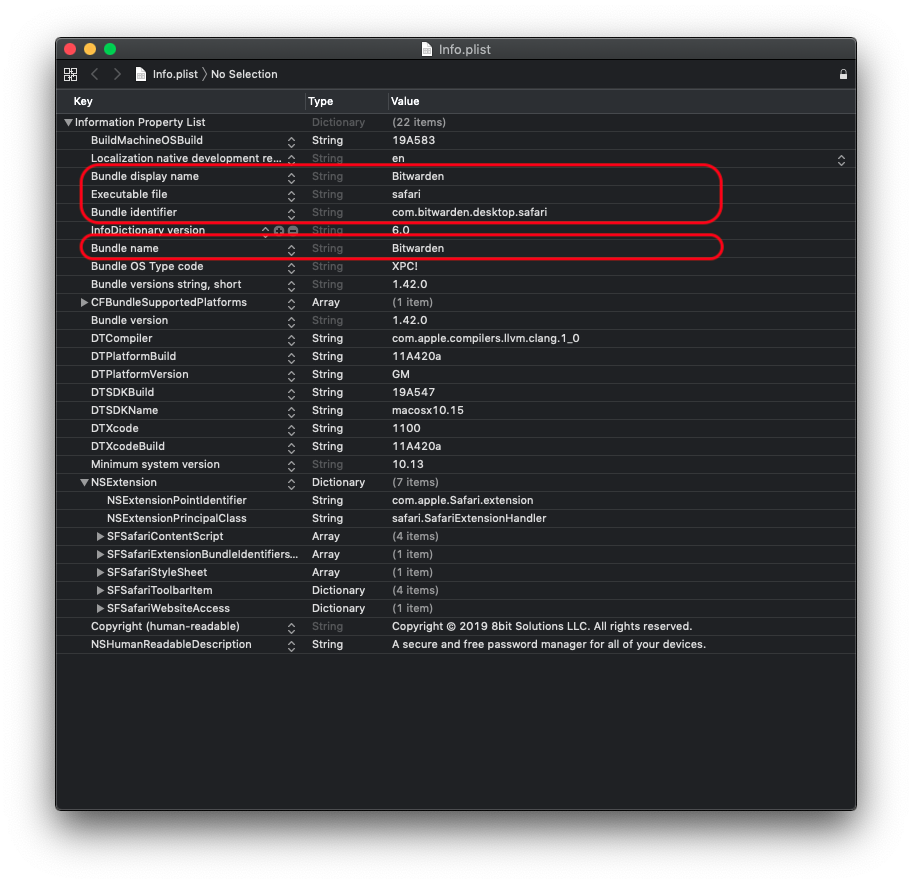
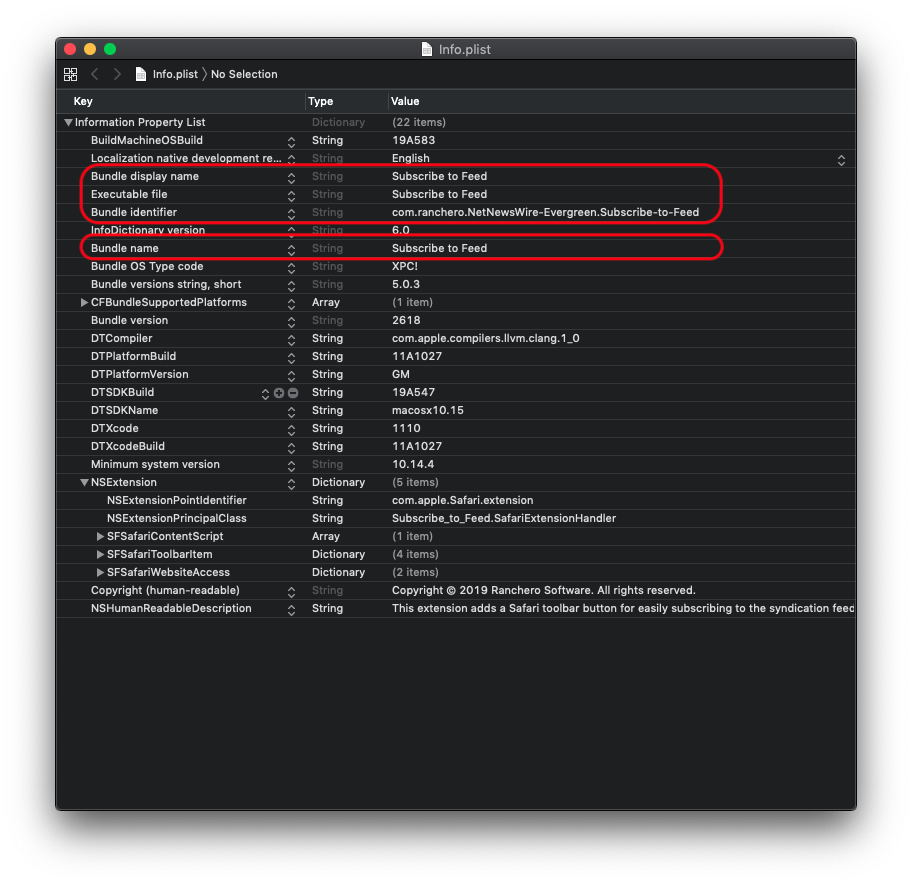
georgesnow
on 18 Feb 2020
I can try changing the Bundle name and display name to "Bitwarden Extension"??
kspearrin
on 21 Feb 2020
If this is not already known: I noticed that if you log out of macOS and log in again, the problem disappears
kennymc-c
on 6 Mar 2020
This issue appears to appear not on first launch of Safari, but after the system resumes from sleep
trevormeier
on 6 Mar 2020
This issue appears to appear not on first launch of Safari, but after the system resumes from sleep
I don't think so. I have a Mac that I literally never put to sleep, however I still get the bug.
It may be worth noting that I use the Bitwarden extension on two computers, one of which has significantly more RAM than the other. I have the impression that the extension locks itself more often on the one with less RAM.
jacopo-j
on 8 Mar 2020
It may be worth noting that I use the Bitwarden extension on two computers, one of which has significantly more RAM than the other. I have the impression that the extension locks itself more often on the one with less RAM.
No, I have this annoying bug too...with 32GB (Safari 13.0.5) (Extension 1.42.0) (Bitwarden Desktop 1.16.6)
 rampolino
on 11 Mar 2020
rampolino
on 11 Mar 2020
Same bug with: (Safari 13.0.5), (Extension 1.43.1), (Desktop 1.17.0)
rampolino
on 12 Mar 2020
With Safari 13.0.5, Extension 1.43.3 and Desktop 1.17.1 everything seems fine now, thank you.
rampolino
on 13 Mar 2020
@kennymc-c suggestion seems true in my case. It was locking on almost every tab change, and then I logged out and back in and so far it's okay again.
andschwa
on 13 Mar 2020
Still crashing for me with: Safari 13.0.5, Extension 1.43.3 and Desktop 1.17.1
The-Big-V
on 14 Mar 2020
Sorry, yes still crashing with Safari 13.0.5, Extension 1.43.3, Desktop 1.17.1
rampolino
on 17 Mar 2020
If this is not already known: I noticed that if you log out of macOS and log in again, the problem disappears
Yes, I have noticed the same. First boot up and resume from sleep, the problem exist. log off and log in the same user the problem seems to disappears...
rampolino
on 21 Mar 2020
For me the with Safari 13.0.5, Extension 1.43.3, Desktop 1.17.1 the problem disappeared and didn't show up since the update.
wucas
on 22 Mar 2020
Now with Safari 13.1 same Problem
rampolino
on 26 Mar 2020
I have this issue with Safari 13.1, OSX 10.14.6, Bitwarden 1.43.3. Logging out and back in (not restart) does seem to work around the issue for me.
 peterloron
on 28 Mar 2020
peterloron
on 28 Mar 2020
With the latest Safari (13.1), Mac OS (10.15.4) and Bitwarden (1.17.2) it seems the issue no longer exists.
mariodian
on 1 Apr 2020
Funny, as I said above the issue was gone for me but with the latest macOS Update (I'm now on Safari 13.1, macOS 10.15.4 and Bitwarden 1.17.2) it started again.
Do we have confirmation yet that the developers are looking into this? Can we maybe help with debugging this further? It doesn't render bitwarden useless but its extremely inconvenient.
wucas
on 2 Apr 2020
This issue makes Bitwarden a total non-starter for trying to introduce any new Mac users to the system. This needs to be addressed with some priority, otherwise all the work to support the platform is wasted in not being able to win new users.
On Thu, Apr 2, 2020 at 9:47 AM, Lucas Wollenhaupt notifications@github.com wrote:
Funny, as I said above the issue was gone for me but with the latest macOS Update (I'm now on Safari 13.1, macOS 10.15.4 and Bitwarden 1.17.2) it started again.
Do we have confirmation yet that the developers are looking into this? Can we maybe help with debugging this further? It doesn't render bitwarden useless but its extremely inconvenient.—
You are receiving this because you commented.
Reply to this email directly, view it on GitHub, or unsubscribe.
trevormeier
on 2 Apr 2020
@trevormeier I had provided the above feedback, but when I last looked through the commits. It doesn't look implemented. I am not familiar with electron (or development system) bitwarden uses I personally use Xcode(objective-c/swift). I had looked at just testing to see if my solution worked, but I am not sure how to build and test it locally.
georgesnow
on 2 Apr 2020
I can try changing the Bundle name and display name to "Bitwarden Extension"??
@kspearrin I think you need to change the Bundle ID as well.
georgesnow
on 2 Apr 2020
With the latest Safari (13.1), Mac OS (10.15.4) and Bitwarden (1.17.2) it seems the issue no longer exists.
I was wrong. The extension only works correctly when Bitwarden app is open as already pointed out.
mariodian
on 3 Apr 2020
I use now Chrome, here bitwarden extension works fine, In Safari the extension is useless now.
rampolino
on 3 Apr 2020
@rampolino yeah I noticed that as well, on Firefox it seems to work too.
@mariodian for me it doesn't seem to matter much whether the Bitwarden App is open or not. Normally I have it open all the time and the safari extension doesn't really care.
wucas
on 3 Apr 2020
Having the Bitwarden app open doesn't fix it for me either. Latest version of the BW plugin is still broken in Safari.
peterloron
on 3 Apr 2020
I so want to shift from LastPass to BitWarden but the constant need to enter my Master Password is so annoying.
 kushpvo
on 7 Apr 2020
kushpvo
on 7 Apr 2020
With the latest Safari (13.1), Mac OS (10.15.4) and Bitwarden (1.17.2) it seems the issue no longer exists.
I have the same exact versions and I still have to enter the master password every now and then even if i have PIN enabled and even if i keep the BW running in the background.
kushpvo
on 7 Apr 2020
I'm wondering how we can get more attention on this issue so an engineer from Bitwarden can be allocated the time to look into it. If you're on this thread, maybe commenting on this Reddit thread or sending a complaint to tech support might help? I've tried talking to tech support but they're dismissive.
trevormeier
on 7 Apr 2020
We're looking into the issue but have not pinned down the cause of the browser extension crash just yet, which is what is causing the issue.
 tgreer-bw
on 7 Apr 2020
tgreer-bw
on 7 Apr 2020
OK - glad to hear someone's working on it. Six months of broken behaviour has been supremely frustrating. I've had to recommend other solutions to many because of this showstopper.
trevormeier
on 7 Apr 2020
@tgreer-bw If needed, I'm happy to run a debug build or whatever to help.
peterloron
on 7 Apr 2020
@peterloron much appreciated!
tgreer-bw
on 7 Apr 2020
@tgreer-bw You can also pass on the dev-build to me for testing! I'd love to help out.
Let me know if you need me to pull up any logs or whatever - just so you can get more data from various users so that you guys can pinpoint the exact cause of this issue.
kushpvo
on 8 Apr 2020
@tgreer-bw @kspearrin Here are my logs. Might help!
error  09:39:12.184832+0530    tccd    Prompting policy for hardened runtime; service: kTCCServiceAppleEvents requires entitlement com.apple.security.automation.apple-events but it is missing for ACC:{ID: com.bitwarden.desktop.safari, PID[7157], auid: 501, euid: 501, binary path: '/Applications/Bitwarden.app/Contents/PlugIns/safari.appex/Contents/MacOS/safari'}, REQ:{ID: com.apple.appleeventsd, PID[421], auid: 55, euid: 55, binary path: '/System/Library/CoreServices/appleeventsd'}
error   09:39:17.933481+0530    tccd    {ID: com.bitwarden.desktop.safari, PID[7157], auid: 501, euid: 501, binary path: '/Applications/Bitwarden.app/Contents/PlugIns/safari.appex/Contents/MacOS/safari'} attempted to call TCCAccessRequest without the com.apple.private.tcc.manager.check-by-audit-token entitlement
error   09:41:44.091238+0530    runningboardd   RBSStateCapture remove item called for untracked item 391-132-2651 (target:xpcservice<com.bitwarden.desktop.safari(501)>)
error   09:42:14.623919+0530    tccd    {ID: com.bitwarden.desktop.safari, PID[7165], auid: 501, euid: 501, binary path: '/Applications/Bitwarden.app/Contents/PlugIns/safari.appex/Contents/MacOS/safari'} attempted to call TCCAccessRequest without the com.apple.private.tcc.manager.check-by-audit-token entitlement
error   09:44:29.208298+0530    tccd    Prompting policy for hardened runtime; service: kTCCServiceAppleEvents requires entitlement com.apple.security.automation.apple-events but it is missing for ACC:{ID: com.bitwarden.desktop.safari, PID[7196], auid: 501, euid: 501, binary path: '/Applications/Bitwarden.app/Contents/PlugIns/safari.appex/Contents/MacOS/safari'}, REQ:{ID: com.apple.appleeventsd, PID[421], auid: 55, euid: 55, binary path: '/System/Library/CoreServices/appleeventsd'}
kushpvo
on 8 Apr 2020
I tried adding the com.apple.security.automation.apple-events entitlement mentioned in many of the crash logs here to see if that helps. Here is a dev build containing that entitlement that you can test with. Let me know if this is any better.
https://send.firefox.com/download/cfcd9dfe24222c95/#i3Am6b_fdl0r6_wGGdrnww
kspearrin
on 8 Apr 2020
@kspearrin Awesome. Giving it a shot right away. What's the best way to clean uninstall the current version I have and do a fresh install of the dev build that you've attached?
kushpvo
on 8 Apr 2020
Just uninstall via applications and reinstall this one.
kspearrin
on 8 Apr 2020
Quick update: Installed the dev-build and set the lock timeout to 1 minute and now it asks for pin unlock instead of master password! - this is good! (Earlier, it used to ask for the master password only) Will now set lock timeout to "browser restart" and see if the extension stays unlocked or not.
kushpvo
on 8 Apr 2020
@kspearrin so on first run if you try to enable the Bitwarden Safari extension without logging into the main app. You get the apple events error. It will refuse to load the extension. However, repeated clicks eventually it allows the extension to load, but you still get the error.
not sure it means or does not mean the issue is fixed. Just providing as reference.

georgesnow
on 8 Apr 2020
Quick update: Installed the dev-build and set the lock timeout to 1 minute and now it asks for pin unlock instead of master password! - this is good! (Earlier, it used to ask for the master password only) Will now set lock timeout to "browser restart" and see if the extension stays unlocked or not.
11 Hours Update: The extension is still unlocked. I used my machine for few hours, i put it into sleep overnight. This dev-build seems to be working. Will let you know if there's anything else. @kspearrin Thanks for the fix!
14 Hours Update: Been using the system since last 3 hours, vault timeout is still set at browser restart - just checked now, it did get locked and asked for the master password, not the pin that i have set.
kushpvo
on 9 Apr 2020
@kspearrin This dev build still keeps locking the vault in few minutes. Here are the new logs.
RBSStateCapture remove item called for untracked item 269-131-1418 (target:xpcservice<com.bitwarden.desktop.safari(501)>)
Prompting policy for hardened runtime; service: kTCCServiceAppleEvents requires entitlement com.apple.security.automation.apple-events but it is missing for ACC:{ID: com.bitwarden.desktop.safari, PID[2655], auid: 501, euid: 501, binary path: '/Applications/Bitwarden.app/Contents/PlugIns/safari.appex/Contents/MacOS/safari'}, REQ:{ID: com.apple.appleeventsd, PID[291], auid: 55, euid: 55, binary path: '/System/Library/CoreServices/appleeventsd'}
kushpvo
on 9 Apr 2020
@kspearrin Sadly, the dev build also fails to stay unlocked for me as well.
peterloron
on 9 Apr 2020
Need this fixed so badly :( It is really annoying and makes the service unusable for people who use safari !
Please let me know if i can help in any way fixing this.
kushpvo
on 13 Apr 2020
@tgreer-bw @kspearrin Any update on a new dev build? Thanks!
peterloron
on 16 Apr 2020
@peterloron Unfortunately, I don't have any new ideas on what to try at the moment.
kspearrin
on 16 Apr 2020
Adding 2 crash logs in case they help. [[Download](https://send.firefox.com/download/681e0cb19bb8e69b/#4PwMQ3YftJtxlcuAeVoP1Q)]
Quickly browsing through the code, it seems the control mechanism for the locking is the VaultTimeoutService and its isLocked() check.
Could it be that the persisted values for lock time from settings are not being updated correctly or overwritten automatically after some period of default timeout?
Any special permissions needed that might be preventing StorageService functionality?
 kenosan
on 19 Apr 2020
kenosan
on 19 Apr 2020
This is really getting annoying and makes me want to go back to LastPass. I seriously don't want to go back and keep using BW but safari is my primary browser and i have all my logins in BW :(
I wish i was an experienced coder and could give you guys some idea/insights.
Recently, my logs showed this. IDK if it is helpful.
{ID: com.bitwarden.desktop.safari, PID[65091], auid: 501, euid: 501, binary path: '/Applications/Bitwarden.app/Contents/PlugIns/safari.appex/Contents/MacOS/safari'} attempted to call TCCAccessRequest without the com.apple.private.tcc.manager.check-by-audit-token entitlement
kushpvo
on 21 Apr 2020
@kspearrin The dev build you sent yesterday (Message on GitHub seems to be deleted now.) didn't work on my machine: The extension no longer shows up in Safari (V13.1, MacOS 10.15.4).
I don't know if this message is related, but it was the only one showing up in Console.app:
Unable to find a SystemExtensions directory at /Applications/Bitwarden.app/Contents/Library/SystemExtensions
Bitwarden 1.17.2 continues to show the following error message in Console.app:
fehler 08:28:03.771188+0200 tccd Prompting policy for hardened runtime; service: kTCCServiceAppleEvents requires entitlement com.apple.security.automation.apple-events but it is missing for ACC:{ID: com.bitwarden.desktop, PID[4441], auid: 501, euid: 501, binary path: '/Applications/Bitwarden.app/Contents/MacOS/Bitwarden'}, REQ:{ID: com.apple.appleeventsd, PID[398], auid: 55, euid: 55, binary path: '/System/Library/CoreServices/appleeventsd'}
Thanks for your efforts.
 cstuder
on 22 Apr 2020
cstuder
on 22 Apr 2020
@kspearrin I tried this new dev build, installed it, opened the app, entered my master password and then tried to enable the safari extension but it wasn't there.
Did a clean uninstall, downloaded it again and did the install again and still the same. Seems like safari extension is missing from this build.
Also, it seems like the message was deleted. Maybe you realised that it was missing the extension?
kushpvo
on 22 Apr 2020
Just chiming in here to say that I did not have this problem until recently, but now it's recurrent. I'm running MacOS 10.15.4, the bitwarden app is the latest (1.17.2), and Safari preferences tells me the extension version is 1.43.4.
Nothing changed on Mac other than upgrading Catalina to 10.15.4 a week or so ago.
UPDATE: I cannot replicate this bug. A restart of my machine and now the extension in safari is working just fine, and as intended.
 fronesis47
on 28 Apr 2020
fronesis47
on 28 Apr 2020
Any updates? I've moved to Firefox now but I want to get back to Safari because firefox is eating up RAM like crazy (2+ GB usage on a 8GB RAM MacBook Pro 13")
Please please please someone find a fix for this.
kushpvo
on 7 May 2020
Devs @tgreer-bw @kspearrin and others - thanks for your work on this so far. We really need to get this solved... the default browser on a primary platform is unusable and that eliminates a lot of potential users for Bitwarden.
How can we support you? What can we do to help you understand the core problem? Can someone take the lead on organizing us? There's certainly plenty of need and interest with more than 100 comments on this issue... so let's find a way!
trevormeier
on 7 May 2020
Thanks @trevormeier for the nudge.
Any console / crash logs for the extension are always helpful.
We’re organizing on this one internally, so any further details will help while we spin up.
tgreer-bw
on 7 May 2020
OK! Here are several from the last week or so
trevormeier bitwarden crash logs 2020-05-07.zip
trevormeier
on 7 May 2020
it might be worth investigating using this utility for logs on tccutil (it references Mojave, but the same thing applies to Catalina):
https://eclecticlight.co/2019/02/01/solving-problems-with-mojaves-privacy-protection/
georgesnow
on 7 May 2020
Thanks developers for your work. Here is one of my crash logs, looks almost identical to the one posted by @trevormeier :
bitwarden safari crash log.zip
Also, a question for others with this issue:
- In the safari extension, when you go to settings>options, and make any change, does the extension immediately lock? (Because on Firefox, for example, the change is applied without locking the extension).
I'm asking this question because, if this is one of the characteristics of the bug, perhaps it gives a way of reproducing the locking behaviour on demand, instead of having to wait for it to happen.
The-Big-V
on 8 May 2020
@tgreer-bw Can you tell us the best way to obtain the logs? console.app and filtering for "any:com.bitwarden.desktop.safari" is fine?
@The-Big-V Hmm, i don't think it's supposed to auto-lock. But i tried reproducing it, wen't to settings>options>changed few things and it did not lock. EDIT Auto-locks when I change the theme
kushpvo
on 8 May 2020
kushpvo
on 8 May 2020
Thank you everyone for the additional info, logs and patience!
 cscharf
on 8 May 2020
cscharf
on 8 May 2020
@kushpvo , re:
Auto-locks when I change the theme
Which theme are you changing and/or what steps are you taking to change the theme which seems to reproduce this issue consistently?
cscharf
on 11 May 2020
light to dark or dark to light. it will cause a refresh and lock. however, it doesn't produce the errors seen above by others that reported in the Console.app
georgesnow
on 11 May 2020
Got it, thanks, I'm assuming Safari is unloading/reloading at that point which locking would be expected (just as if you closed your browser and opened a new session). Thanks for the clarification.
cscharf
on 11 May 2020
Hi everyone, I've put together some changes to fix what I _believe_ may be potential causes (explainable or not) for the specific crash that most are experiencing. Given the error code and way it exited it would appear to be a swift type-safety issue with unsafe unwrapping of some nil value or an invalid cast, so based on the symbolicated crash report I'm hoping this yields some good news (but it's just a test).
If anyone who has been experiencing this is willing to uninstall/remove Bitwarden and re-install this build (from .dmg) please give it a go and let me know. You may need to open Safari once uninstalled, ensure the extension no longer shows, then Quit Safari before installing the dev build.
https://send.firefox.com/download/bf0791f886132eee/#KT_4SrLupwQYl5V9PNeEOw
cscharf
on 15 May 2020
Many thanks, I've installed it, and after 30 mins everything is still working.
Will let you know if there are any issues over the coming day(s).
We appreciate your work @cscharf !
The-Big-V
on 15 May 2020
I started experiencing it again just now after months of this issue not occurring.
It is logging out within minutes even if I am in the same tab (not leaving the tab/browser even for a second) after entering the password. I haven't changed anything - no Mac update, no Safari update, no Bitwarden update.
 amarendra
on 15 May 2020
amarendra
on 15 May 2020
I don't know if this clarifies or confuses matters. I had posted a few weeks ago that I had this problem too, but for me a restart of my machine made it go away and it hasn't come back in over 2 weeks. I'm on the latest MacOS (10.15.4) and Safari (13.1). I have the lock set to "on browser restart" and that's exactly how it's been working.
fronesis47
on 15 May 2020
@amarendra , if the fix noted above actually works, I would anticipate there may be something else causing the crash in the environment that may not have anything to do with software updates per-se, but perhaps a condition in the user profile, memory space, corrupt file on disk, etc. Either way the Safari App Extension should be able to gracefully handle those conditions (as best as possible). Please give the new dev/test build a try and see if that resolves your issue (or profile crash logs so we can determine if it's the same issue).
On another note, Apple has released a number of high-profile and high-impact security updates in recent months for macOS and Safari; I would suggest ensuring you've applied recommended security patches, especially as it applies to zero-day vulnerabilities.
cscharf
on 15 May 2020
@cscharf Thanks Chad, installing this now and I'll let you know how it goes.
trevormeier
on 16 May 2020
After 24 hours of testing, the dev build is working great for me: unlocking and locking when it should.
The-Big-V
on 16 May 2020
Unfortunately I spoke too soon. Crash report:
The-Big-V
on 16 May 2020
Also found these in the log:
- RBSStateCapture remove item called for untracked item 263-139-3663 (target:xpcservice
- Bootstrapping; external subsystem UIKit_PKSubsystem refused setup
- Prompting policy for hardened runtime; service: kTCCServiceAppleEvents requires entitlement com.apple.security.automation.apple-events but it is missing for ACC:{ID: com.bitwarden.desktop.safari, PID[52506], auid: 502, euid: 502, binary path: '/Applications/Bitwarden.app/Contents/PlugIns/safari.appex/Contents/MacOS/safari'}, REQ:{ID: com.apple.appleeventsd, PID[289], auid: 55, euid: 55, binary path: '/System/Library/CoreServices/appleeventsd'}
The-Big-V
on 16 May 2020
Unfortunately the extension is still crashing.
safari_2020-05-16-085136_MBP16.crash.zip
trevormeier
on 17 May 2020
Thanks for the updates and really appreciate the feedback and logs, looking into this further. I'll let you know if there's any additional info/assistance I need to help try to get this resolved.
cscharf
on 18 May 2020
@The-Big-V & @trevormeier , would either of you please mind capturing a console trace while running Safari and capturing the crash? Not sure how frequently this is occurring, but I did add a little logging into that last build to try and determine the command frequency and sequencing. That may help shed some additional light on this issue (hopefully).
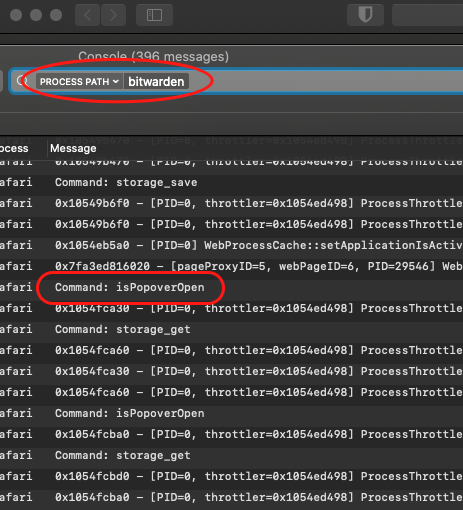
cscharf
on 18 May 2020
OK I think I've got something:
Here is the crash log (looks same as usual):
Here is what was in the console in the minute leading up to it:
bitwarden extension console log.txt.zip
Sorry not quite best way to export from Console, but here is the item that shows right at the moment of the crash:

And I'm now also getting this error message every couple of minutes:
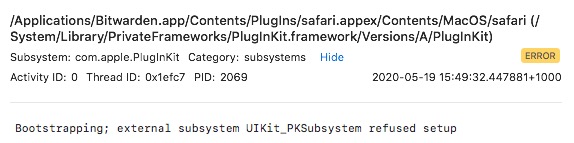
The-Big-V
on 19 May 2020
I noticed something similar when I was testing this build as well
georgesnow
on 19 May 2020
I am not sure if this is related and I can't remember on previous builds if this was the case. However, now every time I open the extension's view controller it resets to "Add a new login" or the login for that page if one exists. If I am in the middle creating an entry, viewing a note or different entry, on the settings page, or the password generator. And anything I had done is lost.
georgesnow
on 19 May 2020
...every time I open the extension's view controller it resets...
@georgesnow , feel free to open a new issue for that, I don't think it's related and _may_ have been how it has always worked, but Safari's App Extensions work rather clumsily across context boundaries and do everything using messaging and injected scripts, so maintaining state can be a little wonky. It could be something to look into (there is another issue reported regarding password history as well from the generator that faces similar state management challenges)
cscharf
on 19 May 2020
I am reading that this behaviour has been difficult to track down and fix. I have used the free version of Bitwarden for a while and this never happened to me. I paid attention to it as I thought it would bug me to have to enter the password/pin every time.
The bug didn't happen when using the free version so I went ahead and got the premium features. And the bug started to happen. Now the extension doesn't stay unlocked for more than a few minutes!
So maybe you can look into what changes between free/premium and check with others if it's happening for them on the free plan as well?
 3zero2
on 19 May 2020
3zero2
on 19 May 2020
@3zero2 , can you confirm the same crash report/backtrace when this occurs? I'm testing that theory now while also filling in other gaps discovered from the latest crash info (thanks @The-Big-V)
cscharf
on 20 May 2020
@cscharf should I use a particular version to provide logs? I'm currently running Version: 1.43.4
3zero2
on 20 May 2020
I'll have a new dev testing build posted here momentarily (Apple's notarization process takes a little bit).
cscharf
on 20 May 2020
Here is the latest dev/test build of the Bitwarden desktop + Safari App Extension. Fingers crossed on this as hopefully it resolves the frequent crashes. I have still not been able to reproduce this but it feels like we're chiseling away at it, thanks again for everyone's help.
DMG Download (please uninstall and open/quit Safari after uninstall before installing this version):
https://send.firefox.com/download/7030c048fd10fdde/#P_e-3ibC5qvWhz6Qms6d_g
cscharf
on 20 May 2020
OK! Installed... here's hoping!
trevormeier
on 20 May 2020
trevormeier
on 20 May 2020
Me too:
safari_2020-05-21-111551_iMac.crash.zip
Same as before, the crash seemed to have occurred after:
safari Command: tabs_query
The-Big-V
on 21 May 2020
The timing of the crash seems to always coincide with my computer going idle. It doesn't happen every time it goes idle, but every time I've noted the time of the crash logs, it's been 20-30 minutes after I stopped using my machine.
trevormeier
on 21 May 2020
Thank you everyone... I'm currently exploring some direct dev support through Apple now. I may add a ridiculous level of NSLog messages and get another build out today if anyone is willing to try it and capture the console output again, figured we'll need to go old-school JavaScript debugging style circa IE 5.5 (alert('1'), alert('2'), etc.).
cscharf
on 21 May 2020
I'm happy to try it. One of the challenges has been the crashes for me happening when I walk away, so the console logs are gone if it's more than an hour before I notice the crash. Some way to capture those logs somewhere easy to find would be helpful
trevormeier
on 21 May 2020
@trevormeier (et. all.), the best way to do that would be to use the log show command via the terminal. With that too you can supply start/end times as well (if desired). Here's an example:
log show --info --debug --predicate 'process BEGINSWITH[c] "safari" && (eventMessage CONTAINS[c] "Command:" || eventMessage CONTAINS[c] "bitwarden")' > ~/Desktop/console.log.txt
That will go back as far in time as your machine has allowed logs to be stored (on our version of macOS, Catalina 10.15.4, that's about 4 to 5 days). Just tried and mine goes back to 5/18.
This should make it easier as well for grabbing those logs vs. opening the console and making yourself go blind ;-).
cscharf
on 21 May 2020
Chad, thank you very much for working with us on this issue. If you do have a "mega log" version, I'll be happy to run it. The cli example above is also very handy.
peterloron
on 21 May 2020
This is pre-verbose debug build, but I've got a crash report and a console log. That log script you posted created a 9.8MB text file!
trevormeier
on 22 May 2020
Thanks @peterloron & @trevormeier , please find the very verbose logging build version here: https://send.firefox.com/download/35af45dc99a52dd6/#Vf7Q-BK-anlt6F3ev0KxiQ
You can capture the logs after any crash using the following command (updates to the log message predicate):
log show --info --debug --predicate 'process BEGINSWITH[c] "safari" && eventMessage BEGINSWITH[c] "com.bitwarden.desktop.safari"' > ~/Desktop/console.log.txt
I've tried to be careful to ensure the console logging messages do not output any sensitive information (example console.log.txt), however please review before uploading them here.
Also, depending on your level of enthusiasm for clearing your machine logs to get a smaller file size (up to you, but not necessary), you can use sudo log delete --all (our NSLog entries are not tagged as --ttl).
cscharf
on 22 May 2020
Hi all, using the verbose build here is:
console log and crash report.zip
Edit: just realised the console log above doesn't overlap the time of the crash. I'll try again later.
The-Big-V
on 23 May 2020
Version: 1.43.4 hasn't crashed on me yet!
3zero2
on 23 May 2020
Finally got a crash +log using the verbose build:
The-Big-V
on 27 May 2020
I've updated to macOS Catalina 10.15.5 (available since May, 26 2020) and haven't experienced this issue so far today. Maybe something changed. Glad to help with proving more info if needed. Note I do need a bit more guidance in how to gather the information you guys are talking about here.
 mackaaij
on 27 May 2020
mackaaij
on 27 May 2020
Thanks all, and @The-Big-V , from the crash logs I can see at least this is a different exception trace, and as maddening as this is (it's the same exception code, which is rather generic) but it appears the crash is happening as Thread 4 is evaluating JavaScript to send back to the main thread, however the main thread never receives the request and the app crash is happening somewhere in Apple's internals, WebKit::WebPageProxy::runJavaScriptInMainFrameScriptWorld(...). I missed putting any diagnostic handler on completion to log any errors occurring, but not sure an error evaluating JS on that side would/should cause an app crash. All of the other threads had yet to exit their msg_trap phase which invokes the userContentController. I still have an open issue with Apple so I'll update that as well and will try to add a completion handler to that JS run call and get another test build out.
I'm encouraged that several others have yet to experience a crash, however if anyone does please let me know, I'm not sure at this stage we'll continue to need crash logs until we have a new test build.
cscharf
on 27 May 2020
I am one of the lucky ones who is yet to experience a crash...
3zero2
on 28 May 2020
Latest feedback from Apple's developer support team is that they believe this stems from a bug in the OS or Safari and I currently have an open bug report, #7709602, aside from that I'm afraid we're at a bit of a dead-end. Please feel free to nudge Apple as well if you're so inclined.
In the meantime, the fixes I have attempted (minus the debugging output) have been committed and will be part of the currently rolling out release of the Bitwarden macOS app + Safari app extension, so hopefully this resolves some or most of everyone's crash issues.
cscharf
on 28 May 2020
Thanks @cscharf for the update.
The-Big-V
on 29 May 2020
Any updates here? I am hitting this every few minutes, any information/crash dump that I can provide? This is pretty much the only thing keeping me from ditching Dashlane and migrating to Bitwarden.
 virgilm
on 12 Jun 2020
virgilm
on 12 Jun 2020
Hi all, the open bug request with Apple is just that, "open" (sadly), however I did finally get feedback from their developer support team with some suggestions. I'll be diving back into this early next week and we'll give it another go (my Mac is "in the shop" at the moment). If anyone wants to take a stab at some Swift cleanup in the meantime I can forward Apple's feedback.
cscharf
on 12 Jun 2020
Latest feedback from Apple's developer support team is that they believe this stems from a bug in the OS or Safari and I currently have an open bug report, #7709602, aside from that I'm afraid we're at a bit of a dead-end. Please feel free to nudge Apple as well if you're so inclined.
In the meantime, the fixes I have attempted (minus the debugging output) have been committed and will be part of the currently rolling out release of the Bitwarden macOS app + Safari app extension, so hopefully this resolves some or most of everyone's crash issues.
@ChrisLane Are you sure that is the whole bug report number? I work at Apple (not in the OS or Safari groups), and that number doesn't have the right number of digits for a Radar item. I was going to take a look at the internal ticket (if I have permissions) and see if I can help out.
peterloron
on 12 Jun 2020
@peterloron , that was through Feedback Assistant which was where I was told to file from Apple's team in the support channel, not sure if a proper radar item has been opened for it or not, I've not seen any movement on it: FB7709602. Developer support indicated that it looked like a bug in Safari or macOS and I'm not familiar enough with Apple's processes/inner workings to know where it's really at status-wise. Thanks for checking, certainly appreciate the help on this one.
cscharf
on 12 Jun 2020
Ah, ok. If you have a name of someone who responded, I can try reaching out to them to see if I can uncover the internal Radar. Thanks.
peterloron
on 12 Jun 2020
Email sent, thanks @peterloron
cscharf
on 12 Jun 2020
Hi everyone, just a quick update, here's another "test" build of the Bitwarden desktop app which includes the Safari App extension with some of the swift code cleaned up from Apple's Developer Support feedback. This may or may not help resolve or alleviate some of the crashes everyone's been experiencing. Any help testing or verifying w/ any crash logs is much appreciated!
https://send.firefox.com/download/91232bc631c88c69/#E7TsNMutBKkiZqOeujd4MQ (Bitwarden-1.18.0.dmg)
cscharf
on 22 Jun 2020
Thanks, I've been trialling it. Unfortunately got a crash today (sorry didn't have console running, but will post log if I can):
The-Big-V
on 24 Jun 2020
Thanks for the crash log, console shouldn't be necessary this go-round since there's not a lot of debugging output in the code this time. It does appear this is a very different crash this time and there's much more detail/insight in the trace, so that'll help with some new direction!
In the meantime if anyone else experiences a crash trying this test build please share the crash trace so we can compare as last time the crash on everyone's machine was exactly the same trace.
cscharf
on 24 Jun 2020
I’ve been running it with no issues so far, but if I get a crash I will post it
On Wed, Jun 24, 2020 at 4:02 AM, Chad Scharf notifications@github.com wrote:
Thanks for the crash log, console shouldn't be necessary this go-round since there's not a lot of debugging output in the code this time. It does appear this is a very different crash this time and there's much more detail/insight in the trace, so that'll help with some new direction!
In the meantime if anyone else experiences a crash trying this test build please share the crash trace so we can compare as last time the crash on everyone's machine was exactly the same trace.
—
You are receiving this because you were mentioned.
Reply to this email directly, view it on GitHub, or unsubscribe.
trevormeier
on 24 Jun 2020
Looks much more stable, I had a crash after a few hours.
virgilm
on 25 Jun 2020
Looks like 2 for 2, same issue, same trace so that's promising. Thanks all!
cscharf
on 25 Jun 2020
This runs now (MacBook Pro 15" 2016, macOS 10.15.5) the fourth day in a row with sleep mode, screen locking, ... without locking of the extension so far.
stranljip
on 26 Jun 2020
That's great news, thanks. I'm still looking into the new crash traces provided (thank you!) however the improvements/fixes to-date will be officially released here shortly through the app store.
cscharf
on 26 Jun 2020
I just updated to the official 1.19.0 and the issue is back immediately. Can you provide a new dev build rebased on the latest release?
stranljip
on 30 Jun 2020
Carsten, here's the latest bits but a local development build. Hopefully that works. Truly odd the development build would work and not the official release, I'm building/distributing the DMG with the exact same build command, same OS/environment and same signing keys/provisioning profile, etc.
1.19.1 (local/dev build), https://send.firefox.com/download/c9967eeabf61651e/#XM7o4wpxEQiuax2aT-lfnQ
The only difference is that in order to debug locally I have to modify the info.plist manifest for the browser app extension for Safari and I wonder if one or both of those 2 additional settings are what's preventing the crash. That would be the only literal difference between the build I'm providing above and what's in the official app store.
<key>NSAppTransportSecurity</key>
<dict>
    <key>NSAllowsArbitraryLoads</key>
    <true/>
    <key>NSAllowsLocalNetworking</key>
    <true/>
</dict>
If indeed NSAllowsArbitraryLoads fixes it.
According to apple's docs NSAllowsArbitraryLoads allows:
Disabling ATS means that unsecured HTTP connections are allowed. HTTPS connections are also allowed, and are still subject to default server trust evaluation, as described in Ensure the Network Server Meets Minimum Requirements. However, extended security checks—like requiring a minimum Transport Layer Security (TLS) protocol version—are disabled.
so it would mean it's something with how it is attempting to connect and the type of protocol it is using at some point. If the connection fails for HTTPS in BitWarden extension does it fail down to HTTP or lower protocol (ie timeout, computer going to sleep)? just some thoughts.
georgesnow
on 30 Jun 2020
I would doubt these keys "fix" the crash (was the only difference I could come up with), all URLs embedded in both configurations are https / TLS, however it fails validation because I have to use IP address (across containers) vs a valid hostname + certificate. I don't believe the computer going to sleep or any other timeout would cause it to attempt to skip/bypass TLS negotiation, especially with an HTTPS URL for connection.
I also don't believe it would have any reason to use a local network connection in a deployed scenario; this is purely for me doing local debugging (attached debugger in Xcode, etc.) which complains to no end unless those 2 flags are set.
The "new" crash seems to be coming from webkit directly but has to do with something in the JavaScript we're sending to run on the main thread, so I'm digging into that at the moment.
cscharf
on 30 Jun 2020
None of the builds (either official or dev) are fixing this issue fully for me. It seems to happen less often, but I still see crashes regularly. I provided the crash dump, if you need another one, I can provide more, with any build you would like me to run with.
virgilm
on 30 Jun 2020
I've updated to macOS Catalina 10.15.5 (available since May, 26 2020) and haven't experienced this issue so far today. Maybe something changed.
This weeks update to 1.19.0 reintroduced the issue for me :(
Same offer: Glad to help with proving more info if needed. Note I do need a bit more guidance in how to gather the information you guys are talking about here.
mackaaij
on 1 Jul 2020
I do wonder if anyone can open Safari web inspector and highlight the background scripts/resources to catch any JavaScript console exceptions or errors coming out of there which may be leading up to the crash. I believe this is stemming from the front-end message handler in Webkit vs. the App Extension itself.
cscharf
on 1 Jul 2020
Hi, is there any idea how long it will take to fix this random locking? (I notice the drop down box of the extension goes black for a split second before asking me to log in again)
I never had this issue before last night, and it is still a problem now. Its ridiculous re entering the password and logging in again after every action. Just not usable. I might understand it with a free version, but this is a paid premium thing. I spent a long time deciding to start using a password manager, and even longer deciding on bitwarden after trialling keepass xc for a while.
I have tried the Bitwarden help guy suggestion for selecting "lock with pin" option, but when it does lock itself, I don't get the option to enter the pin that I set.
Something seems to be going badly wrong. I truly want Bitwarden to work for me, but its incredibly frustrating trying to use it in its current form.
 shineona
on 2 Jul 2020
shineona
on 2 Jul 2020
anyone who has the issue consistently notice which sites they are on and noticed the its locked? Cause you would be able then better watch for JS execution or errors that pulling out this error. I could only get the issue to happen sporadically, but the people who have seem to encounter it regularly.
georgesnow
on 2 Jul 2020
Same here. Also a Premium user, and also started being affected by this issue a few days ago.
Version information:
Darwin 19.5.0 Darwin Kernel Version 19.5.0: Tue May 26 20:41:44 PDT 2020; root:xnu-6153.121.2~2/RELEASE_X86_64 x86_64
Safari Version 13.1.1 (15609.2.9.1.2)
macOS Catalina 10.15.5
Thanks
Hi, is there any idea how long it will take to fix this random locking? (I notice the drop down box of the extension goes black for a split second before asking me to log in again)
I never had this issue before last night, and it is still a problem now. Its ridiculous re entering the password and logging in again after every action. Just not usable. I might understand it with a free version, but this is a paid premium thing. I spent a long time deciding to start using a password manager, and even longer deciding on bitwarden after trialling keepass xc for a while.
I have tried the Bitwarden help guy suggestion for selecting "lock with pin" option, but when it does lock itself, I don't get the option to enter the pin that I set.
Something seems to be going badly wrong. I truly want Bitwarden to work for me, but its incredibly frustrating trying to use it in its current form.
 github-ronk
on 5 Jul 2020
github-ronk
on 5 Jul 2020
I also experience this problem with:
Operating system: macOS High Sierra
Browser: Safari 13.1.1
Build Version (go to "Settings" → "About" in the app): 1.18.0
 Vinz87
on 6 Jul 2020
Vinz87
on 6 Jul 2020
Probably since the last plugin update, the problem occurs much more often than before. Before it only occurred once every 6-10 days, now it occurs several times a day. Something must have changed with this.
kennymc-c
on 6 Jul 2020
We have resolved several type safety issues with the app extension's Swift code in collaboration with the Apple Developer Support team in relation to this crash and at this point I believe we're working with a different manifestation of the issue (original crash has been resolved, or at least "pushed" higher in the stack). I am continuing efforts to reproduce this in a development/debugging environment to try to narrow it down, or even reproduce it locally so we can get it fixed for everyone. At this point Safari is simply crashing the thread from the web browser / JavaScript side and we are digging into that aspect of what could be causing the crash potentially (but without being able to reproduce it ourselves, we are just shooting in the dark). I apologize it is taking some time to track down this issue but we are working on it.
cscharf
on 9 Jul 2020
Can you tell me what you need exactly? I can reproduce this easily (in a matter of minutes, but I don't have a consistent reproduction yet - sometimes even a 1-tab browser staying on a specific page (e.g. AT&T landing) seems to trigger it).
macOS 10.15.5 (19F101)
Safari Version 13.1.1 (15609.2.9.1.2)
Bitwarden 1.45.0
virgilm
on 9 Jul 2020
Thanks @virgilm , would be great to get some insights from Safari's dev tools: https://github.com/bitwarden/browser/issues/1021#issuecomment-652660613
cscharf
on 9 Jul 2020
took 5 mins, navigate on two pages:
https://aliexpress.com and https://teslamotorsclub.com
Aliexpress seemed done with its transaction w/o any issues, I could click on the bitwarden icon in safari afterwards.
No errors in the console (I cleaned before this experiment), except:

which I've seen by itself many times before w/o any consequences for the plugin. Also, this message was present already from previous browsing (aliexpress.com).
I don't think there's much to gather from this, any debug image that I can try?
virgilm
on 10 Jul 2020
Thanks @virgilm , at this point I'm looking through the JavaScript chain in response to where the crash is occurring trying to piece together what may be causing the app extensions main thread to crash. This may or may not still appear to be an Apple bug/issue and I continue to hold hope I'll get some support from their Safari team.
cscharf
on 13 Jul 2020
Only ever seen this in 1.19. Not sure how this is the same as an old issue from Sep ‘19. Similar but different.
Is this seen as a regression (to a bug I never had in any previous versions in over a year)?
 ToGitOrNotToGit
on 14 Jul 2020
ToGitOrNotToGit
on 14 Jul 2020
This is the same observable behavior, but is a different crash stack, which may, or may not, be the same root cause, underlying issue with Safari/macOS or some combination of the above. In this instance it doesn't make sense to call the original reported bug/issue fixed where there's a new bug/issue that exhibits the exact same behavior, so keeping this open as the same "issue".
cscharf
on 14 Jul 2020
I also see this issue. Can I help by providing logs?
 ochaa
on 15 Jul 2020
ochaa
on 15 Jul 2020
Hi all, I am still unable to reproduce this, although it seems a bit more frequent for folks. Can I get some feedback for those experiencing this issue on more detailed settings you're using in your browser extension (and related variables)?
- Vault Timeout
- Vault Timeout Action
- Unlock with PIN?
- 2-step login?
- Premium?
- Enable Auto-fill On Page Load?
- Default URI Match Detection
- Clear Clipboard Setting
- Disable Automatic TOTP Copy?
- Don't Show Cards on Tab Page?
- Don't Show Identities on Tab Page?
- Disable Add Login Notification?
- Disable Changed Password Notification?
- Disable Website Icons?
- Theme
I appreciate any additional information anyone experiencing these issues is able to provide.
cscharf
on 22 Jul 2020
Vault Timeout: 4 hours
Vault Timeout Action: Lock
Unlock with PIN? Disabled
2-step login? Enabled
Premium? Yes
Enable Auto-fill On Page Load? Disabled
Default URI Match Detection: Base domain
Clear Clipboard Setting: Never
Disable Automatic TOTP Copy? Disabled
Don't Show Cards on Tab Page? Disabled
Don't Show Identities on Tab Page? Disabled
Disable Add Login Notification? Disabled
Disable Changed Password Notification? Disabled
Disable Website Icons? Disabled
Theme: Default
mackaaij
on 22 Jul 2020
Thank you for the quick response @mackaaij , just reproduced it locally
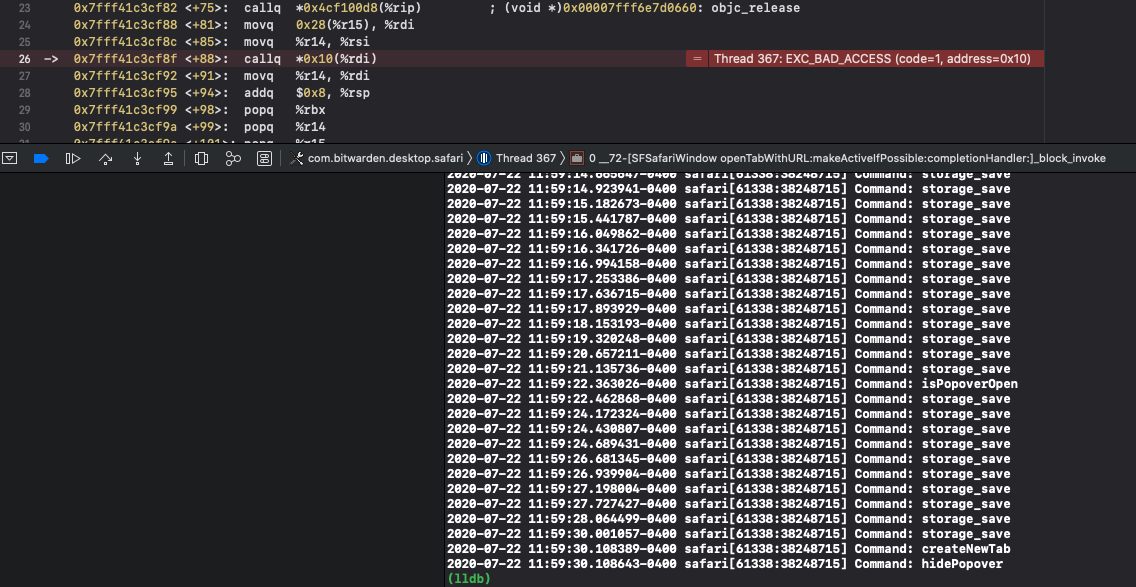
cscharf
on 22 Jul 2020
Vault Timeout: Browser Restart
Vault Timeout Action: Lock
Unlock with PIN? Yes
2-step login? Yes
Premium? No
Enable Auto-fill On Page Load? Yes
Default URI Match Detection: Base Domain
Clear Clipboard Setting: 30 seconds
Disable Automatic TOTP Copy? No
Don't Show Cards on Tab Page? No
Don't Show Identities on Tab Page? No
Disable Add Login Notification? No
Disable Changed Password Notification? No
Disable Website Icons? No
Theme: Dark
I'm using a self-host bitwarden_rs installation
kennymc-c
on 22 Jul 2020
Okay, the crash I am capturing and able to get is different than other posters here, it occurs specifically when launching a new tab from the app extension window (launch URL) for a login, etc. That will consistently crash the extension as well (will create a new bug for this). I have not actually been able to reproduce this crash where simply sitting on a site with a single tab after a few minutes/several minutes the extension crashes.
Crash reported here:
Exception Type:        EXC_BREAKPOINT (SIGTRAP)
Exception Codes:       0x0000000000000002, 0x0000000000000000
Exception Note:        EXC_CORPSE_NOTIFY
Crash I am able to reproduce:
Exception Type:        EXC_BAD_ACCESS (SIGSEGV)
Exception Codes:       KERN_INVALID_ADDRESS at 0x0000000000000010
Exception Note:        EXC_CORPSE_NOTIFY
I'm back to the drawing board on this one but will create the other issue for the open new tab behavior. If anyone can provide more detailed timing, site and actions to reproduce from opening Safari to the app crash that might help a little more (sorry for the back and forth on this).
cscharf
on 22 Jul 2020
- Vault Timeout: On Browser Restart
- Vault Timeout Action: Lock
- Unlock with PIN? YES
- 2-step login? NO
- Premium? YES
- Enable Auto-fill On Page Load? NO (GOD NO/still very bad?)
- Default URI Match Detection: Base Domian
- Clear Clipboard Setting: NEVER
- Disable Automatic TOTP Copy? NO
- Don't Show Cards on Tab Page? NO
- Don't Show Identities on Tab Page? NO
- Disable Add Login Notification? NO
- Disable Changed Password Notification? NO
- Disable Website Icons? NO
- Theme: DEFAULT
The issue I reported is inline with what @cscharf is seeing. I’ll see if it ALSO crashes sitting on a single tab (with others open).
ToGitOrNotToGit
on 22 Jul 2020
- Vault Timeout: On Browser Restart
- Vault Timeout Action: Lock
- Unlock with PIN? YES
- 2-step login? NO
- Premium? YES
- Enable Auto-fill On Page Load? YES
- Default URI Match Detection: Base Domian
- Clear Clipboard Setting: NEVER
- Disable Automatic TOTP Copy? NO
- Don't Show Cards on Tab Page? NO
- Don't Show Identities on Tab Page? NO
- Disable Add Login Notification? NO
- Disable Changed Password Notification? NO
- Disable Website Icons? NO
- Theme: DEFAULT
peterloron
on 22 Jul 2020
- Vault Timeout: On Browser Restart
- Vault Timeout Action: Lock
- Unlock with PIN? NO
- 2-step login? NO
- Premium? YES
- Enable Auto-fill On Page Load? YES
- Default URI Match Detection: Base Domian
- Clear Clipboard Setting: NEVER
- Disable Automatic TOTP Copy? NO
- Don't Show Cards on Tab Page? NO
- Don't Show Identities on Tab Page? NO
- Disable Add Login Notification? NO
- Disable Changed Password Notification? NO
- Disable Website Icons? NO
- Theme: DEFAULT
virgilm
on 23 Jul 2020
Hi Folks,
Finally it started working for me and now its been more than two hours the safari extension stay unlocked.
The one which I had issues was downloaded directly from the Bitwarden website and the version was 1.19.0 and it keep asking the master password.
Now the working one I have downloaded it from App Store and the version is 1.19.1
Hope the above will be usefull.
Cheers
 jobythomaz
on 27 Jul 2020
jobythomaz
on 27 Jul 2020
Vault Timeout: On Browser Restart
Vault Timeout Action: Lock
Unlock with PIN?: No
2-step login?: No
Premium?: Yes
Enable Auto-fill On Page Load?: Yes
Default URI Match Detection: Base Domain
Clear Clipboard Setting: Never
Disable Automatic TOTP Copy?: No
Don't Show Cards on Tab Page?: No
Don't Show Identities on Tab Page?: No
Disable Add Login Notification?: No
Disable Changed Password Notification?: No
Disable Website Icons?: No
Theme: Dark
ochaa
on 27 Jul 2020
How can I get the log/details of crashes to report? Mine seem to crash/lock extremely fast and frequently to the point where it's basically unusable.
Vault Timeout: 4 hours
Vault Timeout Action: Lock
Unlock with PIN?: No
2-step login?: Yes
Premium?: No
Enable Auto-fill On Page Load?: Yes
Default URI Match Detection: Base Domain
Clear Clipboard Setting: Never
Disable Automatic TOTP Copy?: No
Don't Show Cards on Tab Page?: No
Don't Show Identities on Tab Page?: No
Disable Add Login Notification?: No
Disable Changed Password Notification?: No
Disable Website Icons?: No
Theme: Dark
 mikey32230
on 29 Jul 2020
mikey32230
on 29 Jul 2020
You can get crash logs from: ~/Library/Logs/DiagnosticReports/; I've raised a bug with WebKit as well on this: https://bugs.webkit.org/show_bug.cgi?id=214875
cscharf
on 29 Jul 2020
You can get crash logs from:
~/Library/Logs/DiagnosticReports/; I've raised a bug with WebKit as well on this: https://bugs.webkit.org/show_bug.cgi?id=214875
Do you need more crash logs? it appears I get large amounts per day (10-15). I have to set my vault timeout to never in order to actually use it, so I just never notice.
If they are useful let me know how/where to send them (Maybe just attach zip here). Otherwise, hopefully Apple can provide some insights.
mikey32230
on 29 Jul 2020
If the error most users are seeing was introduced in v1.19 (and for some resolved with App Store v1.19.1 why is it suspected to be a Webkit error? Or was it only introduced/regressed after a Safari update?
ToGitOrNotToGit
on 29 Jul 2020
The error users are seeing seems to be downstream from the original error. The crash logs all end inside of WebKit's internals and we've not been able to pinpoint anything else that may be causing it. What's more, None of us here on the Bitwarden team are able to reproduce this exception so we're not able to capture a debug stack or walk through more precise failure locations/disassembly within WebKit to determine what might actually be causing the problem. At this point we're simply looking for any help/assistance in finding root cause and fixing the problem itself.
I'm going to package another test/dev build here based on the latest desktop client, 1.20.0 (which also includes "Unlock with Touch ID" for the desktop app itself) that also includes the fix for #1338 which should help alleviate a good number of crashes, and then we'll need to determine if folks are still experiencing the same crash/issues.
cscharf
on 29 Jul 2020
Okay, here's a test build if anyone is willing to give it a shot and see if the Safari Extension app crashes are still occurring I would appreciate it. Crash logs with this build would be helpful as well (if, you know, it does crash still).
https://drive.google.com/file/d/1URCMqhxh7f2vNzk6ALhwOopp6NPytfgd/view?usp=sharing
cscharf
on 29 Jul 2020
Here you go.
bitwarden_crash.txt
BTW, my safari extension (with the private image above) says version 1.44.0, but my Chrome extension (from the store) says 1.45.0. Expected? The app version is Version 1.20.0 (1.20.0)
virgilm
on 30 Jul 2020
thank you, and not entirely sure on the version, I'll check that, but I do see the exact same crash log, so that hasn't changed.
cscharf
on 30 Jul 2020
@cscharf -
Just a thought - perhaps the crash occurs when some other extension is also active?
FWIW, the crashes I've observed happened in a browser that also had the AdGuard extension installed and active.
The error users are seeing seems to be downstream from the original error. The crash logs all end inside of WebKit's internals and we've not been able to pinpoint anything else that may be causing it. What's more, None of us here on the Bitwarden team are able to reproduce this exception [...]
github-ronk
on 30 Jul 2020
@cscharf -
Just a thought - perhaps the crash occurs when some other extension is also active?
FWIW, the crashes I've observed happened in a browser that also had the AdGuard extension installed and active.
The error users are seeing seems to be downstream from the original error. The crash logs all end inside of WebKit's internals and we've not been able to pinpoint anything else that may be causing it. What's more, None of us here on the Bitwarden team are able to reproduce this exception [...]
Good point. I'm also running AdGuard but not as a browser plugin.
kennymc-c
on 30 Jul 2020
That’s interesting - I use AdGuard DNS (and prior to that was using adblock at router level)
The-Big-V
on 30 Jul 2020
I don't use AdGuard in any way and am experiencing crashes. Bitwarden and "Save to Pocket" are the only two extensions I have enabled at this moment.
mackaaij
on 30 Jul 2020
I tried with only Bitwarden installed, still crashes
virgilm
on 30 Jul 2020
This morning I tried the 1.20 update and that still gave me problems but then I got the test build mentioned above and that one is solving the issue for me.
Oh and I do not use AdGuard either.
 George20730
on 30 Jul 2020
George20730
on 30 Jul 2020
Not using AD Guard.
ToGitOrNotToGit
on 30 Jul 2020
So what it Bitwarden extension is unexpectedly locking but I dont see any corresponding crash log in: ~/Library/Logs/DiagnosticReports/?
For example, I set mine to 4 hours and Its locking randomly at some point prior to 4 hours, but there are also no crash logs from today.
mikey32230
on 30 Jul 2020
@mikey32230 , can you pinpoint the timing of the lock from the last activity (extension tab window was open)? It would be good to nail that down; without a crash log I'm inclined to assume the extension did not crash, however it's hard to say specifically... Also, what version/build of macOS and Safari are you using?
You can also check ~/Library/Logs/CrashReporter, and here's a pretty concise article from the WebKit team as well.
cscharf
on 30 Jul 2020
Hi Folks,
Finally it started working for me and now its been more than two hours the safari extension stay unlocked.
The one which I had issues was downloaded directly from the Bitwarden website and the version was 1.19.0 and it keep asking the master password.Now the working one I have downloaded it from App Store and the version is 1.19.1
Hope the above will be usefull.
Cheers
Hi Dears,
Yesterday again it got crashed, it does not stay unlocked and it was asking master password every time after even setting PIN.
Workarounds I have done as follows:
*Disable and reenabled Safari extension
*Logged Out completely from safari extension
*Login again and set a 4 digit PIN
Now its does-not stay unlocked, but it is not asking my master password, at least it is working for me with a 4 digit pin which is quite ok for time being until permanent fix, and at the same time no crashes reported so far.
Awaiting a permanent fix from the experts !
Cheers
jobythomaz
on 31 Jul 2020
@cscharf I have a couple MacBooks that I use. But the one I've been using most lately is currently:
macOS Catalina 10.15.6 (19G73)
Safari: 13.1.2 (15609.3.5.1.3)
I do not have a ~/Library/Logs/CrashReporter folder.
Honestly, I have no idea when it crashes/unlocks, it is random, usually within a couple minutes of me unlocking and doing something else. I always just set it to timeout at 4 hours.
I don't have the extension tab window "open"/"in focus" while it locks. I just notice when I go back to it after several minutes of doing something else.
It's odd it isn't generating the logs today as the past few days it looks like it had been. You may be right and the lock somehow isn't related to a crash.
I wonder if there is a common/particular Safari preference that could be the cause.
mikey32230
on 31 Jul 2020
@mikey32230 , when you're moving outside of Safari, are you closing the window, minimizing the window or leaving it up/open on your desktop but out of focus (just switching to another app/window)?
I've noticed when I close the window, Safari stays open, obviously, but once the window closes the application will automatically lock and then I have to re-enter my master password again. I believe this is expected behavior but I'll need to dig into the docs to determine when our app is receiving the "close" request/trigger that essentially locks the vault if it's set to anything other than "Never".
cscharf
on 31 Jul 2020
@cscharf I rarely close the safari window. Normally I have it maximized to full screen. I'll either be working in safari or swiping over to different apps.
Would it be expected behavior for it to lock after closing safari even if 4 hours is set? For some reason I feel like I recall reading somewhere that it locks no matter what timeout you have set if safari is closed. This is because the extension only operates in the context of safari, it doesn't persist the timeout "counter" if safari is closed. Now a window closing vs safari quitting are different. I would _expect_ the timeout to persist as long as safari isn't quit.
I'll try testing/keeping a closer eye on this a bit more to see:
- If it locks while never leaving safari focus
- If it locks while using a different app while safari is preset on a separate monitor
- If it locks after a certain period of time
mikey32230
on 31 Jul 2020
@jobythomaz , do you have crash logs by chance? Odd disabling/enabling the extension resolved the issue (although Safari does do some caching "stuff"). Also, please see this comment to see if that's applicable in your case as well.
cscharf
on 31 Jul 2020
@cscharf
Wow.. That was fast.
So I can confirm it locks while never leaving safari focus AND even remaining on the same tab. It is locking sometimes as quick as under 60 seconds. It does appear to be inconsistent though. For example, sometimes it might take 2 minutes or 3 minutes, etc.
I'm not seeing any crash files generated for the past 2 days. I also haven't rebooted for the past several days. I will do that, and see if logs start being generated again. This quick locking behavior is something I was seeing just a couple days ago.
mikey32230
on 31 Jul 2020
@cscharf
Sorry Boss, I have deleted all the old ones to monitor ongoing crashes if any occur 😭.
But once again, it's not stay unlocked, but at least it's asking only 4 digit PIN instead of the long master password and yesterday onwards no crashed reported in regard to Bitwarden.
Cheers
jobythomaz
on 31 Jul 2020
@mikey32230 , when you're moving outside of Safari, are you closing the window, minimizing the window or leaving it up/open on your desktop but out of focus (just switching to another app/window)?
I've noticed when I close the window, Safari stays open, obviously, but once the window closes the application will automatically lock and then I have to re-enter my master password again. I believe this is expected behavior but I'll need to dig into the docs to determine when our app is receiving the "close" request/trigger that essentially locks the vault if it's set to anything other than "Never".
@cscharf
This one is not applicable for me right now, but I had noticed on yesterday when the crashes occur, this happened to me. stay unlocked when safari closed (not #Quit, just close the window)
jobythomaz
on 31 Jul 2020
This has been going on for almost a year now. Maybe it’s time to try a different approach? Maybe building a new extension from scratch, at least as a prototype? Or go to more effort to replicate the issue on the devs machines? Other similar extensions don’t seem to have this issue and a year of user pain and dev time seems mostly wasted.
I’m glad @cscharf has been so active on here otherwise this would be unbearable.
trevormeier
on 31 Jul 2020
@trevormeier , we are planning to build a new extension more inline with our other browsers when Safari 14 hits; however we'll also need to maintain some reverse compatibility with older versions to some degree. I agree this is frustrating on all accounts and I've reached out for help (engineering assistance) from Apple, the WebKit team, even placed a fairly significant bounty via freelancing sites trying to get someone who could help resolve it; all to no avail. We just got our first radar assigned this week by the WebKit team, so we'll see on that one.
For you and anyone else, I'm willing to take this in several directions, this time focusing on the web extension itself (vs. the swift code). I'll be publishing test builds as I make changes to get to root cause; we have almost 20 people on the team now and none of us are able to reproduce this behavior which has certainly made this slow-going for sure. If anyone in the community here is willing to install Xcode, setup a provisioning profile and run this through their debugger, even during a joint screen share session, etc. that could also provide more information than what we have today as we try to find root cause.
cscharf
on 31 Jul 2020
I rebooted my machine and uninstalled/re-installed Bitwarden from the App store, and then re-enabled the safari extension.
There was a single crash log generated exactly at the time the safari extension was enabled (This is probably fine / dismissible), however other than that no other crash logs are being generated during subsequent locks. This is strange to me because they have been quite content up until a few days ago.
I'm now attempting to toggle off various general safari preferences. This seems _potentially_ promising to me because its extremely strange that you and no one else on the Bitwarden team can re-produce the issue. It would not surprise me if those of us with the issue have some sort of non-default preference set that you do not.
Since toggling off the first set of preferences I have not experienced an unexpected lock/crash. Obviously this is very early, but so far so good, considering my crashes/lockouts are typically quite fast. :P
mikey32230
on 31 Jul 2020
🤞 (thanks again for the help!)
cscharf
on 31 Jul 2020
If anyone in the community here is willing to install Xcode, setup a provisioning profile and run this through their debugger, even during a joint screen share session, etc. that could also provide more information than what we have today as we try to find root cause.
I can screen share my Macbook if we find a time frame. Just contact me if you need me.
mackaaij
on 31 Jul 2020
I'm triggering the bug fairly easily with BW 1.19 and macOS 10.15.6 (19G73) on MacBook Pro (Retina, 13-inch, Late 2012).
Xcode installed but would need to do a screenshare to setup profile & debug.
Hit me up @cscharf if you like.
1.20 Beta seems to be working better than 1.19 on Mac mini macOS 10.15.6
ToGitOrNotToGit
on 31 Jul 2020
Thanks all, I'll plan on picking this up next week. Thanks @mackaaij and @ToGitOrNotToGit , I will definitely hit you up Monday if you're available, please feel free to email me your availability (really appreciate it!), (var domain = "bitwarden.com"; return "c" + "scharf" + "@" + domain;)
cscharf
on 31 Jul 2020
I’ve just done a wipe of my hard drive and then a completely fresh installation of 10.15.6 onto my 2012 Mac Mini.
At this stage, I have not restored anything from my backup. Everything that’s been installed has been freshly downloaded, almost exclusively from the Mac App Store. That includes Bitwarden.
Locking began immediately.
I don’t know what the default settings are for a fresh installation, but I haven’t changed any of them.
How can I help?
Andrew
On 1 Aug 2020, at 07:54, Chad Scharf notifications@github.com wrote:
Thanks all, I'll plan on picking this up next week. Thanks @mackaaij and @ToGitOrNotToGit , I will definitely hit you up Monday if you're available, please feel free to email me your availability (really appreciate it!), (var domain = "bitwarden.com"; return "c" + "scharf" + "@" + domain;)—
You are receiving this because you commented.
Reply to this email directly, view it on GitHub, or unsubscribe.
andrewkr
on 1 Aug 2020
@andrewkr , when you set up your clean install, did you keep defaults (Siri on, location services on, etc. etc.) or did you dial back any privacy settings, etc.?
cscharf
on 1 Aug 2020
Also, please try the dev build noted above for testing as there are known issues with "tab switching" that causes crashes in the current production version.
https://github.com/bitwarden/browser/issues/1021#issuecomment-665938638
cscharf
on 1 Aug 2020
@andrewkr , when you set up your clean install, did you keep defaults (Siri on, location services on, etc. etc.) or did you dial back any privacy settings, etc.?
@cscharf, I kept defaults as best as I knew. Certainly, the two that you mentioned, Siri and location services, were both left on.
Re the dev build, is that the one you posted on a Google drive link about three days ago?
andrewkr
on 1 Aug 2020
Yes, that's the one @andrewkr , I'm using that build on a fresh macOS install, all defaults, 4-hour timeout to lock my vault in the Safari extension and I can't seem to do anything to get this to crash or to lock the vault on me (other than Quit). I can even close the window and re-open and it stays logged in and unlocked. Please give that a try for a (perhaps the rest of the weekend) and see if that works/helps.
Either way between this and the Windows desktop fix pending through this weekend we'll likely publish a new desktop app early next week, including this fix and I'll ensure we include the latest/updated browser extension packaged in there as well which will hopefully get most of you some relief.
cscharf
on 1 Aug 2020
Unfortunately, no Safari Preference changes I made were able to prevent the intermittent extension locks/crashes.
It does appear that I am starting to see some crash logs show up again, however locks do not appear to coincide with crash logs majority of the time. Locks occur extremely often and I only see 1 or 2 crash logs.
It is extremely odd to me that no one on the Bitwarden team can reproduce.
It just doesn't make sense to me. I know these are a stretch, but could this somehow be dependent on:
Accounts?
- iCloud (keychain, safari)?
- Bitwarden? (some Bitwarden account level setting/bug?)
Hardware?
- I know Apple has slight differences in software depending on Hardware. Im using two15in MacBook Pros.
mikey32230
on 3 Aug 2020
This reflects my experience too. Very very very frequent locks (need to re-authenticate), but few crashes in the Console.
virgilm
on 3 Aug 2020
Hi,
I'd like to share my experience with this problem. i used to restart safari every time when BWP had crashed. Than BWP ran 1 or 2 days until next crash.
After last crash I deactivated BWP via Safari setting and activated it agin without restarting Safari and since 10 days BWP run
without crash.
Maybe it helps, just try it out.
BWP 1.44
BW custom Version 1.19.1 (1.19.1) from hier.
Safari 13.1.1 (15609.2.9.1.2)
 giss69
on 3 Aug 2020
giss69
on 3 Aug 2020
Hi,
I'd like to share my experience with this problem. i used to restart safari every time when BWP had crashed. Than BWP ran 1 or 2 days until next crash.
After last crash I deactivated BWP via Safari setting and activated it agin without restarting Safari and since 10 days BWP run
without crash.
Maybe it helps, just try it out.
BWP 1.44
Safari 13.1.1 (15609.2.9.1.2)
@giss69 where have you been with this information?!? 😅
... I think this might also be working for me as well. I know I always get my hopes up. I need to give it more time, but so far so good!
mikey32230
on 4 Aug 2020
😢 nope... spoke too soon. It still locks unexpectedly.
mikey32230
on 4 Aug 2020
@cscharf …
Yes, that's the one @andrewkr , I'm using that build on a fresh macOS install, all defaults, 4-hour timeout to lock my vault in the Safari extension and I can't seem to do anything to get this to crash or to lock the vault on me (other than Quit). I can even close the window and re-open and it stays logged in and unlocked. Please give that a try for a (perhaps the rest of the weekend) and see if that works/helps.
That 'rest of the weekend' was less than a day, so I left it longer than that. (We in Australia are about a day ahead of you 'Merikans! 👍)
I tried this build on both my fresh 10.15.6 installation and my old 2011 MBP 10.13.x installation. (That's the one where I can't run the Mac App Store version of BW.) It didn't fix that side of things. I still can't run the Mac App Store version - I still get the blank splash screen - but it has allowed me to have the Safari Extension. Tell me how that works!
Anyway, the extension has stayed unlocked on that machine since I installed it two days ago. My preference is set to lock of browser restart. I'm happy with that side of things. I just wish that I could have BW running as a standalone application. Maybe after I do a fresh installation of 10.13 …
On 10.15.6 Mac Mini, it is slightly different. I installed the build at approximately the same time and with the same preference setting. It locked after about 6 hours whilst I was not at home, or at least that's when I noticed it. I unlocked it then and it has remained unlocked ever since. That's approximately 36 hours.
I hope that some of this essay is helpful!
andrewkr
on 4 Aug 2020
We should have an official release of an updated macOS build here soon and I'm hopeful that will make things better at which we'll be able to narrow focus for any folks this is still happening.
cscharf
on 4 Aug 2020
@cscharf I see an update in Mac app store for 1.21.1. Is this the latest version with the fixes implemented?
mikey32230
on 5 Aug 2020
Yes, that would be it @mikey32230 ... I'm testing the release now, however, and it doesn't seem to have pulled in the latest version of the Safari extension. I'll work with Kyle today to try to get that resolved. (it's still crashing with what should be resolved/fixed).
cscharf
on 5 Aug 2020
My apologies everyone, I missed submitting a request for us to do a browser extension release, working on that.
cscharf
on 5 Aug 2020
The new 1.21.1 version is working much better for me so far!
No crashes today and I haven't recognized any unexpected lockouts 👍
mikey32230
on 6 Aug 2020
I still get 1.20.1 version when downloading from App Store
shineona
on 6 Aug 2020
I have 1.20.1 as well. Same result though: seems to work fine. It looks like it works for a while after install/update?
mackaaij
on 6 Aug 2020
yep, the app is good, always was- just the safari browser extension is still logging itself out. It is version 1.45.0. (firefox extension works fine)
shineona
on 6 Aug 2020
I was talking about the Safari Browser Extension as well and am using 1.45.0. During my previous comment, it didn't crash yet. But as I wanted to check the version to write this comment, it was locked. So no improvement indeed.
mackaaij
on 6 Aug 2020
yeah, sorry folks, still trying to get a new release version of the Safari browser extension rolled out for you, which should have some improvement, I'll post back here when it's ready/live.
cscharf
on 6 Aug 2020
Yeah 1.20.1 and Safari Ext v1.44 (Safari preferences) / v1.45 (crash reporter) still crashing on Mac Mini, MBP no longer crashing. So... clear as mud what’a going on here. Awaiting testing of updated Safari BW Extension.
Actually, it seems 1.20.1 was a regression of the problem, I thought 1.20.0 revolved the issue or was much better.
ToGitOrNotToGit
on 6 Aug 2020
Hi Folks,
Hurray! After new update, no crash and stay unlocked. So Far So Good Guys!
Loving it. Moved out completely from 1Password, and became a premium member by supporting the back end Guys.
Thank You @cscharf for your continued support.
Awaiting new new upgrades with lots of features.
Cheers
jobythomaz
on 7 Aug 2020
I'm glad some folks are having success with the latest release of the desktop app when it comes to the Safari crash, we're still hoping to get out another release of the Safari extension itself to help those others still experiencing issues. Just wanted to provide an update that we're still working on things from our end, thank you everyone for your patience!
cscharf
on 7 Aug 2020
I have been using the 1.20 test build for a while but today Bitwarden updated itself to 1.20.1 and now my problems are back. Making me login after using it once or if lucky twice. :(
Is there away to go back to the 1.20 text build?
George20730
on 13 Aug 2020
@George20730 , I believe you can set an environment variable of ELECTRON_NO_UPDATER=1 in order to avoid the automatic update. Once you uninstall the newer version and re-install the 1.20 test build, simply set that environment variable and it should no longer check for updates (and of course once we do release the official fix, you'll want to revert that more than likely).
cscharf
on 13 Aug 2020
how do I set ELECTRON_NO_UPDATER=1? do I type it in terminal ?
George20730
on 13 Aug 2020
it depends on what shell you're using. I personally still use bash, so if you're using zsh (new macOS default I believe) then you'll do something slightly different. You'll know once you open the terminal as it should say "bash" or "zsh" on the terminal window.
Bash
echo 'export ELECTRON_NO_UPDATER=1' >> ~/.bash_profile
Zsh
echo 'export ELECTRON_NO_UPDATER=1' >> ~/.zshenv
After you've done that, you can launch a new terminal and verify by typing (regardless of shell):
echo $ELECTRON_NO_UPDATER
Should output the number 1
When it comes time to undo that, hopefully you're familiar with VIM or Nano or similar editor to be able to remove that from your profile.
cscharf
on 13 Aug 2020
It still automatically updates to 1.20.1 :(
So I guess the ELECTRON_NO_UPDATER=1? does not help me :( what would be the default setting to reset it to "normal".
I guess I keep waiting for a true fix and that while 1.20 worked great for me.
And @cscharf thanks for all your hard work on this.
George20730
on 13 Aug 2020
Sorry that didn't work out, we anticipate a full release by month-end.
cscharf
on 13 Aug 2020
After installing the latest macos 10.15.6 supplemental update, the extension crashed directly after several weeks without any problems. Could it have something to do with certain system files that are reset after every update? The version of the desktop app (1.20.1) and extension (1.45.0) have not been changed.
kennymc-c
on 15 Aug 2020
Hi @kennymc-c , it has more to do with the latest Safari extension packaged with the latest desktop app contains a known issue causing a majority of these crashes. We're expecting to release a new version of both later this month (hopefully next week 🤞) that will resolve that issue.
cscharf
on 17 Aug 2020
I may have found a situation where I can reproducibly cause the extension to lock. This however includes accessing a site for which I have the credentials but which I can neither share nor does it allow self-registration. I could however offer a remote session if that helps. macOS with all updates, extension 1.45.0.
stranljip
on 24 Aug 2020
Anytime I launch a website from the extension it crashes the extension 100%.
Otherwise, it doesn’t crash.
On Aug 24, 2020, at 2:32 AM, Carsten Heidmann notifications@github.com wrote:
I may have found a situation where I can reproducibly cause the extension to lock. This however includes accessing a site for which I have the credentials but which I can neither share nor does it allow self-registration. I could however offer a remote session if that helps. macOS with all updates, extension 1.45.0.—
You are receiving this because you were mentioned.
Reply to this email directly, view it on GitHub, or unsubscribe.
ToGitOrNotToGit
on 24 Aug 2020
Anytime I launch a website from the extension it crashes the extension 100%.
Yes, that's the known issue currently. This is due to faulty tab handling when force-closing the extension tab window while launching another browser tab. This will be resolved with the next release.
cscharf
on 25 Aug 2020
Hi. Any update on this issue? I also keep getting constant random crashes on Safari.
 CharlieDDayton
on 28 Aug 2020
CharlieDDayton
on 28 Aug 2020
We have a release tentatively planned for end of next week. Could take some time for store approval, etc. but that's the plan for the moment.
cscharf
on 28 Aug 2020
Thanks!
CharlieDDayton
on 28 Aug 2020
When released, will this improve Bitwarden Safari extension overall and improve bug fix turnaround?
https://developer.apple.com/news/?id=kuswih5l
Looks like there’s a tool to convert Chrome and Firefox extensions to Safari 14.
On Aug 28, 2020, at 12:04 PM, Chad Scharf notifications@github.com wrote:
We have a release tentatively planned for end of next week. Could take some time for store approval, etc. but that's the plan for the moment.—
You are receiving this because you were mentioned.
Reply to this email directly, view it on GitHub, or unsubscribe.
ToGitOrNotToGit
on 29 Aug 2020
When released, will this improve Bitwarden Safari extension overall and improve bug fix turnaround? https://developer.apple.com/news/?id=kuswih5l Looks like there’s a tool to convert Chrome and Firefox extensions to Safari 14.
…
When released I think that will greatly help. That way there won’t be a need to have a separate extension for safari. Just port over the Chrome or FF one including any big fixes. Awesome!
CharlieDDayton
on 29 Aug 2020
Yes, that's on our radar, however we'll still need to support legacy versions of macOS and Safari for some time; so we'll still be maintaining this specific Safari App Extension, however we'll certainly be looking to port our current browser extension over to the new Safari 14 browser extension model soon.
cscharf
on 29 Aug 2020
We have a release tentatively planned for end of next week. Could take some time for store approval, etc. but that's the plan for the moment.
Is this still on track for today or tomorrow?
ToGitOrNotToGit
on 4 Sep 2020
Is this still on track for today or tomorrow?
It's still on track, but my timing was a little off. We're targeting the 8th. My apologies as I was confusing our code-freeze and testing deadlines with the physical deployment/push date.
cscharf
on 4 Sep 2020
Hi all, just wanted to update everyone, we've completed our deployment, at least from the server and web vault perspective. We're working through some issues and will be stabilizing things for a minute. Please look for the remaining clients (including the browser extension) to be released next week. My apologies for the delay on this.
cscharf
on 8 Sep 2020
I've updated to BitWarden 1.22.1 and Safari 14 at the same time and it works much better now. After two or three days the extension looks like it keeps the vault open. No problems so far.
Thank you very much! (On the one side it was very annoying, on the other side I will certainly remember my passphrase now.)
cstuder
on 17 Sep 2020
Thanks @cstuder , for those wanting the update you can download the .dmg manually and install from here: https://vault.bitwarden.com/download/?app=desktop&platform=macos Unfortunately with the release of iOS 14 yesterday and demand on the AppStore and other resources we've been having a hard time publishing our latest update to the AppStore (but will keep trying).
cscharf
on 17 Sep 2020
I am using 1.22.1 on Safari 14 and continue to get the crashes.
CharlieDDayton
on 19 Sep 2020
@CharlieDDayton , can you please provide crash logs?
cscharf
on 21 Sep 2020
Here's a crash log:
safari_2020-09-22-102636_iMac.txt
I was using:
macOS 10.15.6
Safari 14.0
Bitwarden extension 1.46.1
The-Big-V
on 22 Sep 2020
Thank you @The-Big-V , 🙁 , it is the exact same crash and stack-trace (from the surface) that was happening before. That is very disappointing and I'm afraid I'm at a bit of a loss. We've even tried hiring, contracting, putting a decent size paid bounty, etc. on this issue and so far have been unsuccessful in getting it resolved, ultimately you and our Safari user community has suffered for it and for that I'm truly sorry.
We're currently prioritizing a migration to the new Safari Web Extensions with the official release of Safari 14 behind us. Please give us a little time but that is definitely a priority. In the meantime there are a few other fixes for the browser extension causing other issues and we'll be doing another release this week with additional fixes, I can only hope that perhaps, maybe, by some shred of hope in the cosmos this makes things better for everyone (but I guess that has yet to be seen).
cscharf
on 22 Sep 2020
Thanks for all the work so far, we’ll get there eventually 👍
I still haven’t pinpointed the issue, it feels like disabling and enabling the extension keeps it unlocked for a while and launching a site from the extension makes it crash earlier but I’m not 100% sure.
mackaaij
on 22 Sep 2020
Thanks @cscharf for your extensive work on this issue. Glad to hear your working on migration to the new Safari Web Extension - that sounds like the best way forward for the long run.
The-Big-V
on 23 Sep 2020
Not only this did not get fixed for me, it actually got worse!! After getting kicked out, I am getting a 'bad password' prompt (when entering the correct master password), then I have to log out and log in again with the same (correct) password to make it work again. And I have to do this pretty much every time I need to enter a password. I really wanted to like bitwarden, but that's pretty much it for me. Such basic functionality has to work to have a standing chance to compete with Dashlane or LastPass.
virgilm
on 24 Sep 2020
Yeah it’s really too bad Bitwarden couldn’t make this enough of a priority to find a fix. Chad’s done amazing work trying to figure it out, don’t get me wrong, but this bug pretty much killed any chance of Bitwarden being widely adopted on any Apple platform. It’s really too bad, Bitwarden is a great project otherwise
trevormeier
on 24 Sep 2020
I thank cscharf for all the effort.
But unfortunately I need a password manager now. And this bug makes Bitwarden unusable on Safari.
I had to switch to 1Password, even though it is 3x more expensive for the same features.
CharlieDDayton
on 25 Sep 2020
For me, Bitwarden works fine for days/weeks if I disable and enable the extension. Did you try this?
As Bitwarden communicated they're on to it via a different approach (the new Safari Web Extensions) I'd personally be fine without "advertisements" for competitors in this issue.
mackaaij
on 25 Sep 2020
I thank cscharf for all the effort.
But unfortunately I need a password manager now. And this bug makes Bitwarden unusable on Safari.
I had to switch to 1Password, even though it is 3x more expensive for the same features.
Charlie, everyone is unhappy about this, none more than the Bitwarden folks. However from discussions with Bitwarden folks, they've already done more than most little companies would have trying to nail this down. Working with us, Apple developer support, bounties, etc. The computer systems we use are fantastically complex and sometimes unearthing the root cause of a bug is extremely difficult. Been there, got the scars.
In this situation, the Bitwarden folks are engaged in trying to fix things. Posts like this don't help motivate them any. We all know there are alternatives. If you choose to use one, that's your call. No need to advertise.
peterloron
on 25 Sep 2020
Sure it sucks when things don't work but Bitwarden really works hard on this and there are still ways to use your passwords and you could always temporary use a different browser instead of switching password managers.
George20730
on 25 Sep 2020
I think it's useful for Charlie to state that this bug has caused him to not be able to continue using Bitwarden. This is also true of many people on my end. Perhaps you don't like it, or the way he said it, but it's useful for the Bitwarden folks to know.
There's no denying Chad and the rest have worked hard on this, but having an erratically functioning security-critical tool for more than a year on the default platform of many of my users has caused me to also have to switch to other solutions. Losing adoption of a password manager is a long-term loss. Whether these facts motivate Bitwarden or not is up to them. I don't think it's useful for others to dismiss this feedback.
trevormeier
on 25 Sep 2020
Hi, I wrote here in july with the safari issue (continued using it but set to "vault time out- never") and since the recent fix I've had no problems at all. seems to be working fully correctly for me
cheers
shineona
on 26 Sep 2020
@shineona Can you please tell which version are you using? v1.22.2 has this issue.
 Varunvaruns9
on 12 Oct 2020
Varunvaruns9
on 12 Oct 2020
I'm still having the issue with v1.22.2, alas.
From what I can see in the logs, Safari is killing all extensions after some period of inactivity. I'm seeing it kill "Add To Pocket" as well at roughly the same time, for example. From what I can tell with a little research, this happens after about 30 seconds of inactivity.
Some more info in this SO thread, along with a purported solution: https://stackoverflow.com/questions/52749680/safari-app-extension-crashes-after-a-few-seconds-for-hello-world-project/56733433#56733433
Basically their solution is to add setInterval(() => safari.extension.dispatchMessage("ping", {}), 1000); to your script.js file to keep some activity going to your extension so it doesn't get killed. I'm afraid I haven't had a chance to dig around the Bitwarden code enough to know if this is a reasonable solution for it, or where to add the code, but if someone with more context could weigh in, that would be great.
 abuchanan920
on 12 Oct 2020
abuchanan920
on 12 Oct 2020
Hi @abuchanan920 ,
Basically their solution is to add setInterval(() => safari.extension.dispatchMessage("ping", {}), 1000); to your script.js file to keep some activity going to your extension so it doesn't get killed. I'm afraid I haven't had a chance to dig around the Bitwarden code enough to know if this is a reasonable solution for it, or where to add the code, but if someone with more context could weigh in, that would be great.
I had found this thread on SO quite some time ago and while it was specific to debugging using Xcode and the process being killed by Safari during a debug session, I did try this with one of the test builds (which was unsuccessful).
The crash that is actually happening now, consistently, across all users _still_ experiencing this crash is WebPageProxy::runJavaScriptInMainFrameScriptWorld (see: Webkit Bug 214875), however beyond the stack where the crash is happening, there is no other info to go off of, even the "event" that's triggering it changes between different users or different instances (that was the verbose logging build that was given to some folks a bit ago). Tracing has led to one dead-end after another.
We are working on building/transitioning back to our core Web Extension for Safari, which should resolve all of these issues for those users who can update to Safari 14+.
cscharf
on 12 Oct 2020
We are working on building/transitioning back to our core Web Extension for Safari, which should resolve all of these issues for those users who can update to Safari 14+.
Just checking in to see how this is going. Is this something to expect in the next couple weeks/month/year?
mikey32230
on 2 Nov 2020
@mikey32230 , this is on the schedule to be done by year end, 2020.
cscharf
on 2 Nov 2020
@cscharf Just casually checking in on the status of the new safari extension / improvements for this issue? Thank you.
mikey32230
on 6 Jan 2021
Apple article. “ If you have an existing web extension you’d like to prepare for distribution in the Mac App Store, it’s easy to to get started with the converter tool in Xcode 12. Here’s how to go about it.” https://developer.apple.com/news/?id=qiz0arxc&utm_source=GiacomoBalli.com&utm_medium=GiacomoBalli.com&utm_campaign=GiacomoBalli.com
From: mikey32230 < [email protected] > Subject: Re: [bitwarden/browser] Safari extension does not stay unlocked (#1021) Date: 1/6/21 8:43 AM To: bitwarden/browser < [email protected] > CC: ToGitOrNotToGit < [email protected] >, Mention < [email protected] >
@cscharf Just casually checking in on the status of the new safari extension / improvements for this issue? Thank you.
— You are receiving this because you were mentioned. Reply to this email directly, view it on GitHub , or unsubscribe .
ToGitOrNotToGit
on 6 Jan 2021
I believe a majority of the port is complete, we're just struggling with getting the extension to show up in Safari after signing/notarization... signing and notarizing works okay, but then the web extension doesn't show up. We're working through that last issue and then can begin testing.
cscharf
on 6 Jan 2021
Whooha! Congratulations :-) I can't wait to see it in action.
stranljip
on 14 Jan 2021
Actually, https://github.com/bitwarden/browser/pull/1531 is the new PR that will resolve this with the new port. Re-opening so communication around this fix is clear; this will not be released next week, but will be part of the Feb release as it needs to go through full regression testing and there will be some lack of support for side-loaded installs of the desktop app (only MAS installs will automatically be allowed to be used in Safari when it comes to web extensions). More to come when it gets closer to release-time.
cscharf
on 14 Jan 2021
we're just struggling with getting the extension to show up in Safari after signing/notarization... signing and notarizing works okay, but then the web extension doesn't show up.
there will be some lack of support for side-loaded installs of the desktop app (only MAS installs will automatically be allowed to be used in Safari when it comes to web extensions)
Please see the following:
cscharf
on 14 Jan 2021
You’re not alone.
On Jan 14, 2021, at 7:57 AM, Chad Scharf notifications@github.com wrote:
we're just struggling with getting the extension to show up in Safari after signing/notarization... signing and notarizing works okay, but then the web extension doesn't show up.there will be some lack of support for side-loaded installs of the desktop app (only MAS installs will automatically be allowed to be used in Safari when it comes to web extensions)
Please see the following:
https://developer.apple.com/forums/thread/667859
https://developer.apple.com/forums/thread/659029
—
You are receiving this because you were mentioned.
Reply to this email directly, view it on GitHub, or unsubscribe.
ToGitOrNotToGit
on 15 Jan 2021
Assuming you seen this...
https://developer.apple.com/news/?id=qiz0arxc
On Jan 15, 2021, at 2:12 PM, Jahn Hardison boxer@biggerhammer.com wrote:
You’re not alone.
On Jan 14, 2021, at 7:57 AM, Chad Scharf notifications@github.com wrote:
we're just struggling with getting the extension to show up in Safari after signing/notarization... signing and notarizing works okay, but then the web extension doesn't show up.there will be some lack of support for side-loaded installs of the desktop app (only MAS installs will automatically be allowed to be used in Safari when it comes to web extensions)
Please see the following:
https://developer.apple.com/forums/thread/667859
https://developer.apple.com/forums/thread/659029
—
You are receiving this because you were mentioned.
Reply to this email directly, view it on GitHub, or unsubscribe.
ToGitOrNotToGit
on 16 Jan 2021
Related issues
 ollieh
·
6Comments
ollieh
·
6Comments
 madranet
·
4Comments
madranet
·
4Comments
 andrejrcarvalho
·
5Comments
andrejrcarvalho
·
5Comments
 arielf
·
6Comments
arielf
·
6Comments
 iaremarkus
·
4Comments
iaremarkus
·
4Comments
Most helpful comment
@mikey32230 , this is on the schedule to be done by year end, 2020.