Browser: Clicking out of the popup causes it to close
In the case where you need to copy and paste both a username and a password:
- press the bitwarden button
- press 'My Vault' tab, and navigate to the relevant account
- click the clipboard button to copy the username
- click out of bitwarden onto the webpage (or application) to paste the username
- click bitwarden again, the popup is now back on the 'Tab' tab, instead of the account details you were using
Now you have to navigate back to 'My Vault' and search for your account again to get the password.
 ollieh
All 6 comments
Unfortunately we can't stop the browser from closing the popup since we don't have control over that, however, we may be able to preserve your existing state between open/closes.
 kspearrin
on 4 May 2017
kspearrin
on 4 May 2017
@kspearrin How about the ability to open a new browser tab and thus achieve persistence that way?
E.g. Similar to how LastPass does it.
Yes we could just open a browser tab and visit the web vault, but the advantage of staying within the confines of the browser extension realm, is that our login credentials can be encrypted client-side (during the authentication process), right?
 begincalendar
on 10 May 2017
begincalendar
on 10 May 2017
@begincalendar
The web vault offers the same client side encryption as the browser extension. There is no difference.
Launching/using the web vault could be a simple workaround for this.
kspearrin
on 10 May 2017
OK cool.
There is no difference.
Technically client-side code that is "shipped" via a signed browser extension is more trustworthy than similar code that is just delivered via an HTTPS request, right? [0]
begincalendar
on 10 May 2017
@begincalendar Sure, that definitely does offer some additional security, however, the same can be done on the web as well. We can sign all of our code with Subresource Integrity. Probably not a bad idea to start doing this anyways, though now we're getting a bit off topic for this issue.
kspearrin
on 10 May 2017
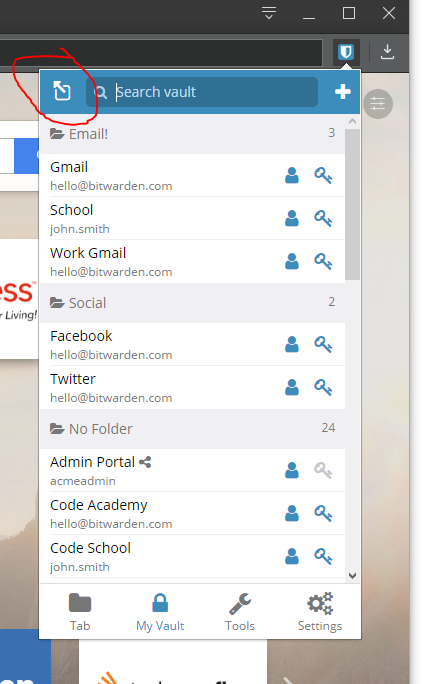
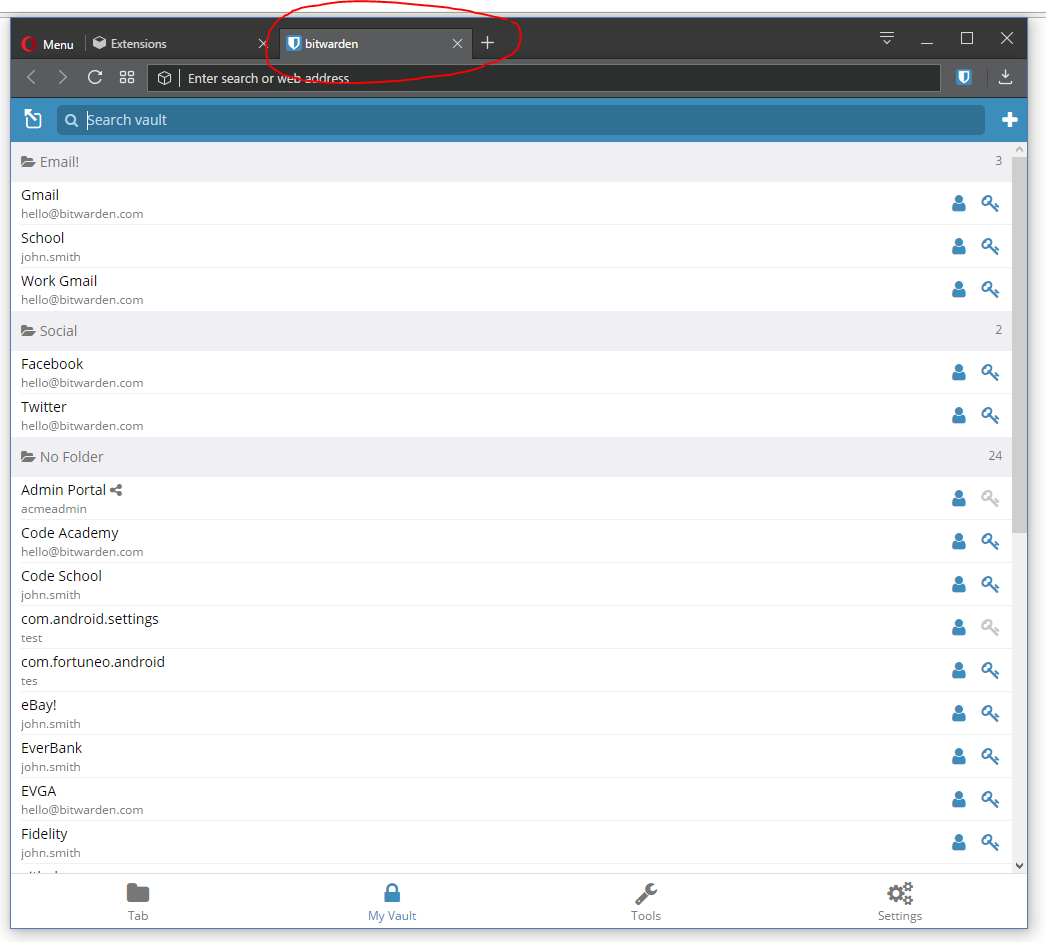
This is resolved in the next version of the browser extension. You can now open the popup into a full-page "website" in the browser window. See:
kspearrin
on 9 Jun 2017
Related issues
 trparky
·
6Comments
trparky
·
6Comments
 garygreen
·
4Comments
garygreen
·
4Comments
 lainy
·
4Comments
lainy
·
4Comments
 arielf
·
6Comments
arielf
·
6Comments
 kosvrouvas
·
3Comments
kosvrouvas
·
3Comments
Most helpful comment
Unfortunately we can't stop the browser from closing the popup since we don't have control over that, however, we may be able to preserve your existing state between open/closes.