Browser: PIN Lock Input Screen is insecure
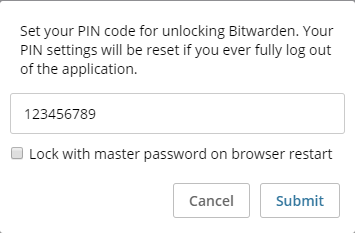
The PIN input screen is insecure in the sense that you can read what you input into it. The screen to input your PIN to unlock it is secure though. I figure that this is an oversight.
 trparky
All 6 comments
This was left as a plaintext box on purpose for now since we don't collect a confirmation and we want users to see exactly what they are setting their PIN to. It should only be typed in this visible way once.
 kspearrin
on 7 Mar 2019
kspearrin
on 7 Mar 2019
Yeah but what if someone was looking over your shoulder? My suggestion is to make it so that the user either has to click on something to reveal what was typed or make the user type in the PIN twice for confirmation.
trparky
on 7 Mar 2019
I think it can be better
This was left as a plaintext box on purpose for now since we don't collect a confirmation and we want users to see exactly what they are setting their PIN to. It should only be typed in this visible way once.
The problem with this argument is: "The pin is can be bypass", if you put wrong the pin few times the session close and you will need to login again (this time with no pin).
So, the users preffer forget the pin and put it wrong few times to recover the account than a third person seeing the pin input and have access to all the passwords.
 criptodev
on 18 Jun 2019
criptodev
on 18 Jun 2019
Since this PIN is per-installation (not even per-device), you would need a physical access to the unlocked device prior to be able to do anything with the PIN. So IMHO the arguments here are invalid. If you want to protect your computer and your passwords, first lock your session when you're away, so that no one can do anything even if they know your PIN. Plus, if you're already thinking about people looking over your shoulder, then you could also check that no one looks.
Nevertheless, I agree that this field should be hidden by default with an option to display the text.
 Crocmagnon
on 19 Jun 2019
Crocmagnon
on 19 Jun 2019
Since this PIN is per-installation (not even per-device), you would need a physical access to the unlocked device prior to be able to do anything with the PIN. So IMHO the arguments here are invalid. If you want to protect your computer and your passwords, first lock your session when you're away, so that no one can do anything even if they know your PIN. Plus, if you're already thinking about people looking over your shoulder, then you could also check that no one looks.
Nevertheless, I agree that this field should be hidden by default with an option to display the text.
1) So, because you would need a physical access to the unlocked device, let's make all local software insecure, because the OS already have a lock option.
2) Shoulder surfing it's a IT security social engineering topic, and because of this (and other topics) the hide passwords and pin exists.
criptodev
on 19 Jun 2019
- So, because you would need a physical access to the unlocked device, let's make all local software insecure, because the OS already have a lock option
No need to take the extreme version of what I said 🙂 We're not making software insecure here, just allowing the user to see what he typed.
- Shoulder surfing it's a IT security social engineering topic, and because of this (and other topics) the hide passwords and pin exists.
I understand, that's also why I agree that the field should be hidden by default 😉
Crocmagnon
on 19 Jun 2019
Related issues
 HizzyHaz
·
4Comments
HizzyHaz
·
4Comments
 andrejrcarvalho
·
5Comments
andrejrcarvalho
·
5Comments
 mkuhring
·
5Comments
mkuhring
·
5Comments
 kosvrouvas
·
3Comments
kosvrouvas
·
3Comments
 madranet
·
4Comments
madranet
·
4Comments