Browser: Pop-Out Window Loses Current Domain
Using Yandex Browser [based off WebKit / Chrome], the pop-out window does not retain info about the currently open website.
Here I am on Github. If I open the Bitwarden menu, my login is available:
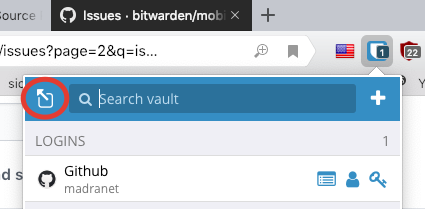
However, after I click the Pop-out window button, it opens with no site data filled in. It looks like Bitwarden is taking the current URL as being the URL of the pop-out window itself, rather than the main window which spawned it. via the dropdown menu:
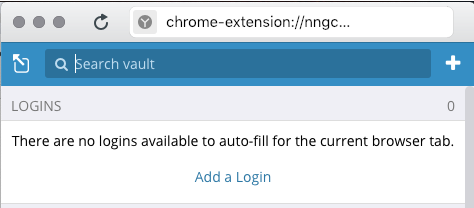
Thus, if I want to edit an existing login or create a new login [if Bitwarden missed offering to do it automatically] and which requires opening the pop-out window, I have to use the search to find the domain name again in order to edit it, or manually type in the domain info in order to create a new entry.
 madranet
All 4 comments
IMHO this is not a bug since the pop out doesn’t have the same context of execution as the popup.
What if you change tab ? What if you have multiple browser windows open ?
It makes more sense to not consider any tab active in the pop out.
 Crocmagnon
on 21 Jan 2019
Crocmagnon
on 21 Jan 2019
I disagree.
Quite often, I want to pop-out the window so I can keep [for example] the 'Edit' section available while I transfer some info from the site I'm on. [Like all password managers, Bitwarden isn't always guaranteed to save the login info correctly, or to save all the parts I need]
As the dropdown menu doesn't remember state, every time I clicked off it onto the page to copy a piece of info, I'd have to:
- pop the menu down again
- click the view icon to view that entry
- click the Edit link to edit it
- add/edit the info I want
- click Save [if I forget to do this, the info is lost as soon as I click off the menu]
then click back on the page to copy the next piece of info I want and repeat the whole process again. So, as I said above, it definitely does make more sense in those circumstances to click the pop-out window button, so I can switch back and forward between the page and the pop-out window, editing the info, without 'losing my place' each time.
But, as per initial post in this thread, even doing it that way, I still have to either search for the site in question or manually add it because of the pop-out window not receiving the original URL from the menu. It just makes the process unnecessarily fiddly.
Of course, another option, which would be just as helpful would be if the dropdown menu could remember state and/or autosave any changes we've just made, if we click off it.
madranet
on 21 Jan 2019
Bitwarden user here. I also expected the pop-out to retain state or at least the current domain.
Of course, another option, which would be just as helpful would be if the dropdown menu could remember state and/or autosave any changes we've just made, if we click off it.
I agree this is a bigger issue and possibly should be discussed in its own issue.
Currently it is very easy to loose input. Anytime you need to navigate away from the tabbed menu (for example to gather more information), the menu recedes taking with it any unsaved changes. Therefore, it's natural for a user to try to use the pop-out to preserve in-progress edits.
Perhaps there is a middle ground where the pop-out retains state if any custom operations have been applied? For example, if you start editing a record and then pop-out, you will stay in the edit menu.
 dhimmel
on 12 Jul 2019
dhimmel
on 12 Jul 2019
There are a couple of feature requests for this too.
https://community.bitwarden.com/t/pop-out-to-a-new-window-should-retain-current-site-match-or-search-results/4644
https://community.bitwarden.com/t/kepp-current-tab-filter-when-pop-out-to-new-window/7856
Ideally, clicking on the pop-up button on the ephemeral (pop-down) window should duplicate the ephemeral window into a stable (stand-alone) window, i.e., the entire context should be preserved. If we were in the middle of editing an entry, we should be able to continue editing in the new stable window.
If we want the user to be able to create a fresh stable window, then that would be a different operation. The Chrome browser on my desktop, for example, gives me a choice of "New tab to the right" (fresh tab) and "Duplicate" (duplicate of current tab, preserving current form inputs).
But it's not necessary to make a menu for this. Different clicks would suffice, e.g., click means duplicate to a stable window, ctrl-click means fresh stable window.
Also, currently, if an entry is being edited in the ephemeral window, accidentally clicking outside the ephemeral window causes loss of unsaved data. It would be nice if clicking outside the pop-down caused an automatic new stable window all the unsaved data intact.
Some of the above are feature requests, but loss of context and loss of data are bugs.
 fortran77
on 8 Feb 2020
fortran77
on 8 Feb 2020
Related issues
 blockloop
·
6Comments
blockloop
·
6Comments
 passcod
·
5Comments
passcod
·
5Comments
 mkuhring
·
5Comments
mkuhring
·
5Comments
 IanSavchenko
·
6Comments
IanSavchenko
·
6Comments
 kosvrouvas
·
3Comments
kosvrouvas
·
3Comments
Most helpful comment
I disagree.
Quite often, I want to pop-out the window so I can keep [for example] the 'Edit' section available while I transfer some info from the site I'm on. [Like all password managers, Bitwarden isn't always guaranteed to save the login info correctly, or to save all the parts I need]
As the dropdown menu doesn't remember state, every time I clicked off it onto the page to copy a piece of info, I'd have to:
then click back on the page to copy the next piece of info I want and repeat the whole process again. So, as I said above, it definitely does make more sense in those circumstances to click the pop-out window button, so I can switch back and forward between the page and the pop-out window, editing the info, without 'losing my place' each time.
But, as per initial post in this thread, even doing it that way, I still have to either search for the site in question or manually add it because of the pop-out window not receiving the original URL from the menu. It just makes the process unnecessarily fiddly.
Of course, another option, which would be just as helpful would be if the dropdown menu could remember state and/or autosave any changes we've just made, if we click off it.