Browser: Extension is completely broken in Microsoft Edge on Windows 10 Insider Preview build 17763.1
The BitWarden browser extension is completely broken in Microsoft Edge on Windows 10 Insider Preview build 17763.1. It keeps telling me "Unfortunately this window is not available in private mode for this browser." even though I'm not in a Private window and I have enabled Private Mode access for the extension. You cannot log into your BitWarden account because of this issue, that's the reason why I'm saying that it's "completely broken". With the release of the new Windows 10 version looming on the horizon, this issue needs to be fixed.
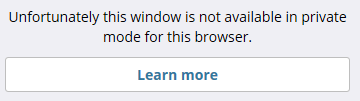
I have version 1.32.1 of the extension installed.
 trparky
All 11 comments
I'm still trying to install a VM with the preview on it. Having issues at the moment.
 kspearrin
on 21 Sep 2018
kspearrin
on 21 Sep 2018
Same on Insider build 18242. This then affects Edge in the soon-to-be-released October 2018 update, and in the 19H1 update.
 thorsteneb
on 21 Sep 2018
thorsteneb
on 21 Sep 2018
I can't even get the "Unfortunately this window is not available in private mode for this browser." problem due to other bugs in Edge. I just opened this one: https://developer.microsoft.com/en-us/microsoft-edge/platform/issues/19075248/
Please vote on it for increased visibility to MS team.
kspearrin
on 22 Sep 2018
Also, I would strongly suggest that you report these issues to MS through the feedback hub in Edge (Settings -> Help & Feedback -> Send Feedback). These are breaking bugs on their side that need to be addressed ASAP if they plan to ship this in October.
kspearrin
on 22 Sep 2018
I voted it up.
trparky
on 22 Sep 2018
Anyone here want to try to help be debug this more? I can't get debugging at all working on my 17763 VM due to the above linked error so I can't really proceed. Maybe it works for one of you though?
kspearrin
on 29 Sep 2018
I have the Edge debugger for the extension running.
If you can give me a line to set a breakpoint in the code I can give you the call stack for it.
 ruffy91
on 29 Sep 2018
ruffy91
on 29 Sep 2018
@ruffy91 Are you able to debug dev builds? Or only the production build?
Here is a commit I added to try and see what is causing the problem with what we see in prod: https://github.com/bitwarden/browser/commit/092abb2aeda0de3120eeabfbb0db566ed2be0d0f
kspearrin
on 29 Sep 2018
ATM only the production build.
Where can I get a dev build?
Is it possible to build the extension in Windows Subsystem on Linux and then install it?
ruffy91
on 29 Sep 2018
You can build it on any environment with node.js.
Check out the repo and then
npm install
npm run build:prod
Then side-load the build folder into Edge extensions. You'll need to enable developer mode under windows settings and also about:flags in Edge. Feel free to stop by dev chatroom if you want to discuss. https://gitter.im/bitwarden/Lobby
kspearrin
on 29 Sep 2018
Now tracking here: https://github.com/bitwarden/browser/issues/744
kspearrin
on 3 Oct 2018
Related issues
 nehalvpatel
·
55Comments
nehalvpatel
·
55Comments
 LeGiTiM
·
51Comments
LeGiTiM
·
51Comments
 liberty1tech
·
25Comments
liberty1tech
·
25Comments
 timint
·
18Comments
kspearrin
·
62Comments
timint
·
18Comments
kspearrin
·
62Comments
Most helpful comment
I can't even get the "Unfortunately this window is not available in private mode for this browser." problem due to other bugs in Edge. I just opened this one: https://developer.microsoft.com/en-us/microsoft-edge/platform/issues/19075248/
Please vote on it for increased visibility to MS team.