Browser: [Major annoying] Bitwarden does not obey autocomplete="off"
I have an issue that Bitwarden for Chrome does not obey autocomplete=off for input fields. This is very annoying for example when moderating other user accounts and it resets their username to my own.
<input type="password" autocomplete="Off" />
 timint
All 18 comments
Hi timint,
Are you sure it's the Bitwarden extension?
Can you please check if you've disabled Chrome's auto-fill features?
Can you test this in Firefox, please?
Thank you in advance,
 SergeantConfused
on 23 Nov 2020
SergeantConfused
on 23 Nov 2020
I am sure this is bitwarden. Because I see the bitwarden animation when prefilling the fields.

Yes the Google Chrome password manager is disabled. And I don't believe Chrome would ignore autocomplete="off".
timint
on 23 Nov 2020
@SergeantConfused I can confirm the problem is in both Firefox and Chrome.
Bitwarden does not obey autocomplete="off".
timint
on 25 Nov 2020
In browser/src/content/autofill.js
Find
function fillTheElement(el, op) {
After that, add
if (el.getAttribute('autocomplete') != '' && el.getAttribute('autocomplete').match(/^(off|0|false)$/i)) return false;
We should also access the <form> element if it flagged for no autocompletion.
Edit: Nevermmind I think I broke it instead. 👎
timint
on 26 Nov 2020
I've had a look-around, I think I know what we need to do to fix this, I'll try to implement a fix this week.
 wusatosi
on 20 Dec 2020
wusatosi
on 20 Dec 2020
@wusatosi Looking forward to it. Other than that I feel that the prefilling of passwords matched sites better than LastPass does it. Nicely done!
timint
on 21 Dec 2020
I think I've found the problem:
The content script does not collect documents with the special attribute correctly.
https://github.com/bitwarden/browser/blob/83cea49a1b9eeb382cf6cb8a7b4b725d0371e3c9/src/content/autofill.js#L300
This collects the value of the auto-complete preference to the background service if its associated attribute is not equal to "off", which is a logic error, we should collect this preference when the HTML explicitly disfavors auto complete operation.
wusatosi
on 21 Dec 2020
@timint Can you provide a website that uses autocomplete=off? We can use that as a testing site.
wusatosi
on 2 Jan 2021
@wusatosi Here is one that uses <form autocomplete="off">:
http://demo.litecart.net/admin/?app=users&doc=edit_user
http://demo.litecart.net/admin/?app=customers&doc=edit_customer
The platform is reset every half hour.
I will see if I have a link for <input autocomplete="off" /> as well.
timint
on 2 Jan 2021
@wusatosi Here is one that uses
<form autocomplete="off">:http://demo.litecart.net/admin/?app=users&doc=edit_user
http://demo.litecart.net/admin/?app=customers&doc=edit_customerThe platform is reset every half hour.
I will see if I have a link for
<input autocomplete="off" />as well.
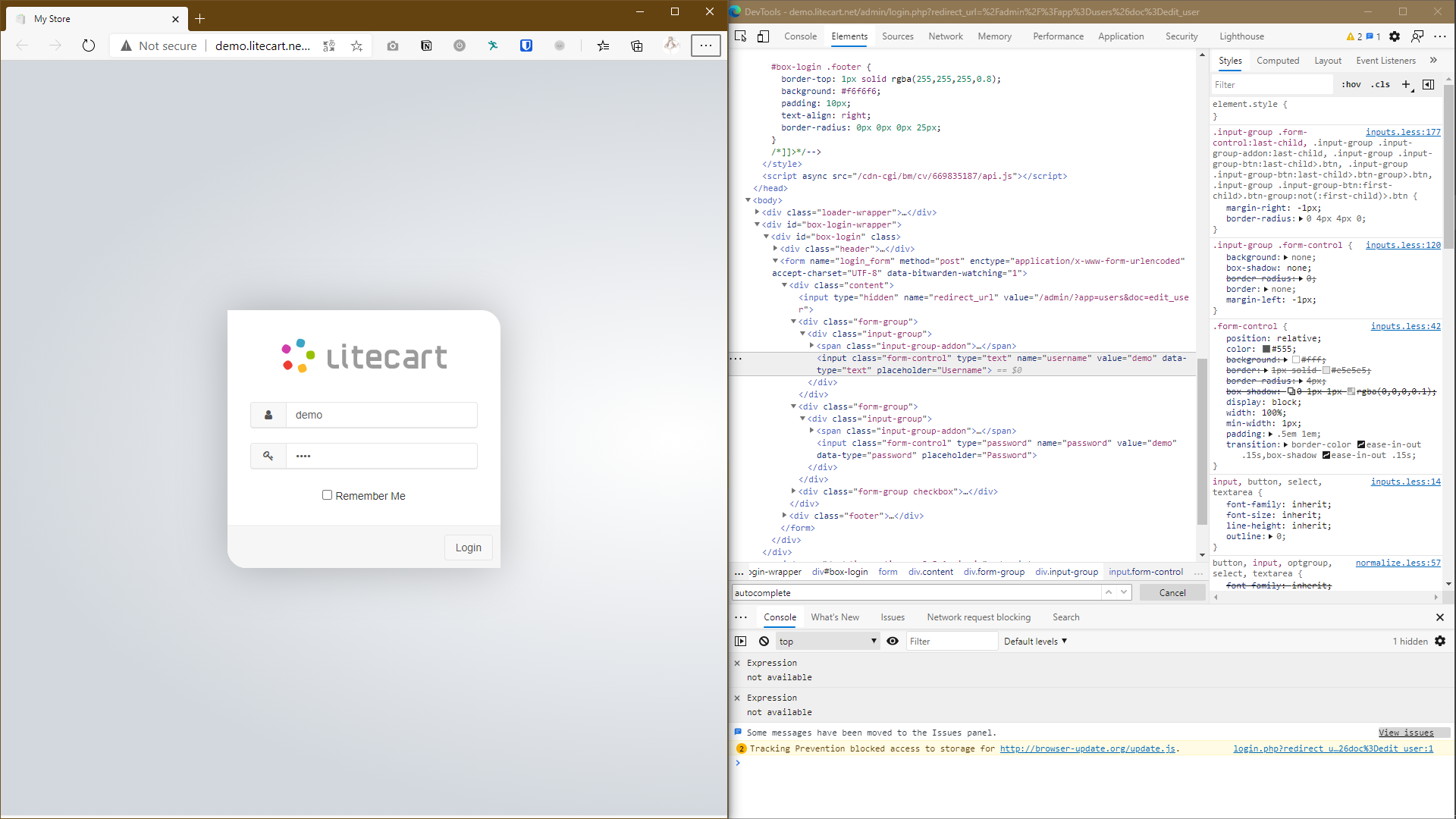
I didn't see any form with autocomplete="off"
wusatosi
on 2 Jan 2021
You are supposed to login, lol. I was thinking I should say anything but thought it was obvious. 😁
timint
on 2 Jan 2021
oof, I'll test it out later
wusatosi
on 3 Jan 2021
@timint My fix works for the provided URLs on my side. Can you test it from your side?
Unzip this file to a directory and import the directory it from your browser as an extension, under "extension" => "load unpacked"
bitwarden-autocomplete-fix-v1.zip
wusatosi
on 4 Jan 2021
@timint
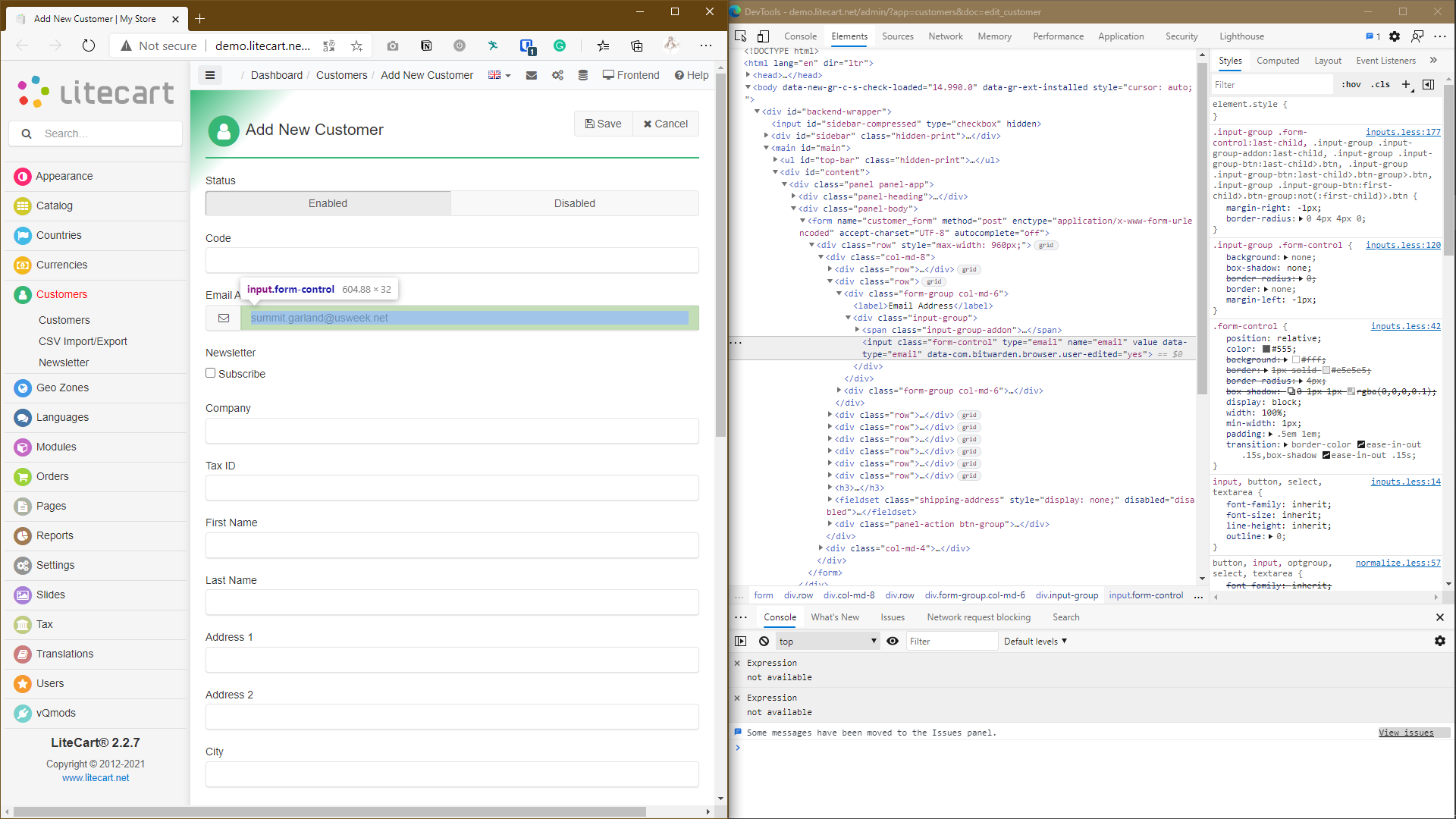
In the "edit customer page," the email address input is not marked as autocomplete="off" btw.
wusatosi
on 4 Jan 2021
Lol. Yeah, that's what I said. This one uses <form autocomplete="off">. Which means all fields inherit this setting, not just one.
timint
on 4 Jan 2021
Ignoring autofill for autocomplete="off" fields will break a whole host of websites that users expect to autofill. For example, banks often will put autocomplete="off" on password fields so prevent the browser from saving the users password. Users still expect Bitwarden to autofill these fields.
Here's one example: https://www.wellsfargo.com/
 kspearrin
on 4 Jan 2021
kspearrin
on 4 Jan 2021
Hi all, I'm going to close this issue. Big thanks to @wusatosi for submitting a PR to change this behavior, however at this time this is expected behavior as Kyle mentioned above and won't necessarily be changed. You can use custom fields for specific sites you want to not auto-fill. I would welcome someone to post in the Bitwarden Community Forums for a feature request perhaps for adding a configuration setting/toggle or something to that effect (that doesn't change the current default and expected behavior). Github however is for bugs/issues and this would require more thought around an enhancement to the product.
 cscharf
on 4 Jan 2021
cscharf
on 4 Jan 2021
@kspearrin I don't care what your bank does. But if it uses regular passwords to protect your money, you probably should worry about other things than having your most precious password not being prefilled. How about having to click the icon and manually have the password prefilled for such cases?
@cscharf
Maintaing CRM systems or administrating user profiles is not something out of the ordinary. Bitwarden becomes totally useless for this. Everytime I open up a customer profile, their email and password is replaced and I have to retype their email and clear out the new password. How can you say this is the expected behavior. The other password managers e.g. LastPass don't have this behavior. Not even your browser does.
I have stated an issue. It's been confirmed. @wusatosi has provided a fix. It solves all problems. Now you are telling me the expected behavior is to go bananas by dishonoring autocomplete. What are you thinking, really?
timint
on 4 Jan 2021
Related issues
 ple103
·
6Comments
ple103
·
6Comments
 HizzyHaz
·
4Comments
HizzyHaz
·
4Comments
 passcod
·
5Comments
passcod
·
5Comments
 garygreen
·
4Comments
garygreen
·
4Comments
 junweilee
·
6Comments
junweilee
·
6Comments