Browser: [Fixed]Login on paypal.com broken on Firefox
The bug has been resolved and the fix is integrated into the extension.
Hi there!
_Edit: the developer fixed this bug in the code, but it's still in the process of the next release of bitwarden. We must be patient until it's out.
I added the way to skirt the bug in "Actions to skirt the bug"_
Description of the bug:
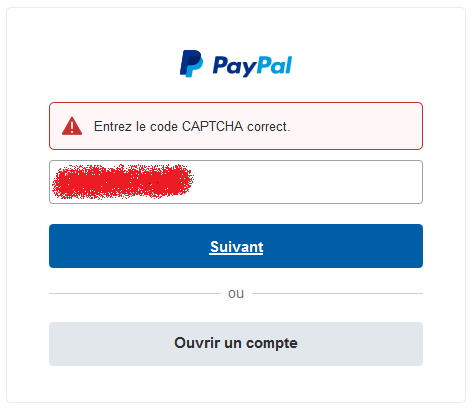
When attempting to log in on paypal.com, bitwarden can fill the email, then when hitting "next", the page returns an error "Entrez le code CAPTCHA correct." (English: "Enter the correct CAPTCHA code"). [There is no visible captcha, it's a hidden procedure of the website, it always worked without captcha for the user before the bug]. Paypal refuses to go further, it's thus impossible to enter the password, and log in successfully.
(Moreover: side minor bug: the "Auto-fill feature on page load" doesn't work on paypal.com. I guess it's related to the high security standards and unsual login method, I don't care if this bug is not resolved: hitting the keyboard shortcut or the extension click-fill feature both work).
Actions that skirt the bug:
- manually type the email with the keyboard (then you can make bitwarden autofill the password).
- disable the bitwarden extension
- being logged out/locked (vault closed) beforehand
Tweak that doesn't do anything:
- disable "Enable Auto-fill On Page Load" (I thought this was the reason at first, that's why I tested it first).
Versions of Firefox tested:
- Nightly (70.0a1)
- Firefox regular ( 68.0.1)
(I'm sorry, I don't know exactly since when (or which version) this bug is there, i'd say a couple of months?)
Operating System:
Windows 10 v. 1903.
Exclusions:
- no bug on Chromium-variant browsers
- not this bug on Microsoft Edge.
Thank you in advance for looking into it!
 LeGiTiM
All 51 comments
I am not able to reproduce. When I go to paypal.com to login in, I see email and password on the same page/form. Is this not what you see?

 kspearrin
on 27 Jul 2019
kspearrin
on 27 Jul 2019
Came here to report this bug as well. I'm using Firefox 69.0b7 with macOS.
@kspearrin I think @LeGiTiM is seeing this login screen which gives me the captcha issue as he's described:

and here's the error you get when using bitwarden to fill the email field:

If I manually type in my email I don't get this error.
If you open the paypal login page while in incognito mode you'll get the above screen (or clear all paypal cookies).
After logging in and out I now see the same screen that you see and autofill works.

 taylorsilva
on 27 Jul 2019
taylorsilva
on 27 Jul 2019
Indeed, it's just as @taylorsilva explained. It happens only for a "clean visit" of the website.
Bitwarden is probably filling the password field in the background, and clicking "Next" somehow triggers the final login step, while the catcha validation is supposed to happen when you click "next", before you enter the password => error message.
I don't know if you can fix this bug since it seems more related to the site method itself, than the fault of bitwarden.
But maybe that trying to detect sites who use 2 steps logins like this and injecting the username, then the password only after clicking "next" would be useful (or an otion to define this behavior manually for a site, or an option to disable autofill on a site)? I know that Tumblr and Yahoo use a similar method (with a next button before entering the password), but I didn't get issues with bitwarden on them.
LeGiTiM
on 1 Aug 2019
Is there a way that bitwarden can only fill in fields that are visible on the screen? Just throwing the obvious idea out there, I'm sure "visible" is a tough state to define if the site is not explicitly using type=hidden.
EDIT
Looked at the paypal page and they use a css class called "hide" which just does a display: none.
taylorsilva
on 2 Aug 2019
Came here to report the same problem.
Happens when I go to paypal.com and I'm not already logged in. I press CTRL-SHIFT-L and Enter and I get the captcha error message.
Firefox 68
 Christilut
on 15 Aug 2019
Christilut
on 15 Aug 2019
I was here to talk about the same problem
hope this is fixed :)
 celsec
on 19 Aug 2019
celsec
on 19 Aug 2019
I can confirm that I also suffer from this issues on the latest Firefox Nightly.
 kah0922
on 28 Aug 2019
kah0922
on 28 Aug 2019
This is still an issue when using Bitwarden auto-fill. :/
 SharkyRawr
on 29 Aug 2019
SharkyRawr
on 29 Aug 2019
Should be fixed next version.
kspearrin
on 30 Aug 2019
Thanks @kspearrin! I'm guessing this was the fix?
https://github.com/bitwarden/browser/commit/c99403255dc4e64a7e54bb0ea86b77ad57d8c676
taylorsilva
on 30 Aug 2019
Yes.
kspearrin
on 30 Aug 2019
@kspearrin Thank you for this fix. When will this get into a new release?
 hrcl
on 17 Sep 2019
hrcl
on 17 Sep 2019
Similar issue w/Edge Chrome (dev). Instead of captcha, we see "Try entering the code again."
I'm using the extension "From Microsoft Store".
 truthsword
on 22 Sep 2019
truthsword
on 22 Sep 2019
(Still) having the same issue on Firefox 69.0.1 64bit on ArchLinux. This is quite bad as PayPal is quite an essential website.
Any ETA on the release?
 targodan
on 29 Sep 2019
targodan
on 29 Sep 2019
I think it is possible to fix this by adding the fields:
login_email
&
login_password
Can anybody proof this?
See my attachment.

But it seems to be important to disable "Enable Auto-fill On Page Load". Otherwise some functions did not work anymore, like adding an amount to payout to your bank account.
 sorryusernameisalreadytaken
on 8 Oct 2019
sorryusernameisalreadytaken
on 8 Oct 2019
"Try entering the code again."
Same issue for me, been about 2 months, I just turned off autofill for paypal so that's good enough, manually typing out works fine. Now I search for it as I was annoyed this evening and look, a bug report!
Glad to see it should be fixed when the next update is released!
Thanks again for the great addon! Bitwarden (itself and the addon) Well worth the yearly I more then happily subscribe to!
 Hammerfest
on 8 Oct 2019
Hammerfest
on 8 Oct 2019
Same issue with vivaldi and chrome browsers with bitwarden extension installed
The solution is to open paypal in a private window (as it, bitwarden is disabled) and paypal will valid its captcha
 LaurentOngaro
on 6 Nov 2019
LaurentOngaro
on 6 Nov 2019
Same issue with Firefox and Bitwarden. In private mode it works - I didn't suspect bitwarden and found this issue by accident. Please fix this.
 mathsen
on 12 Nov 2019
mathsen
on 12 Nov 2019
Same here, latest Firefox and Bitwarden.
Glad I came across this thread.
 Tryer101
on 18 Nov 2019
Tryer101
on 18 Nov 2019
Got this today on Firefox 70.0.1
 Gamertech
on 23 Nov 2019
Gamertech
on 23 Nov 2019
I'm not very familiar with github, I don't know if/how I can 'reopen' this thread as an active issue. I'm afraid that the contributors/developers of bitwarden don't see/watch this one anymore. Apparently @kspearrin has done something to fix it (thank you!), but it hasn't worked, given all the reports here (still not working as intended for me either).
I suggest newcomers with the same bug to open a new thread with description of the issue and eventually a link to this one, to just make sure they realize it's still bugged.
Have a good day everyone!
LeGiTiM
on 23 Nov 2019
@LeGiTiM :)
I contacted Bitwarden via the official website earlier this morning with a Ref. to this thread.
I understand the Dev knows about this bug/problem but it's still occurring after many months.
Could this be due to the fact that this software is developed and maintained by only one person?
I'm contemplating the idea of switching to another password manager at this point.
Tryer101
on 23 Nov 2019
It's true that it's annoying (especially for people who care about their privacy and wipe their cookies & local data between sessions), but it's a very specific bug to how paypal handle logins, more than the very own fault of Bitwarden's developer. I guess time is needed to find the accurate trick to get around procedures like this.
It'd be a shame to get rid of bitwarden just for this annoyance, especially when we can still login by entering manually the email with our keyboard to skirt the bug.
The problem is that this bug will affect all users of bitwarden with a fresh install of firefox, or after a cleaning of cookies/local storage, and they won't know the trick above, so reports will keep coming, or some people, who don't know the tip and won't have the reflex/patience to seek for a solution, will really ditch bitwarden because they will assume they can't login to such an essential site as paypal.
I'm sure a developer will find the solution for this at some point.
Edit: it appears there was a little confusion. The fix has already been coded and merged in the source code, but it's not yet implemented in the current version running in our browsers. That's why we still have the issue. We just have to be patient and wait for the next public release of bitwarden. Thanks again kspearrin!!!
LeGiTiM
on 23 Nov 2019
Good point! :)
One thing though, I wonder why Bitwarden's Dev don't send an email to all users so the seeking for a solution wouldn't have to be. At this age of communication, such a task is very easy to do.
Tryer101
on 23 Nov 2019
@kspearrin Thank for the fix. Can you estimate when we can calculate with an rls?
sorryusernameisalreadytaken
on 25 Nov 2019
Last browser release was Jul 30, has apparently been fixed for a while, but no release date mentioned sooooooo
We sit, we wait, my paltry renewal occurred and I am still ok with that.
Hammerfest
on 26 Nov 2019
I really can't understand why such an important fix doesn't get released for the masses... I mean even if it means just cherry-picking this single commit and release a hotfix for the current version. This bug probably affects much more people than those who are registered on github, search for it (it is a closed bug report...) and comment here. Many people might even not even consider, that it's bitwarden's fault (as me for a couple of time). So please release this overdue fix.
mathsen
on 26 Nov 2019
I'm getting this invisible captcha problem with PayPal in all browsers with Bitwarden extension installed. The quickest workaround I've found is to type the email address manually.
 dlorde
on 10 Dec 2019
dlorde
on 10 Dec 2019
Hi ! I use Firefox & Bitwarden, and same error with auto-fill.
 Sigri44
on 15 Dec 2019
Sigri44
on 15 Dec 2019
Same error on Paypal with extension today
But work if typing manually
OS : W10
Browser : Firefox 71.0
Bitwarden : 1.41.0
 ItsPedoBear
on 15 Dec 2019
ItsPedoBear
on 15 Dec 2019
I have this issue for the past 3 months or so.
I couldn't find what was causing it, and now I finally find the culprit after getting angry at that error message xD
I'm having this on Firefox and Chrome (latest build Version 79.0.3945.79).
 koopernick
on 15 Dec 2019
koopernick
on 15 Dec 2019
This problem was the cause for me to switch too KeePassXC. Benefit: I have the database now stored on my own devices.
mathsen
on 16 Dec 2019
This problem was the cause for me to switch too KeePassXC
Still an issue here. Quite annoying. However, KeePass isn't a solution as it won't auto-type on Paypal for me either.
Benefit: I have the database now stored on my own devices.
You can run BW on your own server.
truthsword
on 16 Dec 2019
Please stop closing the issue, I just ran into it today.
 DanHakimi
on 17 Dec 2019
DanHakimi
on 17 Dec 2019
Yup... can confirm this issue still exists. I'm thinking it's something to do with Google reCAPTCHA v3, or a similar interpretation where it detects password locker auto fills as non-human, and fails the test.
 UtopiaOpera
on 19 Dec 2019
UtopiaOpera
on 19 Dec 2019
 matteocontrini
on 19 Dec 2019
matteocontrini
on 19 Dec 2019
See #1068 (comment).
Has the "upcoming release" happened? If so, what version number. I'm still seeing this problem. ICBW, but it seems premature to close a topic based on an "upcoming release" when users haven't confirmed the fix. Eh?
truthsword
on 19 Dec 2019
Has the "upcoming release" happened?
It doesn't seem so: https://github.com/bitwarden/browser/releases
it seems premature to close a topic based on an "upcoming release"
It's actually normal on open source projects. When a fix has been implemented the issue is marked as closed in order to focus development on open issues
matteocontrini
on 19 Dec 2019
Has the "upcoming release" happened? If so, what version number. I'm still seeing this problem.
current master branch is at 1.42.1, which contains the fix.
Unfortunately the add-on currently shipped for Firefox is 1.41.0.
So either we have to
- wait for a roll-out of a new release in Firefox's "add-on store"
- check out the options from the original reporter (https://github.com/bitwarden/browser/issues/982#issue-473512930)
- build and install it on our own, as described in the README (which failed for me for unknown reasons, but YMMV)
hrcl
on 19 Dec 2019
So... why is it not rolled out on the add-on store yet? Oversight? Limitations from the store?
targodan
on 19 Dec 2019
So... why is it not rolled out on the add-on store yet? Oversight? Limitations from the store?
If it's any consolation, the Chrome Store extension is at v1.41 too. So we wait.
truthsword
on 19 Dec 2019
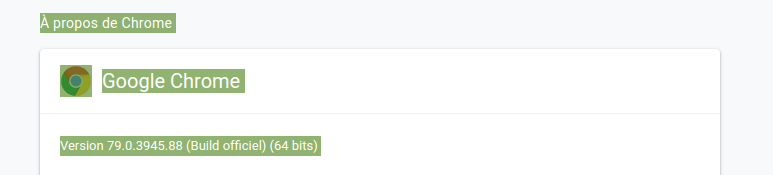
Same error on Google Chrome for Linux with auto-fill
 ghost
on 20 Dec 2019
ghost
on 20 Dec 2019
build and install it on our own, as described in the README (which failed for me for unknown reasons, but YMMV)
Can you explain your "unknown reasons" a bit more?
sorryusernameisalreadytaken
on 20 Dec 2019
So... why is it not rolled out on the add-on store yet? Oversight? Limitations from the store?
There is currently no release built since July 30 2019 in https://github.com/bitwarden/browser/releases . The fix was implemented after that date.
Thus, and it's just my guess based on the above, I doubt the code with the fix has been sent to the extension repositories yet.
 setyb
on 24 Dec 2019
setyb
on 24 Dec 2019
Update: Version 1.42.2 has been built, which includes this fix. According to Kyle, it's been sent to Mozilla, so now it's up to them to approve it and make it available. Even if it gets approved right away, Firefox 72 will be released on the 7th of January, so bitwarden v1.42.2 will either be released before then, or be held until at least the 9th of January, because IIRC extension updates are disabled for a day (or two) during Firefox releases to reduce the possibility of compounded problems.
setyb
on 5 Jan 2020
Thank you for the info @setyb !
LeGiTiM
on 5 Jan 2020
Thank you for the info @setyb !
You're welcome. My pleasure.
setyb
on 5 Jan 2020
Hopefully, v1.42.2 has come to Firefox already, but Chrome still awaits the update.
truthsword
on 21 Jan 2020
I've just tried and it works perfectly! :)
On Tue, Jan 21, 2020 at 12:05 PM Bob Sutton notifications@github.com
wrote:
Hopefully, v1.42.2 has come to Firefox already, but Chrome still awaits
the update.—
You are receiving this because you commented.
Reply to this email directly, view it on GitHub
https://github.com/bitwarden/browser/issues/982?email_source=notifications&email_token=ANZZRYHAV2HINSNQKQFKRHDQ64TL5A5CNFSM4IHGYHAKYY3PNVWWK3TUL52HS4DFVREXG43VMVBW63LNMVXHJKTDN5WW2ZLOORPWSZGOEJQPQSI#issuecomment-576780361,
or unsubscribe
https://github.com/notifications/unsubscribe-auth/ANZZRYABBLSAO4HVB4PCFELQ64TL5ANCNFSM4IHGYHAA
.
Tryer101
on 21 Jan 2020
@LeGiTiM You may want to update the original post now that the fix has been released and confirmed to work.
setyb
on 10 Feb 2020
The ticket is closed, I think it's sufficient.
But I edited anyway for people who dig too deep ^^
LeGiTiM
on 10 Feb 2020
Related issues
 passcod
·
5Comments
kspearrin
·
5Comments
passcod
·
5Comments
kspearrin
·
5Comments
 gavrilfb
·
4Comments
gavrilfb
·
4Comments
 madranet
·
4Comments
madranet
·
4Comments
 mkuhring
·
5Comments
mkuhring
·
5Comments
Most helpful comment
I really can't understand why such an important fix doesn't get released for the masses... I mean even if it means just cherry-picking this single commit and release a hotfix for the current version. This bug probably affects much more people than those who are registered on github, search for it (it is a closed bug report...) and comment here. Many people might even not even consider, that it's bitwarden's fault (as me for a couple of time). So please release this overdue fix.