Browser: Hotkey(s) on Mac OS 10.13.3 not working
I am using bitwarden in Safari 11.0.3 (13604.5.6) and Chrome 65.0.3325.146 (Official Build) and in neither do the hot keys Cmd+Shit+L or Cmd+/ work.
 torstenb
All 7 comments
In chrome, go to chrome://extensions scroll down to your keyboard shortcuts for extensions there. Is Bitwarden bound to something? Sounds like your system may be squatting on these shortcuts already.
 kspearrin
on 9 Mar 2018
kspearrin
on 9 Mar 2018
It indeed wasn’t. Same on my other Mac. Is that standard behavior to have to select a short-cut upon installation in Google Chrome on Mac?
On Mar 9, 2018, at 10:32 AM, Kyle Spearrin notifications@github.com wrote:
In chrome, go to chrome://extensions scroll down to your keyboard shortcuts for extensions there. Is Bitwarden bound to something? Sounds like your system may be squatting on these shortcuts already.
—
You are receiving this because you authored the thread.
Reply to this email directly, view it on GitHub https://github.com/bitwarden/browser/issues/543#issuecomment-371905104, or mute the thread https://github.com/notifications/unsubscribe-auth/AAH3zmyaux3RJC67mr8ZRAgrIGRT5oxrks5tcsrOgaJpZM4Skq0p.
torstenb
on 9 Mar 2018
No. Chrome auto-disabeld it for some reason.
kspearrin
on 9 Mar 2018
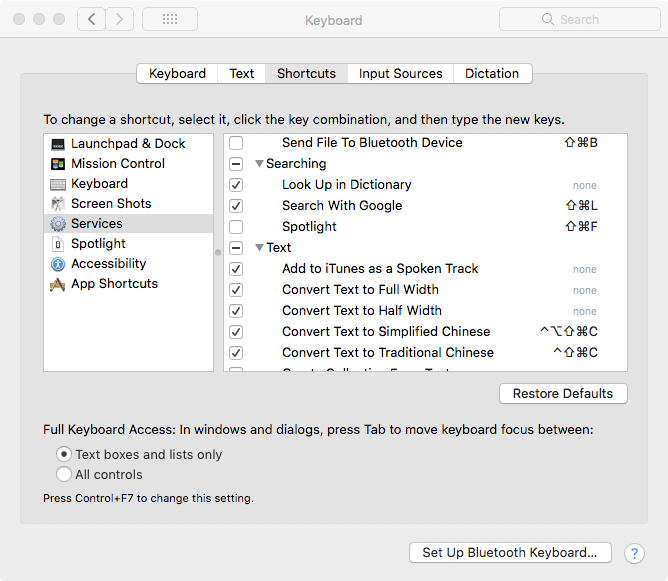
In Mac OS 10.13 in System Preferences I noticed that in the Shortcuts settings for Services, there is an entry for Cmd+Shift+L for ‘Search With Google’ under Searching. Could that have something to do with it?
torstenb
on 9 Mar 2018
Most likely. Do you know what is setting that shortcut?
kspearrin
on 9 Mar 2018
I do not. It is a relatively new install of High Sierra on both my Macs. The shortcut is not listed on Apple's support page for Mac keyboard shortcuts, so it may not come with the default install.
torstenb
on 9 Mar 2018
In the latest chrome there doesn't seem to be a setting to configure hotkeys. Whats the hotkey for generating a password?
 TylerBarnes
on 25 Apr 2019
TylerBarnes
on 25 Apr 2019
Related issues
 0b10011
·
25Comments
kspearrin
·
62Comments
0b10011
·
25Comments
kspearrin
·
62Comments
 Dobby16
·
17Comments
Dobby16
·
17Comments
 heubergen
·
172Comments
heubergen
·
172Comments
 minmarble
·
16Comments
minmarble
·
16Comments
Most helpful comment
In chrome, go to
chrome://extensionsscroll down to your keyboard shortcuts for extensions there. Is Bitwarden bound to something? Sounds like your system may be squatting on these shortcuts already.