Browser: Publish Safari Extensions as a Safari App Extensions
Apple came up with a new idea to integrate Extensions in Safari; https://developer.apple.com/documentation/safariservices/safari_app_extensions
Currently the old technique is only deprecated but in Safari Technology Preview it already started to not work anymore at all (meaning extensions doesn't work even if you upgrade from a older version where the extensions was installed)
 heubergen
All 172 comments
Looks like a completely different API https://developer.apple.com/documentation/safariservices/safari_app_extensions/converting_a_safari_extension_to_a_safari_app_extension
Meaning we'd have to write a whole new app just to support Safari :-/
 kspearrin
on 6 Jul 2018
kspearrin
on 6 Jul 2018
I guess it's something you have do check with your usage statistic if it makes sense or not. Obviously as a user I would like to see it.
heubergen
on 6 Jul 2018
@kspearrin _Safari Technology Preview 80_ was released yesterday (see https://webkit.org/blog/8825/release-notes-for-safari-technology-preview-80/)... and there is the end for the Bitwarden extension 🙁... it is gone and cannot be installed anymore.
Any update on this topic, any plans, ... ?
 bwydoogh
on 18 Apr 2019
bwydoogh
on 18 Apr 2019
@bwydoogh No sorry, no updates. At this time, I am not sure we will be able to continue supporting Safari in the near future.
- Apple has introduced a completely new way of writing extensions for Safari. As far as I understand, this means that we cannot use our existing browser extension code any longer. All other browsers use a standard way of writing extensions (called WebExtensions) with web technologies like HTML, JavaScript, CSS. Apple's new way requires re-writing the extension interface and backend using native Swift/Objective-C. I am not versed in these languages.
- Safari currently accounts for <2% of our browser extension users. Maintaining a completely different browser extension codebase for that many users isn't feasible.
- For someone who is not well versed in the Apple development ecosystem, Apple's documentation and other community resources on writing Safari Extension Apps (the new way) is pretty sparse.
If someone who is knowledgeable with writing Safari Extension Apps, or even better, making an existing WebExtension somehow work with Apple's new API, wants to provide some consulting on how we can bring Bitwarden back to Safari, please let me know.
kspearrin
on 18 Apr 2019
As a user and somebody who wants to tell other people Bitwarden is available where you need it, I want Bitwarden to survive new versions of Safari as well. So I really hope this will be fixed. Maybe call for help a bit louder (by using other channels you have at your disposal)?
For now, I filed a complaint at Apple as suggested over here:
https://apple.stackexchange.com/questions/337094/safari-12-compatible-versions-of-ad-blockers-fail-to-block-many-ads
I’m not deep into this topic but I suggested Apple to wait with shutting down extensions until they support webextensions to allow developers to work in a common codebase between browsers. I feel this will be a problem for more extensions but also for new extensions to come so I hope they’ll act on it.
 mackaaij
on 20 Apr 2019
mackaaij
on 20 Apr 2019
In a chat with me on CrowdIn (as I noticed translations were behind), @kspearrin mentioned "Our desktop app for macOS uses Electron with JavaScript, HTML, and CSS. It isn't a native codebase with Swift/Obj-C like these new Safari Extension Apps require." I found this on Stackoverflow, hopefully it's similar enough or gives handles to move this topic forward: https://stackoverflow.com/questions/45612515/how-to-embed-a-mac-app-extension-in-an-electron-app
mackaaij
on 23 Apr 2019
Safari version in Catalina beta no longer supports Bitwarden. Recommend that Safari support is officially depreciated and official announcement made.
 elb101
on 25 Jun 2019
elb101
on 25 Jun 2019
Yeah, as far as I know Bitwarden just works fine in other browsers on Catalina so may be not worth the work. Still, how big of a thing is this extension in Electron by now? I just found https://blog.yimingliu.com/2018/11/14/notes-on-porting-a-safari-extension-to-a-safari-app-extension/ which I think is the only way:
Do I really have to port all my global.js / background.js Javascript code to Swift / Objective-C?
The idea is that we embed a WKWebview instance inside the app extension, and have that WKWebview view act as a bridge between the old global.js and the new content script. The WKWebview loads the old global.html file, and shuttles calls from the injected script to the JS inside itself using evaluateJavascript, and then dispatches the evaluated results back to the content script.
For a trivial example, this approach seems to work — though I have not tested it extensively. I imagine for complex use cases though, the time spent re-building global.js to work inside a WKWebview is about the same (or more) than just rewriting it in Objective-C or Swift.
The implementation with Electron should work similar, although maybe in the end maintaining the extension alongside the other platforms/browsers may be more extensive then this.
 scipham
on 6 Jul 2019
scipham
on 6 Jul 2019
If Bitwarden doesn’t retain Safari integration, then it’s useless to people who use Safari and can’t be recommended as alternatives to LastPass or 1Password. Some people use Safari because it’s not controlled by an advertising company (unlike Chrome) and because it respects their battery (unlike Firefox). I will be withdrawing recommendations of Bitwarden as a lower-cost alternative to 1Password and LastPass unless this is fixed. I’m not expecting the Bitwarden to take action because of my comment (I’m not currently spending any money with Bitwarden, and the amount of money my company would have spent on Bitwarden is relatively small), but it should be clear that for some people, the lack of Safari support is a lack of support period.
 halostatue
on 12 Jul 2019
halostatue
on 12 Jul 2019
I am about to recommend Bitwarden over LastPass in a book :) Would appreciate serious reconsideration as it looks like there is new information about this issue. Safari is the default webbrowser in macOS and besides the reasons mentioned above it is hard for regular users to switch webbrowser.
LastPass isn’t working nicely with Safari for me either, its menu is drawn partly off the screen (I reported this of course but they’re not acting on it). This fact, and the fact LastPass is more cumbersome and worse in support makes me still prefer Bitwarden over LastPass at the moment.
mackaaij
on 12 Jul 2019
I just switched to 1password. Moved into the Apple ecosystem in effort to attain more privacy. iCloud Keychain wasn't cutting it for me, and I was about to move into Bitwarden before this happened.
@kspearrin Please remove Safari from supported platforms on the Bitwarden website until you decide for sure that you'll support it. It is misleading.
elb101
on 12 Jul 2019
@otherbrito Safari is still supported by Bitwarden on MacOS 10.14 and older. In addition, Catalina e.g. MacOS 10.15 is just going to be released this fall. So in short: nothing misleading. Especially for those, who do not want to upgrade or who can not upgrade.
scipham
on 12 Jul 2019
I wouldn't call that quite "nothing misleading" unless the caveat of "those who do not want to or can not upgrade" is clearly communicated before download.
Those who do not upgrade their systems (and I speak purely those who can no longer receive security updates, but can absolutely upgrade to a newer system that can) are like the antivaxxers of personal computing, in opinion.
elb101
on 12 Jul 2019
Right, ok, anyway, let’s get back to the technical discussion here on github. Has any bitwarden engineer looked into this (and the above) more closely in the meanwhile? Last thing we heard was end of April, any news on this side?
scipham
on 12 Jul 2019
We are not removing Safari from our website. Nothing has been finalized about our continued support of Safari. As I mentioned in my previous post, I was hoping someone would reach out to me that could consult on how we can make Bitwarden work under the new App Extension model. Someone has, and I have been working with them on the feasibility of such. Additional updates will be provided in this thread as they become available.
kspearrin
on 13 Jul 2019
That's great news! Thanks for sharing that with us 😄
 Crocmagnon
on 15 Jul 2019
Crocmagnon
on 15 Jul 2019
I'm currently trialing a switch to Bitwarden from Lastpass and just wanted to chime in and express my appreciation for at least trying to work with the community to find a way to continue supporting Bitwarden in Safari.
The two primary reasons for me being inclined to switch are that you have at least a decent native Windows vault app from what I've experienced so far (Lastpass has practically abandoned support for theirs and I don't wanna touch it with a 10-foot poll) and Bitwarden is open source making it more auditable. I do have and use a MacBook in addition to my Windows machine and I'm strongly inclined to use Safari right now because of its relatively significant power efficiency and if I do make the full-on switch to Bitwarden it would benefit me to have a fully functional extension for Safari.
That being said, I'm one who is generally strongly in favor of supporting and promoting cross-platform standards so I also sympathize if you ultimately decide the special porting hurdles are not worth it and deprecate Safari support. For me Chromium and Firefox are not preferred on my MacBook for battery life reasons but it's also not the end of the world if that's what I have to end up using for consistent and reliable Bitwarden extension support.
 OneOkami
on 15 Jul 2019
OneOkami
on 15 Jul 2019
Hey, I don’t want to sound rude or anything, but I’d love to hear if there’s any (rough) timeline of when the extension will be available for Safari? A rough number like a few weeks or months would be sufficient for me.
Additionally, if you guys need a beta tester, I’d be happy to help.
Thanks for working on it!
 KarimGeiger
on 10 Aug 2019
KarimGeiger
on 10 Aug 2019
Hey, I don’t want to sound rude or anything, but I’d love to hear if there’s any (rough) timeline of when the extension will be available for Safari? A rough number like a few weeks or months would be sufficient for me.
Additionally, if you guys need a beta tester, I’d be happy to help.
Thanks for working on it!
Right, as you may have noticed here, it is quite unclear if it may return to MacOS 10.15 and higher in any way. So if it does, you may expect this to be on a longer term roadmap. As I understand the current developers correctly, there is currently more need for someone experienced in conversion or overwriting code to a system extension. Which all comes along with maintaining it separately, which may not be worth it.
Workaround as mentioned earlier is the use of Firefox or chrome for now.
Just as a clearification for myself to one of the developers: This problem is not only persisting in the safari extension, but also in the MacOS Main application , right? As it occurs to me at least.
scipham
on 10 Aug 2019
This problem is not only persisting in the safari extension, but also in the MacOS Main application , right? As it occurs to me at least.
I didn't notice any problems with the main app.
 cofatoeu
on 11 Aug 2019
cofatoeu
on 11 Aug 2019
The macOS desktop app shouldn't have any issue. Apple only changed its policies about Safari extensions.
Crocmagnon
on 11 Aug 2019
An update here:
I have been successful in porting (read: hacking) the existing Bitwarden web extension into Safari's new app extensions model. I am about 80% of the way there, but I see no reason why we can't have this functioning (albeit with some quirks) for the most part here in the next couple of weeks.
One thing that I still haven't decided on: Should we bundle distribution of the browser extension into the desktop app or should we distribute it separately on its own?
kspearrin
on 16 Aug 2019
Awesome to hear! Let me know if you need a beta tester.
I personally don’t mind whether it’s its own package or bundled. I probably would go for the bundled version, but that’s just me.
KarimGeiger
on 16 Aug 2019
I would also love to help test, thanks for all the hard work!
As for bundled vs separate, would you still offer just the extension in the Apple App Store? I think most users probably use just the browser extension (feel free to correct me if I'm wrong), and I would personally prefer to be able to download just one and/or the other.
 jmauss
on 17 Aug 2019
jmauss
on 17 Aug 2019
Appreciate the work. I would be happy to be part of the bets test.
 pavankjadda
on 19 Aug 2019
pavankjadda
on 19 Aug 2019
I'm for the standalone, as some may use brave/chrome/ff etc instead of safari.
 maxgrass
on 20 Aug 2019
maxgrass
on 20 Aug 2019
@kspearrin The Safari browser extension should be bundled with the application. This does not prevent people who use Chrome, &c. from using the extensions from those browsers and does not force a second download on Safari users. Both 1Password and LastPass include their Safari browser extension with the main application, and every other app I’ve seen that has a browser extension does the same.
I have two applications that are just browser extensions: a URL handler for NewsBlur and PIPifier.
halostatue
on 20 Aug 2019
Excellent news on the progress made :)
I am also happy to help test when/if needed.
As for distribution I don't really have a preference. Whatever is easiest for you to maintain would get my vote. I have no issue grabbing a separate download if it saves you hassle.
 satysin
on 21 Aug 2019
satysin
on 21 Aug 2019
Good to hear that there is some progress, I'm currently user the Safari 13 beta on macOS 10.14.6, which also removes all "old" extensions, so when Catalina will roll out this will probably roll out to Mojave and High Sierra users as well.
For the distribution of the new extension, I think you should include it with the desktop app, LastPass is doing it the same way, you'll always need to enable the Safari extension (in the Safari settings) after you install an app that includes an extension, so people that do not want it will not get it ;)
 TheRijn
on 24 Aug 2019
TheRijn
on 24 Aug 2019
@ all
Here is a beta build of the v1.16 Bitwarden desktop app, which now includes a bundled Safari App Extension (v1.42). Please test and let me know how it's working for you and if there are any issues.
Known issues
- "New login" and "password change" notifications may not work due to bug in Safari. See blocker from Apple here: https://forums.developer.apple.com/thread/121765
- File picker for attachment upload will cause the popup window to lose focus and then close, preventing you from being able to select a file.
- Self-hosted servers will not work with the extension due to CORS issues with the popup webview. This is fixed in the next server update.
Download
Please uninstall any previously installed version of the Bitwarden desktop app, then download and install the latest .dmg below. If you were using the older Safari JavaScript extension that was installed from the Safari Extension Gallery, this new version should automatically replace it (no need to uninstall it).
Beta 2 (latest) - https://cdn.bitwarden.net/misc/Bitwarden-1.16.0-beta2.dmg
Beta 1 - https://cdn.bitwarden.net/misc/Bitwarden-1.16.0-beta1.dmg
kspearrin
on 26 Aug 2019
Installed on Mojave fine. Replaced the existing Bitwarden extension without issue which is nice. After a 1 minute test it seems to work okay on the surface. Fills in details when asked. I can confirm the two known issues.
satysin
on 26 Aug 2019
Sorry..... :-) I read over this
Self-hosted servers will not work with the extension due to CORS issues with the popup webview. This is fixed in the next server update.
Installed on Catalina Beta 19A536g
Put old version into trash
Extension is visible under Safari Version 13.0 (15608.2.2)
Entered my own server and got this:
Ein Fehler ist aufgetaucht
Origin file:// is not allowed by Access-Control-Allow-Origin.
Do you have any hint?
 Toddehawk
on 27 Aug 2019
Toddehawk
on 27 Aug 2019
@Toddehawk See known issue no. 3 above.
Self-hosted servers will not work with the extension due to CORS issues with the popup webview. This is fixed in the next server update.
kspearrin
on 27 Aug 2019
Can verify installs working well with Catalina Public Beta 19A536g and Safari 13.0 (15608.2.2). Can also verify known issues with notifications on update password and new login. Thanks for your work on this @kspearrin!
 wyolinc
on 28 Aug 2019
wyolinc
on 28 Aug 2019
The beta provided (desktop app and extension) work well. Will there by any options in the future for extension only?
jmauss
on 28 Aug 2019
Since I am not hearing back any issues from folks, I am going to assume this is working well and should hopefully have a release out soon.
@jmauss No plans at this time, since this appears to be how Apple wants us to distribute the extensions now.
kspearrin
on 29 Aug 2019
That makes sense, I am just now understanding how they are handling extensions moving forward. Thanks for the hard work, I am so happy to see continued Safari support!
jmauss
on 29 Aug 2019
@kspearrin I might have discovered an issue with form filling shortcut with the new extension.
Repo steps
- Start Safari
- Sign in to Bitwarden extension (now cmd + \ shortcut works)
- Drag some tab in to a separate window
- cmd + \ shortcut stops working
note: The shortcut seems to be generally not working when you have multiple windows of safari open regardless of the order of logging in/creating the windows.
Safari Version 13.0 (15608.2.5)
macOS 10.15 beta 7
 adusak
on 2 Sep 2019
adusak
on 2 Sep 2019
@adusak Thanks. Should be fixed for release.
kspearrin
on 4 Sep 2019
beta2 has been posted with the fix for @adusak
See https://cdn.bitwarden.net/misc/Bitwarden-1.16.0-beta2.dmg
kspearrin
on 4 Sep 2019
Thank you!!! Beta 2 works great for me
 dmlh
on 5 Sep 2019
dmlh
on 5 Sep 2019
Thanks for the hard work. I stopped using Safari after Catalina update, I can use it again.
pavankjadda
on 6 Sep 2019
@kspearrin Seriously, THANK YOU for your work, already done! Do you have any updates on the third point in regards to self-hosted servers?
- Self-hosted servers will not work with the extension due to CORS issues with the popup webview. This is fixed in the next server update.
Best regards and keep up the good work!
goeste
 Goeste
on 7 Sep 2019
Goeste
on 7 Sep 2019
@Goeste Server v1.32 went live today with the needed fix for self-hosted server and the Safari extension.
kspearrin
on 7 Sep 2019
Server v1.32 went live today with the needed fix for self-hosted server and the Safari extension.
AWESOME!! will update tmrw and give feedback on 1.3.2
Best,
goeste
Goeste
on 7 Sep 2019
@Goeste Server v1.32 went live today with the needed fix for self-hosted server and the Safari extension.
Works perfectly on latest Catalina Beta with self hosted installation!
Great Work !
@kspearrin You are the best :-)
Best regards
Thorsten
Toddehawk
on 7 Sep 2019
Found an issue with Beta 2. Bitwarden asking for Master password every 5 minutes. I tried to logout and login, still see the issue. I enabled unlock with pin option with 30 minutes timeout as shown below

pavankjadda
on 8 Sep 2019
@kspearrin THX! just updated and cannot experience any issues for now. Will provide info if, in any case, an unwanted behaviour arises.
Thank you again for your work & help to get Mac useres back on track ;)
Best,
Felix
Goeste
on 8 Sep 2019
Thanks so much for implementing the Safari Extension. It seems to work quite fine for me now with a custom server.
However, I found a site that didn't seem to work with Safari. I can't autofill on this site: https://my.sevdesk.de/#/login
When I try, it just says "Unable to auto-fill the selected item on this page. Copy and paste the information instead". I already tried restarting the browser and clearing the site cache, but nothing seems to work for it. Probably because it's a form that loads via JavaScript?
KarimGeiger
on 8 Sep 2019
@KarimGeiger I am not able to reproduce the issue here. Maybe wait until the page fully loads before opening the extension?
kspearrin
on 9 Sep 2019
@kspearrin Hmm seems to now work fine for me, too... Not sure what was happening there. Sorry for bothering then. Been using it a few days now and other than that, everything's smooth.
One other thing I noticed is the missing "new login" banner, as you have mentioned above, even though I'm on macOS Catalina Beta, which (according to the issue you linked) should have that fix implemented already. But yeah, that's just a minor thing that I'm sure gets fixed by Apple soon. So all in all: I'm pretty happy. Thanks again!
KarimGeiger
on 9 Sep 2019
@pavankjadda I am not able to reproduce this issue. I have lock set to 30 minutes with PIN as well. Checking it after 12 minutes, the application is still not locked, as expected.
kspearrin
on 9 Sep 2019
@kspearrin Initially I didn't check "Unlock with Pin" box and it was asking for master password. In order to avoid entering master password every 5 minutes, I selected 'Unlock with Pin'. I think somehow it's is logging me out every 3-5 minutes. I can send you logs if you are capturing any through extension
pavankjadda
on 9 Sep 2019
Is it still happening? Can you try changing to unlock on restart and then back to 30 minutes to see if that changes anything? I don't know of any logs that would be helpful here.
kspearrin
on 9 Sep 2019
Here is funny part, I installed this on my personal and work mac. It's working fine on work mac but signing out on personal mac. I will try this tonight on personal mac
pavankjadda
on 9 Sep 2019
@kspearrin Just now Tested with your instructions and I no longer have this issue. Will let you know if I get the similar issue in the future
pavankjadda
on 10 Sep 2019
I have issue with beta2 and safari tp 91.
I can't login to sites. Instead of the account data, I see endless loading animation. For example, on the instagram sign-in page.
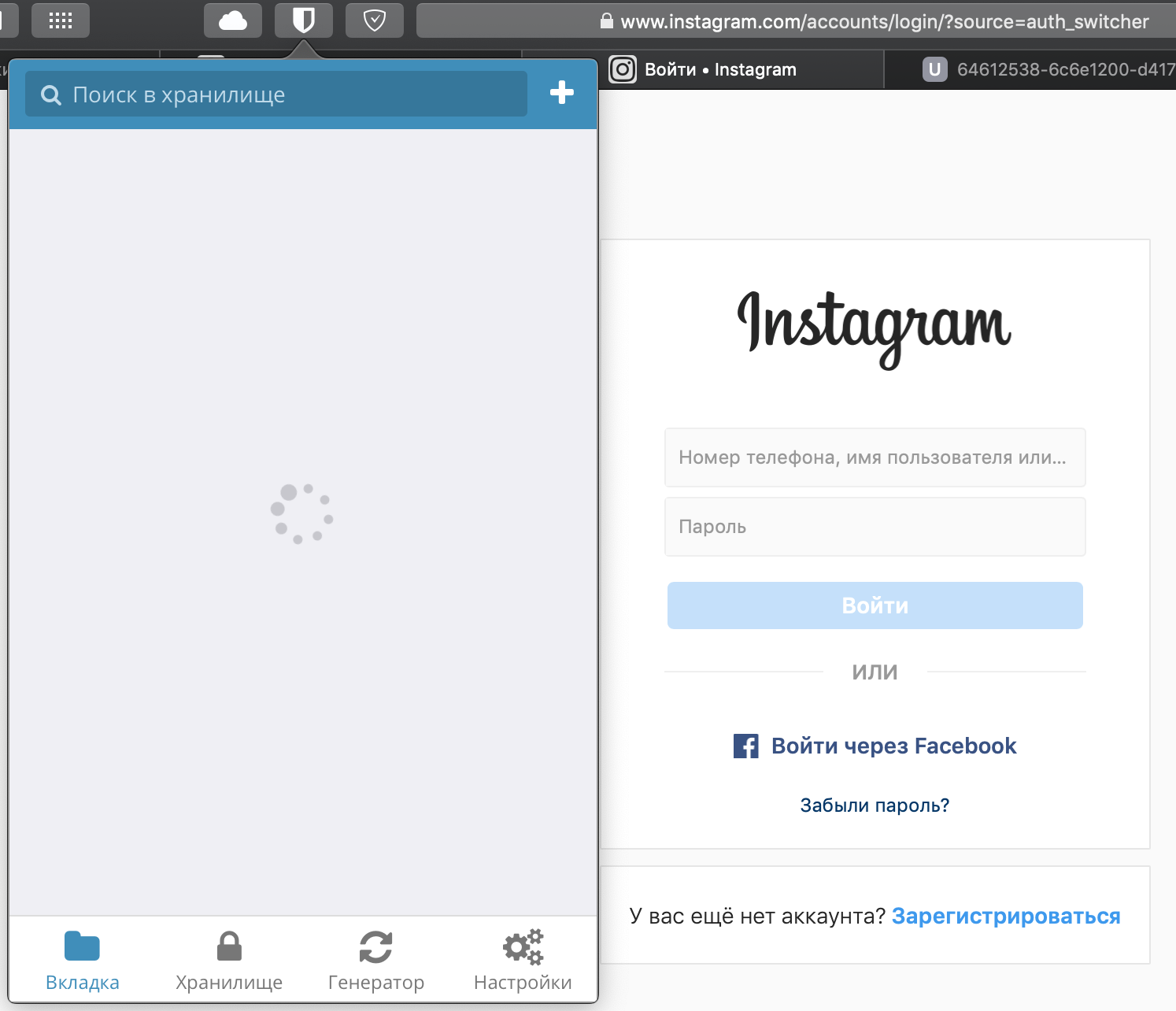
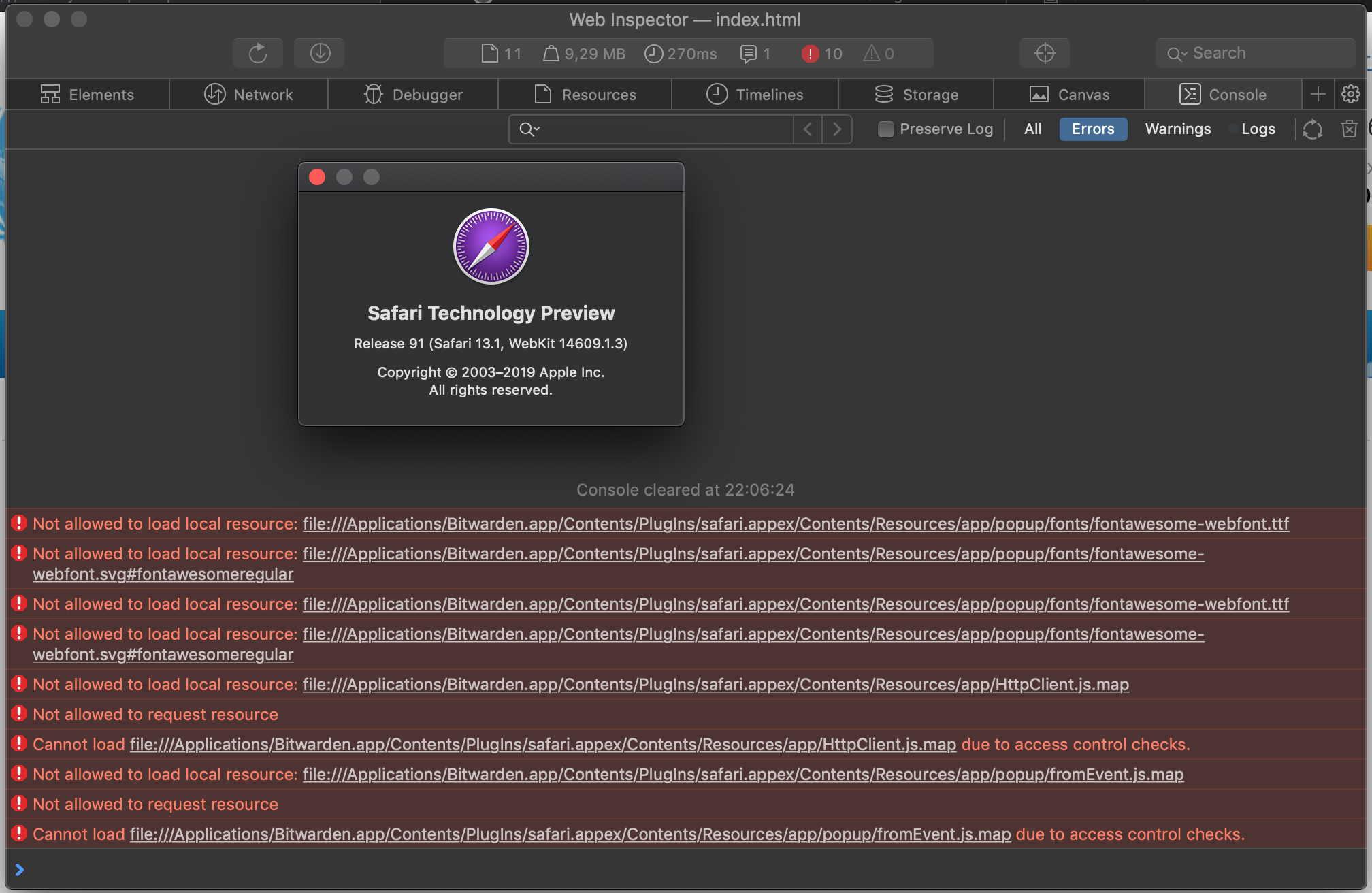
I see the following in the error console:
 korenskoy
on 10 Sep 2019
korenskoy
on 10 Sep 2019
@korenskoy Is this the first time you've tried the new extension? Did it work before?
Do the "My vault" tab work (second tab from the left)?
kspearrin
on 10 Sep 2019
@kspearrin The extension has always worked like this in Safari TP (from beta1 version).
My vault tab is working fine. And search in the first tab also works.
korenskoy
on 12 Sep 2019
Hmm. Those failed resource loading errors are expected and unrelated to this. I am not sure how I can debug this further without access to an account that reproduces it.
If you create a new test account with just a few items in it, does it also have the same issue?
kspearrin
on 12 Sep 2019
Just an update here: I tried to submit this update to the Mac App Store, but Apple review is rejecting our update because we do not offer in-app purchases for premium subscriptions. This has never been a problem in the past since we do not advertise the premium membership in the app and a user would have to discover it on our website, unsolicited. However, now they have changed their policy and since we offer a premium subscription product on our website, they are forcing us to also offer it as an in-app purchase (along with their 30% fee per sale).
Long story short: I will not be able to update the desktop app to include the Safari App Extension until I can figure out a way to also start offering premium subscriptions as in-app purchases. This is a bit harder than you might think since it affects our entire billing stack.
kspearrin
on 12 Sep 2019
FFS Apple 😞
If this is not resolved once Catalina is released can you still publish the updated Bitwarden desktop app (including the new Safari extension) on the website? Or do apps with Safari extensions _have_ to be installed via the App Store?
satysin
on 12 Sep 2019
I can still release the .dmg version that you all have been beta testing since that doesn't go through their approval process, but obviously I'd like to keep all the app distribution channels on the same versions.
But yes, if Catalina is released and this hasn't been figured out by then, I will just push out the .dmg version.
kspearrin
on 12 Sep 2019
Thanks Kyle. As a Safari user I appreciate all the extra work you are putting into supporting us. This whole thing is ridiculous.
satysin
on 12 Sep 2019
Thank you so much for implementing the Safari Extension. I'm using it every day and can't imagine how I would live without it.
cofatoeu
on 13 Sep 2019
For what it's worth, I'm OK with installing and updating the macOS desktop app and Safari extension using Homebrew Cask, but I understand if that's a less than ideal way to distribute software to non-power users.
 GHF
on 13 Sep 2019
GHF
on 13 Sep 2019
Maybe i miss something here. I have downloaded the 1.16.0-beta2.dmg and drag it into the application folder. The app is working but there is no Safari Extension. In Contents there is a folder PlugIns that includes a safari.appex file but i don't know what to do with that.
I am using MacOS 10.13.6 and Safari 12.1.2
 perarg
on 14 Sep 2019
perarg
on 14 Sep 2019
@perarg you don’t do anything. Just open Safari and it will self register if you look in extensions.
satysin
on 14 Sep 2019
@satysin Nope. In Safari -> Preferences -> Extensions, there isn't there.
perarg
on 14 Sep 2019
Might be because you’re not on Mojave or Catalina. I’m not sure Safari that comes with 10.13 supports the new extension model?
satysin
on 14 Sep 2019
Hmm, so i am in the middle. I cannot go to 1.16.0 because it seems the Safari doesn't support the new extension model. In official website there is 1.15.2 that doesn't include the extension. In AppStore there is 1.15.3 (i don't know if the extension is included there) but it cannot be installed. I don't know why. Most of my tries end up with a Waiting... label forever.
Is there a way to get 1.15.3 with extension included or just the extension bypassing AppStore ?
perarg
on 14 Sep 2019
Thanks for the hard work. We definitely appreciate it. Please publish dmg file available until this situation is resolved.
pavankjadda
on 14 Sep 2019
Safari 13 (14608.1.49) just came out for Mojave 10.14.6 (18G95) and I am happy to report the Bitwarden extension is working just fine (along with the known issues of course).
If you're on Mojave (not sure what other macOS are supported) you can install Safari 13 via Software Update.
satysin
on 19 Sep 2019
Just upgraded to Safari Version 13.0 (14608.1.49) on Mojave 10.14.6 (18G95) and realized the BitWarden extension no longer worked. Found this page, uninstalled the old version, downloaded and installed beta 2 Version 1.16.0 (1.16.0) and although the app works fine there is no extension in Safari still. I've restarted Safari and my Mac to no avail. Any ideas?
 ShawnCBerg
on 19 Sep 2019
ShawnCBerg
on 19 Sep 2019
Just upgraded to Safari Version 13.0 (14608.1.49) on Mojave 10.14.6 (18G95) and realized the BitWarden extension no longer worked. Found this page, uninstalled the old version, downloaded and installed beta 2 Version 1.16.0 (1.16.0) and although the app works fine there is no extension in Safari still. I've restarted Safari and my Mac to no avail. Any ideas?
I had a similar issue and fixed it by purging the old version and reinstalling the new -- specifically, uninstalling the desktop app, reinstalling it with brew cask install bitwarden (in order to capture the other folders where settings might be stored), purging it with brew cask zap bitwarden, and reinstalling with the .dmg file from here.
Edit: then I had to enable the extension in Safari in Preferences -> Extensions
Last edit: here's the output of brew cask zap bitwarden -- maybe you could skip this step by just deleting these folders:
==> Trashing files:
~/Library/Logs/Bitwarden
~/Library/Application Support/Bitwarden
~/Library/Caches/com.bitwarden.desktop
~/Library/Caches/com.bitwarden.desktop.ShipIt
~/Library/Preferences/ByHost/com.bitwarden.desktop.ShipIt.*.plist
~/Library/Preferences/com.bitwarden.desktop.plist
~/Library/Preferences/com.bitwarden.desktop.helper.plist
~/Library/Saved Application State/com.bitwarden.desktop.savedState
 jtyler22
on 19 Sep 2019
jtyler22
on 19 Sep 2019
I had a similar issue and fixed it by purging the old version and reinstalling the new -- specifically, uninstalling the desktop app, reinstalling it with
brew cask install bitwarden(in order to capture the other folders where settings might be stored), purging it withbrew cask zap bitwarden, and reinstalling with the.dmgfile from here.Edit: then I had to enable the extension in Safari in
Preferences->ExtensionsLast edit: here's the output of
brew cask zap bitwarden-- maybe you could skip this step by just deleting these folders:
That worked! Googled how to install home-brew and the fix you provided solved the problem. Thanks!
ShawnCBerg
on 19 Sep 2019
I feel that the world go forward and i pull you back. I am on a fairly old Macbook that goes up to 10.13 so i cannot upgrade to Mojave due to Apple's fantastic policy. So i have to use Safari 12 and there isn't any extension available for this version.
perarg
on 19 Sep 2019
Now that Safari 13 is generally available to all Mojave users, is there any timeline on the MacOS app beta being properly released so the extension will be installed?
 braunsonm
on 20 Sep 2019
braunsonm
on 20 Sep 2019
Safari just updated on my iMac and notified me that two of my extensions, including BW, no longer work. I had also just prior to that updated my iPhone to the new iOS 13. I also note that BW on the iPhone no longer seems to work in Safari - it shows as an option for passwords but freezes on the logo screen after opening.
 billagee4
on 20 Sep 2019
billagee4
on 20 Sep 2019
A quick suggestion: I was too surprised to discover that BitWarden is no longer working in Safari 13 after the update this morning.
Maybe add an announcment on the BitWarden homepage. The link there still points to the old extension.
 cstuder
on 20 Sep 2019
cstuder
on 20 Sep 2019
Just upgraded to Safari Version 13.0 (14608.1.49) on Mojave 10.14.6 (18G95) and realized the BitWarden extension no longer worked. Found this page, uninstalled the old version, downloaded and installed beta 2 Version 1.16.0 (1.16.0) and although the app works fine there is no extension in Safari still. I've restarted Safari and my Mac to no avail. Any ideas?
I had a similar issue and fixed it by purging the old version and reinstalling the new -- specifically, uninstalling the desktop app, reinstalling it with
brew cask install bitwarden(in order to capture the other folders where settings might be stored), purging it withbrew cask zap bitwarden, and reinstalling with the.dmgfile from here.Edit: then I had to enable the extension in Safari in
Preferences->ExtensionsLast edit: here's the output of
brew cask zap bitwarden-- maybe you could skip this step by just deleting these folders:==> Trashing files: ~/Library/Logs/Bitwarden ~/Library/Application Support/Bitwarden ~/Library/Caches/com.bitwarden.desktop ~/Library/Caches/com.bitwarden.desktop.ShipIt ~/Library/Preferences/ByHost/com.bitwarden.desktop.ShipIt.*.plist ~/Library/Preferences/com.bitwarden.desktop.plist ~/Library/Preferences/com.bitwarden.desktop.helper.plist ~/Library/Saved Application State/com.bitwarden.desktop.savedState
Awsome suggestion.
Another way to completely remove preferences and other settings saved for an app is to use AppCleaner (freemacsoft). It detects when sending something to trash and then checks what other files from the app it can delete.
 ovisirius
on 20 Sep 2019
ovisirius
on 20 Sep 2019
I just update Safari to version 13 (13608.1.49) on High Sierra (10.13.6). I tried @jtyler22 solution but it doesn't show Bitwarden extension on Preferences -> Extensions. I tried with version Bitwarden 1.16.0-Beta2.dmg
perarg
on 20 Sep 2019
Just upgraded to Safari 13 and discovered the extension no longer works. Yet to try the beta but wanted to say thanks to @kspearrin and the Bitwarden team for providing a solution for a < 2% usage platform. Hope you get around the subscription crap imposed by Apple.
 canine-afficionado
on 20 Sep 2019
canine-afficionado
on 20 Sep 2019
Just upgraded to Safari 13 and discovered the extension no longer works. Yet to try the beta but wanted to say thanks to @kspearrin and the Bitwarden team for providing a solution for a < 2% usage platform. Hope you get around the subscription crap imposed by Apple.
I won't call it crap.. They just want control, that's pretty normal.. If you would have company and options like they have, you will act exactly same :)
 beather
on 20 Sep 2019
beather
on 20 Sep 2019
@perarg Same here 10.13.6 & 13608.1.49 - Tried manual clearing Library files after deleting app, Tried AppCleaner and Manual removal of any leftovers. No extension showing in Safari -> Preferences -> Extensions. Hoping solution can be found as Bitwarden is so much better vs the competition. Thanks to Bitwarden and @kspearrin for continued support
 mrtrumpy
on 20 Sep 2019
mrtrumpy
on 20 Sep 2019
Updated to Safari 13.0 using macOS Mojave 10.14.6. Bitwarden (and Pocket and Buffer) were gone. Downloaded beta 2 (https://github.com/bitwarden/browser/issues/664#issuecomment-525021821) and everything was fine. I did have to restart Safari as my vault looked empty after my first login.
mackaaij
on 20 Sep 2019
It seems that in Safari 13 works the beta2 version only in Mojave (10.14). Something is still not working when using High Sierra (10.13)
perarg
on 20 Sep 2019
Beta2 working great for me so far. I'm on Mojave 10.14.6 and Safari 13.0 FYI. I completely removed previous version using brew cask zap before installing the Beta.
canine-afficionado
on 20 Sep 2019
Thank you for supporting us macOS users!
Beta2 is working on for me. Mojave, Safari 13.0.
I can confirm the issues you reported. Thank you!
 arvicrivera
on 20 Sep 2019
arvicrivera
on 20 Sep 2019
When will the update be submitted to the App store?
 Drallas
on 20 Sep 2019
Drallas
on 20 Sep 2019
v1.16.2 .dmg has been published on our website. If you were using the beta, you can simply update from Bitwarden > Check for updates.
App Store update is still pending on squaring away the in-app purchase options Apple is now requiring us to add. If you need the Safari app extension, you must use the .dmg from our website for now.
kspearrin
on 20 Sep 2019
Thank you for your support to all this. It is still not working on Safari 13 and High Sierra. There is no extension in Preferences -> Extensions
perarg
on 20 Sep 2019
When trying to connect to my self-hosted Bitwarden server I get an error.
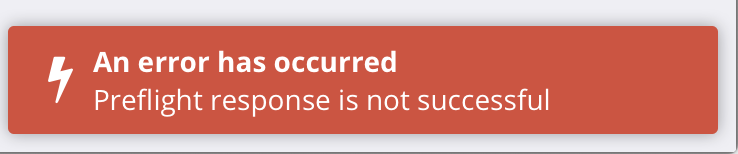
Also, can you put a donate link or something on your website so those of us who are self-hosting can send you some money for your hard work?
 feld
on 20 Sep 2019
feld
on 20 Sep 2019
@perarg I don't think High Sierra supports extensions any longer. Apple removed the Safari Extension Gallery and I don't think High Sierra supports App Extensions.
kspearrin
on 20 Sep 2019
@kspearrin what do you mean 'High Sierra doesn't supports App Extensions' ? I am already use 1password extension about a year with High Sierra and Safari 12 and version 13 from now on. The Extension Gallery doesn't work, you are right but i think each developer can include the Safari extension in .app
perarg
on 20 Sep 2019
I'm on high sierra now running Safari version 13.0 (13608.1.49) and still have 6 other existing extensions functioning since today's update without error. I've checked deactivating and reactivating them too and seem to still function correctly...so maybe something else?
mrtrumpy
on 20 Sep 2019
When trying to connect to my self-hosted Bitwarden server I get an error.
Updated my bitwarden server and the issue is gone. Please disregard.
feld
on 20 Sep 2019
@mrtrumpy It's hard to say why it works with Mojave and Catalina, but not High Sierra. I just assumed that High Sierra didn't support them, but that doesn't seem to be the case based on what you are experiencing. Unfortunately, I don't have a High Sierra MacBook to test with.
kspearrin
on 20 Sep 2019
Thank you for making this. A lot of people really needed this today because Apple decided to push their breaking changes. Works for me on Mojave and Safari 13!!!
 MichaelRoberts98
on 20 Sep 2019
MichaelRoberts98
on 20 Sep 2019
Thanks @kspearrin . Happy to assist with of any logs that might be of any help.
(Shame as got 3 macs still on HS that are used daily with BW...and chrome is a resource & privacy hog so would like to stick with Safari.)
mrtrumpy
on 20 Sep 2019
I can confirm that v1.16.2 .dmg from the website works on Safari 13. I'm using self-hosted server docker images tagged 1.30.4
Thanks a lot for prompt action and not neglecting your customers (no matter how small a % we are) 🙌
 kenosan
on 20 Sep 2019
kenosan
on 20 Sep 2019
the cmd+shift+y shortcut appears to break the extension in the v1.16.2dmg
 zackschuster
on 20 Sep 2019
zackschuster
on 20 Sep 2019
Thank you for supporting us macOS users!
Beta2 is working on for me. Mojave, Safari 13.0.
I can confirm the issues you reported. Thank you!
Yes it works :)
Thanks Kyle
 Bogey
on 20 Sep 2019
Bogey
on 20 Sep 2019
@mrtrumpy @perarg
Can you guys please try v1.16.3-beta3 here:
https://cdn.bitwarden.net/misc/Bitwarden-1.16.3-beta3.dmg
I added a change that might fix the High Sierra problem, but I need someone to confirm.
kspearrin
on 21 Sep 2019
@kspearrin First of all, i really appreciate your help. Thanks a million.
I removed the following folders:
~/Library/Logs/Bitwarden
~/Library/Application Support/Bitwarden
~/Library/Caches/com.bitwarden.desktop
~/Library/Caches/com.bitwarden.desktop.ShipIt
~/Library/Preferences/ByHost/com.bitwarden.desktop.ShipIt.*.plist
~/Library/Preferences/com.bitwarden.desktop.plist
~/Library/Preferences/com.bitwarden.desktop.helper.plist
~/Library/Saved Application State/com.bitwarden.desktop.savedState
Installed (Drag n Drop) the beta3 into applications folder. Now the extension is visible into Preferences => Extensions but nothing happens. Neither an icon at the toolbar or options with right click into fields of a webpage.
perarg
on 21 Sep 2019
@kspearrin Ditto @perarg Sooo appreciate your work on trying to resolve this issue....
As @perarg removed and installed. The extension appears now in Safari. When you click to activate, very briefly it "flashes" in the toolbar then disappears. Here's a link to screencast if it helps: https://www.screencast.com/t/xMotcm0P
Thanks again
mrtrumpy
on 21 Sep 2019
@mrtrumpy good observation skills :) I confirm this "flashing"
perarg
on 21 Sep 2019
I just installed the new version from the website and it works so far well with Safari 13 on Mojave. I had previously installed the version from the App Store and uninstalled it before. Do I have to wait for update notifications until the new version is available in the App Store and then reinstall it or does the App already support update notifications outside the App Store?
 kennymc-c
on 21 Sep 2019
kennymc-c
on 21 Sep 2019
@mrtrumpy Looks like its immediately crashing when enabled for some reason. Do you have XCode available that you could use to debug the extension?
kspearrin
on 21 Sep 2019
@kspearrin Thanks. Lol I just cleaned out my mac 2 days ago removing Xcode :) I'll reinstall and see what it does...Thanks again
mrtrumpy
on 21 Sep 2019
I'm also on high sierra with safari 13. I can also test something tomorrow, just need to know what :-)
 universal
on 21 Sep 2019
universal
on 21 Sep 2019
@kspearrin Reinstalled xcode 10.1 - realised no idea how to debug extension.Lol :) Any hints/guidance that might help
mrtrumpy
on 22 Sep 2019
@mrtrumpy Before we start getting into XCode debugging, could you check to see if there are any crash logs on your device from the Bitwarden safari extension?
Have a look in ~/Library/Logs/DiagnosticReports.
To show the Library folder in Finder hit command+J and tick the box with the label that says Show Library Folder. Or use the Terminal to navigate there.
The name of the Bitwarden app extension is called "safari", so look for any reports listed like safari_{DATE}_{DEVICE}.crash
kspearrin
on 22 Sep 2019
@kspearrin I confirmed the same behavior as @mrtrumpy reported and below is the content of its crash report.
I'm using Safari 12.1.2 on High Sierra 10.13.6.
Thanks a lot.
--
Process: safari [11444]
Path: /Applications/Bitwarden.app/Contents/PlugIns/safari.appex/Contents/MacOS/safari
Identifier: safari
Version: 1.42.0 (1.42.0)
Code Type: X86-64 (Native)
Parent Process: ??? [1]
Responsible: safari [11444]
User ID: 501
Date/Time: 2019-09-22 13:31:46.374 +0900
OS Version: Mac OS X 10.13.6 (17G8030)
Report Version: 12
Anonymous UUID: 19C9CF9A-C63E-C3F8-107A-5D99423BEEC9
Sleep/Wake UUID: F11242CE-223F-4CEF-A1A8-072DDFFE4158
Time Awake Since Boot: 15000 seconds
Time Since Wake: 2300 seconds
System Integrity Protection: enabled
Crashed Thread: 0
Exception Type: EXC_CRASH (SIGABRT)
Exception Codes: 0x0000000000000000, 0x0000000000000000
Exception Note: EXC_CORPSE_NOTIFY
Termination Reason: DYLD, [0x1] Library missing
Application Specific Information:
dyld: launch, loading dependent libraries
Dyld Error Message:
Library not loaded: @rpath/libswiftCore.dylib
Referenced from: /Applications/Bitwarden.app/Contents/PlugIns/safari.appex/Contents/MacOS/safari
Reason: image not found
Binary Images:
0x104403000 - 0x104419ff7 +com.bitwarden.desktop.safari (1.42.0 - 1.42.0)
0x108eef000 - 0x108f39acf dyld (551.5) <30B355CB-35BA-3112-AA76-4E46CD45F699> /usr/lib/dyld
0x7fff51be8000 - 0x7fff52a46fff com.apple.AppKit (6.9 - 1561.60.100) <6E7BB720-A1C6-3188-A832-9E8559D9DE75> /System/Library/Frameworks/AppKit.framework/Versions/C/AppKit
0x7fff53e57000 - 0x7fff53e57fff com.apple.Cocoa (6.11 - 22) <043AD60F-EAFA-311A-B1B5-135988C237B7> /System/Library/Frameworks/Cocoa.framework/Versions/A/Cocoa
0x7fff5460a000 - 0x7fff54aacff7 com.apple.CoreFoundation (6.9 - 1454.98) <8FB720F3-EE8D-3756-946B-1C08C6E6A19C> /System/Library/Frameworks/CoreFoundation.framework/Versions/A/CoreFoundation
0x7fff5676d000 - 0x7fff56b33ff3 com.apple.Foundation (6.9 - 1454.98) <18E2EAB8-F4A8-3D55-9A97-8D3EBCF92389> /System/Library/Frameworks/Foundation.framework/Versions/C/Foundation
0x7fff5fe5b000 - 0x7fff5fe74ffb com.apple.SafariServices.framework (13607 - 13607.3.10) <1EEF72FA-5855-3699-8F92-83FCE51D60C4> /System/Library/Frameworks/SafariServices.framework/Versions/A/SafariServices
0x7fff6326b000 - 0x7fff63704fff com.apple.WebKit (13605 - 13605.3.8)
0x7fff7a2d6000 - 0x7fff7a2d7ffb libSystem.B.dylib (1252.50.4)
0x7fff7b98e000 - 0x7fff7bd7c7e7 libobjc.A.dylib (723)
 k0yama
on 22 Sep 2019
k0yama
on 22 Sep 2019
I'm getting basically the same error log on Safari - Version 13.0 (13608.1.49) and os x 10.13.6.
just in case, i put the logs into a gist: https://gist.github.com/universal/57369663d68e3c298f94bebfdb6ac19f
universal
on 22 Sep 2019
I have the same crash error since yesterday. Bitwarden app dissappeared from toolbar.
I migrated all my team (11 people) to Bitwarden 2 months ago to "Team-plan" because I really like this app. It sounds really awfull that Safari will not supporting anymore. It is really sad that you throw people even if it is 2%, may be in this 2% more people who have subscription plans that in other 98%? Please think about and don't throw us :)
My crash report:
Process: safari [1056]
Path: /Applications/Bitwarden.app/Contents/PlugIns/safari.appex/Contents/MacOS/safari
Identifier: safari
Version: 1.42.0 (1.42.0)
Code Type: X86-64 (Native)
Parent Process: ??? [1]
Responsible: safari [1056]
User ID: 501
Date/Time: 2019-09-22 12:30:50.173 +0300
OS Version: Mac OS X 10.14.2 (18C54)
Report Version: 12
Anonymous UUID: B607B0BD-76B4-2F8D-6F9D-0E8ED234A72F
Time Awake Since Boot: 1100 seconds
System Integrity Protection: disabled
Crashed Thread: 0
Exception Type: EXC_CRASH (SIGABRT)
Exception Codes: 0x0000000000000000, 0x0000000000000000
Exception Note: EXC_CORPSE_NOTIFY
Termination Reason: DYLD, [0x1] Library missing
Application Specific Information:
dyld: launch, loading dependent libraries
Dyld Error Message:
Library not loaded: @rpath/libswiftCore.dylib
Referenced from: /Applications/Bitwarden.app/Contents/PlugIns/safari.appex/Contents/MacOS/safari
Reason: image not found
Binary Images:
0x10ee72000 - 0x10ee88ff7 +com.bitwarden.desktop.safari (1.42.0 - 1.42.0) <7D7D7195-BCFC-3712-A200-240ACA3FE95E> /Applications/Bitwarden.app/Contents/PlugIns/safari.appex/Contents/MacOS/safari
0x11afd7000 - 0x11b055a67 dyld (640.2) <289AB27E-F09F-3384-A14A-100431139559> /usr/lib/dyld
0x7fff4782e000 - 0x7fff4864fffb com.apple.AppKit (6.9 - 1671.20.108) <0C441020-D10E-3CE0-B320-527E50EADBEC> /System/Library/Frameworks/AppKit.framework/Versions/C/AppKit
0x7fff49a9a000 - 0x7fff49a9afff com.apple.Cocoa (6.11 - 23)
0x7fff4a2bd000 - 0x7fff4a70aff7 com.apple.CoreFoundation (6.9 - 1561)
0x7fff4c642000 - 0x7fff4ca10fff com.apple.Foundation (6.9 - 1561) <27FD022F-F0E3-3053-BADA-DF9BF856CA85> /System/Library/Frameworks/Foundation.framework/Versions/C/Foundation
0x7fff55724000 - 0x7fff5573cffb com.apple.SafariServices.framework (14606 - 14606.3.4)
0x7fff58e45000 - 0x7fff59344ff3 com.apple.WebKit (14606 - 14606.3.4) <86C207C2-21F2-3E8B-997C-70B7B252231E> /System/Library/Frameworks/WebKit.framework/Versions/A/WebKit
0x7fff749ac000 - 0x7fff749adffb libSystem.B.dylib (1252.200.5) <25F4A1F5-6551-312F-B397-C8D45ACC530A> /usr/lib/libSystem.B.dylib
0x7fff76453000 - 0x7fff76bd9fe7 libobjc.A.dylib (750.1) <804715F4-F52D-34D0-8FEC-A25DC08513C3> /usr/lib/libobjc.A.dylib
 orokhovatskiy
on 22 Sep 2019
orokhovatskiy
on 22 Sep 2019
@mrsanchos it seems you have Mojave (10.14). What bitwarden version have you tried? Other people here say that they have no problem using Safari 13 and Mojave with 1.16.2 that is uploaded on the official website.
perarg
on 22 Sep 2019
@perarg I am using Safari Version 12.0.2 (14606.3.4). I will try to update to 13.x Safari. I tried to install Bitwarden-1.16.2.dmg that should fix this error. And I understood that I shouldn't update to Catalina OS.
orokhovatskiy
on 22 Sep 2019
I confirm. After installing all the updates on Mojave and then upgrading to Safari 13. The problem was solved, the extension works correctly again in Safari
orokhovatskiy
on 22 Sep 2019
@perarg @mrtrumpy @universal @k0yama
The crash report looks like it is having trouble resolving the Swift runtime. I found this on StackOverflow. Seems Swift runtime needs to be bundled with the app on older versions of macOS.
https://stackoverflow.com/questions/26024100/dyld-library-not-loaded-rpath-libswiftcore-dylib
Try beta4 with this fix here:
https://cdn.bitwarden.net/misc/Bitwarden-1.16.3-beta4.dmg
kspearrin
on 23 Sep 2019
@kspearrin - I just installed beta 4 and can verify that at least as far as showing up (I haven't migrated my data from 1Password yet), the extension is visible and seems to want to work in Safari 13 on High Sierra 10.13.6.
Thanks a lot!
Fred
 Smokifred
on 23 Sep 2019
Smokifred
on 23 Sep 2019
@kspearrin I also confirmed it works fine in Safari 12 on High Sierra.
Thank you so much!
k0yama
on 23 Sep 2019
@kspearrin It seems to work in Safari 13 on High Sierra too. Thank you :) I haven't tried yet some features like updating passwords, save new passwords, etc. If there is any issue, i give a feedback here.
perarg
on 23 Sep 2019
I'm having trouble typing a master password with accents in the Safari extension when the field is in "hidden mode". It works fine when the password is visible. Also works fine on Firefox on the same machine. I have an Apple QWERTY (american?) keyboard.
This letter for example: ù, is obtained by using option+` (backtick) and then the letter u. When I do this combination in the hidden field, I get the two characters (backtick + u, one following the other).
Letters with this accent ˆ, like î, appear without the accent, with no symbol before or after. The accent is obtained by typing option+i and then the letter you want the accent on.
Crocmagnon
on 23 Sep 2019
Thanks for verifying guys. I will work on releasing this version with High Sierra support soon.
@Crocmagnon That sounds like more of a Safari problem to me. It's just a input of type "password". We're not doing anything fancy there.
kspearrin
on 23 Sep 2019
@kspearrin , thanks for fixing this. I too can confirm it's working in High Sierra with beta4
 darrylhodgins
on 23 Sep 2019
darrylhodgins
on 23 Sep 2019
@kspearrin Confirming Working Here too !!! Thanks so much for continuing to support this. Amazing support !!!! I can stay with BW - Yay !!!
mrtrumpy
on 23 Sep 2019
People who are using Safari 13 production release. Can you confirm is this known issue is resolved or not?
"New login" and "password change" notifications may not work due to bug in Safari. See blocker from Apple here: https://forums.developer.apple.com/thread/121765
kspearrin
on 23 Sep 2019
@kspearrin i confirm that neither "new login" or "password change" work in Safari 13. Bitwarden is not be triggered when using Safari production release.
perarg
on 23 Sep 2019
I can confirm that after installing Bitwarden-1.16.3-beta4 my extension start working again with Safari 13 on High Sierra 10.13.6.
With Bitwarden-1.16.2 an Bitwarden-1.16.3-beta3 it wasn't working!
 BobWs
on 23 Sep 2019
BobWs
on 23 Sep 2019
I can confirm that after installing Bitwarden-1.16.3-beta4 my extension start working again with Safari 13 on High Sierra 10.13.6.
With Bitwarden-1.16.2 an Bitwarden-1.16.3-beta3 it wasn't working!
How did you do it? i installed Bitwarden-1.16.3-beta4 and restart safari 13. but my extension don't start to work...
 eliaspeters
on 23 Sep 2019
eliaspeters
on 23 Sep 2019
@eliaspeters quit Safari. Launch the Bitwarden from Applications folder. After launch, open Safari. Go to Preferences -> Extensions and check Bitwarden extension.
perarg
on 23 Sep 2019
I can confirm that after installing Bitwarden-1.16.3-beta4 my extension start working again with safari 13.0 and Mojave 10.14.6.
Thank you so much! Extraordinarily quality!!!
 godfriedverheul
on 23 Sep 2019
godfriedverheul
on 23 Sep 2019
v1.16.3-beta4 fixes the cmd+shift+y shortcut for me. thank you!
zackschuster
on 23 Sep 2019
v1.16.4 was released officially with high sierra support.
kspearrin
on 24 Sep 2019
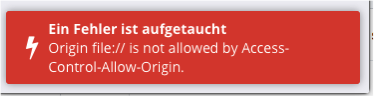
I can't login with v1.16.4 on high sierra on my own Bitwarden Server. I get this error message
 ManuelW77
on 25 Sep 2019
ManuelW77
on 25 Sep 2019
@ManuelW77 You need to update your server to latest.
kspearrin
on 25 Sep 2019
1.16.5 is now available from the mac app store. Anyone here able to test the install from the Mac App Store and make sure it works as expected? You'll need to uninstall the .dmg version before testing.
kspearrin
on 30 Sep 2019
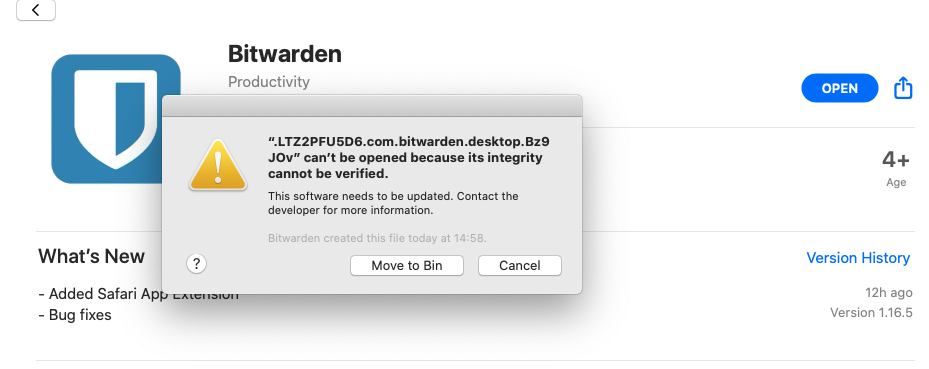
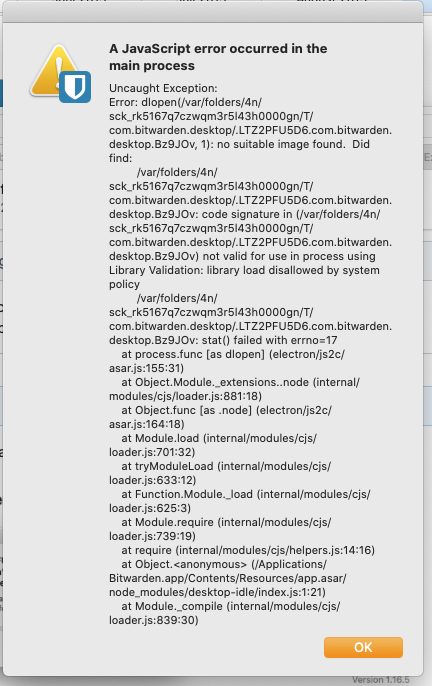
Just installed on Catalina last beta and got this screen
 porcherie
on 30 Sep 2019
porcherie
on 30 Sep 2019
Weird. It passed review with Apple so I am curious why it would fail to install. Anyone with Mojave able to install?
kspearrin
on 30 Sep 2019
I have the same problem with the official whatsapp desktop app from the App Store...
I uninstalled with app cleaner the old Bitwarden installation as well
porcherie
on 30 Sep 2019
I'm on Mojave and i can confirm that the Safari extension works again..
Drallas
on 30 Sep 2019
@Drallas That's from the mac app store?
kspearrin
on 30 Sep 2019
@Drallas That's from the mac app store?
Yes, didn't uninstall anything, just updating Bitwarden and restarting Safari.
Drallas
on 30 Sep 2019
Yes 1.16.5 works fine on Mojave 10.14.6.
At first the app failed to download from the Mac App Store, however after restarting my computer it works fine.
Freek
Op 30 sep. 2019, om 14:55 heeft Kyle Spearrin notifications@github.com het volgende geschreven:
1.16.4 is now available from the mac app store. Anyone here able to test the install from the Mac App Store and make sure it works as expected? You'll need to uninstall the .dmg version before testing.
—
You are receiving this because you commented.
Reply to this email directly, view it on GitHub https://github.com/bitwarden/browser/issues/664?email_source=notifications&email_token=ANJA4HSFUAKPN6EKNF22LQDQMHZM5A5CNFSM4FITM6K2YY3PNVWWK3TUL52HS4DFVREXG43VMVBW63LNMVXHJKTDN5WW2ZLOORPWSZGOD75RFNY#issuecomment-536548023, or mute the thread https://github.com/notifications/unsubscribe-auth/ANJA4HUDFTFAPF4YGINT5PTQMHZM5ANCNFSM4FITM6KQ.
godfriedverheul
on 30 Sep 2019
Mac App Store showing version 1.16.5. Removed old version, installed the
new one.
Everything is working fine for me. Mojave 10.14.6 - Safari 13.0.1
On Mon, Sep 30, 2019 at 8:55 AM Kyle Spearrin notifications@github.com
wrote:
1.16.4 is now available from the mac app store. Anyone here able to test
the install from the Mac App Store and make sure it works as expected?
You'll need to uninstall the .dmg version before testing.—
You are receiving this because you commented.
Reply to this email directly, view it on GitHub
https://github.com/bitwarden/browser/issues/664?email_source=notifications&email_token=AA4BJ4O35Y5HFSOAZ7BJQUTQMHZMXA5CNFSM4FITM6K2YY3PNVWWK3TUL52HS4DFVREXG43VMVBW63LNMVXHJKTDN5WW2ZLOORPWSZGOD75RFNY#issuecomment-536548023,
or mute the thread
https://github.com/notifications/unsubscribe-auth/AA4BJ4MY5AYXEX2UHA56FDDQMHZMXANCNFSM4FITM6KQ
.
arvicrivera
on 30 Sep 2019
@kspearrin It crashes on launch in High Sierra. I removed the beta-4 and tried to install it through Safari Gallery Extensions. In ~/Library/Logs/DiagnosticReports are created 8 files (.crash). I don't know what files are useful to upload for checking this out.
perarg
on 30 Sep 2019
The desktop app still crashes immediately on startup for me on the version installed from the Mac App store. (This is on Mac OS X 10.11.6 with Safari 11.1.2.)
crash-report.txt
 jimwins
on 30 Sep 2019
jimwins
on 30 Sep 2019
I'm also getting a crash of the desktop app on startup with the app store version. MacOS 10.13.6 (HS).
crash_report.txt
Also, with the app store version, I'm having the Safari extension problem where it logs me out frequently, and the first tab just spins.
 austin1howard
on 1 Oct 2019
austin1howard
on 1 Oct 2019
With the latest version from the website (1.16.6) the desktop app loads but the safari extension is still having those problems. Something odd I noticed...when I first launch Safari and log in, the prompt says "Logged in as __@__ on bitwarden.com for some calls.
austin1howard
on 1 Oct 2019
With the latest update (1.16.7) on the AppStore, the Safari extension became slow when trying to invoke it. When clicking on the Bitwarden icon, it takes 1-2 seconds to open it, which is annoying.
Any idea why it happened ?
 Zegorax
on 4 Oct 2019
Zegorax
on 4 Oct 2019
1.16.7 version still not working in High Sierra with Safari 13
perarg
on 5 Oct 2019
1.16.6 is working with safari 13 on high Sierra for me but the desktop app is extremely slow. I have huge lag before it opens.
BobWs
on 5 Oct 2019
Removing previous version = Transfer Bitwarden.app into Trash and empty trash. Should i remove preferences or other files from library folder ?
I am now in Bitwarden-1.16.3-beta4 that it works in Safari, but without the ability to add or refresh any new or existing password. After "removing" this from the Applications and Install the version from AppStore, the Bitwarden.app doesn't start at all.
perarg
on 6 Oct 2019
I use the Safari extension on Safari 13.0.1, running on High Sierra, and I currently have Bitwarden 1.16.6 installed (from the website). The Safari extension works but it keeps logging me out every few minutes, even though it's set to lock only on restart.
 jlhopes
on 9 Oct 2019
jlhopes
on 9 Oct 2019
Closing this issue since Safari support is now included in the Bitwarden desktop app.
Please open new issues if you discover something.
kspearrin
on 10 Oct 2019
hi @kspearrin the extension fails to login with the following error on safari.

Safari: Version 13.0.2 (15608.2.30.1.1)
Mac OS: ver 10.15
Is this expected?
 tckb
on 29 Oct 2019
tckb
on 29 Oct 2019
@tckb You need to add the following directive in your Apache configuration (in the case of a reverse-proxy to your self-hosted Bitwarden instance)
Header set Access-Control-Allow-Methods "POST, GET, OPTIONS, DELETE, PUT"
Zegorax
on 29 Oct 2019
@Zegorax interestingly it works with all the other browser extensions.
tckb
on 29 Oct 2019
I have installed BitWarden from the Apple App Store, but how to get the new extension installed? It didn’t automatically install with the desktop app and I don’t see it listed in the Apple Extension Store. Thanks in advance! Hoping to get this going and drop kick 1Password through the goalposts of life!
 micheldorsey
on 5 Nov 2019
micheldorsey
on 5 Nov 2019
Closing this issue since Safari support is now included in the Bitwarden desktop app.
@kspearrin i don't understand what is meant by this. How does this work? I tried right-click on a login field in Safari, but there's no menu for Bitwarden, so what does this exactly mean?
 michaelaye
on 5 Nov 2019
michaelaye
on 5 Nov 2019
Open Safari, use Cmd + comma (,) to open settings, go to Extensions to see if Bitwarden is there and enabled.
I use Cmd + backslash () to fill logins, I'm not sure if there is a context menu.
mackaaij
on 5 Nov 2019
Open Safari, use Cmd + comma (,) to open settings, go to Extensions to see if Bitwarden is there and enabled.
I use Cmd + backslash () to fill logins, I'm not sure if there is a context menu.
Yeah, the extension is not there in settings. I just deleted the app and installed from the bitwarden website, opened and logged in. Still nothing in the extensions list.
micheldorsey
on 5 Nov 2019
FYI : On a non-US keyboard, the shortcut on Safari to fill a login is CMD + $ (the letter next to à)
Zegorax
on 5 Nov 2019
FYI : On a non-US keyboard, the shortcut on Safari to fill a login is CMD + $ (the letter next to à)
Yeah, I’m not getting shortcuts enabled because the extension is not installed. How is the extension installed? Do you have to manually install it or does it automatically install when the desktop app is installed? No one seems to be answering that question. The extension is not installed because I can not see it in the safari extensions list.
micheldorsey
on 5 Nov 2019
You simply have to install it via the AppStore by installing the desktop app. After that, Bitwarden will advertise its extension to Safari, therefore allowing you to enable it in Safari's settings.
Zegorax
on 5 Nov 2019
You simply have to install it via the AppStore by installing the desktop app. After that, Bitwarden will advertise its extension to Safari, therefore allowing you to enable it in Safari's settings.
I’m running Catalina, does that make a difference? I will try rebooting too. BTW, I downloaded the app from the BitWarden website versus the Apple store, but I assume the BitWarden website to be more up-to-date than the App Store.
micheldorsey
on 5 Nov 2019
I am also on Catalina. I would advise you to download the AppStore version.
Zegorax
on 5 Nov 2019
I am also on Catalina. I would advise you to download the AppStore version.
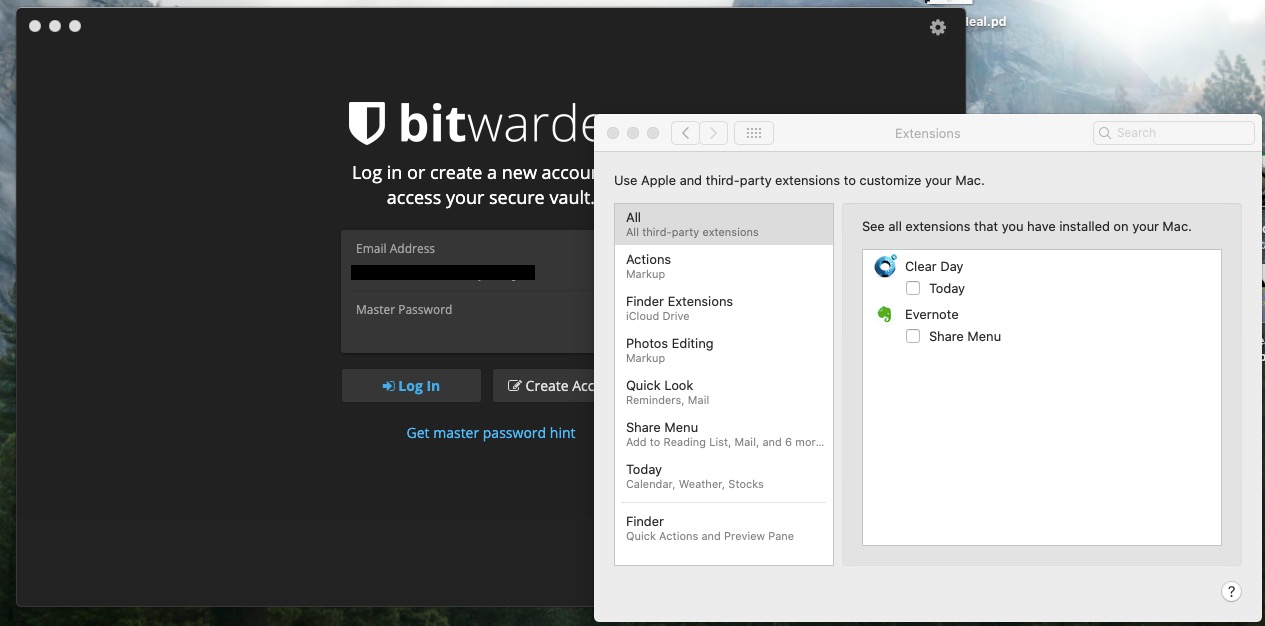
Removed app using AppZapper to remove all associated preferences and the reinstalled using App Store version. Still no joy.
micheldorsey
on 5 Nov 2019
You are not in the correct settings. You need to open Safari, then go to "Safari" in the menu bar > Preferences > Extensions and check the Bitwarden app.
Zegorax
on 5 Nov 2019
You are not in the correct settings. You need to open Safari, then go to "Safari" in the menu bar > Preferences > Extensions and check the Bitwarden app.
Success! This is proving my rustiness in MacOS. Been using my iPad as my main computer for quite some time and needed a bit of re-education.
micheldorsey
on 5 Nov 2019
Pls check if you existing chrome extension can be converted into Safari extension like this -> https://developer.apple.com/videos/play/wwdc2020/10665/
 mobihunterz
on 7 Jul 2020
mobihunterz
on 7 Jul 2020
Related issues
 lainy
·
4Comments
lainy
·
4Comments
 IanSavchenko
·
6Comments
IanSavchenko
·
6Comments
 junweilee
·
6Comments
junweilee
·
6Comments
 jikamens
·
3Comments
jikamens
·
3Comments
 arielf
·
6Comments
arielf
·
6Comments
Most helpful comment
An update here:
I have been successful in porting (read: hacking) the existing Bitwarden web extension into Safari's new app extensions model. I am about 80% of the way there, but I see no reason why we can't have this functioning (albeit with some quirks) for the most part here in the next couple of weeks.
One thing that I still haven't decided on: Should we bundle distribution of the browser extension into the desktop app or should we distribute it separately on its own?