Safari TOTP not copying automatically when using keyboard fill shortcut #770
In addition to this ticket, might it be possible to autofill the TOTP code of a page using a different shortcut? For example in safari on MacOS we use Command + , then for TOTP Command + Shift + ?
Thanks in advance!
 Dobby16
All 17 comments
We can't reliably autofill TOTP codes on pages, so the option to do this is not available. It must be copied and then manually pasted by the user.
 kspearrin
on 11 Mar 2019
kspearrin
on 11 Mar 2019
@kspearrin I would argue it's most certainly possible if the TOTP box has an ID.
For example IT Glue, when you press log in, it adds an input box with id user_otp_attempt, so if there's a totp on the login entry, query the DOM for the id of the totp every 0.5 seconds or something for x seconds, if found fill it in and stop querying?
I mean it won't work in 100% of usecases but it's most certainly possible to make it reliable enough for use.
Microsofts totp box seems to have id idTxtBx_SAOTCC_OTC
Finding this totp id automagically should also be possible by looking through which data-com.bitwarden.browser.user-edited "entries" has the totp code in them?
I'm no expert ofc, but i do think i see a possibility here.
 Lillecarl
on 8 Apr 2019
Lillecarl
on 8 Apr 2019
AWS Console has id="mfacode" on the input field.
I would really love to have auto-fill for TOTP, because now I need 4 clicks to copy the code (open Bitwarden, open AWS card, copy TOTP, move cursor to the input field) and Cmd+V to insert the code.
 IanSavchenko
on 11 Apr 2019
IanSavchenko
on 11 Apr 2019
@IanSavchenko Your TOTP code is auto-copied to your clipboard after you perform an autofill action. All you need to do is paste on the MFA page.
kspearrin
on 11 Apr 2019
@kspearrin It's a nice feature with the clipboard indeed, though since it overwrites the current clipboard it's a bit messy for people without clipboard managers. Am i not correct that it's possible by querying the DOM to find what the ID of the totp field is and from that autofill the info?
Lillecarl
on 11 Apr 2019
@Lillecarl Yes, that is possible, however, there is no standard for defining an MFA code input field, so creating an autofill solution based on a DOM name/id would be very spotty.
kspearrin
on 11 Apr 2019
@kspearrin Well you're already adding data-com.bitwarden.browser.user-edited to all input fields we write something in, if you check the value and see that it matches the totp in BW when the user first signs in with mfa, then you'd know the ID of that particular site and the ID could be stored for next login. If in the future the id isn't found (site changed the name), then we'd just repeat the process. This way we'd have totp autofill basically always.
Lillecarl
on 11 Apr 2019
@IanSavchenko Your TOTP code is auto-copied to your clipboard after you perform an autofill action. All you need to do is paste on the MFA page.
Awesome! How could I miss that! 👏 👏 👏 👏
I can only suggest showing some kind of notification or popup like "Your TOTP code copied to your clipboard".
IanSavchenko
on 11 Apr 2019
It would be a great feature to have the ability to select a TOTP field and press a button, or similar to have the bitwarden plugin remember the field if possible (quick check on focused field for an id or a unique css class would solve 90+% of use cases)
 jamon
on 9 May 2019
jamon
on 9 May 2019
Having just migrated from 1Password, I really miss this feature. 1Password can reliably autofill MFA fields for all sites I've had, including AWS and in-house applications.
 beanaroo
on 2 Mar 2020
beanaroo
on 2 Mar 2020
@beanaroo It's really quite decent that it saves it to the clipboard so you can just paste it, but it sure isn't the same as autofill and autosubmit.
@kspearrin If you were to implement something that queries the DOM every X seconds when the following is true:
- You recently autofilled a login
- The login has a TOTP string stored
Look for id X, write value -> Look for ID Y, "press button"
I would happily supply id's for the buttons (regex if needed when frameworks name shit wierdly) and form ids.
Lillecarl
on 2 Mar 2020
@Lillecarl It's great when it works but after trying it for two weeks, it rarely does. I am unable to reproduce the inconsistency.
Being able to just auto-fill would be ideal. Especially if, like me, you're logging into dozens of accounts every morning.
beanaroo
on 16 Mar 2020
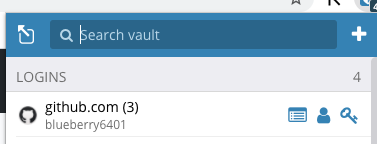
Or can you put a button to quick copy OTP next to these 3 buttons, it's much simpler.
 blueberry6401
on 13 Apr 2020
blueberry6401
on 13 Apr 2020
The KeePassXC Browser addon seems to also have a decent TOTP field detection. I believe it is implemented here.
It would already be useful if the addon would display an icon within every field candidate that, if clicked upon, fills that field with the TOTP. Same goes for username and password entries to facilitate auto-fill (one click instead of key combo or via addon menu), but that's arguably another issue.
I don't know if this is related, but for me the automatic copying of the TOTP after filling in the username and password doesn't work at all under Firefox. So unless there's some easier way, I have to always go via the context menu, which takes ages.
 frederikmoellers
on 12 May 2020
frederikmoellers
on 12 May 2020
https://www.cloudflare.com login often does not automatically copy totp
 loveqianool
on 3 Jul 2020
loveqianool
on 3 Jul 2020
@kspearrin Would it be possible to just extend the Custom Fields section of a credential, which already supports mapping a value to an arbitrary DOM ID, so that one could map the TOTP value to a DOM ID in the same way?
You could add a fourth custom field type (in addition to Text Hidden and Boolean) of Authenticate TOTP or something
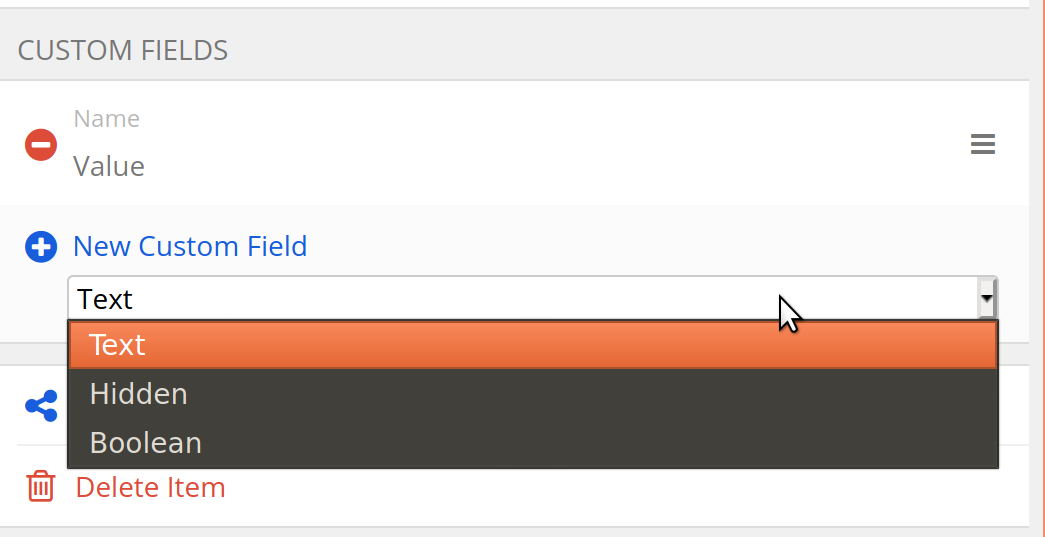
You'd of course not show the Value text box for those custom fields (as the value would be the TOTP code)
We can't reliably autofill TOTP codes on pages
I totally get that it's hard for Bitwarden to guess which field is a TOTP field but it would be great to enable users to set it.
 gene1wood
on 7 Dec 2020
gene1wood
on 7 Dec 2020
Using Firefox 84.0.1 with extension 1.47.1. Extension does not reliably copy totp into clipboard after auto filling username and password.
 muzzah
on 26 Dec 2020
muzzah
on 26 Dec 2020
Related issues
 garygreen
·
4Comments
garygreen
·
4Comments
 ple103
·
6Comments
ple103
·
6Comments
 madranet
·
4Comments
madranet
·
4Comments
 mkuhring
·
5Comments
mkuhring
·
5Comments
 jikamens
·
3Comments
jikamens
·
3Comments
Most helpful comment
Or can you put a button to quick copy OTP next to these 3 buttons, it's much simpler.
