Botframework-webchat: OAuth card does not render in Azure/CDN production build
application/vnd.microsoft.card.oauth cards are not being rendered and show up as [File of type 'application/vnd.microsoft.card.oauth']. This is when using AAD v2 as the auth configuration. This is a huge blocker for me right now and is preventing validating any down stream bot functionalty based on authentication. This is using the sample: https://github.com/Microsoft/BotBuilder/tree/master/CSharp/Samples/AadV2Bot

This appears to be logged in the botbuilder repo (https://github.com/Microsoft/BotBuilder/issues/4632), but this should really be tracked in this web chat repo I would think
 ukphillips
All 43 comments
Will report investigations here, stay tuned.
 compulim
on 6 Jun 2018
compulim
on 6 Jun 2018
I don't have a C# bot on my hand. So the quickest way for me is writing the attachment part in JS. I tested these scenarios:
- Bot send an OAuth card attachment (see below)
- Connect to bot using one of these techs:
- Emulator
- Azure Bot Service (bot registration)
- Host a Web Chat page, with latest from
@master
- OAuthCard released in 0.13.0, and we don't have any significant work over the code path, so
@mastershould be good
- OAuthCard released in 0.13.0, and we don't have any significant work over the code path, so
And looks like it's working.
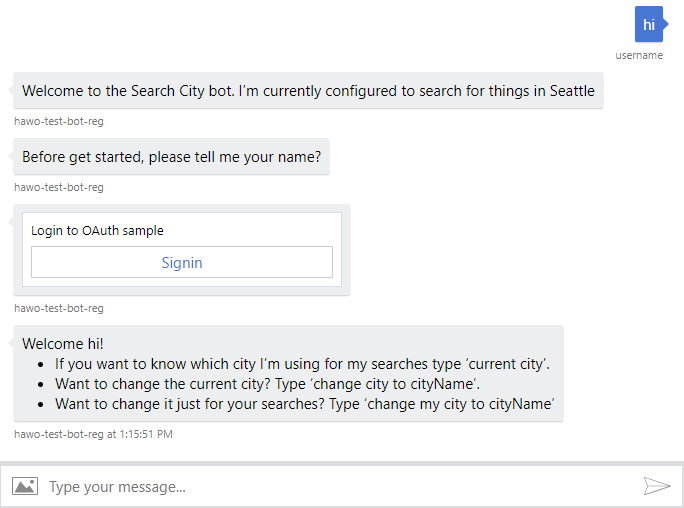
{
contentType: 'application/vnd.microsoft.card.oauth',
content: {
text: 'Login to OAuth sample',
connectionname: 'SampleConnection',
buttons: [{
type: 'signin',
title: 'Signin'
}]
}
}
@ukphillips Which version of Web Chat are you using? Embed, cdn.botframework.com, or NPM?
If it's CDN, we got an issue and will fix it asap.
compulim
on 6 Jun 2018
@compulim The bot located here is in C# and can duplicate the issue. I just re-ran that bot and still see the same issue
 kashifkhan
on 6 Jun 2018
kashifkhan
on 6 Jun 2018
I think this is unrelated to the bot code, but the Web Chat component. (Or may be I am missing something here)
So how do you host the Web Chat component in your HTML page?
compulim
on 6 Jun 2018
Its the default web chat interface that gets pushed when you deploy the solution. I haven't modified the HTML page in any way.
kashifkhan
on 7 Jun 2018
Got it! That's my missing piece.
Will take a look at it.
compulim
on 7 Jun 2018
@kashifkhan do you mean the Web Chat interface inside Azure Portal?
compulim
on 7 Jun 2018
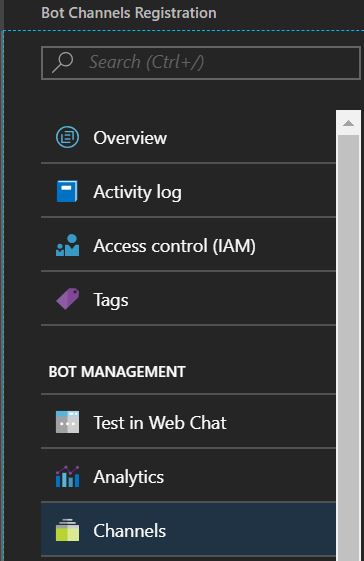
@compulim I meant the Web Chat link that you get when you go to the Azure portal, select "Bot Registration Channels" and then "Channels"
I also just tried the web chat interface inside Azure portal and its not working there either.
kashifkhan
on 7 Jun 2018
@compulim as @kashifkhan mentioned it's not working in the portal, but I was also attempting to embed it inline (non-react) using:
```
ukphillips
on 8 Jun 2018
@kashifkhan the Azure portal use an older version of Web Chat. We do update it from time to time, but the current version doesn't have OAuth card yet.
@ukphillips unfortunately, the CDN was a bit outdated too (@0.11.3 I believe). We fixed that and on the next release, /latest/ will point to a version with OAuth card (@>=0.13.0). We do publish dev build to CDN, you can try out at https://cdn.botframework.com/botframework-webchat/0.13.1-master.248c723/botchat.js. You can find versions from NPM.
compulim
on 8 Jun 2018
@compulim When I use that version of the botchat, I notice that the token server is providing me with a magic code, my understanding was that the magic code was no longer required by the bot service for web chat and directline authentication. Last week when I was doing authentication it was not requiring the magic code, has something changed on the bot service?
ukphillips
on 11 Jun 2018
@ukphillips AFAIK, I didn't hear anything change. @Jeffders or the support team could have a better answer this question. Looping them in.
compulim
on 13 Jun 2018
@ukphillips Are you using WebChat in your own site or the Bot Framework emulator?
 Jeffders
on 13 Jun 2018
Jeffders
on 13 Jun 2018
@Jeffders I am trying with both (also attempted using v3 and v4 of the emulator, with the same results), and the functionality is behaving the same (returning a magic code) in all.
ukphillips
on 13 Jun 2018
Even with Emulator v4, the Web Chat could be outdated (we develop asynchronously, merge from time to time). It will be more accurate if you could try out pre-release build, either thru:
- CDN at https://cdn.botframework.com/botframework-webchat/master/botchat.js
- NPM via
npm install botframework-webchat@master
@ukphillips can you try out using one of them?
compulim
on 16 Jun 2018
Do you know when the update will be pushed in to the next release ?
kashifkhan
on 18 Jun 2018
@kashifkhan do you mean the Web Chat in Azure or NPM or CDN?
compulim
on 18 Jun 2018
@compulim CDN
kashifkhan
on 18 Jun 2018
Within this week. :)
compulim
on 18 Jun 2018
Any update on when this will be fixed? I to am now being significantly effected on a project i am working on that needs to be completed soon.
 AndrewTilson
on 22 Jun 2018
AndrewTilson
on 22 Jun 2018
0.14.0 is now published on NPM and CDN at https://cdn.botframework.com/botframework-webchat/0.14.0/botchat.js (and also botchat-es5.js).
@AndrewTilson Sorry we have some last minute deploy script change.
compulim
on 27 Jun 2018
Hello, is there any update on this issue. We are experiencing the same problem (.NET) and would really like to get this functionality working. For information, we are currently using the magic number produced by BotAuth for authentication... however understandably this is not ideal from a usability point of view so are really looking for a better experience for when we go live in a few weeks time.
 uniper-scott
on 6 Jul 2018
uniper-scott
on 6 Jul 2018
When will this update make its way to Azure as well?
 mlipinski
on 27 Jul 2018
mlipinski
on 27 Jul 2018
@mlipinski it should be landing this Friday. See #1044 for details on how to specify versions using URL params.
compulim
on 31 Jul 2018
@compulim Will this fix the rendering issue for the sign in card on the webchat?
uniper-scott
on 1 Aug 2018
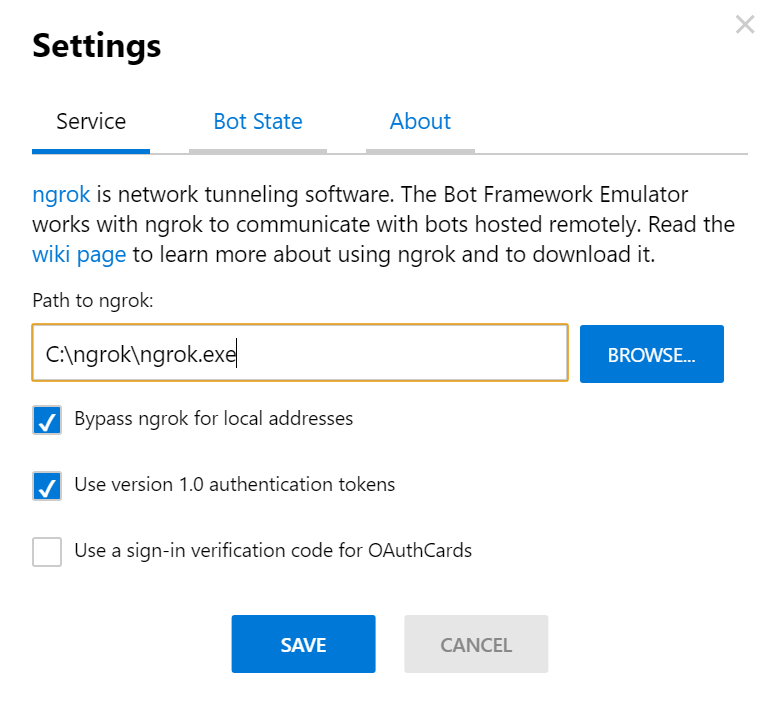
@ukphillips I was able to remove the need for magic codes in the emulator v3 by unchecking the "Use a sign-in verification code for OAuthCards" in Settings. To access Settings, click the three dots near the URL bar. The image below shows the Settings:
The CDN is still not working for me (I tried versions 0.13.1 and 0.14.1): the card renders, but it sends me to a magic code. I have two issues:
1) I didn't want to have a magic code and don't know how to configure the WebChat CDN not to require it (like I do in the emulator)
2) After I click on the "Sign In" button to get the magic code, the WebChat stops working and all messages to the chatbot fail. To enter the magic code I have to refresh the page that hosts the WebChat, which of course won't work for users.
These behaviors happen in the WebChat CDN, they don't happen in the emulator. As we know, the embedded version of the WebChat doesn't even render, although this is likely to change by Friday. I didn't try the NPM version: I don't know how to 😢
 RealLucasMeyer
on 1 Aug 2018
RealLucasMeyer
on 1 Aug 2018
@uniper-scott do you mean the OAuthCard is rendered as unknown card (showing [File of type 'application/vnd.microsoft.card.oauth'])? If yes, you are probably using Web Chat < 0.13.0
Let me do some clarifications here:
- OAuthCard is new in
0.13.0
- If you see
[File of type 'application/vnd.microsoft.card.oauth'], you are using Web Chat < 0.13.0
- If you see
- Web Chat have many distribution channels: GitHub Releases, NPM, CDN, IFRAME (v1/v3), Emulator, and Azure Portal
- IFRAME is, https://webchat.botframework.com/embed/.../?v=0.14.0
- This channel will be updated with capability to select version thru
?v=0.14.0, starting this Friday - In Web Chat channel settings, check "Enable Preview" to use IFRAME v3, which will support this feature
- This channel will be updated with capability to select version thru
- "Azure Portal" means the "Test in Web Chat" button in Azure Portal
- IFRAME is, https://webchat.botframework.com/embed/.../?v=0.14.0
- If we say version 0.14.0, it will be the very same bit across all channels
- IFRAME and Azure Portal use the bit with ES5 polyfill
- Different channels has different shipping schedule
- From this Friday, we will ship simultaneously across GitHub Releases, NPM, CDN, and IFRAME, in an automated manner, version must be >= 0.14.0
- Emulator and Azure Portal are not in simul-ship mode
- Emulator v4 Preview 4.0.15-alpha is using a pre-release build of 0.13.1, support OAuthCard
- Emulator v3 3.5.35 is using Web Chat 0.11.2, does not have OAuthCard
- Emulator v3 3.5.36 is using Web Chat 0.13.1, support OAuthCard
- Azure Portal is using a very old build of Web Chat, does not support OAuthCard
@RealLucasMeyer, @corinagum will get in touch with you on the issue.
compulim
on 1 Aug 2018
@compulim Thank you for taking the time to reply to me, it was very helpful. We are indeed using the latest version 3 of the bot builder (3.15.3). We were using the standard embed iframe markup that is supplied by the Azure portal for webchat.
I have updated our iframe to use the v=0.14.0 url parameter and we are now getting the sign in card :D
Admittedly it still doesn't work fully, as when I click sign in I get an 'about:blank' popup, however I assume that this is my configuration. Thank you for your help so far. For info, our code appears to work in the emulator.
I'll update when we get it working. If we can get rid of the magic number copy/paste from BotAuth it makes our internal chatbot an easier sell to the users.
uniper-scott
on 3 Aug 2018
What time on Friday will this be release?
(Edited to hide email details)
mlipinski
on 3 Aug 2018
@uniper-scott I got the same issue as you - when I use v=0.14.0, whenever I click "Sign In", it takes me to "about:blank". I tried to use v=0.13.1 to match the emulator (that works) and I get a blank chatbot.
I've also tried v=0.14.1 and get the same about:blank as v=0.14.0.
Other than the emulator, did anyone make this work in any other way?
RealLucasMeyer
on 3 Aug 2018
Let me try out the OAuthCard over the weekend and see.
But at least, we have some ways to push fixes sooner to everyone. :smile:
compulim
on 5 Aug 2018
Hi. Hi I am following the issue with the blank page after Sign In click in an iframe. Do you have any updates on it and can you give some timeline when it will be fixed?
 linach
on 24 Aug 2018
linach
on 24 Aug 2018
Hello, I also see a blank page after clicking on the Sign In item in an iframe (within a Sharepoint web part). Using the emulator is successful with retrieving a token after the login window appears but won't be helpful to our user base Any news on when this might get rectified completely?
 matt-wright
on 24 Aug 2018
matt-wright
on 24 Aug 2018
Hello, Is issue of [File of type 'application/vnd.microsoft.card.oauth'] on Azure Test web chat fixed? Is next version of Azure web chat is updated? I am using OAuth card but it's giving the issue of [File of type 'application/vnd.microsoft.card.oauth']. when its integrated to Sharepoint portal then also getting the same issue but on simulator OAuth card works.
 chetankerhalkar
on 24 Aug 2018
chetankerhalkar
on 24 Aug 2018
I'm seeing the blank page after clicking the Sign In button on the OAuthCard as well. Tried 0.14.0-0.14.2 with same results. Any updates?
 nkpatterson
on 29 Aug 2018
nkpatterson
on 29 Aug 2018
@linach @matt-wright @nkpatterson You may get blank page if you are using WebChat Channel secret. Please enable DirectLine and are use a DirectLine secret (we are working to support WebChat secrets).
To register for the DirectLine channel:
- Go to https://portal.azure.com/.
- Navigate to your bot resource.
- Click on “Channels”, then click on the DirectLine icon (it looks like a globe).
- Copy one of the Secret Key values and store this for later. This is your ‘DirectLine Secret’ string. Finally, press ‘Done’.
Then replace the WebChat Channel Secret in the iframe URL (which is value of the "s" parameter) with the stored DirectLine Secret.
There you go! You should be able to open the sign-in page now.
 Piao08
on 31 Aug 2018
Piao08
on 31 Aug 2018
Can confirm I'm also getting about:blank when using 0.14.0-0.14.2 with the iframe embed.
 robdmoore
on 9 Sep 2018
robdmoore
on 9 Sep 2018
The solution proposed by @Piao08 worked for me with 0.14.3 (using the "master" tag).
RealLucasMeyer
on 9 Sep 2018
@ukphillips I was able to remove the need for magic codes in the emulator v3 by unchecking the "Use a sign-in verification code for OAuthCards" in Settings. To access Settings, click the three dots near the URL bar. The image below shows the Settings:
The CDN is still not working for me (I tried versions 0.13.1 and 0.14.1): the card renders, but it sends me to a magic code. I have two issues:
I didn't want to have a magic code and don't know how to configure the WebChat CDN not to require it (like I do in the emulator)
After I click on the "Sign In" button to get the magic code, the WebChat stops working and all messages to the chatbot fail. To enter the magic code I have to refresh the page that hosts the WebChat, which of course won't work for users.These behaviors happen in the WebChat CDN, they don't happen in the emulator. As we know, the embedded version of the WebChat doesn't even render, although this is likely to change by Friday. I didn't try the NPM version: I don't know how to 😢
Same issue, I can get the CDN WebChat working with the OAuth card, but don't know how to configure it to not pass back the magic code. I'm just using DirectLine with a very basic Default.htm that has the following...
BotChat.App({
directLine: { secret: direct_line_secret },
user: { id: 'userid' },
bot: { id: 'botid' },
resize: 'detect'
}, document.getElementById("bot"));
But can't find anything that allows elimination of the magic code in WebChat...
 martinabbott
on 22 Oct 2018
martinabbott
on 22 Oct 2018
Up for discussion:
- How to do OAuth without magic code
- Why magic code is presented, how we skip magic code
- How Web Chat call Bot Framework and OAuth provider for a secure login experience
 corinagum
on 30 Oct 2018
corinagum
on 30 Oct 2018
Okay so here is a solution using WebChat that seems to work with AAD and no magic code.
NOTE: The magic code is part of the RFC and is there to add an extra factor. By removing the magic code, there is an increased security risk. This is in part mitigated through the use of Direct Line enhanced security that allows the setting up of "valid" domains that are allowed to be authenticated.
I found the key to the solution in the Bot Framework teams blog.
Essentially the key is to use the Direct Line secret and a user id to get a token. Once you have that the process flows as described for redeeming the token for an actual OAuth token.
I used the v4 SDK sample 18 Authentication Bot for testing the authentication, published to a Bot Service using AAD V1 endpoint and didn't make any code changes to the bot.
I cloned the WebChat repo, and changed the ./samples/react/index.html file as follows.
<script type="text/babel">
  // MOTE: For this to work with AAD you need to configure Enhanced Security in Direct Line
  // You can use http://localhost:8000 for this or deploy to an Azure Web App but then use HTTPS
  const setupChat = async () => {
    const params = BotChat.queryParams(location.search);

    // Generate a pseudo unique userId, which has to start with dl_
    // Borrowed from: https://gist.github.com/gordonbrander/2230317
    const userId = 'dl_' + Math.random().toString(36).substr(2, 9);

    // Generate a token to be used for the channel based on the secret provided
    const response = await fetch(
        'https://directline.botframework.com/v3/directline/tokens/generate',
        {
          headers: {
            'Authorization': 'Bearer ' + params.s,
            'Content-Type': 'application/json'
          },
          body: JSON.stringify({User:{Id: userId}}),
          method: 'POST'
        });
    const json = await response.json();

    window.botchatDebug = params.debug && params.debug === 'true';

    ReactDOM.render(
      <BotChat.Chat
        bot={{
          id: params.botid || 'botid',
          name: params.botname || 'botname'
        }}
        directLine={{
          token: json.token, // Grab the token from the Direct Line API response
          webSocket: params.webSocket && params.webSocket === 'true' // defaults to true
        }}
        locale={ params.locale }
        resize="detect"
        user={{
          id: userId,
          name: params.username || 'username'
        }}
      />,
      document.getElementById('BotChatGoesHere')
    );
  };

  setupChat();
</script>
I configured enhanced security in my Bot Service to use http://localhost:8000 as a trusted domain. NOTE: You need the port number as well as the domain.
Once built and enhanced security enabled and configured, call using http://localhost:8000/samples/react/?s=[YOUR_DIRECT_LINE_SECRET].
I built and ran and tested in Edge and Chrome, and neither required the magic code.
Ultimately this should live in a module, but hopefully it shows how I managed to get this working.
martinabbott
on 31 Oct 2018
The latest instructions for this issue are available to view here
corinagum
on 29 Nov 2018
Related issues
 filipjakov
·
4Comments
filipjakov
·
4Comments
 joshm998
·
3Comments
corinagum
·
3Comments
joshm998
·
3Comments
corinagum
·
3Comments
 electrobabe
·
4Comments
electrobabe
·
4Comments
 mmalaiarasan-conga
·
3Comments
mmalaiarasan-conga
·
3Comments
Most helpful comment
Okay so here is a solution using WebChat that seems to work with AAD and no magic code.
NOTE: The magic code is part of the RFC and is there to add an extra factor. By removing the magic code, there is an increased security risk. This is in part mitigated through the use of Direct Line enhanced security that allows the setting up of "valid" domains that are allowed to be authenticated.
I found the key to the solution in the Bot Framework teams blog.
Essentially the key is to use the Direct Line secret and a user id to get a token. Once you have that the process flows as described for redeeming the token for an actual OAuth token.
I used the v4 SDK sample 18 Authentication Bot for testing the authentication, published to a Bot Service using AAD V1 endpoint and didn't make any code changes to the bot.
I cloned the WebChat repo, and changed the ./samples/react/index.html file as follows.
I configured enhanced security in my Bot Service to use http://localhost:8000 as a trusted domain. NOTE: You need the port number as well as the domain.
Once built and enhanced security enabled and configured, call using http://localhost:8000/samples/react/?s=[YOUR_DIRECT_LINE_SECRET].
I built and ran and tested in Edge and Chrome, and neither required the magic code.
Ultimately this should live in a module, but hopefully it shows how I managed to get this working.