Botframework-webchat: User messages rendered as bot's
Hi guys,
Tried this using:
- http://unpkg.com/botframework-webchat/botchat.css and http://unpkg.com/botframework-webchat/botchat.js
- build botchat.js and botchat.css: https://github.com/Microsoft/BotFramework-WebChat/releases/tag/v0.14.1 (and one old version built for a previous project)
I have the current chat scenario:
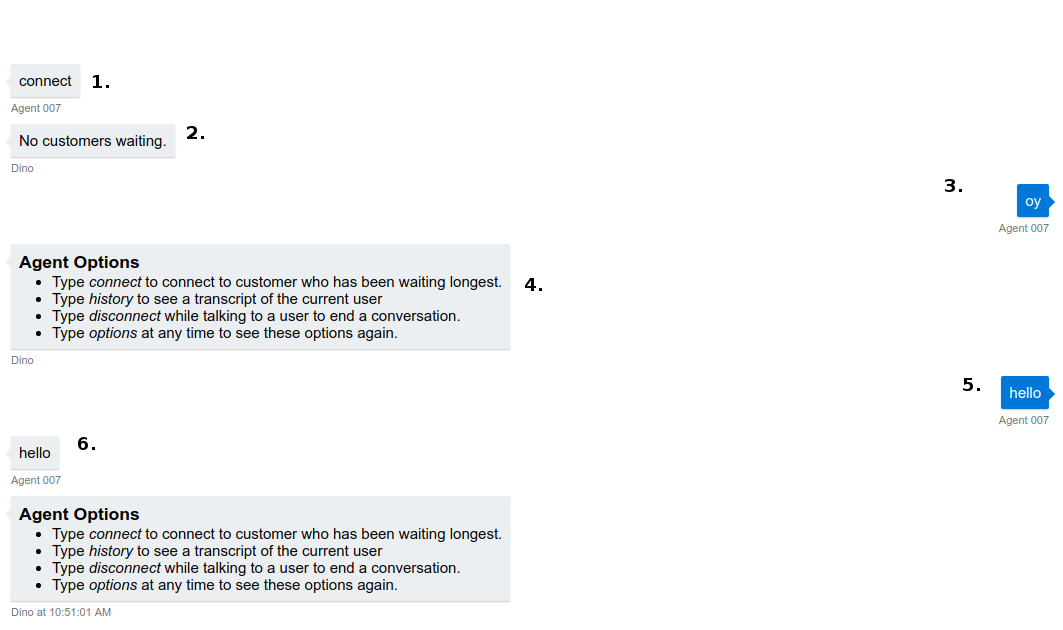
Follows the explanation of the denoted numbers:
- By using the backchannel (on the click of a button on the webpage) directline sends a message type event containing the 'connect' string as value (code is below). It isn't suppose to render in the webchat and also it renders as a message from bot (wrong side).
  .postActivity({
    from: user, // Agent007
    type: 'message',
    text: 'connect'
  })
  .subscribe(
    id => console.log('Posted activity, assigned ID ', id),
    error => console.log('Error posting activity', error)
  );
Bot responds with a predefined message,
Agent sends the message: 'oy',
Bot responds with a predefined message,
Agent sends the message: 'hello',
Just before the Agent's 'hello' message was sent, webchat renders that message on the bot-side, and then it renders the bot's predefined message just underneath.
NOTE There is no rule: it happends every now and then, especially if the webchat user (Agent) is sending messages too fast to the bot.
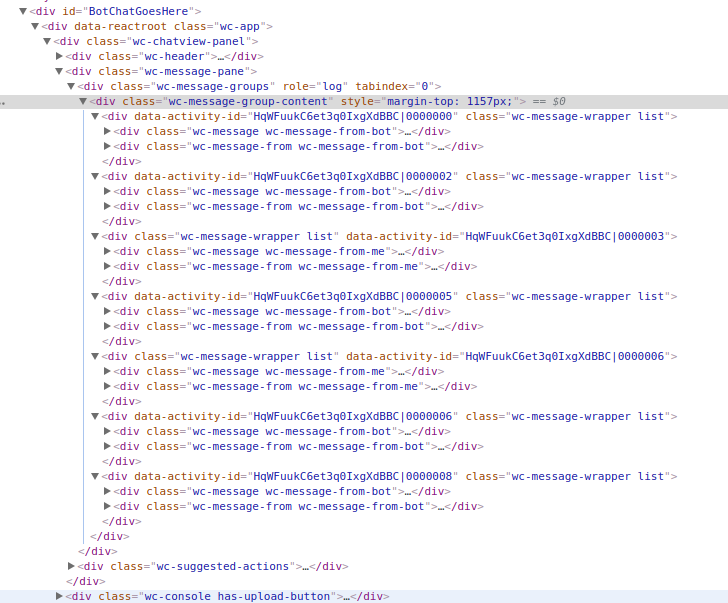
Below is the webchat created html for the previously described scenario:
 filipjakov
All 4 comments
Probably the user ID sent by Bot Framework (a.k.a. Direct Line service) does not match to what you set on Web Chat.
For example, in your graph, 5 is what we sent to Bot Framework (show up on right hand side). And 6 is what Bot Framework echoed back. The message echoed back is almost the same as the one we sent, thus, when we receive this echo back message, we will replace it with the existing one. Looks like the activity sent and received has different user ID, thus, the received echo back is not recognized as a message sent by the user (show up on right hand side).
We use this echo back message for various purpose:
- When we receive the echo back, we are sure the message is successfully sent to the bot (so we won't show "send failed, retry" status)
- The echoed back message will have an assigned activity ID
- If the message sent contains a file attachment, the echo back message will have the URL for the location that store the uploaded file
When we receive the echo back message, we replace it with the one in memory. So that's why you will see 5 become 6, if the user ID does not match.
Are you using token to authenticate with Direct Line?
There is a recent blog post talks about the new token returned from Direct Line.
The token is a JWT (JSON Web Token). For security reason, we now burnt the user ID inside the token so it cannot be forged. So can you check if the user ID inside the token differs from what you set in Web Chat?
In Web Chat v4, if the Direct Line token contains the user ID, we will use the user ID inside token, ignoring the one that passed in. To decode the token, you can look at this PR.
 compulim
on 31 Oct 2018
compulim
on 31 Oct 2018
@compulim Thank you for your fast and elaborate reply. I found the bug to be the number literal assigned to the id field of the user object (user: { id: id, name: name}), which was fed to the BotChat.App. When I convert it to a string, everything works as planned.
filipjakov
on 31 Oct 2018
Good to know it fixed. :)
compulim
on 31 Oct 2018
Oh, and if you have time, feel free to try out the new Web Chat. There are some live demos on this page.
compulim
on 31 Oct 2018
Related issues
 prashanthsridhar
·
3Comments
compulim
·
3Comments
prashanthsridhar
·
3Comments
compulim
·
3Comments
 mmalaiarasan-conga
·
3Comments
mmalaiarasan-conga
·
3Comments
 electrobabe
·
4Comments
electrobabe
·
4Comments
 Stardox
·
3Comments
Stardox
·
3Comments