Botframework-webchat: [WebChat] CardAction Only sends "Text" back to the bot
Using WebChat, we are sending CardActions either as SuggestedActions or as HeroCard Buttons.
The issue we are facing is that we can not differentiate between a SuggestedAction pressed or a normal text message. Whenever the SuggestedAction is pressed, we only receive is the "Text" field of that CardAction
- We have tried to send it as postBack or imBack
- We made sure Type, Value, Title, Text, DisplayText are filled
- Only the Text field comes back to the bot, all others are null - We tried to fill the ChannelData field but this always returns back only the ClientActivityID
- When using CardAction as postBack inside hero cards, we get "postBack": true inside of ChannelData, and we receive the payload inside the "Text" field
When dealing with hero cards we can check if ChannelData has "postBack": true , if so then the "Text" would be the payload but what can we do to get the payload from a SuggestedAction ?
Using Javascript integration of WebChat
https://cdn.botframework.com/botframework-webchat/latest/webchat.js`
window.WebChat.renderWebChat(
                    {
                       directLine: window.WebChat.createDirectLine({
                          token: TokenFetched
                       }),
                        styleOptions: {
                          rootHeight: '100%',
                          rootWidth: '100%'
                            },
                       userID: '1',
                       username: 'Marc'
                    },
                    document.getElementById('webchat')
                 );
Thank you
 marcasmar94
All 3 comments
@marcasmar94 thanks for filing this issue. Could you please provide your code related to the suggested actions / hero card implementations?
 corinagum
on 11 Oct 2019
corinagum
on 11 Oct 2019
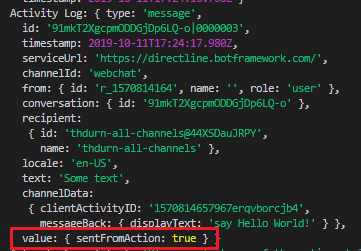
@marcasmar94 I would recommend using a messageBack action instead of a postBack. It includes the action's value property where you can indicate how the activity was sent. Take a look at the code snippets below.
Bot Framework SDK v4 (Node)
this.onMessage(async (context, next) => {
  await context.sendActivity({
    text: 'Please select one of the actions below',
    suggestedActions: {
      actions: [
        {
          displayText: 'say Hello World!',
          title: 'Message back as JSON with display text',
          text: 'Some text',
          type: 'messageBack',
          value: {
            sentFromAction: true
          },
        }
      ]
    }
  });
Response
 tdurnford
on 11 Oct 2019
tdurnford
on 11 Oct 2019
Thank you @tdurnford , using messageBack got the desired result. 👍
marcasmar94
on 12 Oct 2019
Related issues
 AndreMantas
·
4Comments
AndreMantas
·
4Comments
 compulim
·
3Comments
compulim
·
3Comments
 1Copenut
·
3Comments
1Copenut
·
3Comments
 joshm998
·
3Comments
compulim
·
3Comments
joshm998
·
3Comments
compulim
·
3Comments