Botframework-composer: Array data binding in adaptive card (little similar to issue #3422)
Hi,
This is similar issue related to #3422 , in Bot composer, I'm trying to databind the json array to columnset columns to the .lg file to generate a table structure. It is not working, but working in adaptive designer site. I wish that is supported in Bot composer as it is(since that is the highlighted feature of product). But you mentioned its not supported in native composer and gave some work around. I'm trying to generate a table with dynamic rows. Is there any code workaround how to achieve that?
##Below is my SCHEMA ###########:

#####JSON Data
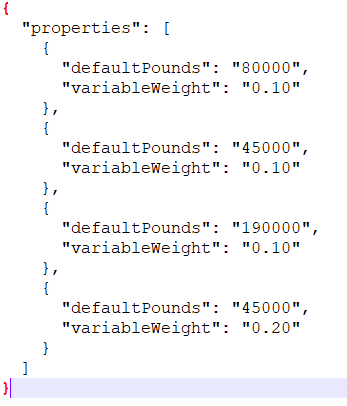
###### Actual output in BOT emulator

# OUTPUT i need and its working in Adaptive card designer, but not in composer
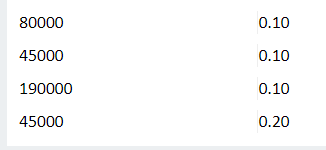
Please help on this or suggest available features in composer to achieve this. we will be using lot of table structures as bot response.
Thanks,
Sri
 sriget
All 4 comments
@sriget is the content parameter the JSON Data in your description?
This seems like it could be a gap in lg/expressions. @vishwacsena or @boydc2014 can you comment?
 cwhitten
on 6 Aug 2020
cwhitten
on 6 Aug 2020
@sriget is the
contentparameter the JSON Data in your description?This seems like it could be a gap in lg/expressions. @vishwacsena or @boydc2014 can you comment?
yes @cwhitten . content parameter is the json data i posted. thanks for taking look on it so quick.
sriget
on 6 Aug 2020
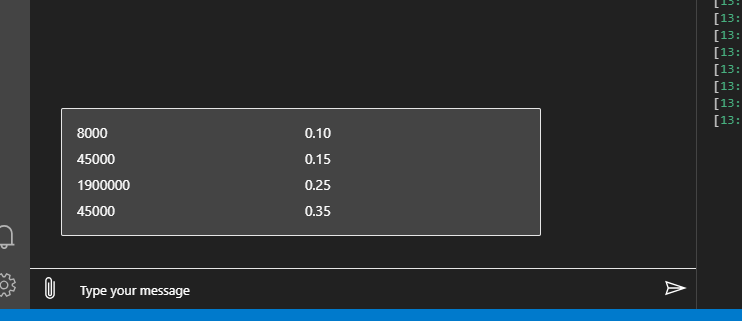
@sriget as it was noted in #3422 adaptive card templating preview feature is not supported but you can achieve your desired outcome using language generation. Here is an example.
(remove the backslashes)
# adaptiveCardTemplate()
[Activity
    Attachments = ${json(genAdaptiveCard(json(getProperties()).properties))}
]

# genAdaptiveCard (collection)
- ```
{
    "type": "AdaptiveCard",
    "$schema": "http://adaptivecards.io/schemas/adaptive-card.json",
    "version": "1.2",
    "body": [
        ${join(foreach(collection, item, getColumnSet(item.defaultPounds, item.variableWeight)), ',')}
    ]
}
\```

# getColumnSet (key, value)
- ```
{
    "type": "ColumnSet",
    "columns": [
        {
            "type": "Column",
            "width": "stretch",
            "items": [
                {
                    "type": "TextBlock",
                    "text": "${key}"
                }
            ]
        },
        {
            "type": "Column",
            "width": "stretch",
            "items": [
                {
                    "type": "TextBlock",
                    "text": "${value}"
                }
            ]
        }
    ]
}
\```

> This would come from your state. For now just emulating it via LG.
# getProperties
- \```
{
    "properties": [
        {
            "defaultPounds": "8000",
            "variableWeight": "0.10"
        },
        {
            "defaultPounds": "45000",
            "variableWeight": "0.15"
        },
        {
            "defaultPounds": "1900000",
            "variableWeight": "0.25"
        },
        {
            "defaultPounds": "45000",
            "variableWeight": "0.35"
        }
    ]
}
\```
 vishwacsena
on 7 Aug 2020
vishwacsena
on 7 Aug 2020
Thank you @vishwacsena . This example is excellent to understand better. It works. Appreciate your quick response.
sriget
on 8 Aug 2020
Related issues
 stephanbisser
·
21Comments
stephanbisser
·
21Comments
 hraz-msft
·
21Comments
hraz-msft
·
21Comments
 arafattehsin
·
15Comments
arafattehsin
·
15Comments
 kalebk
·
16Comments
kalebk
·
16Comments
 DS2019
·
21Comments
DS2019
·
21Comments
Most helpful comment
@sriget as it was noted in #3422 adaptive card templating preview feature is not supported but you can achieve your desired outcome using language generation. Here is an example.
(remove the backslashes)