Botbuilder-samples: MultiTurnPromptBot responds out of order when run via Microsoft Teams
Sample information
- Sample type: Sample
- Sample language: dotnetcore
- Sample name: MultiTurnPromptBot
Describe the bug
Conversation is out of order when run via Teams
To Reproduce
Steps to reproduce the behavior:
- Publish to team.
- Run in teams
- Notice questions are re-asked and appear out of order.
Expected behavior
Waterfall steps should be maintained
Screenshots
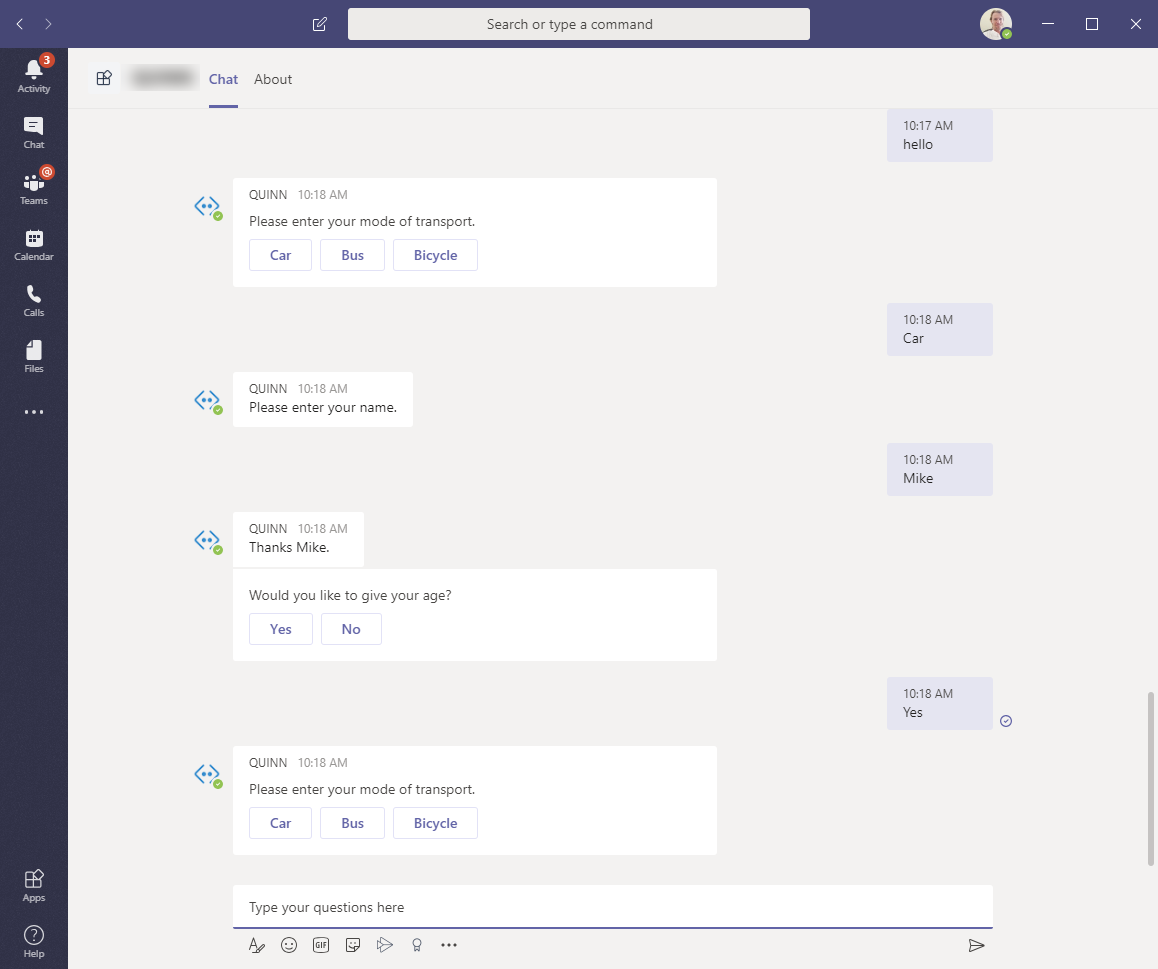
 mjanulaitis
All 17 comments
@mjanulaitis Unfortunately, I'm not able to reproduce this. What version of bot SDK are you running? (I'm running 4.7.0)
 dmvtech
on 11 Jan 2020
dmvtech
on 11 Jan 2020
@dmvtech I am running version 4.7.0.
mjanulaitis
on 12 Jan 2020
@mjanulaitis Are you able to reproduce the issue when debugging locally and using ngrok/service bus? I'm wondering if we can maybe figure out why it is doing this in that way.
Alternatively, have you configured either your bot or bot channels registration for Application Insights? We can also use that to get an idea of what is happening.
dmvtech
on 14 Jan 2020
hi @mjanulaitis Just checking in. Did you still need assistance. Wondering if we can do any of the steps I mentioned above to further troubleshoot the issue.
dmvtech
on 23 Jan 2020
The bug never appears when run locally. I can build any of the Microsoft samples and push them to Azure. They all have the same issue.
mjanulaitis
on 23 Jan 2020
Ah, ok. Let me run some more tests.
dmvtech
on 23 Jan 2020
Have you had the time to install any of the Microsoft samples into Azure and test via the Test in Web Chat? I can reproduce the bug with any sample I try.
mjanulaitis
on 30 Jan 2020
I am testing now. Stand by.
dmvtech
on 30 Jan 2020
I am still not able to reproduce this, but it appears that I might be using a slightly newer sample (I don't notice the prompt for the attachment/picture at the end of the dialog). Can you make sure you're using the most recent sample and try? Additionally, let me know which commit you are going off of or share your sample in a repo. I will try and go back to an older commit and see if I can repro.
dmvtech
on 30 Jan 2020
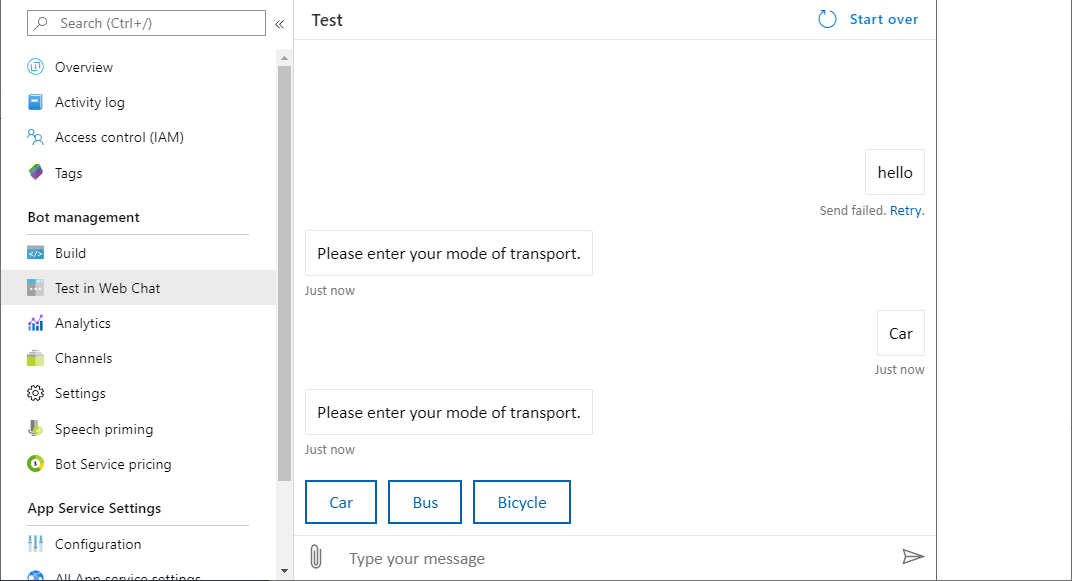
I pulled again and re-published. Same results:
mjanulaitis
on 30 Jan 2020
WEIRD.
@Virtual-Josh Any ideas here? _nevermind Josh, not really a Teams thing_
dmvtech
on 30 Jan 2020
Oh, wait. This a _little_ different. The first message is reporting failing, but bot is still responding. It's not failing at the same point. Is it random on where it 'fails'? meaning; it doesn't respond, out of order, at the same spot always, correct?
dmvtech
on 30 Jan 2020
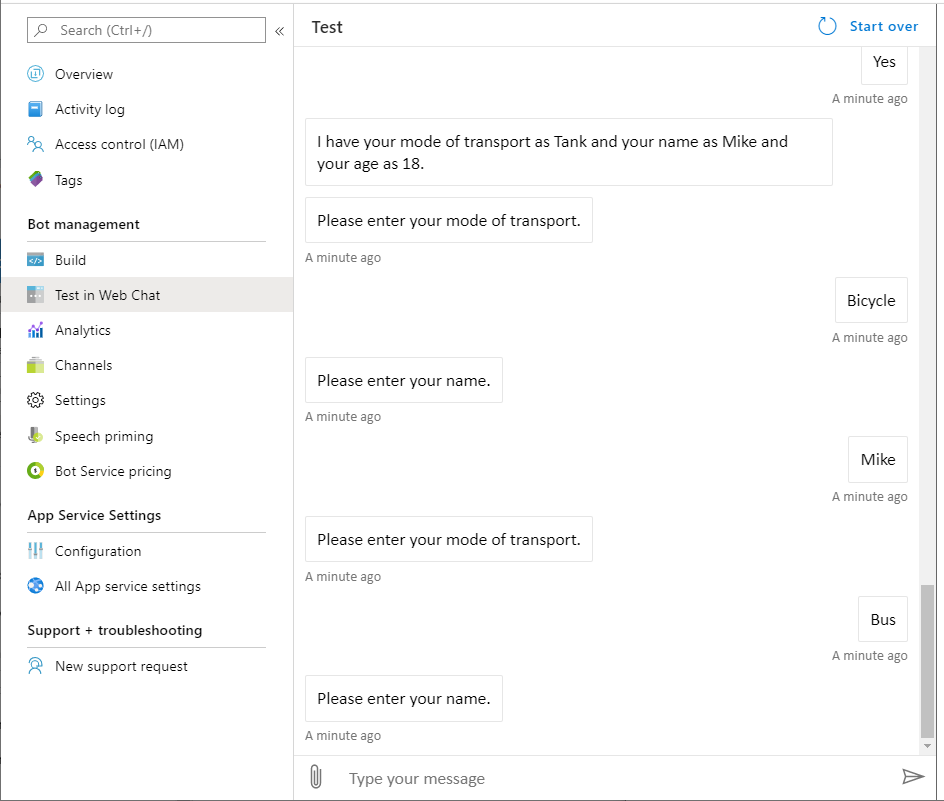
Yes that is correct. The failure is totally random. I Just tried again and was able to get through the entire session then this happened when trying again:
mjanulaitis
on 30 Jan 2020
This is really, really strange.
Do you ever see the final step, regarding the attachment? You should see _either_:
Skipping attachment prompt in Teams channel...
OR
Please attach a profile picture (or type any message to skip).
To ensure there's no problem with the publishing and confirm that changes are being pushed to the correct place, can you update the following strings in the UserProfileDialog.cs file, publish and test again?
"Please enter your name." to "Please enter your name.NNN"
"Would you like to give your age?" to "Would you like to give your age?NNN"
Finally, since you pulled the newest commit of the samples and have not changed them, can you please confirm the following lines in startup.cs are _exactly_ as below:
// Create the storage we'll be using for User and Conversation state. (Memory is great for testing purposes.)
services.AddSingleton<IStorage, MemoryStorage>();

// Create the User state. (Used in this bot's Dialog implementation.)
services.AddSingleton<UserState>();

// Create the Conversation state. (Used by the Dialog system itself.)
services.AddSingleton<ConversationState>();

// The Dialog that will be run by the bot.
services.AddSingleton<UserProfileDialog>();
If you take a look at the second screen shot you can see I have been changing one of the names of the selection options. In the last case from Car to Tank. This way I can verify the latest code I pulled is actually running. I verified the startup is unmodified and contains the block as you listed above. Finally, yes I am able to occasionally get all the way through the attachment screen.
mjanulaitis
on 31 Jan 2020
I took a look and I think that checking for DialogTurnStatus.Waiting should be all that is needed. And this is already being done as this is using UserProfileDialog which inherits from ComponentDialog.
The other thought I had; is your App Service (plan) scaled out? I was just curious if maybe you have multiple instances of the bot that are running, and with memory state, you are essentially talking to two different running instances of the bot. (one message goes to one bot, the next message goes to the other). This would be solved by using a persistent state storage, multiple running bots would all use one state storage and know exactly where you were in conversation.
dmvtech
on 3 Feb 2020
The bot should have only been on one server. I am no longer working on this project and am unable to continue the support issue. Thank you for your help thus far.
mjanulaitis
on 3 Feb 2020
Related issues
 arunprasathv
·
3Comments
arunprasathv
·
3Comments
 Batta32
·
9Comments
Batta32
·
9Comments
 cleemullins
·
5Comments
cleemullins
·
5Comments
 pesarkhobeee
·
9Comments
pesarkhobeee
·
9Comments
 feich-ms
·
9Comments
feich-ms
·
9Comments