Botbuilder-samples: Failed to acquire token for client credentials.
I am currently following Teams Conversation Bot sample. I have followed it to the letter as far as i can see.
What works.
When i talk to the bot though the web view

I can see it hitting the code on my localhost.
 protected override async Task OnMessageActivityAsync(ITurnContext<IMessageActivity> turnContext, CancellationToken cancellationToken)
        {
            turnContext.Activity.RemoveRecipientMention();

            switch (turnContext.Activity.Text.Trim())
            {
                case "MentionMe":
                    await MentionActivityAsync(turnContext, cancellationToken);
                    break;

                case "UpdateCardAction":
                    await UpdateCardActivityAsync(turnContext, cancellationToken);
                    break;

                case "Delete":
                    await DeleteCardActivityAsync(turnContext, cancellationToken);
                    break;

                case "MessageAllMembers":
                    await MessageAllMembersAsync(turnContext, cancellationToken);
                    break;

                default:
                    var value = new JObject { { "count", 0 } };

                    var card = new HeroCard
                    {
                        Title = "Welcome Card",
                        Text = "Click the buttons below to update this card",
                        Buttons = new List<CardAction>
                        {
                            new CardAction
                            {
                                Type= ActionTypes.MessageBack,
                                Title = "Update Card",
                                Text = "UpdateCardAction",
                                Value = value
                            },
                            new CardAction
                            {
                                Type = ActionTypes.MessageBack,
                                Title = "Message all members",
                                Text = "MessageAllMembers"
                            }
                        }
                    };

                    await turnContext.SendActivityAsync(MessageFactory.Attachment(card.ToAttachment()));
                    break;
            }
        }
what doesn't work
It appears to send the response back but nothing appears in the response window. How do i test this if it doesn't show the response?
Ngrok error
After a bit more digging I can see that ngrok is getting an error back of sorts its a web page I managed to pick the following error out of it.
AggregateException: Failed to acquire token for client credentials. (AADSTS700016: Application with identifier '9e0d71-7665-4f24-8898-f82f9bebba56' was not found in the directory 'botframework.com'. This can happen if the application has not been installed by the administrator of the tenant or consented to by any user in the tenant. You may have sent your authentication request to the wrong tenant.
Trace ID: 4bf53bae-84dc-4b16-98e8-e99b322dc200
Correlation ID: 3c249469-d177-49dd-989f-80044a3b9faa
Timestamp: 2019-11-12 08:41:56Z) (AADSTS700016: Application with identifier 'e0d71-7665-4f24-8898-f82f9bebba56' was not found in the directory 'botframework.com'. This can happen if the application has not been installed by the administrator of the tenant or consented to by any user in the tenant. You may have sent your authentication request to the wrong tenant.
I have checked the settings on the bot and the application itself. They have the same secret and application client id.

botframework.com appears to contain a list of bots that were created on azure.
What i have tried.
- Visual studio is running as administrator.
Chckedbotframework.com my bot is listed.
Users have the write to create apps in AD, I am currently the only user anyway.

web chat errors
I can see in the bot that its logging errors with the web chat

The thing is the bot is responding.
Emulator
Running the emulator does work. The issue appears to be with the setup of the bot on azure.
Cross posted here https://stackoverflow.com/q/58814879/1841839
 LindaLawton
All 19 comments
It looks like something might have gone sideways when you registered your bot on Azure. Can I get your bot channel registration's app ID?
 jwiley84
on 12 Nov 2019
jwiley84
on 12 Nov 2019
Sure thing 829e0d71-7665-4f24-8898-f82f9bebba56 I have tried recreating the bot a few times. I also tried with echo bot there is no change that one can call the code from azure web chat but the response never makes it back to the web chat.
I have considered deploying it but I am not sure how thats going to work when the settings are read from env vars in azure but these samples appear to only read from app.settings json.
LindaLawton
on 13 Nov 2019
Looking into this.
jwiley84
on 13 Nov 2019
I went ahead and enabled logging in the bot and pushed it up to Azure. I am seeing the same error there
Trace ID: 7d65b26f-b461-4906-803f-b637cad53401
Correlation ID: 9fe70397-dbf6-4bde-a361-b19abf7f090f
Timestamp: 2019-11-14 14:39:50Z) (AADSTS700016: Application with identifier '829e0d71-7665-4f24-8898-f82f9bebba56' was not found in the directory 'botframework.com'. This can happen if the applica
tion has not been installed by the administrator of the tenant or consented to by any user in the tenant. You may have sent your authentication request to the wrong tenant.
Trace ID: 7d65b26f-b461-4906-803f-b637d2d53401
Any info on this would be great because i was due to show this to some people on Friday as a proof of concept. Is this something i am doing wrong or is it an issue on Azures end?
LindaLawton
on 14 Nov 2019
because you're running this in localhost, let's check your appsettings.json. Have you updated it with your MicrosoftAppId and AppPassword?
{
  "MicrosoftAppId": "829e0d71-7665-4f24-8898-f82f9bebba56",
  "MicrosoftAppPassword": "tu0<rest of your password here>"
}
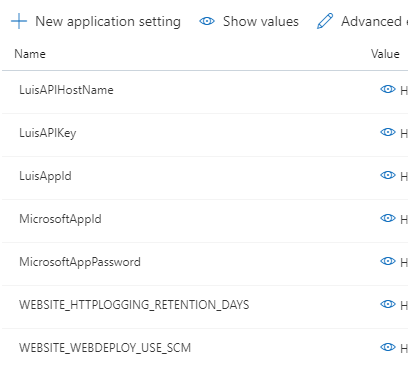
Yes as all of the settings have been added to the app.settings json file. if they were not there then Azure would not be responding with the App id i sent which is in the error message
Application with identifier '829e0d71-7665-4f24-8898-f82f9bebba56' was not found in the directory 'botframework.com'.
As menonted in my last message i suspected it may have something to do with localhost so I published it to Azure. It is also configured properly and returns the same error message. 829e0d71-7665-4f24-8898-f82f9bebba56 can not be found.
LindaLawton
on 15 Nov 2019
When you say you published to azure, do you mean you published the whole bot? Like I said earlier, I think something went wrong when you published.
I'm not normally a fan of the "turn it off and back on again" method, but in this case, I recommend you redeploy in a fresh deployment.
jwiley84
on 18 Nov 2019
Visual studio publish to azure. Then set the azure endpoint of the bot to the endpoint of the bot.
Yes all the parameters have been added as needed
LindaLawton
on 20 Nov 2019
What happens if you do the same type of deployment with a standard (non-teams bot)?
jwiley84
on 26 Nov 2019
No idea TBH I am doing this by following your tutorials.
Btw doing it through the cli works creating everything through the azure website fails. Might give you an idea how to test this
LindaLawton
on 27 Nov 2019
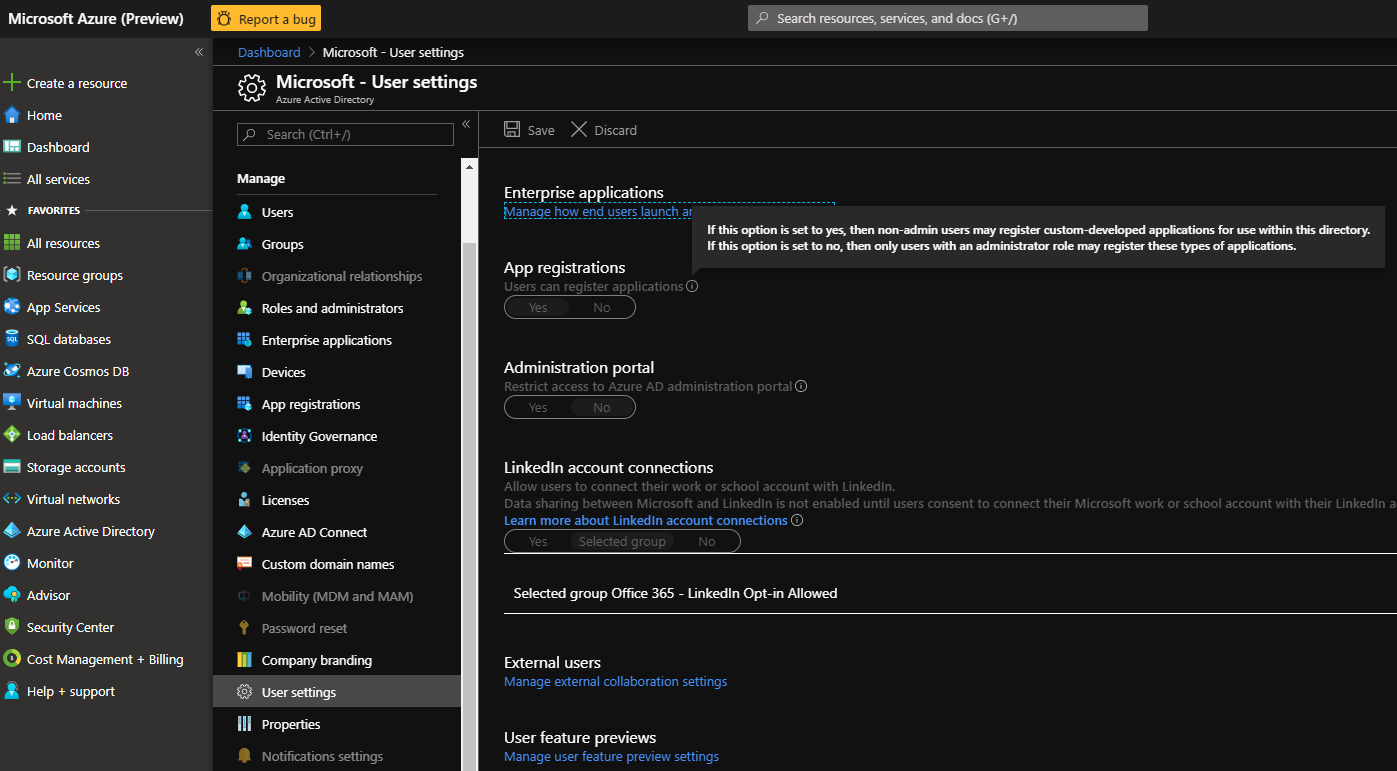
I'm waiting for a response to an email, but can you try something for me? In your Azure Active Directory (in your Azure portal), can you check your settings to see if you can register apps? It's possible that your app was deployed correctly, in that it's in Azure, but not registered, so it's not actually functioning, just sitting there:
jwiley84
on 2 Dec 2019
Sorry i cant help anymore this project was done for a client I am now out of azure time on my free account. I dont think i can spinn anything up anymore.
LindaLawton
on 10 Dec 2019
I'm sorry we weren't able to resolve what was going on with your bot. If you need further assistance on this matter, please feel free to reopen this issue.
jwiley84
on 19 Dec 2019
@jwiley84 - I'm having the exact problem. Can we reopen this issue?
 carlosromero68
on 12 Jan 2020
carlosromero68
on 12 Jan 2020
@carlosromero68 idk if you still need it but i had what looks like this problem and i had to change the manifest. http://thewindowsupdate.com/2019/08/19/how-to-create-an-app-registration-in-azure-ad-for-a-bot-solution/
 HatBeardZero
on 2 Apr 2020
HatBeardZero
on 2 Apr 2020
Solution to this was that you can not create it though the UI you need to do it all though the CLI. Something in the UI must be broken that it does not properly create things in the backend as soon as you do it though the CLI it all worked.
LindaLawton
on 31 Aug 2020
Hi,
I am getting same error as started this thread. I have followed all the troubleshooting as mentioned above, but still issue is not resolved.
could you please check this. Details are below:
I am trying to debug the simple bot in visual code using node.js with ngrok.
I am able to debug successfully without any in bot emulator. but when I am trying to debug using Teams, i am getting the following error message in visual code terminal.
POST /api/messages 401 88 - 3.377 ms
(node:9700) UnhandledPromiseRejectionWarning: Error: BotFrameworkAdapter.processActivity(): 401 ERROR
Error: Unauthorized. Invalid AppId passed on token: 5c629fa6-0ffa-4336-a404-8826971a490d
at D:\Projects\BAIN\Source Code\POC\BAIN-BOT\node_modules\botframework-connectorlib\auth\channelValidation.js:92:23
at Generator.next (
at fulfilled (D:\Projects\BAIN\Source Code\POC\BAIN-BOT\node_modules\botframework-connectorlib\auth\channelValidation.js:4:58)
at process._tickCallback (internal/process/next_tick.js:68:7)
at BotFrameworkAdapter.
at Generator.throw (
at rejected (D:\Projects\BAIN\Source Code\POC\BAIN-BOT\node_modules\botbuilderlib\botFrameworkAdapter.js:12:65)
at process._tickCallback (internal/process/next_tick.js:68:7)
(node:9700) UnhandledPromiseRejectionWarning: Unhandled promise rejection. This error originated either by throwing inside of an async function without a catch block, or by rejecting a promise which was not handled with .catch(). (rejection id: 7)
Application Insights Logs: - Microsoft.IdentityModel.Clients.ActiveDirectory.AdalServiceException:
Failed to acquire token for client credentials. (AADSTS700016: Application with identifier '5c629fa6-0ffa-4336-a404-8826971a490d' was not found in the directory 'botframework.com'. This can happen if the application has not been installed by the administrator of the tenant or consented to by any user in the tenant. You may have sent your authentication request to the wrong tenant.
Trace ID: 53a75490-0502-4f73-988a-1563c4a24600
Correlation ID: 6c95cea2-58c2-4e53-b5e2-661c1e5bbfd9
Timestamp: 2021-01-01 11:44:28Z
 ganeshglitz
on 2 Jan 2021
ganeshglitz
on 2 Jan 2021
When you set up the bot do it though the CLI dont try to do it though the web interface. Thats how i got it working.
LindaLawton
on 4 Jan 2021
Hi,
I am getting same error as started this thread. I have followed all the troubleshooting as mentioned above, but still issue is not resolved.
could you please check this. Details are below:
I am trying to debug the simple bot in visual code using node.js with ngrok.
I am able to debug successfully without any in bot emulator. but when I am trying to debug using Teams, i am getting the following error message in visual code terminal.
POST /api/messages 401 88 - 3.377 ms
(node:9700) UnhandledPromiseRejectionWarning: Error: BotFrameworkAdapter.processActivity(): 401 ERROR
Error: Unauthorized. Invalid AppId passed on token: 5c629fa6-0ffa-4336-a404-8826971a490d
at D:\Projects\BAIN\Source Code\POC\BAIN-BOT\node_modules\botframework-connectorlib\auth\channelValidation.js:92:23
at Generator.next ()
at fulfilled (D:\Projects\BAIN\Source Code\POC\BAIN-BOT\node_modules\botframework-connectorlib\auth\channelValidation.js:4:58)
at process._tickCallback (internal/process/next_tick.js:68:7)
at BotFrameworkAdapter. (D:\Projects\BAIN\Source Code\POC\BAIN-BOT\node_modules\botbuilderlib\botFrameworkAdapter.js:674:27)
at Generator.throw ()
at rejected (D:\Projects\BAIN\Source Code\POC\BAIN-BOT\node_modules\botbuilderlib\botFrameworkAdapter.js:12:65)
at process._tickCallback (internal/process/next_tick.js:68:7)
(node:9700) UnhandledPromiseRejectionWarning: Unhandled promise rejection. This error originated either by throwing inside of an async function without a catch block, or by rejecting a promise which was not handled with .catch(). (rejection id: 7)Application Insights Logs: - Microsoft.IdentityModel.Clients.ActiveDirectory.AdalServiceException:
Failed to acquire token for client credentials. (AADSTS700016: Application with identifier '5c629fa6-0ffa-4336-a404-8826971a490d' was not found in the directory 'botframework.com'. This can happen if the application has not been installed by the administrator of the tenant or consented to by any user in the tenant. You may have sent your authentication request to the wrong tenant.
Trace ID: 53a75490-0502-4f73-988a-1563c4a24600
Correlation ID: 6c95cea2-58c2-4e53-b5e2-661c1e5bbfd9
Timestamp: 2021-01-01 11:44:28Z
I've encountered the same issue, here is how I resolve it.
- go to your bot in the Azure portal
- select the 'Authentication' menu on the left panel
- select 'Accounts in any organizational directory (Any Azure AD directory - Multitenant)' in the 'Supported account types' as below

 libindavis
on 10 Jan 2021
libindavis
on 10 Jan 2021
Related issues
 Batta32
·
9Comments
Batta32
·
9Comments
 pesarkhobeee
·
9Comments
pesarkhobeee
·
9Comments
 WashingtonKayaker
·
9Comments
WashingtonKayaker
·
9Comments
 jackiebecker
·
5Comments
jackiebecker
·
5Comments
 feich-ms
·
9Comments
feich-ms
·
9Comments
Most helpful comment
@carlosromero68 idk if you still need it but i had what looks like this problem and i had to change the manifest. http://thewindowsupdate.com/2019/08/19/how-to-create-an-app-registration-in-azure-ad-for-a-bot-solution/