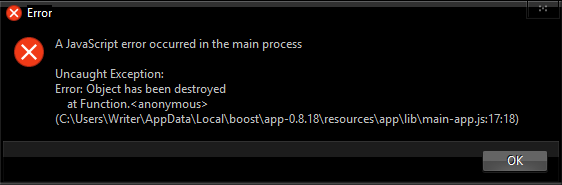
Keeps crashing, can not trace problem.
Runs fine on install.
After closing, does not re-launch.
All I did was set the UI theme to Dark and editor style to dracula!
Sometimes it re-launches after 4 or 5 attempts, often it does not do even that.
Launches OK if re-installed.
See attached pop-up error:
 washere
All 10 comments
Hi @washere , could you teach your environment?
 kazup01
on 10 Dec 2017
kazup01
on 10 Dec 2017
C:\Users\Writer\Desktop>set
ALLUSERSPROFILE=C:\ProgramData
APPDATA=C:\Users\Writer\AppData\Roaming
AWE_DIR=C:\Program Files (x86)\Khrona LLC\Awesomium SDK\1.6.6\
CommonProgramFiles=C:\Program Files\Common Files
CommonProgramFiles(x86)=C:\Program Files (x86)\Common Files
CommonProgramW6432=C:\Program Files\Common Files
COMPUTERNAME=WRITER
ComSpec=C:\WINDOWS\system32\cmd.exe
docear_bibtex_current=C:\Users\Writer\Desktop_data\15ECFE42ED033U1C4RTTT56X5T2W8FDGXM7P\default_files\default.bib
FPS_BROWSER_APP_PROFILE_STRING=Internet Explorer
FPS_BROWSER_USER_PROFILE_STRING=Default
GTK_BASEPATH=C:\Program Files (x86)\GtkSharp\2.12\
HOMEDRIVE=C:
HOMEPATH=\Users\Writer
LOCALAPPDATA=C:\Users\Writer\AppData\Local
LOGONSERVER=\WRITER
NUMBER_OF_PROCESSORS=4
OS=Windows_NT
Path=C:\Python36\Scripts\;C:\Python36\;C:\Program Files (x86)\ActiveState Komodo IDE 11\;C:\ProgramData\Oracle\Java\javapath;C:\WINDOWS\system32;C:\WINDOWS;C:\WINDOWS\System32\Wbem;C:\WINDOWS\System32\WindowsPowerShell\v1.0\;C:\Program Files\Calibre2\;C:\Program Files (x86)\Scapple;C:\Program Files\Java\jre1.8.0_111\bin;C:\Users\Writer\AppData\Local\Microsoft\WindowsApps;C:\adb;C:\Program Files (x86)\get_iplayer;C:\Program Files (x86)\GtkSharp\2.12\bin;C:\Program Files\jEdit;C:\Program Files (x86)\Brackets\command;C:\Program Files\JSONBuddy;C:\ProgramData\Oracle\Java\javapath;C:\WINDOWS\system32;C:\WINDOWS;C:\WINDOWS\System32\Wbem;C:\WINDOWS\System32\WindowsPowerShell\v1.0\;C:\Program Files\Calibre2\;C:\Program Files (x86)\Scapple;C:\Program Files\Java\jre1.8.0_111\bin;C:\Users\Writer\AppData\Local\Microsoft\WindowsApps;C:\wamp64\bin\php\php7.0.10;C:\wamp64\bin\apache\apache2.4.23\bin;C:\wamp64\bin\mysql\mysql5.7.14\bin;C:\Users\Writer\AppData\Local\atom\bin;C:\Program Files\Microsoft VS Code\bin;C:\Users\Writer\AppData\Local\Pandoc\;C:\Python36;C:\Python27
PATHEXT=.COM;.EXE;.BAT;.CMD;.VBS;.VBE;.JS;.JSE;.WSF;.WSH;.MSC;.PY;.PYW
PROCESSOR_ARCHITECTURE=AMD64
PROCESSOR_IDENTIFIER=Intel64 Family 6 Model 37 Stepping 5, GenuineIntel
PROCESSOR_LEVEL=6
PROCESSOR_REVISION=2505
ProgramData=C:\ProgramData
ProgramFiles=C:\Program Files
ProgramFiles(x86)=C:\Program Files (x86)
ProgramW6432=C:\Program Files
PROMPT=$P$G
PSModulePath=C:\Program Files\WindowsPowerShell\Modules;C:\WINDOWS\system32\WindowsPowerShell\v1.0\Modules
PUBLIC=C:\Users\Public
SESSIONNAME=Console
SystemDrive=C:
SystemRoot=C:\WINDOWS
TEMP=C:\Users\Writer\AppData\Local\Temp
TMP=C:\Users\Writer\AppData\Local\Temp
USERDOMAIN=WRITER
USERDOMAIN_ROAMINGPROFILE=WRITER
USERNAME=Writer
USERPROFILE=C:\Users\Writer
VBOX_MSI_INSTALL_PATH=C:\Program Files\Oracle\VirtualBox\
windir=C:\WINDOWS
washere
on 11 Dec 2017
The same question happened to me when open Boostnote.
Any solution?
 dxj1113
on 11 Dec 2017
dxj1113
on 11 Dec 2017
So I had the same issue today and it was caused by some "ghost" processes. Open PowerShell and run get-process *Boostnote* | stop-process to stop all Boostnote related processes.
It seems like Boostnote is not always exiting correctly. I'll keep my eye out when it happens again.
PS C:\Users\glenn> get-process *boost*

Handles  NPM(K)    PM(K)      WS(K)     CPU(s)     Id  SI ProcessName
-------  ------    -----      -----     ------     --  -- -----------
    712      47    31996      66424      33.52   3748   1 Boostnote
    346      24    61432      30776       0.33   9176   1 Boostnote
 glego
on 17 Dec 2017
glego
on 17 Dec 2017
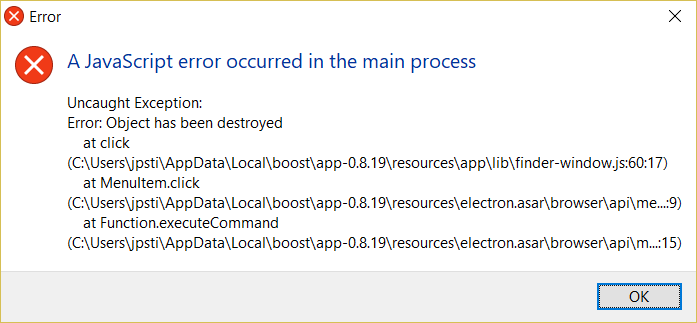
After I close the app when it initially opens, then try to run it again after, I get the following error:
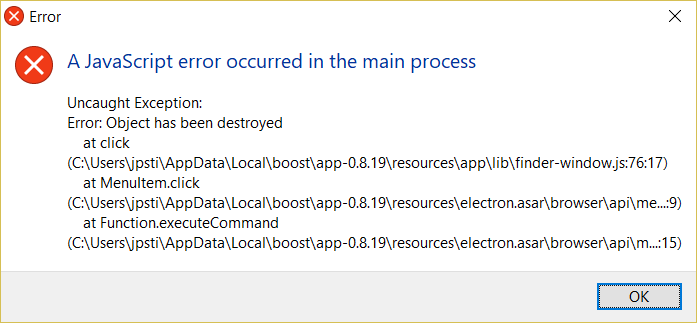
If I try to close the app via the system tray icon, I get the following error:
The only way to get it to open again is by the method @glego posed above, or by killing the process in Task Manager.
Using the Windows 64 bit build version 0.8.19
 JaimeStill
on 29 Dec 2017
JaimeStill
on 29 Dec 2017
On Windows 10 64 bit using 0.8.19, I hit this too and I temporarily avoid it by using the Ctrl+Q option. I hit all the same errors above only after using the main app windows X icon in the upper right corner. I suppose the exiting of the app (Ctrl+Q) is not supposed to be the same thing as closing the window but I can't reopen the window (via taskbar process icon or Super+Alt+E command or rerunning the Boostnote desktop icon) without closing the app via Ctrl+Q.
 gjatkinson
on 31 Dec 2017
gjatkinson
on 31 Dec 2017
@gjatkinson Just want to confirm this also happens for 8.20 on Linux. Ctrl-Q fine, X in corner leaves electron processes running and can't reopen.
$ uname -a
Linux <hostname> 4.14.15-1-ARCH #1 SMP PREEMPT Tue Jan 23 21:49:25 UTC 2018 x86_64 GNU/Linux
 chiroptical
on 29 Jan 2018
chiroptical
on 29 Jan 2018
Fixed!
 Rokt33r
on 3 Feb 2018
Rokt33r
on 3 Feb 2018
@barrymoo is right, I'm having the same issue on Linux Mint 18.3.
If I close the window with the X symbol, the processes keep running and I can't reopen. The problem does not occur with ctrl + q
Version 0.11.3
 wAuner
on 23 Mar 2018
wAuner
on 23 Mar 2018
@wAuner Please open another issue. The above problem was for Windows.
Rokt33r
on 23 Mar 2018
Related issues
 Ocanamat
·
3Comments
Ocanamat
·
3Comments
 dtgay
·
3Comments
dtgay
·
3Comments
 shunchuan
·
3Comments
shunchuan
·
3Comments
 ysshah
·
3Comments
ysshah
·
3Comments
 luong-komorebi
·
3Comments
luong-komorebi
·
3Comments
Most helpful comment
On Windows 10 64 bit using 0.8.19, I hit this too and I temporarily avoid it by using the Ctrl+Q option. I hit all the same errors above only after using the main app windows X icon in the upper right corner. I suppose the exiting of the app (Ctrl+Q) is not supposed to be the same thing as closing the window but I can't reopen the window (via taskbar process icon or Super+Alt+E command or rerunning the Boostnote desktop icon) without closing the app via Ctrl+Q.