Hello there,
I'm happy to announce the first beta release of bookmarks v3.0.0, which most notably includes sharing among a few other goodies. (Update: You can only share folders: Click on folder 'details' and then go to the 'Sharing' tab)
I would be glad to hear your feedback after trying it out in this thread as well as possible bugs in new issues. Don't forget to backup your database before trying this out!
Requirements are:
- PHP v7.2+
- PHP extensions mbstring and intl
- Nextcloud v17+
Changes in this release are:
- dac2cc7c2db177199bd82ecdfaec027b47c72f2b UI: Selection: Implement "select all" and "cancel selection"
- cbdcbf1af0afea9f995eca8a43978c8898f899fb Better document how the screeenly api url looks like
- 84e889a5f9d52f94ffeb5b0658cf9b7eef1fd842 Move UI: Automatically open current folder
- 63ef98d745e9867f83e23905d46313f1a693f2c7 Implement bookmark counting endpoints and UI indicators
- 18df1c1cf4a56e5893059dde4f70bacaa31fc5d3 Fix bookmark creation: Assign folders correctly
- aa0963c3aef0bee254a7883ded7f91d8dc95ab86 Drop tables on uninstall
- 796d6c8a268fa86965f7d2f08925fc55691aa178 Fix import and export
- 93e2df6f923a62b778f2b0589cdd666b78e51c12 Allow editing URLs
- 1ad192cfd394acf547e8dccee947472cd95d86cf Implement a full children endpoint
- 79b2922d197d08463f239de77dd85a0cf2ee839d Breadcrumbs: -AddBookmark button +Add Folder/Bookmark dropdown
- b543fab1803bb6092ffe73ebdac0cf06baf3933a Don't enable scraping by default
- 6d656d3242ea8f34b9d8c3a193168c80214d1f94 Drop libgmp dependency
- 768f311da5620379ea39a5e93f7eb7fa7fb854ed Implement hash caching
- Implement sharing and public links
- Major backend refactoring
Update: Here's the link to beta 2: https://github.com/nextcloud/bookmarks/releases/tag/v3.0.0-beta.2
Cheers! :space_invader:
 marcelklehr
All 47 comments
 sunjam
on 9 Apr 2020
sunjam
on 9 Apr 2020
v3.0.0-1 testing on NextcloudPi 18.0.3 stable. Firefox 74.0 (64-bit)
- [x] imported 1337 :sunglasses: bookmarks to InstanceB
- [x] Folder structure imported
- [x] Tags imported

- [x] Where are Untagged bookmarks?
I do not see any _Untagged_ bookmarks, of which I have plenty on InstanceA with regular bookmarks release. Has a tag been added to all of these bookmarks?
No bookmarks here
Try changing your query or add some using the button on the left. - [x] no folder icons displayed in
listview - [x] bookmarks icons displayed in
listviewincluding within folders - [x] double importing will create duplicate folders

- [x] no feedback or way to know an import is taking place.
I realize I'm importing a lot of bookmarks, but the user just has to trust that their bookmarks are being imported without visual indication of what is happening. - [x] recent bookmarks are now displayed in a new order. Just an fyi
- [x] when no server limit is set:
1337 bookmarks of 0 available
Might make more sense as1337 bookmarks available. reference - [x] bookmarks (...) menu not visible within bookmark folders on a 1920x1080 display and requires the scrollbar to access.

- [x] Unsure of where the new share option lives
Check selecting an individual bookmark, tried (...) menu, details menu. Not sure. - [ ] open Details Menu will block access to selection options &
switch viewicon until closed

sunjam
on 16 Apr 2020
@sunjam Sharing functionality is hidden in the folder details under the 'Sharing' tab ;)
marcelklehr
on 16 Apr 2020
Thank you very much for your work @marcelklehr. I did some initial tests with beta-1.
Environment
NC: 18.0.3
bookmarks: 3.0.0-beta.1
Working
- [x] create bookmark
- [x] delete bookmark
- [x] create folder
- [x] delete folder
- [x] move bookmark
- [x] move folder
Bugs
- [x] Delete All Bookmarks
- Displayed error: "Request failed with status code 500"
- Log entry: Exception: Call to undefined method OCA\Bookmarks\Db\FolderMapper::deleteAll()
- [x] 'Untagged' always empty
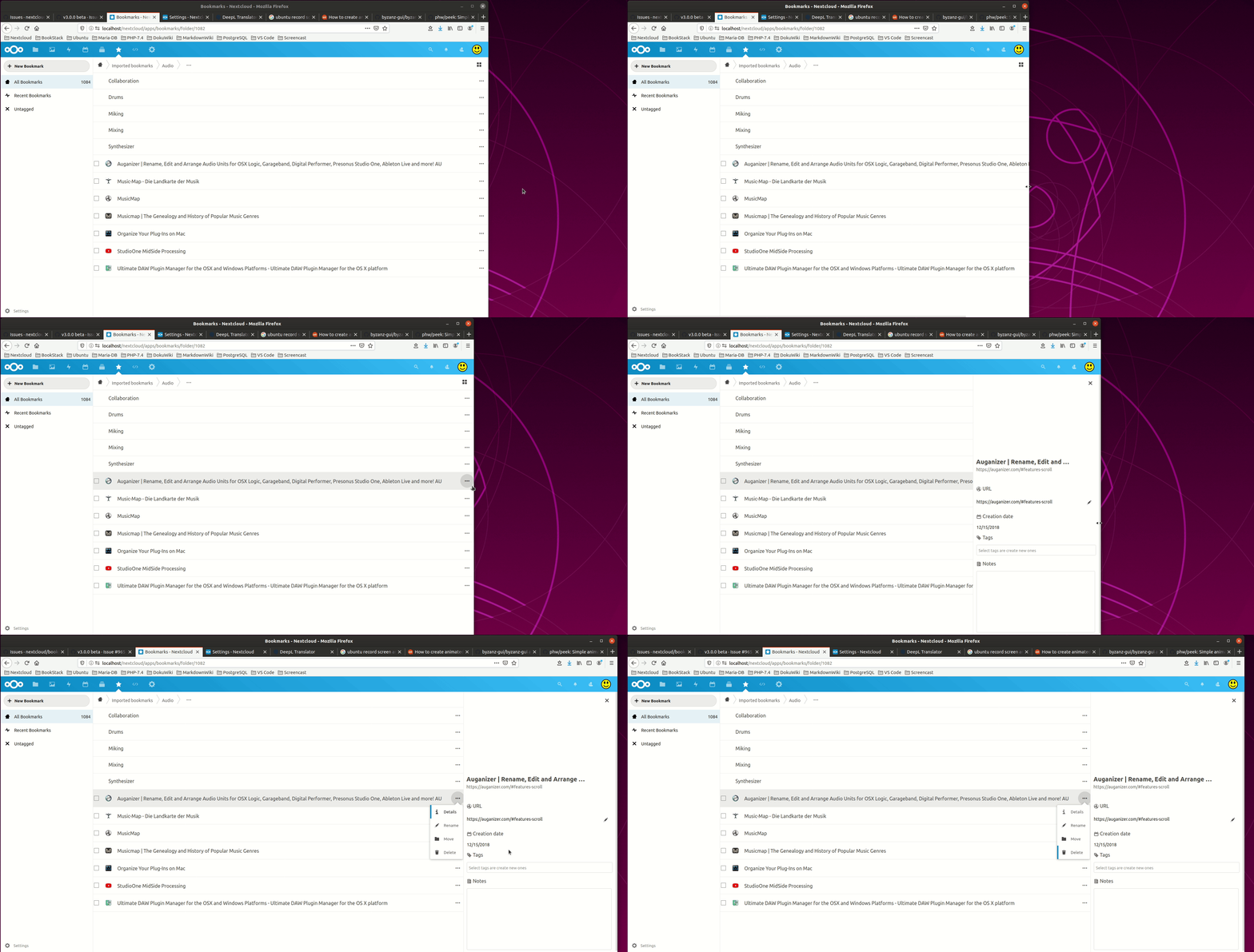
- [ ] Table view does sometimes not shrink when details pane is opened that the context menu is no longer accessible (see: https://github.com/nextcloud/bookmarks/issues/965#issuecomment-615655121)
- [x] Sharing folder is not yet possible
- no results even when entering an existing user or group name
- spinner spins forever
- [x] Import bookmarks
- duplicates folders but not the bookmarks. At least the number of stored bookmarks stays the same after second import
- page is not refreshed when import finished but needs to be refreshed manually
- Should we import bookmarks to a dedicated sub folder (e.g. Imported Bookmarks)?
- [x] Sorting:
- Bookmarks disappear when changing sorting
- Page often displays 'No bookmarks here' after changing sorting
Nice-to-Have
- Export bookmarks (https://github.com/nextcloud/bookmarks/issues/975):
- adjust file name
- choose folder where the export file should be stored
- Hover over a bookmark name could display the URL instead of the name (https://github.com/nextcloud/bookmarks/issues/976)
- Allow accessing the context menu with a right-click when Right-Click App is enabled (https://github.com/nextcloud/bookmarks/issues/977)
- Selection (https://github.com/nextcloud/bookmarks/issues/978):
- Allow (multi)-selection for folders and moving/deleting the multi-selection
- Within the selection context menu (top-right) allow 'select all in folder' beside 'select all visible'
If helpful I can take screenshots and/or videos...
 gibelium
on 17 Apr 2020
gibelium
on 17 Apr 2020
Regarding bookmarks Import: I've fixed the UI feedback issue.
duplicates folders but not the bookmarks. At least the number of stored bookmarks stays the same after second import
This is intentional, as the bookmarks app does not allow duplicates. Instead bookmarks can be in multiple folders at once. 🤯
Should we import bookmarks to a dedicated sub folder (e.g. Imported Bookmarks)?
I've thought about that but wasn't sure, what would be most expected. What do you think? Adding imports to a new folder is quite simple technically. We could even import into the currently active folder.
marcelklehr
on 17 Apr 2020
@gibelium
Sharing folder is not yet possible
Do you have nextcloud in a subfolder on your server?
marcelklehr
on 17 Apr 2020
This is intentional, as the bookmarks app does not allow duplicates. Instead bookmarks can be in multiple folders at once. 🤯
I'm totally fine ending up without duplicates after a second import. :-)
I think importing the same bookmarks twice is a more accidental use case...
I would import bookmarks into a new folder. When I'm right this is the way like Google Chrome and Firefox handle imports to, so people are used to it and you do not mess up your existing bookmarks.
gibelium
on 17 Apr 2020
Do you have nextcloud in a subfolder on your server?
Bookmarks app resides in /var/www/nextcloud/apps/bookmarks on a lokal Ubuntu system. Just like all other apps.
gibelium
on 17 Apr 2020
Bookmarks app resides in /var/www/nextcloud/apps/bookmarks on a lokal Ubuntu system. Just like all other apps.
And what's the URL of your nextcloud root?
marcelklehr
on 17 Apr 2020
And what's the URL of your nextcloud root?
URL to of bookmarks app is http://localhost/nextcloud/index.php/apps/bookmarks so nextcloud root can be accessed via http://localhost/nextcloud.
gibelium
on 17 Apr 2020
Yep, that's what I suspected. I'll fix the sharee search. (It assumes you are running nextcloud at http://localhost/)
marcelklehr
on 17 Apr 2020
@sunjam recent bookmarks are now displayed in a new order. Just an fyi
How has the order changed? :thinking:
marcelklehr
on 17 Apr 2020
@marcelklehr, will you be able to provide another build with your latest changes? I can then do some more manual tests during the weekend...
Is there already a plan when to release 3.0.0 final to app store?
gibelium
on 17 Apr 2020
@marcelklehr, will you be able to provide another build with your latest changes?
Let us know if you want any specific things tested. 👍
sunjam
on 17 Apr 2020
Thank you for taking on the acceptance testing! :heart:
I have not planned a fixed date for the release. It's ready when it's ready :) I will not introduce new features into the new release anymore, though.
will you be able to provide another build with your latest changes?
I'll publish another beta then :)
The main purpose of the beta phase is finding regressions stemming from the refactoring, of which you have caught quite a few already :ok_hand:, as well as testing public and private sharing.
The following issues I could not reproduce, so far:
- Table view does sometimes not shrink when details pane is opened that the context menu is no longer accessible
- no folder icons displayed in listview
- bookmarks (...) menu not visible within bookmark folders on a 1920x1080 display and requires the scrollbar to access.
Details on these are appreciated.
The following issues are 'wontfix' (at least for this release; feel free to open separate issue for these):
- open Details Menu will block access to selection options & switch view icon until closed
- Export bookmarks:
- adjust file name
- choose folder where the export file should be stored
- Hover over a bookmark name could display the URL instead of the name
- Allow accessing the context menu with a right-click when Right-Click App is enabled
- Selection:
- Allow (multi-)selection for folders and moving/deleting the multi-selection
- Within the selection context menu (top-right) allow 'select all in folder' beside 'select all visible'
marcelklehr
on 17 Apr 2020
Thank you for your work, @marcelklehr!!!
I will create new issues for the nice-to-have ones mentioned by me...
Regarding the table-shrink issue I will record a short video tomorrow...
gibelium
on 17 Apr 2020
https://github.com/nextcloud/bookmarks/commit/c8dd018fc52b2378cac88ad13626a732192b332b That didn't take long... time to test beta2. See below; any previously mentioned issues I'll leave above.
@sunjam recent bookmarks are now displayed in a new order. Just an fyi
How has the order changed? thinking
- [x]
Recent Bookmarksnow displays bookmarks I added on 10/25/2019 on a clean install with import. Unsure why, and these are not my oldest bookmarks by date added. - [x] I am seeing a small in-progress graphic during import. Perhaps I just missed it last time.
 .
. - [x] Untagged bookmarks are listed after import.
- [x] All Bookmarks is only displaying 2 folders and 2 bookmarks.
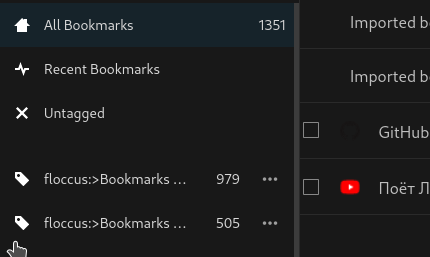
- It seems the bookmarks now live within the
Imported Bookmarksfolders
sunjam
on 17 Apr 2020
@marcelklehr, please find a screen recording which tries to visualize the table-shrink _"issue"_... :-)
gibelium
on 18 Apr 2020
Delete All Bookmarks
- [x] Basically works well
- [x] As this can be a long running task we should think about a visual feedback (e.g. progress bar modal)
- [ ] I got the following log entry after deleting all (about 1900) bookmarks
TypeError: Argument 3 passed to OC\AppFramework\Middleware\MiddlewareDispatcher::beforeOutput() must be of the type string, null given, called in /var/www/nextcloud/lib/private/AppFramework/Http/Dispatcher.php on line 123
{"reqId":"RI4FEc3WWBkZFicqYbHb","level":3,"time":"2020-04-18T07:08:13+00:00","remoteAddr":"127.0.0.1","user":"ncadmin","app":"index","method":"GET","url":"/nextcloud/apps/bookmarks/bookmark/3999/favicon","message":{"Exception":"TypeError","Message":"Argument 3 passed to OC\\AppFramework\\Middleware\\MiddlewareDispatcher::beforeOutput() must be of the type string, null given, called in /var/www/nextcloud/lib/private/AppFramework/Http/Dispatcher.php on line 123","Code":0,"Trace":[{"file":"/var/www/nextcloud/lib/private/AppFramework/Http/Dispatcher.php","line":123,"function":"beforeOutput","class":"OC\\AppFramework\\Middleware\\MiddlewareDispatcher","type":"->"},{"file":"/var/www/nextcloud/lib/private/AppFramework/App.php","line":125,"function":"dispatch","class":"OC\\AppFramework\\Http\\Dispatcher","type":"->"},{"file":"/var/www/nextcloud/lib/private/AppFramework/Routing/RouteActionHandler.php","line":47,"function":"main","class":"OC\\AppFramework\\App","type":"::"},{"function":"__invoke","class":"OC\\AppFramework\\Routing\\RouteActionHandler","type":"->"},{"file":"/var/www/nextcloud/lib/private/Route/Router.php","line":299,"function":"call_user_func"},{"file":"/var/www/nextcloud/lib/base.php","line":1008,"function":"match","class":"OC\\Route\\Router","type":"->"},{"file":"/var/www/nextcloud/index.php","line":38,"function":"handleRequest","class":"OC","type":"::"}],"File":"/var/www/nextcloud/lib/private/AppFramework/Middleware/MiddlewareDispatcher.php","Line":159,"CustomMessage":"--"},"userAgent":"Mozilla/5.0 (X11; Ubuntu; Linux x86_64; rv:75.0) Gecko/20100101 Firefox/75.0","version":"18.0.3.0","id":"5e9aa75d79d29"}
Import Bookmarks
- [ ] The name of the imported bookmarks folder could be enhanced including _filename_ and _timestamp_ to be able to distinguish between the several imports
- [x] Import allows all kinds of files and always confirms with "Import successful"
- [ ] Can we restrict the file chooser to allow only HTML files?
- [ ] Possible feedback for imports:
- Not supported file format
- Empty bookmarks file / No bookmarks found
- Successfully imported x of x bookmarks
- others?
- Spinner within the import button may be overlooked
- [ ] Can we open a progress bar modal instead or additionally?
gibelium
on 18 Apr 2020
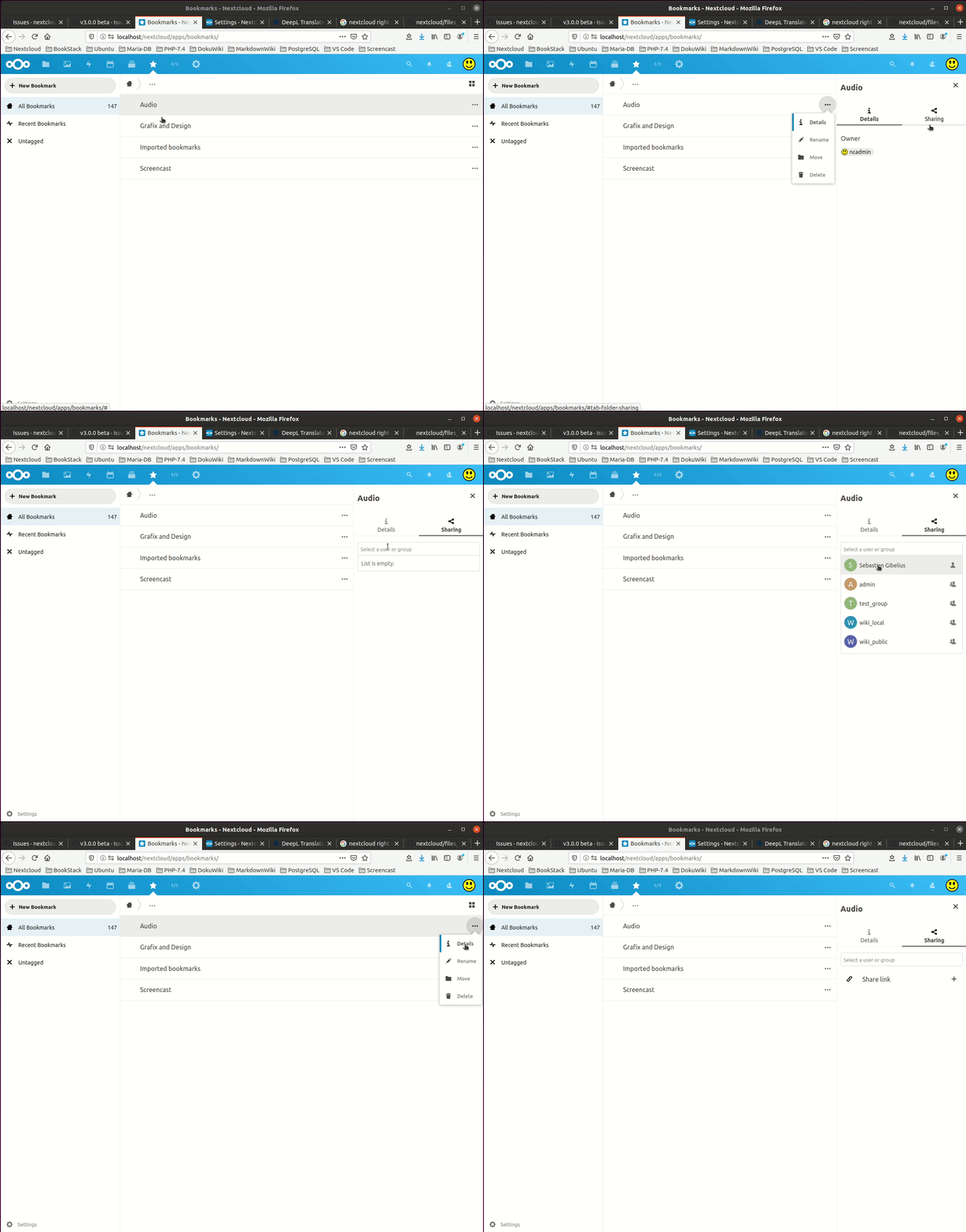
Share dropdown initially empty
When reloading the bookmarks app page and trying to share a folder to a user or group the dropdown box is initially empty. After typing some characters it shows the matching entries. When removing the typed in characters the list is filled with all available users and groups.
- [x] Share dropdown could be initialized during page reload
gibelium
on 18 Apr 2020
Shared bookmarks
I shared a single bookmarks folder to another user with enabled options to edit and share the bookmarks. The shared bookmarks are available for the user but the number of bookmarks is zero and the untagged bookmarks are empty although none of the bookmarks is tagged.
- [x] Should the bookmarks shared with me be counted in 'All Bookmarks'?
- [ ] Should the non-tagged but editable bookmarks shared with me be shown in 'Untagged'?
- [ ] Should we add a category for shared bookmarks next to All, Recent and Untagged bookmarks?
- [ ] Should we allow to unshare a folder as the user the folder was shared with? I can delete a folder that was shared with me but this does not remove the share entry for the one who shared the folder.

gibelium
on 18 Apr 2020
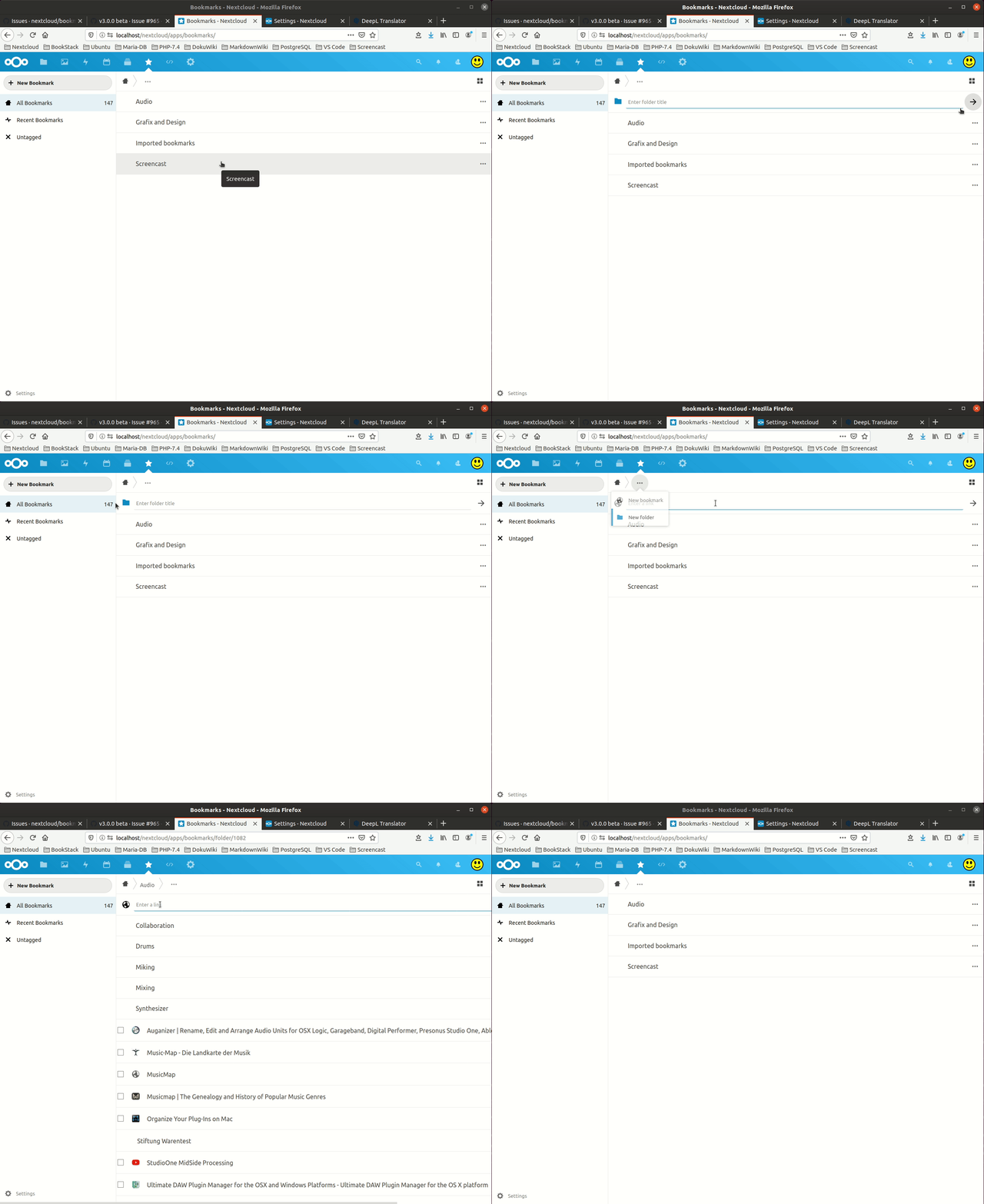
Cancel 'New bookmark' and 'New folder' operations
When adding a new bookmark or folder it is not possible to cancel the creation neither via mouse interaction nor by escape key.
Perhaps I missed something but it seems that nothing else than refreshing the bookmarks page cancels the creation of a new bookmark and/or folder.
- [x] Cancellation of 'New bookmark' operation should be possible
- [x] Cancellation of 'New folder' operation should be possible
gibelium
on 18 Apr 2020
Move bookmark from shared folder
Folder 'Test' was created by another user and shared with me with edit permission. I create a new bookmark in the shared folder and then move it to the/my root folder. The moved bookmark is not selectable via checkbox and the context menu button is not shown. Refreshing the page does not help. The bookmark is somehow no longer editable.
- [x] does the edit permission for a shared folder mean that users can delete content of that folder? I would expect that behaviour.
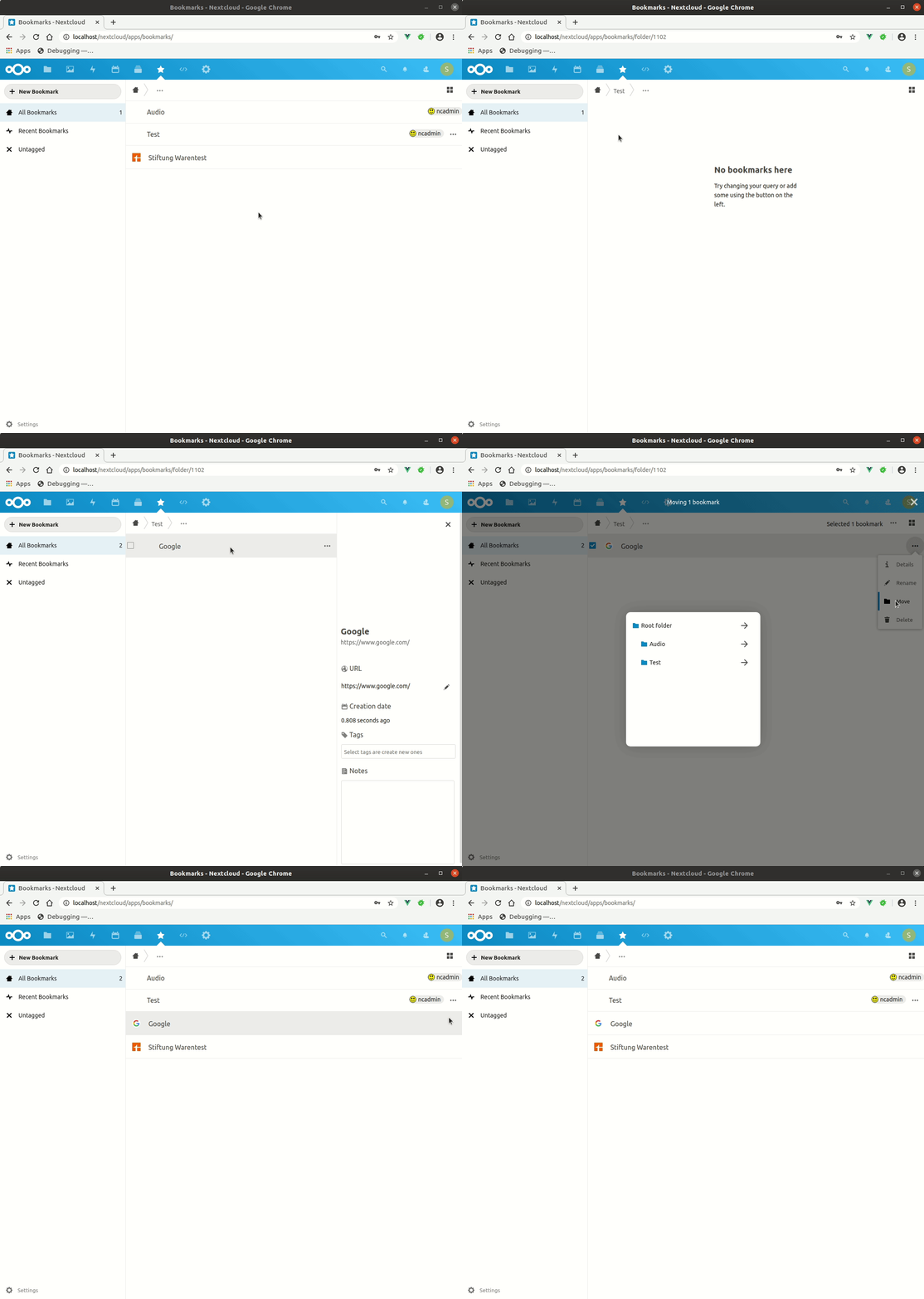
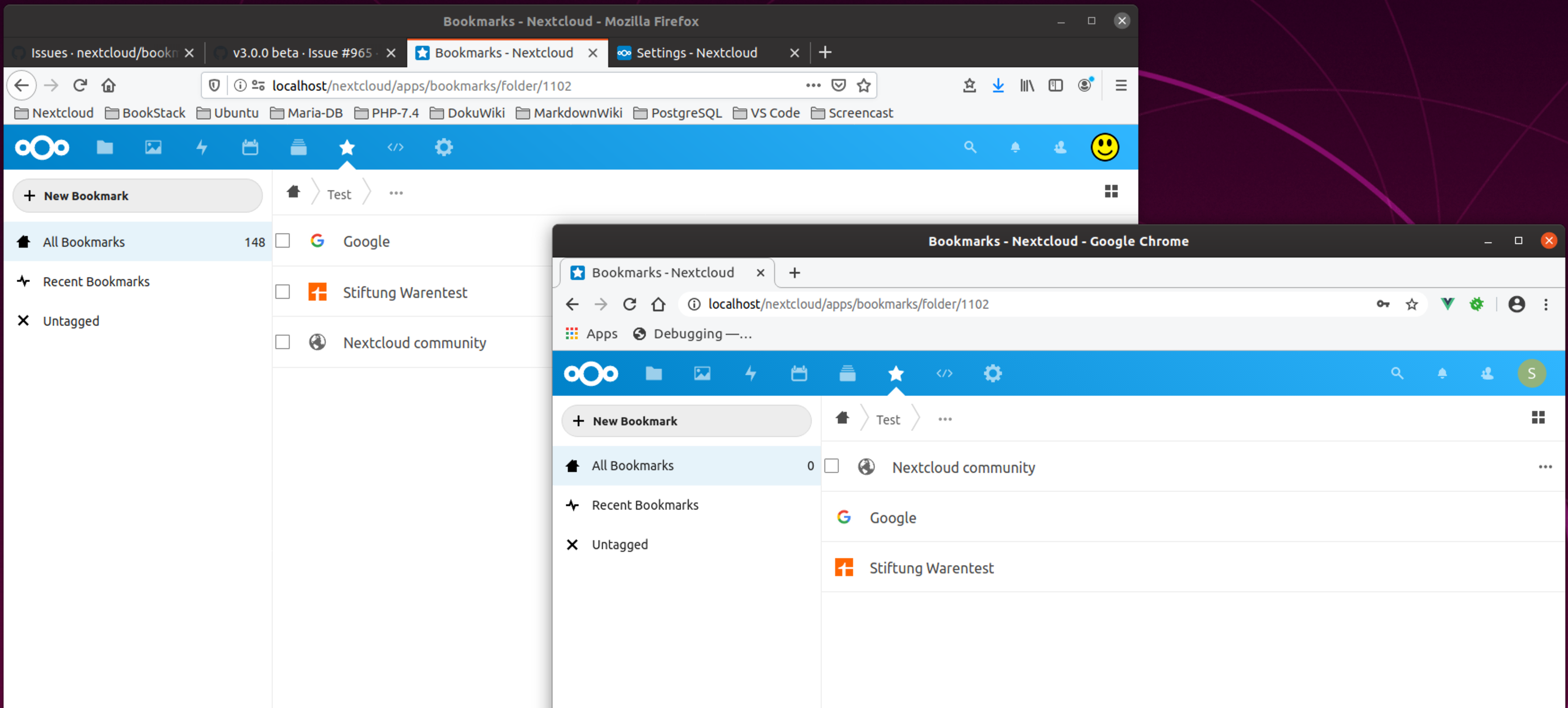
It also happens sometimes (I have not yet found steps to reproduce) that the bookmark created within a shared folder directly misses the multiselection checkbox and the context menu.
Also some bookmarks can be edited/deleted/moved by both users, some not (see screenshot)
gibelium
on 18 Apr 2020
@sunjam You're still using the legacy floccus adapter :scream_cat:
marcelklehr
on 18 Apr 2020
@gibelium Spinner within the import button may be overlooked
I agree, but a new UI component will not make it into this release :)
@gibelium The name of the imported bookmarks folder could be enhanced including filename and timestamp to be able to distinguish between the several imports
Agreed. => Next release :)
@gibelium Should the bookmarks shared with me be counted in 'All Bookmarks'?
This is deliberate as shared bookmarks are owned by a different user and thus do not count towards the usage limit, if one is set.
@gibelium Should the non-tagged but editable bookmarks shared with me be shown in 'Untagged'?
This is deliberate so far, as there is no simple way to query all shared bookmarks recursively, yet.
@gibelium Should we add a category for shared bookmarks next to All, Recent and Untagged bookmarks?
I like that! This would be possible if we only display the shared folders. => Next release.
marcelklehr
on 19 Apr 2020
Nice to Have's
Apply a tag
Shared by URLto all bookmarks shared by url.When shared book url is accessed, display this in the Activity app. Link to API info.
:heavy_plus_sign: You have shared a bookmark via url: Learning Python
:heavy_check_mark: Bookmark accessed via public link: Learning Python
sunjam
on 19 Apr 2020
@sunjam Apply a tag Shared by URL to all bookmarks shared by url.
I thought about that, too. What would be your goal with that?
marcelklehr
on 19 Apr 2020
@sunjam Apply a tag Shared by URL to all bookmarks shared by url.
I thought about that, too. What would be your goal with that?
It would be the easiest way I can think of to track which bookmarks I've shared besides the Shared category idea. Plus, tags would be useful for future expansion of sharing, presuming we one day support system tags for Flow automation with Bookmarks. Might also be possible to reflect different types of sharing: users/groups vs public url.
Obviously, this is quite presumptive, but you'll find Bookmark integration via system tags was originally proposed by this server tag discussion some time ago.
sunjam
on 19 Apr 2020
Crazy example:
I've shared a folder of bookmarks. Any bookmark with Shared to marcelklehr tag is automatically added. Now, every time I add or remove this tag I can change the bookmarks within this shared folder.
This could also be a way to move towards webhooks #900. Also, see this nextcloud dev request on Deck app tag integration with Flow app from 6 hours ago.
sunjam
on 19 Apr 2020
It would be the easiest way I can think of to track which bookmarks I've shared besides the Shared category idea.
I see.
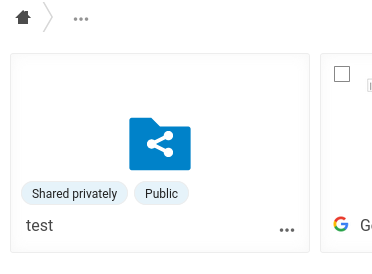
What I gather from both your suggestions is that there is indeed no simple way to quickly see which folders have been shared, right now. The share(d) list view will have to wait for now, as that is a little more work, involving new API endpoints, however, the following should be fine for now to find folders I have shared in an exploratory way (as the counterpart of the owner label for sharees):
marcelklehr
on 19 Apr 2020
I've deliberately left out sharing by tag, as during the design phase (wow, that was 3 years ago, I think) we felt there were a lot of edge cases and possibly unexpected/non-intuitive behavior that would be hard to get right. Let's not get ahead of ourselves. This is already quite a big release, so I would rather get the current feature set ready before packing in any more features. I appreciate your creativity for future features and how a bright future could look and I'm happy to see issues for all of these, even if I can't promise anything :)
I'm also excited about integrating with Flow, btw. There's already an issue somewhere about that.
marcelklehr
on 19 Apr 2020
@marcelklehr You are totally amazing to have gotten sharing worked out!! It is a Herculean effort that should be lauded! It is truly awesome. Wow. Thank you.
Do you want any other particular aspects of sharing tested for beta2?
sunjam
on 19 Apr 2020
@gibelium I create a new bookmark in the shared folder and then move it to the/my root folder.
Ah, moving bookmarks across user borders wasn't working correctly. Nice catch! Fixed.
@gibelium Should we allow to unshare a folder as the user the folder was shared with? I can delete a folder that was shared with me but this does not remove the share entry for the one who shared the folder.
I think ideally, the sharee can remove (read: hide) the shared folder from their view and have a way to get it back again, while only the owner can actually remove permissions. This is not yet implemented, however. My reasoning is that it's possible to share with groups and you shouldn't be able to remove the share for the whole group by deleting it as a sharee. so => next release :D
@gibelium Cancellation of 'New bookmark' operation should be possible. Cancellation of 'New folder' operation should be possible.
heh, the buttons that show these forms are technically toggles, so clicking them again will hide the respective form, but I guess nobody will figure that out :smile: I'll work on this.
marcelklehr
on 20 Apr 2020
@sunjam Do you want any other particular aspects of sharing tested for beta2?
Something I haven't tested as of yet, is how receiving a share, especially one that you cannot edit, plays with floccus syncing.
marcelklehr
on 21 Apr 2020
Oh, and we need to test with NC 19 :scream_cat:
marcelklehr
on 21 Apr 2020
Oh, and we need to test with NC 19 🙀
I can do that next weekend. Nevertheless, a list of things to test would be helpful, so I don't forget something. :-)
gibelium
on 21 Apr 2020
Oh, and we need to test with NC 19 scream_cat
Updated to Nextcloud 19.0.0 beta 4. Log sent via forum. Bookmarks listed as incompatible, but still running.
When sharing a single bookmark, the link proceeds to share every bookmark I have in the app. :100:
sunjam
on 22 Apr 2020
@gibelium This is what I could come up with: https://github.com/nextcloud/bookmarks/wiki/Acceptance-testing
@sunjam When sharing a single bookmark, the link proceeds to share every bookmark I have in the app.
Does that only happen in NC19?
marcelklehr
on 22 Apr 2020
@sunjam When sharing a single bookmark, the link proceeds to share every bookmark I have in the app.
Mh, I seem to have fixed that together with something else.
marcelklehr
on 22 Apr 2020
@marcelklehr, will you provide a beta.3 with all your latest changes?
gibelium
on 23 Apr 2020
Bookmarks beta3 on 19.0.0 beta4
Import returns Request failed with status code 500✖
sunjam
on 23 Apr 2020
Beta.3 is out :)
marcelklehr
on 25 Apr 2020
I finally started testing. Please find the results of the first session.
The two issues I find so far are:
1) Import does not work at all
2) Moving bookmarks into the same folder they are already in seems to delete the bookmarks. At least they vanish... :-)
Environment
Ubuntu 19.10
Google Chrome: 81.0.4044.129
Nextcloud: 19.0.0-beta.5
Bookmarks: 3.0.0-beta.3
Tests
[x] Migrates all data correctly from old version
- [ ] ERROR: After migration one bookmark is references twice. It is still in the folder it should be but also in the root folder.

- [ ] ERROR: After migration one bookmark is references twice. It is still in the folder it should be but also in the root folder.
[x] Import bookmarks
- ERROR: Argument 1 passed to OCA\Bookmarks\Service\FolderService::importFile() must be of the type string, null given, called in /var/www/nextcloud/apps/bookmarks/lib/Controller/BookmarkController.php on line 636
- [x] Export bookmarks
- [x] Create a bookmark
- [x] Edit URL
- [x] Edit tags
- [x] Edit notes
- [x] Edit title
- [x] Create a folder
- [x] Edit title
- [x] Delete folder
- [x] Move bookmark
- [ ] ERROR: Deletes bookmark when moving it into the folder it is already in
- [x] Move folder
[x] Select multiple bookmarks
- [x] Delete selection
- [x] Move selection
- [x] ERROR: Deletes bookmarks when moving them into the folder they are already in

[x] Filter by recent bookmarks
- [x] Filter by single tag
- [x] Filter by multiple tags
- [x] Filter untagged
- [x] Add new tag
- [x] Rename tag
gibelium
on 28 Apr 2020
Awesome, we're getting close :tada:
@gibelium ERROR: After migration one bookmark is references twice. It is still in the folder it should be but also in the root folder.
I can't seem to reproduce this. Bookmarks unexpectedly turning up in the root folder has been an issue in the past, though, so I think it's likely that this happened before the migration?
marcelklehr
on 28 Apr 2020
I can't seem to reproduce this. Bookmarks unexpectedly turning up in the root folder has been an issue in the past, though, so I think it's likely that this happened before the migration?
Well, I gave the migration test a second try and I also cannot reproduce the case after I cross checked that in the old version the bookmarks were in the correct folders. So yes, it could be that it was a failure in the old version.
gibelium
on 29 Apr 2020
:rocket:
marcelklehr
on 30 Apr 2020
Related issues
 bspire
·
4Comments
sunjam
·
4Comments
bspire
·
4Comments
sunjam
·
4Comments
 kaffeeringe
·
6Comments
kaffeeringe
·
6Comments
 GambaJo
·
5Comments
sunjam
·
5Comments
GambaJo
·
5Comments
sunjam
·
5Comments
Most helpful comment
@marcelklehr You are totally amazing to have gotten sharing worked out!! It is a Herculean effort that should be lauded! It is truly awesome. Wow. Thank you.
Do you want any other particular aspects of sharing tested for beta2?