Blenderproc: Loading a textured mesh
I'm trying to modify Random Backgrounds example and load a textured mesh instead of a textureless object.ply used there. I have backpack.obj file:
mtllib backpack.mtl
v -3.367944 11.502476 41.016083
v 0 8.7985144 40.919247
v 0 11.660328 40.974461
...
and backpack.mtl file:
map_Ka backpack.jpg
which refers to the texture backpack.jpg.
MeshLab opens backpack.obj with no problems and displays the textured mesh:
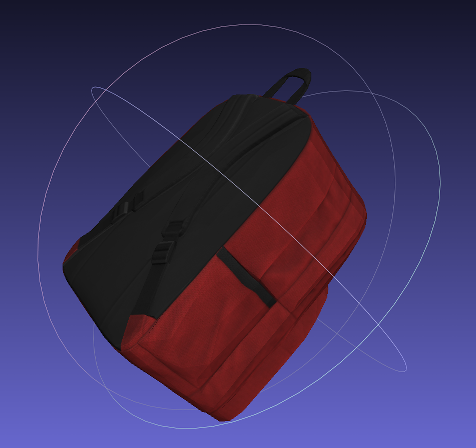
I changed config.yaml for this example to:
# Args: <obj_file> <output_dir>
{
  "version": 3,
  "setup": {
    "blender_install_path": "/home/<env:USER>/blender/"
  },
  "modules": [
  {
    "module": "main.Initializer",
    "config":{
      "global": {
        "output_dir": "<args:1>"
      }
    }
  },
  {
    "module": "loader.ObjectLoader",
    "config": {
      "path": "<args:0>",
      "add_properties": {
        "cp_category_id": 1,
        "cp_is_object": True
      }
    }
  },
  {
    "module": "lighting.LightSampler",
    "config": {
      "lights": [
      {
        "location": {
          "provider": "sampler.Shell",
          "center": {
            "provider": "getter.POI",
            "selector": {
              "provider": "getter.Entity",
              "conditions": {
                "cp_is_object": True,
                "type": "MESH"
              }
            }
          },
          "radius_min": 100,
          "radius_max": 500,
          "elevation_min": 1,
          "elevation_max": 89,
          "uniform_elevation": True
        },
        "color": {
          "provider": "sampler.Color",
          "min": [0.5, 0.5, 0.5, 1],
          "max": [1, 1, 1, 1]
        },
        "type": "POINT",
        "energy": {
          "provider": "sampler.Value",
          "type": "int",
          "min": 100,
          "max": 1000
        }
      }
      ]
    }
  },
  {
    "module": "camera.CameraSampler",
    "config": {
      "cam_poses": [
      {
        "number_of_samples": 2,
        "check_if_objects_visible": {
          "provider": "getter.Entity",
          "conditions": {
            "cp_is_object": True,
            "type": "MESH"
          }
        },
        "location": {
          "provider": "sampler.Shell",
          "center": {
            "provider": "getter.POI",
            "selector": {
              "provider": "getter.Entity",
              "conditions": {
                "cp_is_object": True,
                "type": "MESH"
              }
            }
          },
          "radius_min": 100,
          "radius_max": 400,
          "elevation_min": 1,
          "elevation_max": 89,
          "uniform_elevation": True
        },
        "rotation": {
          "format": "look_at",
          "value": {
            "provider": "getter.AttributeMerger",
            "elements": [
            {
              "provider": "getter.POI",
              "selector": {
                "provider": "getter.Entity",
                "conditions": {
                  "cp_is_object": True,
                  "type": "MESH"
                }
              }
            },
            {
              "provider": "sampler.Uniform3d",
              "min": [-0.5, -0.5, -0.5],
              "max": [0.5, 0.5, 0.5],
            },
            ],
            "transform_by": "sum"
          },
          "inplane_rot": {
            "provider": "sampler.Value",
            "type": "float",
            "min": -0.7854,
            "max": 0.7854
          }
        }
      }
      ],
      "intrinsics": {
        "fov": 1,
        "resolution_x": 640,
        "resolution_y": 480
      }
    }
  },
  {
    "module": "renderer.RgbRenderer",
    "config": {
      "transparent_background": True
    }
  },
  {
    "module": "renderer.SegMapRenderer",
    "config": {
      "map_by": ["instance", "class", "name"],
      "default_values": {"class": 0, "name": "none"}
    }
  },
  {
    "module": "writer.CocoAnnotationsWriter",
    "config": {
      "append_to_existing_output": True
    }
  }
  ]
}
omitting manipulators.MaterialManipulator. When I run this example I'm getting gray only objects:
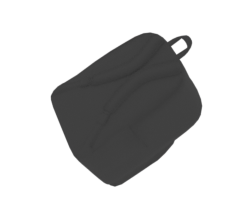
What am I doing wrong?
 pauljurczak
All 7 comments
I added manipulators.MaterialManipulator back to config.yaml, but the result is the same.
pauljurczak
on 21 May 2021
Hey,
usually it should just load the texture if it is specified in blender. To find out what went wrong here I have a few questions:
- Could you provide the .obj, .mtl and .jpg file?
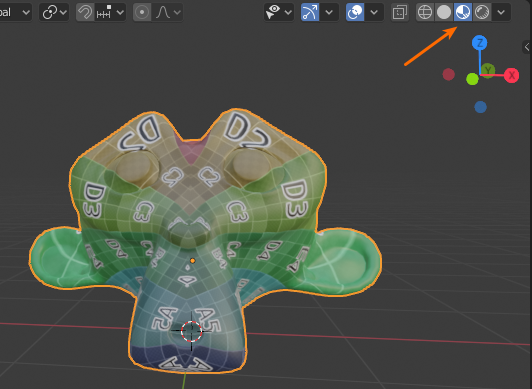
which refers to the mesh backpack.jpg.Do you mean texture file here?- Could you try to load the .obj file in blender the standard way and check if that works: https://www.youtube.com/watch?v=wOvEzw1cWuY, be aware that you have to switch to a texture rendered mode:
Best,
Max
 themasterlink
on 21 May 2021
themasterlink
on 21 May 2021
Here are the files.
backpack.zip
pauljurczak
on 21 May 2021
I loaded backpack.obj into Blender in texture rendered mode, and it is gray:
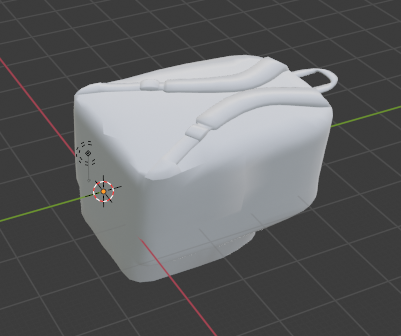
Does it mean there is nothing I can do about it?
pauljurczak
on 21 May 2021
Hey,
your .mtl file is not correct. If you check the wiki for .mtl files: https://en.wikipedia.org/wiki/Wavefront_.obj_file
You can see that you need a bit more than just the material name:
newmtl Texture
   Ka 1.000 1.000 1.000
   Kd 1.000 1.000 1.000
   Ks 0.000 0.000 0.000
   d 1.0
   illum 2
   map_Kd backpack.jpg
And then you have to use that material in the .obj file:
vn 0.028147001 0.99868 -0.042962
s 1
usemtl Texture # this line is new here!
f 1/1/1 2/2/2 3/3/3
Then it works.
Best,
Max
themasterlink
on 21 May 2021
PS: You better use map_Kd than map_Ka.
PPS: You should use a conversion tool which can deal with the materials in .ply files I would recommend osgconv.
themasterlink
on 21 May 2021
Thanks a lot! It works now. Initially, I went for the simplest .obj option, which worked with MeshLab. I edited the files manually and wasn't aware that Blender needs more elaborate description.
pauljurczak
on 21 May 2021
Related issues
 hummat
·
5Comments
hummat
·
5Comments
 soans1994
·
3Comments
soans1994
·
3Comments
 luigifaticoso
·
4Comments
luigifaticoso
·
4Comments
 eugval
·
3Comments
eugval
·
3Comments
 manuelli
·
3Comments
manuelli
·
3Comments