hello again authors,
is there a way to automate the blender procedure (like perform extrude operations on a mesh) for various images. i read that the blender is built with python api so is there a way. i have several images to be converted into 3d model and generate synthetic data. sorry for the non- blender proc community question. (example shown in image: i have created few traffic sign boards, but i have many images)
thank you

 soans1994
All 3 comments
@soans1994 Hi,
Yes, automating such procedures should be possible. BlenderProc, essentially, is built on top of the BlenderAPI.
That being said, I don't think BlenderProc has a solution for your problem directly, though I guess it shouldn't be very hard for you to come up with a custom module given you know what procedures and in what order are to be carried out in order to achieve the desired result. All respective steps have an API call of some sort, just togglePython Tooltips (Edit -> Preferences -> Interface -> Tooltips -> Python Tooltips) and check the info in the Info Context Menu in the Scripting tab when performing operations in the GUI. It should be enough to build a module.
 ideas-man
on 2 May 2021
ideas-man
on 2 May 2021
Hi,
maybe let me give a more details which could be useful for you.
I assume to automize this you would want to get the rim also filled. What you can always do is just use the alpha channel of your texture as a material input to the Principled BSDF:
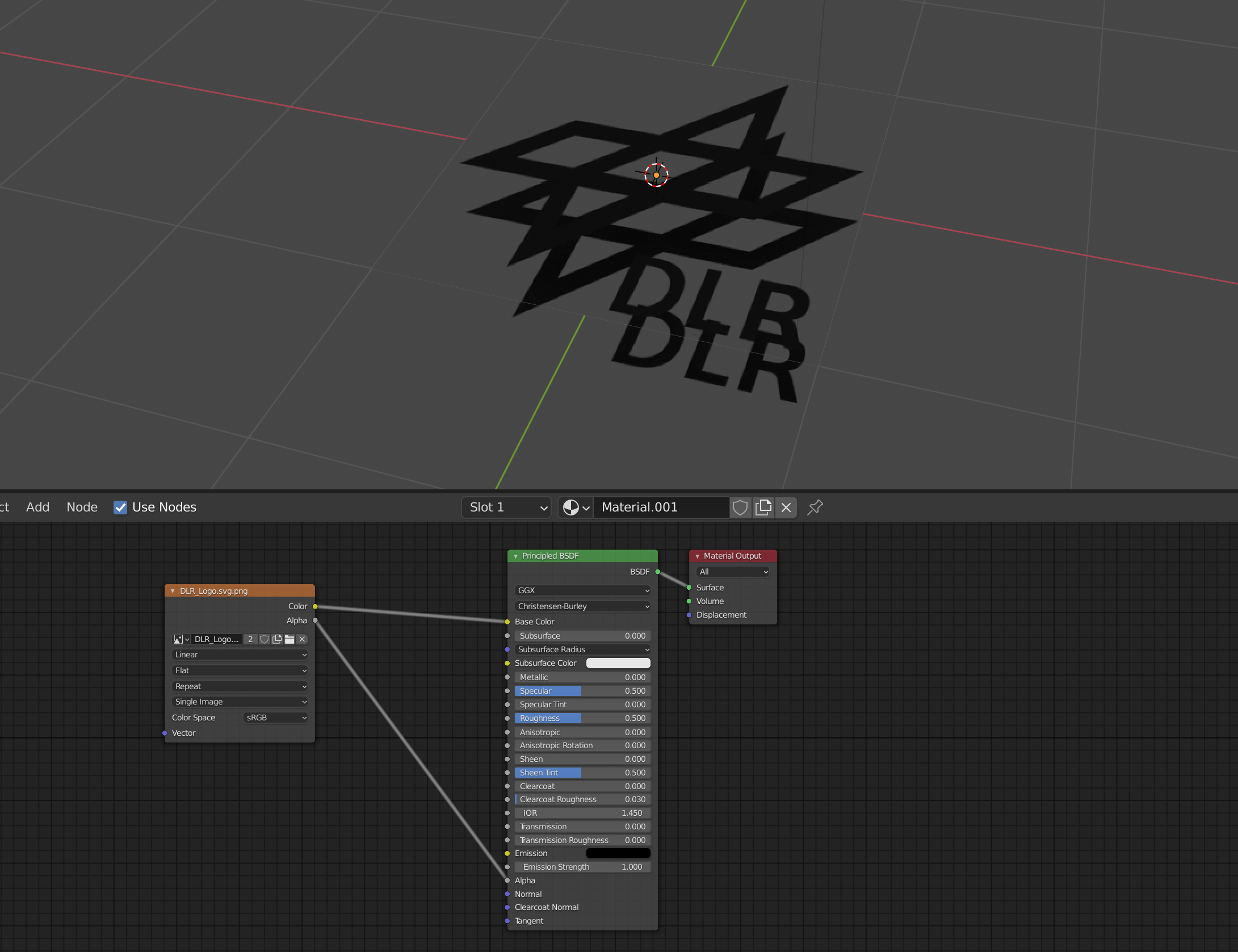
Then you add a solidify modifier, to get these two planes above each other and then you have to fill in the rim, you check out this post on how to do this:
However, this is quite complicated and depending on the amount of signs, it might not be worth it.
Best,
Max
 themasterlink
on 4 May 2021
themasterlink
on 4 May 2021
thank you for the suggestions, it really helped.
soans1994
on 6 May 2021
Related issues
 luigifaticoso
·
6Comments
luigifaticoso
·
4Comments
luigifaticoso
·
6Comments
luigifaticoso
·
4Comments
 shreeramsigdel77
·
4Comments
shreeramsigdel77
·
4Comments
 albertotono
·
3Comments
soans1994
·
4Comments
albertotono
·
3Comments
soans1994
·
4Comments
Most helpful comment
Hi,
maybe let me give a more details which could be useful for you.
I assume to automize this you would want to get the rim also filled. What you can always do is just use the alpha channel of your texture as a material input to the Principled BSDF:
Then you add a solidify modifier, to get these two planes above each other and then you have to fill in the rim, you check out this post on how to do this:
https://blender.stackexchange.com/questions/84129/is-there-a-way-to-add-fake-thickness-to-an-alpha-image-texture
However, this is quite complicated and depending on the amount of signs, it might not be worth it.
Best,
Max