Blenderproc: Error when running COCO annotations example visualization
Running
python scripts/vis_coco_annotation.py
after
python run.py examples/coco_annotations/config.yaml examples/coco_annotations/camera_positions examples/coco_annotations/scene.blend examples/coco_annotations/output
from the COCO annotations example throws
Traceback (most recent call last):
  File ".../BlenderProc/scripts/vis_coco_annotation.py", line 60, in <module>
    item = annotation["segmentation"][0]
KeyError: 0
 hummat
All 5 comments
Hey Matthias,
thanks for the hint. This seems to be caused by a recent change, sorry for the inconvenience.
We gonna fix that in the next update.
As a quick workaround, just replace line 50 of the vis_coco_annotations.py script with:
if isinstance(annotation["segmentation"], dict):
 cornerfarmer
on 5 Feb 2021
cornerfarmer
on 5 Feb 2021
Hi Dominik,
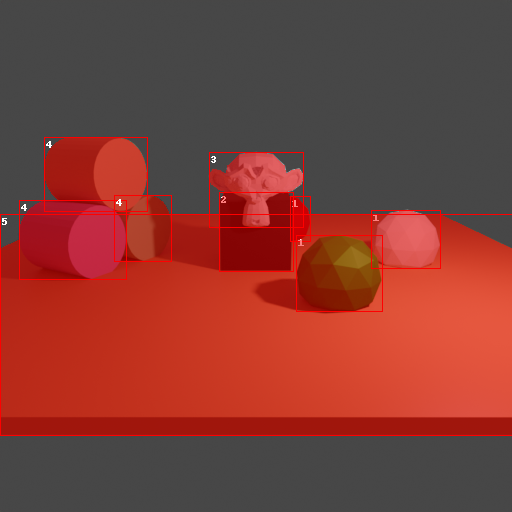
thanks for the quick answer! That fixes the error though the segmentation mask visualization seems a little off:
hummat
on 5 Feb 2021
Hey Matthias,
this effect is only caused by anti aliasing, so you can simply ignore it.
For verification I disabled anti aliasing manually and rendered the same scene again:
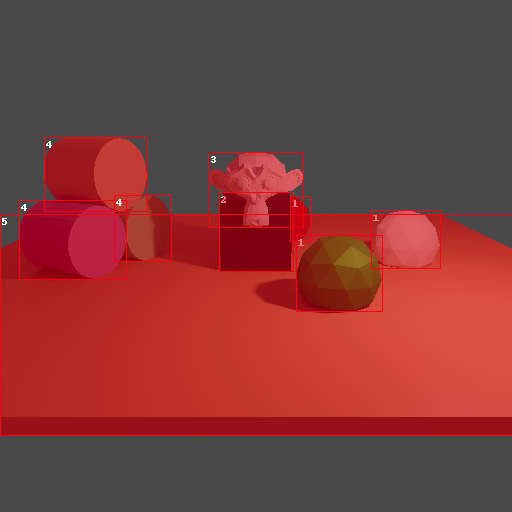
As you can see effect you described is gone here.
cornerfarmer
on 5 Feb 2021
Oh, I didn't even notice _that_ difference :D What I was referring to was a comparison to the image given in the example:
https://github.com/DLR-RM/BlenderProc/raw/master/examples/coco_annotations/rendering.png
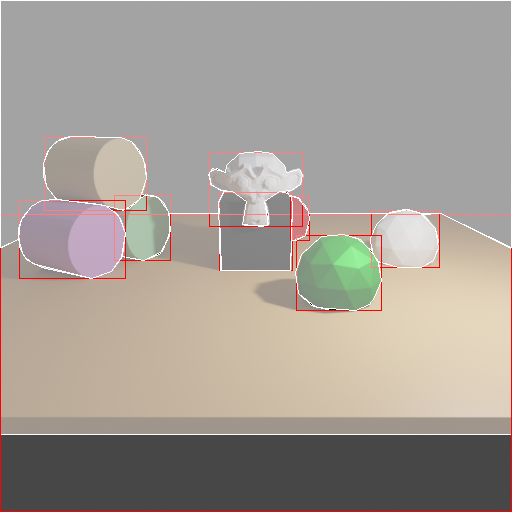
Which seems to be closer to what the visHdf5Files.py outputs (though not as a transparent overlay):
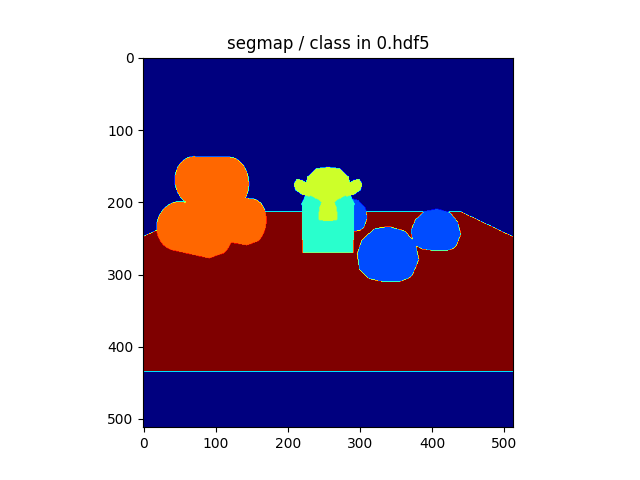
But if this is intended and no bug we can close this (though I do like the visHdf5Files.py visualization a little better). Thanks again!
hummat
on 5 Feb 2021
Oh, I didn't even notice _that_ difference :D What I was referring to was a comparison to the image given in the example:
Hi,
What you see in the header of the README file is the visualization of the COCO anotations in the polygon format (COCO writer module is using RLE format by default for some time) + the image is pretty old. The result you have is supposed to be that way.
 ideas-man
on 5 Feb 2021
ideas-man
on 5 Feb 2021
Related issues
 soans1994
·
4Comments
soans1994
·
4Comments
 chrisxu1995
·
5Comments
chrisxu1995
·
5Comments
 Lotfi-MERAD
·
3Comments
Lotfi-MERAD
·
3Comments
 b-yogesh
·
5Comments
b-yogesh
·
5Comments
 shreeramsigdel77
·
4Comments
shreeramsigdel77
·
4Comments
Most helpful comment
Hi,
What you see in the header of the README file is the visualization of the COCO anotations in the polygon format (COCO writer module is using RLE format by default for some time) + the image is pretty old. The result you have is supposed to be that way.