Blenderproc: renderer.SegMapRenderer "There are more object colors than there are objects"
Hello,
I was working on my project, when all of the sudden renderer.SegMapRenderer started putting out the same error no matter which config.yaml I ran.
Here is an example of the error (I printed out used_objects length, used_object_ids and max_id from SegMapRendererUtility.
This is an example when running examples/semantic_segmentation/config.yaml.
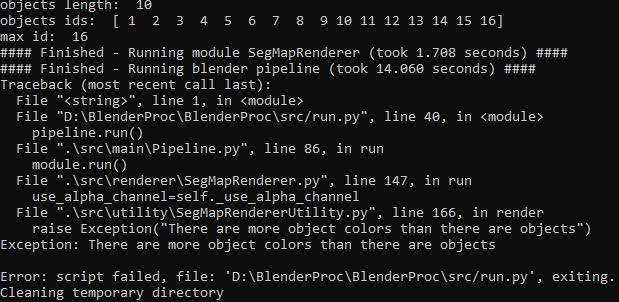
For some reason, additional object ids are put into used_object_ids array when using segmap.
I already had this error in the past and tried to fix it and then somehow it fixed itself, but now I have it again. I'm not sure what's triggering it. And the strangest thing is, when it happens it happens for (I guess) all config files which use SegMap.
 matemato
All 4 comments
Hi @matemato,
I can successfully run the examples/semantic_segmentation example. I get the following value for used_objects, used_object_ids and max_id (see image below).

I am not sure why you are getting 16 as the length for the used_object_ids array which should be 10 like in my case. Also, you seem to be missing the value 0 (worlds background category id) in the used_object_ids array. Can you maybe share your config.yaml file if it is different from the one given in examples/semantic_segmentation? Thanks!
 moizsajid
on 9 May 2021
moizsajid
on 9 May 2021
Hi,
I am using the exact same config as in examples. My problem is I guess I did something in my project and the problem is now with every config.yaml that uses SegMap and even with this example. I have to test a bit more... Do you have any idea how this could happen?
matemato
on 9 May 2021
I figured out that this is where the problem lies:
I changed setDenoiser in RendererUtility.py and now looks like this, but I have no idea why segmentation would have problems with this. All I did was add glare and RGB node. When I switch this to defualt setDenoiser method, segmentation works.
```python
@staticmethod
def custom_set_denoiser():
# The intel denoiser is activated via the compositor
bpy.context.scene.use_nodes = True
nodes = bpy.context.scene.node_tree.nodes
links = bpy.context.scene.node_tree.links
    # The denoiser gets normal and diffuse color as input
    bpy.context.view_layer.use_pass_normal = True
    bpy.context.view_layer.use_pass_diffuse_color = True
    # bpy.context.view_layer.cycles.denoising_store_passes = True


    # Add denoiser node
    render_layer_node = Utility.get_the_one_node_with_type(nodes, 'CompositorNodeRLayers')
    denoise_node = nodes.new("CompositorNodeDenoise")
    glare_node = nodes.new("CompositorNodeGlare")
    RGB_curves_node = nodes.new("CompositorNodeCurveRGB")
    composite_node = Utility.get_the_one_node_with_type(nodes, 'CompositorNodeComposite')

    # Link nodes

    links.remove(composite_node.inputs[0].links[0])

    links.new(render_layer_node.outputs['Image'], denoise_node.inputs['Image'])
    links.new(render_layer_node.outputs['DiffCol'], denoise_node.inputs['Albedo'])
    # links.new(render_layer_node.outputs['Denoising Albedo'], denoise_node.inputs['Albedo'])
    links.new(render_layer_node.outputs['Normal'], denoise_node.inputs['Normal'])

    links.new(denoise_node.outputs['Image'], glare_node.inputs['Image'])
    links.new(glare_node.outputs['Image'], RGB_curves_node.inputs['Image'])
    links.new(RGB_curves_node.outputs['Image'], composite_node.inputs['Image'])

    # Set Glare node

    glare_node.glare_type = 'FOG_GLOW'
    glare_node.quality = 'HIGH'
    glare_node.mix = -0.95
    glare_node.threshold = 20
    glare_node.size = 6

    # Set RGB node

    RGB_curves_node.mapping.curves[3].points.new(0.25, 0.18)
    RGB_curves_node.mapping.update()
Ok I figured it out. SegMapRenderer does not use denoiser and my custom_set_denoiser didn't check if denoiser was None so it glitched out. I added an if statement for checking if denoiser is None and it works now. Sorry for the troubles.
matemato
on 9 May 2021
Related issues
 albertotono
·
3Comments
albertotono
·
3Comments
 b-yogesh
·
3Comments
b-yogesh
·
3Comments
 soans1994
·
3Comments
soans1994
·
3Comments
 hummat
·
5Comments
hummat
·
5Comments
 Lotfi-MERAD
·
3Comments
Lotfi-MERAD
·
3Comments
Most helpful comment
Ok I figured it out. SegMapRenderer does not use denoiser and my custom_set_denoiser didn't check if denoiser was None so it glitched out. I added an if statement for checking if denoiser is None and it works now. Sorry for the troubles.