Blenderproc: About bop provide ycb model .ply file question
I converted the model to ply file through meshlab and picture texture is normal, like as follows:
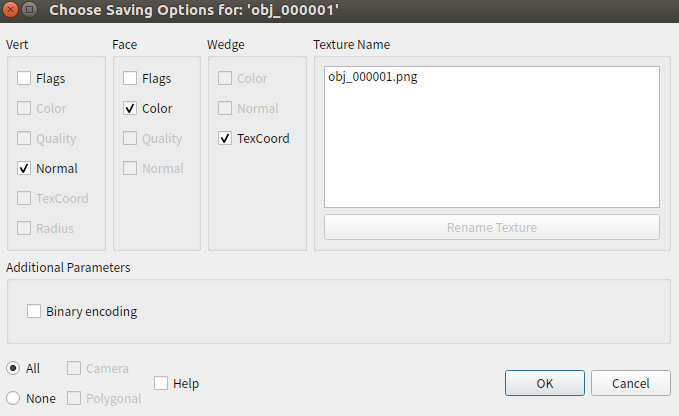
But when I use BlenderProc render, I get the picture:

I provide the model, can you help me solve the question or how can I get the model about bop .ply file?
https://drive.google.com/drive/folders/1lnVlSdzsFSRMoo2eNORorTS0WsvGWba8?usp=sharing
I'm looking forward to your reply!
Thank you!
 YyYyYong0331
All 7 comments
Hey,
your linked file is not accessible to everyone, could you please change this?
Best,
Max
 themasterlink
on 23 Mar 2021
themasterlink
on 23 Mar 2021
Hey,
but I highly suspect that you are using vertex colors, check out this example:
Best,
Max
themasterlink
on 23 Mar 2021
Hi,
Thanks for replying to me
I uploaded the file again, you should be able to access it: https://drive.google.com/drive/folders/18CdzxQfKEN_p6aFlSkAAs90RdBScCc5y?usp=sharing
I try the basic_object_pose example, but I get it:

I use config_ycbv_random.yaml, because the models have texture image, like my models. It works fine.
Command:
python run.py examples/bop_challenge/config_ycbv_random.yaml /home/wy/media/data/bop ycbv /home/wy/Projects/bop_toolkit resources/cctextures examples/bop_challenge/output
When I replace the YCBV model with my model, just only in bop/ycbv/models file replace, my model becomes black.

I use the models just YCB fruits.
Although the format of my model is similar to the YCBV model, I think there are some details that cause errors.
But I don’t know what went wrong.
Thanks
YyYyYong0331
on 23 Mar 2021
Hey,
okay, I checked. The short answer is: Do not use .ply.
The long answer is that you use textures, which are not supported in .ply, they work in your case because your program adds a comment to these files: comment TextureFile obj_000007.png. But that is not in the standard and can therefore not be read by blender.
I would save all your files as .obj instead as .ply that should solve the problem.
Best,
Max
themasterlink
on 23 Mar 2021
Hi,
Thanks Max.
I tried your suggestion, but it only works in ObjectLoader.py.
BopLoader.py does not yet support importing obj files, even if I try to modify the code.
I have a simple way. It is converted into the same format as the YCBV model provided by BOP through meshlab.
MeshLab: Search -> Convert PerWedge UV into PerVertex UV
and export .ply likes:
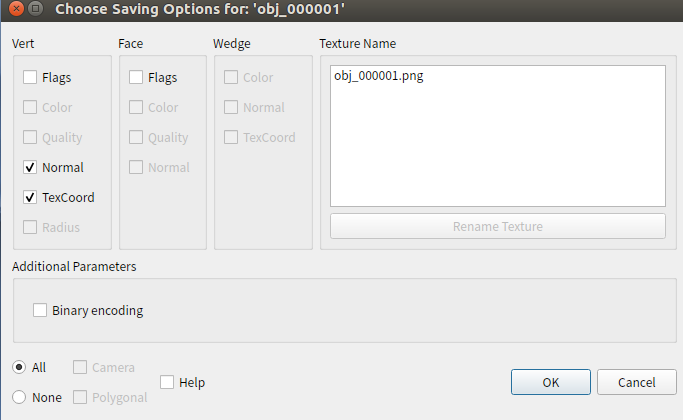
Remember to modify the texture map name.
Thanks
YyYyYong0331
on 24 Mar 2021
The problem has been resolved, I will close the issue.
YyYyYong0331
on 24 Mar 2021
I tried your suggestion, but it only works in ObjectLoader.py.
BopLoader.py does not yet support importing obj files, even if I try to modify the code.
One last remark to this, loading .obj files should be done with the ObjectLoader and not with the BopLoader the bop loader is for loading the bop dataset.
If your dataset is not in the BOP format it won't work.
Best,
Max
themasterlink
on 24 Mar 2021
Related issues
 ttsesm
·
3Comments
ttsesm
·
3Comments
 hummat
·
5Comments
hummat
·
5Comments
 wangg12
·
3Comments
wangg12
·
3Comments
 matemato
·
4Comments
matemato
·
4Comments
 b-yogesh
·
3Comments
b-yogesh
·
3Comments
Most helpful comment
Hi,
Thanks Max.
I tried your suggestion, but it only works in
ObjectLoader.py.BopLoader.pydoes not yet support importing obj files, even if I try to modify the code.I have a simple way. It is converted into the same format as the YCBV model provided by BOP through meshlab.
MeshLab: Search -> Convert PerWedge UV into PerVertex UV

and export .ply likes:
Remember to modify the texture map name.
Thanks