Binderhub: Browser backed storage of notebook contents
Following on from https://github.com/jupyterhub/binderhub/issues/1003#issuecomment-555726161
This issue is for discussions specific to the idea of creating a notebook extension that also stores the content of the notebook in "browser storage" and later offers the user a way to download the notebook 9if the binder has gone away) and even later offers the user the option to relaunch the binder with this notebook.
As a first version this is a "nice to have" so if we can get something that works "now" for 80% of users that is better than waiting longer to get it to work for 95%. This means cross domain issues are out for the moment as are storing files that aren't notebooks. Let's tackle those after we have some experience with the more basic thing.
I think this is something to be implemented as a notebook extension because it is JS. So JS skills will be required to work on this.
cc @manics
General ideas about "persistence" should go in #1003.
 betatim
All 15 comments
I think Kaggle kernels does this "store stuff in the browser" trick too. Need to double check.
betatim
on 21 Nov 2019
Jupyter.notebook.toJSON() turns the current notebook into JSON without using the contents API (which makes a network request).
Unfortunately Jupyter.notebook.fromJSON() isn't the direct inverse. Need to rearrange some of the JSON field names and get. additional metadata.
betatim
on 22 Nov 2019
Looks promising...
function getNotebookFromBrowser() {
    return {
        "content": Jupyter.notebook.toJSON(),
        "name": Jupyter.notebook.notebook_name,
        "path": Jupyter.notebook.notebook_path,
        "format": "json",
        "type": "notebook"
    };
}

function localstoreSaveNotebook() {
    var nb = getNotebookFromBrowser();
    localStorage.setItem(nb["path"], JSON.stringify(nb));
    console.log("local-storage saved: " + nb["path"])
}

function localstoreLoadNotebook(path) {
    var path = path || Jupyter.notebook.notebook_path;
    var nb = localStorage.getItem(path);
    if (nb) {
        Jupyter.notebook.fromJSON(JSON.parse(nb));
        console.log("local-storage loaded " + path)
    }
    else {
        console.log("local-storage not found: " + path)
    }
}

// Download (size limited) https://stackoverflow.com/a/18197341
function downloadNotebookFromBrowser() {
    var nb = getNotebookFromBrowser();
    var element = document.createElement("a");
    element.setAttribute("href", "data:text/plain;charset=utf-8," + encodeURIComponent(JSON.stringify(nb)));
    element.setAttribute("download", nb["name"]);
    element.style.display = "none";
    document.body.appendChild(element);
    element.click();
    document.body.removeChild(element);
}
Next step: convert to an extension
 manics
on 22 Nov 2019
manics
on 22 Nov 2019
Give this a go! https://github.com/manics/jupyter-offlinenotebook
Only tested on firefox
manics
on 22 Nov 2019
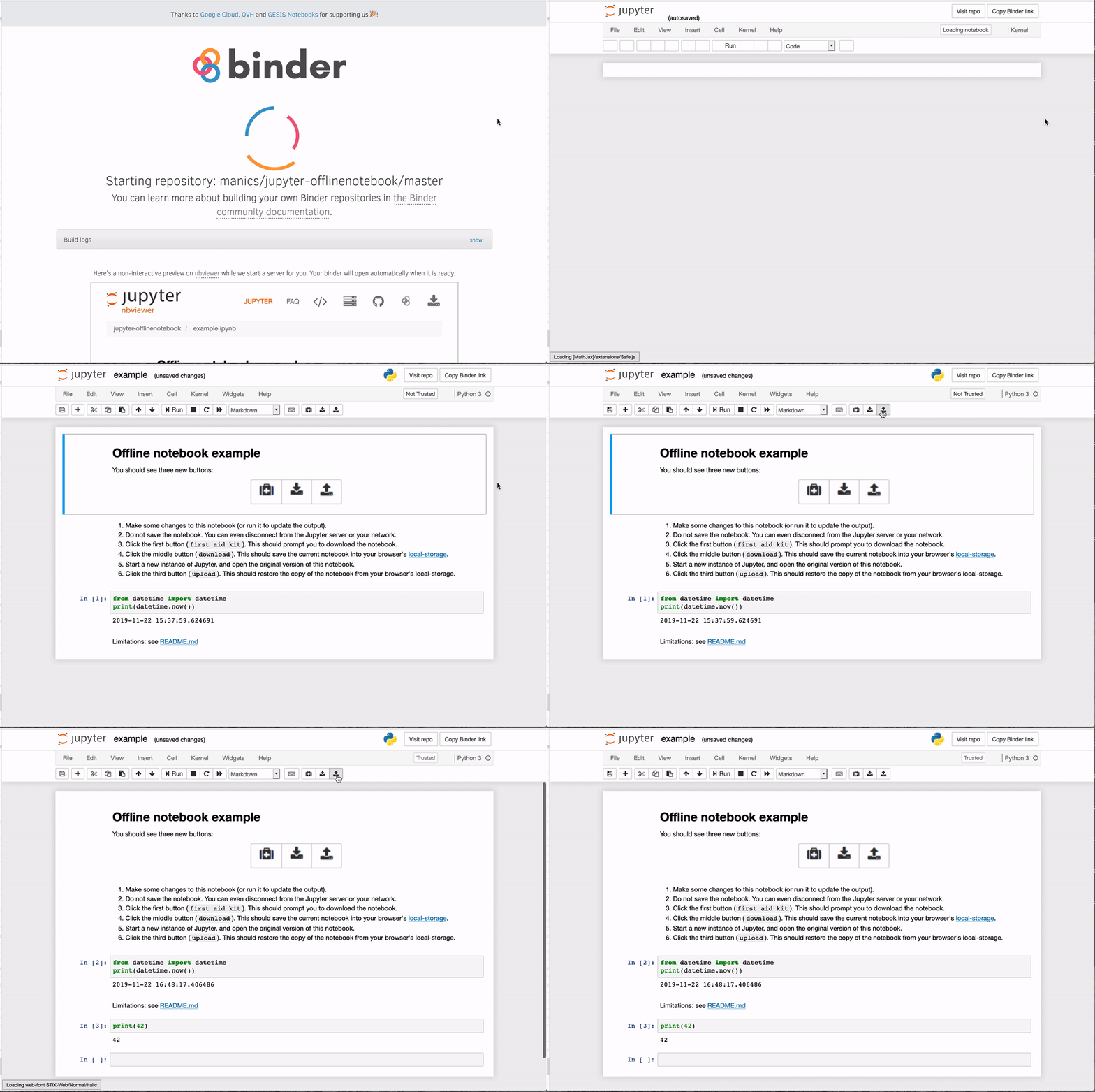
Bam! How cool is this??? (also are there browsers that aren't firefox :p)
betatim
on 22 Nov 2019
I tried out the extension in Firefox and Chrome. Works in both.
betatim
on 23 Nov 2019
I've just merged https://github.com/manics/jupyter-offlinenotebook/pull/4 so it'll use BINDER_REPO_URL from https://github.com/jupyterhub/binderhub/pull/1010 (open the javascript console to see what's going on). If it's not set you won't see the buttons.
manics
on 28 Nov 2019
I was thinking that once #1010 has been merged and deployed: should we add the offlinenotebook extension to repo2docker by default and see if anyone notices/comments on it? I think getting it out there with some real users would be good to get feedback/bug reports/test on weird browsers.
After a while of it being used and worked on we can make an announcement to direct attention to it.
betatim
on 29 Nov 2019
After reading through the notebook docs source code I figured out how to add dialogs on success/failure which I think was the main blocker for usability.
Also had a go at adding binder links, at the moment they're displayed as URLs:
Is there a way to enable it for a subset of repos (e.g. jupyter*/* GitHub repos only) instead of everything at once?
manics
on 29 Nov 2019
We don't have the ability to use a different version of repo2docker for different repos (yet). I think in practice enabling it for all will lead to a gradual rollout because most users don't rebuild a repo, they use one that was already built and hence won't show this extension.
If we wanted to make it a really small rollout I think we'd either have to build the infrastructure for switching repos to different versions of r2d or make the extension so that it rolls a random number and only turns itself on for a small fraction of builds.
Past experience suggests that most people don't notice when we do little things like this and only take note/use a feature after some marketing effort. -> I'd add it for all rebuilds and wait for feedback.
betatim
on 29 Nov 2019
I think the latest version is in a pretty good state: https://github.com/manics/jupyter-offlinenotebook/tree/0.0.8:
- Uses IndexedDB via Dexie.js instead of localstorage (notebooks previously saved into localstorage won't be accessible)
- Repo and Binder link buttons in the notebook toolbar
- Works in Firefox and Chrome on Fedora Linux
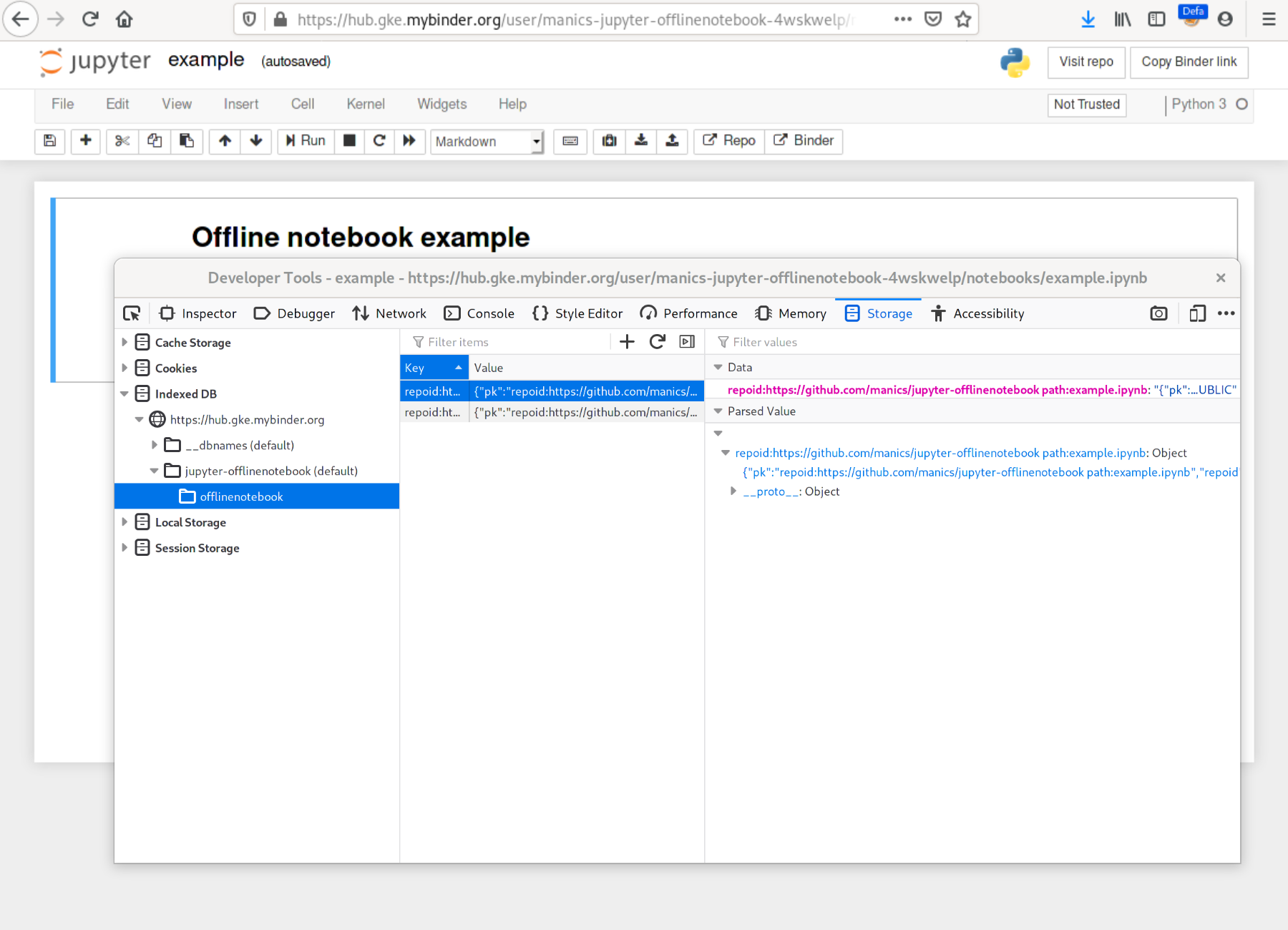
How about give it a few days, if there are no issues tag it as 0.1.0 and then roll out?
manics
on 1 Dec 2019
Sounds like a good plan!
I was also wondering if we could use the repo2docker appendix to install this in a few repos (something like random.seed(repo_name); if random.random() < 0.1). Maybe that is too much effort compare to adding it to repo2docker directly.
For my education: what does IndexDB get you over local storage? Bigger files?
betatim
on 1 Dec 2019
localstorage is limited to 5-10 MB total per origin. As soon as you embed resources in a notebook such as images you can easily hit it. IndexedDB provides a lot more space, up to 2GB in Firefox https://developer.mozilla.org/en-US/docs/Web/API/IndexedDB_API/Browser_storage_limits_and_eviction_criteria#Storage_limits
manics
on 1 Dec 2019
We have added https://github.com/manics/jupyter-offlinenotebook to repo2docker in https://github.com/jupyter/repo2docker/pull/845. Closing this for now.
betatim
on 7 Feb 2020
@betatim I've invited you to be a collaborator on https://github.com/manics/jupyter-offlinenotebook/ so it's not dependent on one person.
manics
on 8 Feb 2020
Related issues
 choldgraf
·
6Comments
choldgraf
·
6Comments
 davidanthoff
·
4Comments
davidanthoff
·
4Comments
 melaniewalsh
·
4Comments
melaniewalsh
·
4Comments
 yuvipanda
·
3Comments
yuvipanda
·
3Comments
 raffadrummer
·
4Comments
raffadrummer
·
4Comments
Most helpful comment
I think the latest version is in a pretty good state: https://github.com/manics/jupyter-offlinenotebook/tree/0.0.8:
How about give it a few days, if there are no issues tag it as
0.1.0and then roll out?