Betaflight-configurator: BFC 10.6 RC1 cannot flash in Chrome version, however ok in win32 version
Win 10 x64, Chrome 77.0.3865.90 (Official Build) (64-Bit), BF versions tried: Nightly 9/27, 4.0.0, 4.0.6, 4.1.0RC5. FC: OMNINXT7
Sequence:
- Install BFC 10.6RC1 Chrome install version
- Connect USB (tried both with BOOT button pressed or not pressed)
- Update Firmware - choose version
- Load Firmware - Flash
Result: Contact bootloader - times out, doesn't start erasing / flashing.
Identical settings in win32 install version --> flashes no problem
 RipperDrone
All 29 comments
1655 This has been reported by several users now, however I can't reproduce it.
 IvoFPV
on 27 Sep 2019
IvoFPV
on 27 Sep 2019
@IvoFPV - yes just found the referenced issue and your reply. Hm, what else can I share as far as setup / hardware... to help you reproduce?
RipperDrone
on 27 Sep 2019
The way I installed BFC in Chrome is:
- Download + Unzip BFC Chrome version into a temporary directory
- Start Chrome / Show extensions
- Activate Developer Mode
- Load app package from temporary directory
- Launch BFC
Win10 x64 Build 1907
RipperDrone
on 27 Sep 2019
I run windows build 1903. I will check on another PC with 1907. That's the only thing different from what you are describing here.
IvoFPV
on 27 Sep 2019
sounds like timing issues with USB port? Configuring the FC is no problem, it only seems to happen when in DFU mode...?
I tried various UART speed settings 256000, 115k, 19.2k etc. - nope
RipperDrone
on 27 Sep 2019
@IvoFPV - no need trying a different Win version - my memory served me bad. On the failing computer I have 1903 running like you. Seems rather related to serial protocoll drivers / timings ...
RipperDrone
on 27 Sep 2019
Not sure... Do you put it into DFU before you click Flash Firmware? Or do you let it go into DFU itself?
IvoFPV
on 27 Sep 2019
U mean by typing 'BL' in CLI or by pressing Boot button while connecting to USB? Tried both, doesn't matter. Neither letting itself go into DFU mode (which it does as per header info in BFC!)
RipperDrone
on 27 Sep 2019
Never mind, just reproduced it. Definitely only Chrome app version doesn't work. Going to look into it more...
IvoFPV
on 27 Sep 2019
Great, getting closer! :-) What made it reproducible on your computer?
RipperDrone
on 27 Sep 2019
Seems to break here. @mikeller Any thoughts on this?
https://github.com/betaflight/betaflight-configurator/blob/074bb46f788e15a552a2267f433e3f21707c7f64/src/js/protocols/stm32usbdfu.js#L218
IvoFPV
on 27 Sep 2019
@RipperDrone: You should be using the version that is recommended for your platform.
Closing this as a duplicate of #1655.
 mikeller
on 28 Sep 2019
mikeller
on 28 Sep 2019
@mikeller would love to, but now both are somewhat flawed:
- Chrome version cannot flash, but has clear, readible fonts
- win32 version can flash, but fonts are dithered / washed out sometimes / almost unreadible
Choose hell or devil! 🤔😅
RipperDrone
on 28 Sep 2019
BTW: Can't see why it has been tagged as 'user error' if everything worked till BFC (Chrome version ) 10.5.1 and is broken from 10.6. Must be something in the code itself...?
RipperDrone
on 28 Sep 2019
@RipperDrone:
win32 version can flash, but fonts are dithered / washed out sometimes / almost unreadible
This should be fixable. If a uninstall / reinstall of the app does not fix it then this normally means that the local application data is corrupted - try uninstalling the application, then deleting the C:\Users\<username>\AppData\Local\betaflight-configurator directory.
Chrome version cannot flash, but has clear, readible fonts
The problem with this is that running Chrome web apps outside of Chromebooks is living on borrowed time - Google has announced that they are dropping support for this about 2 years ago, and every new Chrome release could see them make this announcement a reality - so relying on this to keep working, or putting effort into making it work, seems to be a waste of time - sooner or later this will just stop working without any way around it.
mikeller
on 29 Sep 2019
@mikeller makes sense, thank you for explaining. Is there another way to participate in Nightly code testing without having to build the app myself? This was the beauty of chrome versions, they are auto-built by Travis- full win32 builds are available at RC/release level only ... 🤔
RipperDrone
on 29 Sep 2019
@RipperDrone: At the moment there isn't - the Chrome web app was a convenient way to do this, but it's entirely dependent on Google supporting this in Chrome.
One thing I want to look into is making it possible to provide pre-built nightlies for the configurator (and Blackbox log viewer), like we are doing for firmware.
One potential avenue to get this will be to leverage azure, which is work that was started in #1386 - but unfortunately I have not found the time to drive this to a point where it can be made available to all users.
mikeller
on 29 Sep 2019
ok, I'll have to try btw the 2 options then. Here is the result from deleting the bfc directory you referred me and then reinstalling:
- still dithered fonts (see example below), gets even more blurry sometimes when resizing app window and/or moving BFC window on Win10 canvas. Never happens in Chrome version. Have tried different graphics card settings (Anti Aliasing etc.), clearView on/off - no luck.
- installation takes 5+ minutes (!). Seems to stall at 90%, then crawls to finishing line super-slowly. Could be my SSD (which is fast but all SSDs have access time limitations when a large number of small files is written to them). Seems there are more than 1,000 files written in the Win32 install...
Thus, unfortunately the easy-breezy part of trying and testing BFC on Win10 is over, things are getting a bit messy...

RipperDrone
on 29 Sep 2019
@RipperDrone:
still dithered fonts
Not sure there is much we can do - this is something that comes from NW.js - we'll be looking into updating to a newer version after 10.6.0 has been released, hopefully this should fix it.
installation takes 5+ minutes
This is a known issue - the problem here is that the virus scanner is taking a very long time to analyse all of the 1000s of files that are copied during the current install. We'll look into installing the app in compressed form and see if this now works as it should, again, after 10.6.0 has been released.
mikeller
on 29 Sep 2019
@RipperDrone download a build from https://nwjs.io/ and unzip it somewhere (Folder on the Desktop!) and then grab a ChromeOS zip from https://ci.betaflight.tech/job/BetaFlight_Configurator/ and unzip that into the same folder.
I'd try whatever is newest, but maybe the latest version has that USB issue. If that is the case, try https://dl.nwjs.io/v0.40.1/nwjs-sdk-v0.40.1-win-ia32.zip as that is the exact build I've been using occasionally. Just ignore the devtools :p
run nw.exe and see what happens.
Ask me if I forgot anything.
 Docteh
on 29 Sep 2019
Docteh
on 29 Sep 2019
@Docteh - good input, thanks. Results as follows:
step 1 - latest nwjs and bf chrome version dumped into same folder --> no success still:

RipperDrone
on 29 Sep 2019
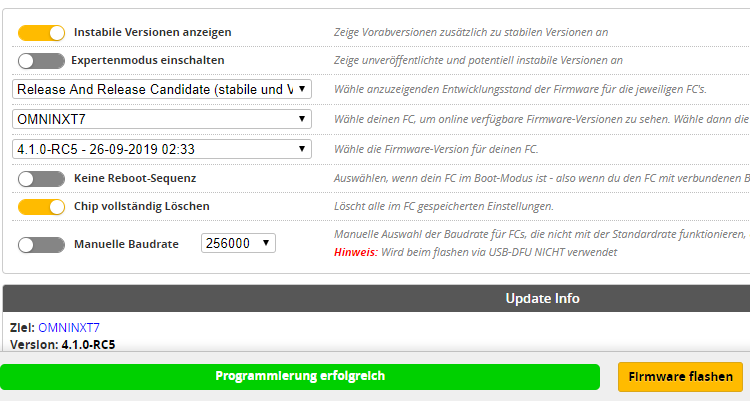
step 2 - nwjs extract from https://dl.nwjs.io/v0.40.1/nwjs-sdk-v0.40.1-win-ia32.zip, bf chrome version extract into same folder - invoke nw.exe
--> success!
So yes, seems js version dependent :-(
RipperDrone
on 29 Sep 2019
Despite the USB flashing being successful, here is the catch: Dithered fonts (delayed screen updating?). Hope this video explains well what it looks like (when overlying the BFC app window with e.g. a progress bar, the fonts in BFC even start dancing / shivering permantently... :-)
Doesn't happen with BFC chromium install, though does happen with both win32 install and your new recommendation via nw.exe
Video:
https://drive.google.com/open?id=1in94zpjIYu9tOUXHDo-GqLpKve8LZdlO
RipperDrone
on 29 Sep 2019
One more insight: When the USB port is connected, the screen refresh seems to NOT happen at all, window content remains like this:
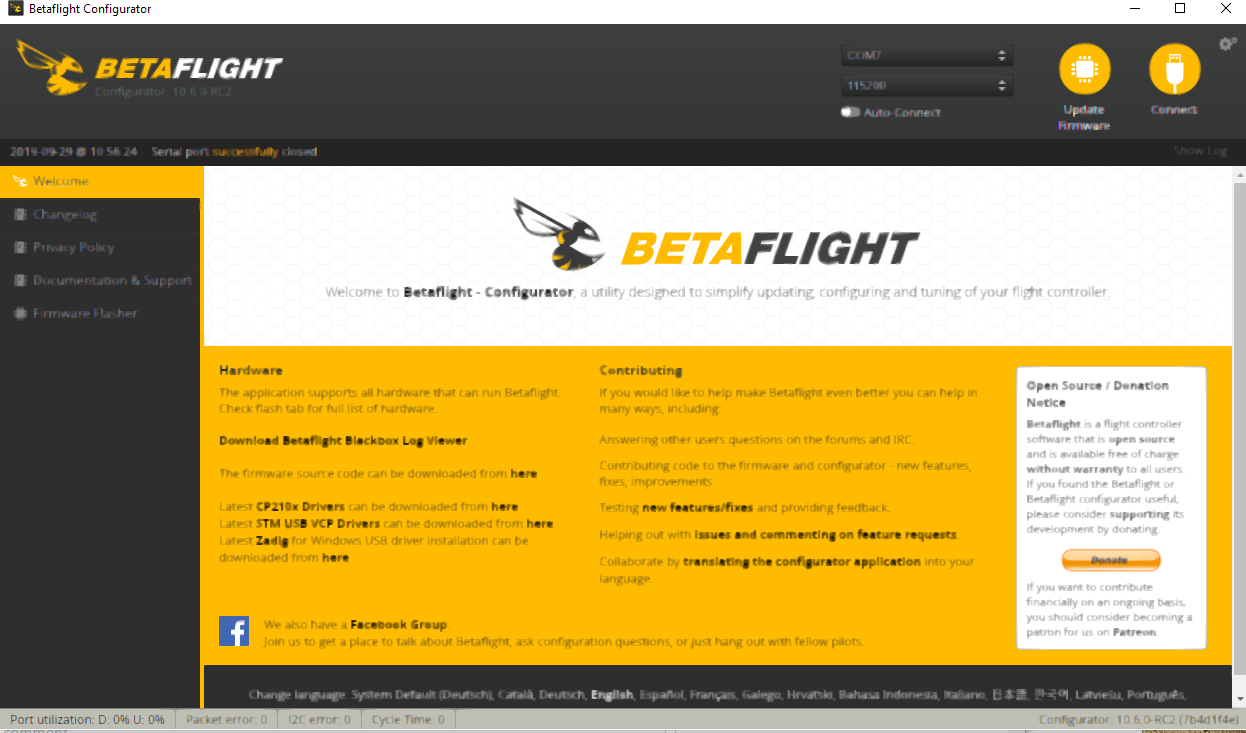
When USB is connected, it seems there is a refresh every 0.5-1 seconds, re-sharpening the fonts display. Strange... 🤔
RipperDrone
on 29 Sep 2019
@RipperDrone: At the moment there isn't - the Chrome web app was a convenient way to do this, but it's entirely dependent on Google supporting this in Chrome.
One thing I want to look into is making it possible to provide pre-built nightlies for the configurator (and Blackbox log viewer), like we are doing for firmware.
One potential avenue to get this will be to leverage azure, which is work that was started in #1386 - but unfortunately I have not found the time to drive this to a point where it can be made available to all users.
@mikeller I have a working version of this building the Mac and Windows builds in an azure pipeline and pushing them to github - is there anything I can do to help?
 frozenskys
on 29 Sep 2019
frozenskys
on 29 Sep 2019
@frozenskys: It's just a matter of sharing the link for the repository around then. If I remember correctly, your solution uses a dedicated repository to release the nightly binaries?
mikeller
on 29 Sep 2019
I have been out of the hobby since BF 4.0.3. Today I installed Configurator 10.6.0-RC1 using the CHROMEOS installer for Chrome. I did this because I could not get the MacOS DMG installer to work. When trying to flash my DALRC722DUAL the board goes into DFU but after that nothing happens. I tried several times. In the past the ChromeOS version always worked flawlessly on my MAC.
My work-around for now is to flash with Configurator 10.5.1 native MacOS install.
 jcutcher01
on 29 Sep 2019
jcutcher01
on 29 Sep 2019
@jcutcher01: What version of MacOS are you using?
mikeller
on 29 Sep 2019
I am running the latest... Mojave 10.14.6
jcutcher01
on 30 Sep 2019
Related issues
 McGiverGim
·
3Comments
McGiverGim
·
3Comments
 Knifa
·
6Comments
Knifa
·
6Comments
 Stavr0s91i
·
5Comments
Stavr0s91i
·
5Comments
 richard-scott
·
3Comments
richard-scott
·
3Comments
 MathijsG
·
9Comments
MathijsG
·
9Comments
Most helpful comment
@mikeller I have a working version of this building the Mac and Windows builds in an azure pipeline and pushing them to github - is there anything I can do to help?