Azurestorageexplorer: ADLS Gen 2 : Unable to retrieve child resources when opening Blob Container
Storage Explorer Version: 1.11.0
Build Number: 20191105.2
Platform/OS: Windows 10
Architecture: x64
Regression From: 1.10.2
Bug Description
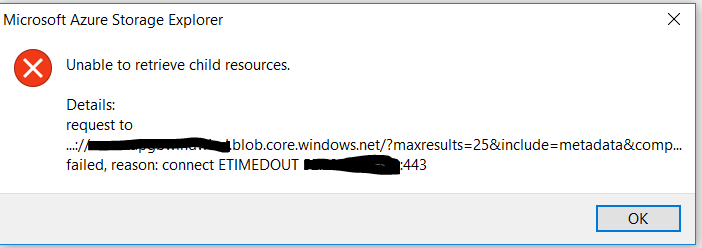
An error message is being displayed when trying to navigate to an ADLS Gen2 file system
Steps to Reproduce
- Navigate to an ADLS Gen 2 Accoutn
- Open Blob Containers
- Error Message Appears
Expected Experience
File Systems are displayed when "Blob Containers" is opened
Actual Experience
The below error message appears:
Additional Context
Yesterday I tried both with and without a proxy but the same error message appears(in West Europe and there were storage errors all day due to outage)
Today I can see the containers when not on Proxy. Using Proxy, it does not list the file systems
 GBBBAS
All 20 comments
I'm having the same problem with a different message:
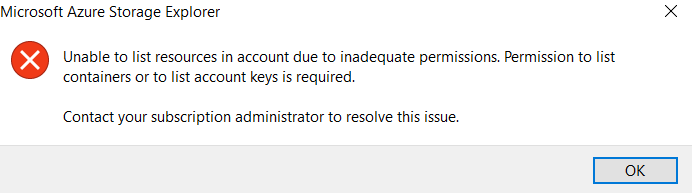
The DFS Endpoint issue doesn't seem to be the problem here.
 Voonce
on 8 Nov 2019
Voonce
on 8 Nov 2019
I have the same issue since v 1.10.1 but not with 1.8.0. I think this is because proxy setting. But even we config proxy correctly, It still does not work. Our IT Security team found that Azure Storage Explorer did not send request to server via the proxy server but go directly. That may be the problem.
Do you use proxy in your environment?
 sarmoho
on 8 Nov 2019
sarmoho
on 8 Nov 2019
One more thing, if you used proxy serve and config it correctly but still have this problem like me. I found workaround by select "Target Azure Stack APIs" under "Edit" menu. It will fix the list file system problem but you will not use some feature like "Manage Access".
sarmoho
on 8 Nov 2019
I think the problem is related to the Known issue from the release notes.
Known Issues
Storage Explorer 1.11.0 now requires a DFS endpoint (such as "myaccount.dfs.core.windows.net") to attach to ADLS Gen2 containers. Previous versions of Storage Explorer allowed you to use a blob endpoint. These attachments may no longer work after upgrading to 1.11.0. If you encounter this problem, reattach using the DFS endpoint.
 timostrotmann
on 8 Nov 2019
timostrotmann
on 8 Nov 2019
I use proxy settings.
I have the same issue since v 1.10.1 but not with 1.8.0. I think this is because proxy setting. But even we config proxy correctly, It still does not work. Our IT Security team found that Azure Storage Explorer did not send request to server via the proxy server but go directly. That may be the problem.
Do you use proxy in your environment?
Unfortunately I still get the same error.
One more thing, if you used proxy serve and config it correctly but still have this problem like me. I found workaround by select "Target Azure Stack APIs" under "Edit" menu. It will fix the list file system problem but you will not use some feature like "Manage Access".
Voonce
on 8 Nov 2019
I think the problem is related to the Known issue from the release notes.
Known Issues
Storage Explorer 1.11.0 now requires a DFS endpoint (such as "myaccount.dfs.core.windows.net") to attach to ADLS Gen2 containers. Previous versions of Storage Explorer allowed you to use a blob endpoint. These attachments may no longer work after upgrading to 1.11.0. If you encounter this problem, reattach using the DFS endpoint.
I am navigating to the Storage Account from my subscription, so have not connected using an endpoint.
GBBBAS
on 8 Nov 2019
Same problem here, but... only when using company's internet connection (which is behind a proxy), connecting without the proxy is still working fine
Really must be something about the proxy, after the new version
Dfs endpoint didn't solve anything
Switching "Target Default Azure APIs" won't allow me to even list file systems
Waiting on another version won't be easy
 rmramalho
on 8 Nov 2019
rmramalho
on 8 Nov 2019
If you go through a proxy, your best bet right now is to downgrade to 1.10.1 while we are investigating the issue. You can find 1.10.1 here on Github under the Releases table in this repo.
 jinglouMSFT
on 8 Nov 2019
jinglouMSFT
on 8 Nov 2019
If you go through a proxy, your best bet right now is to downgrade to 1.10.1 while we are investigating the issue. You can find 1.10.1 here on Github under the Releases table in this repo.
Tried 1.10.1 and 1.10.0, both has the same problem
1.9.0 works fine!
Thanks
rmramalho
on 9 Nov 2019
What types of proxies are y'all behind? We use Fiddler to test proxy (because Fiddler is a proxy) and we don't see any issues. So we think there's something special about the proxies y'all are using in the wild.
 MRayermannMSFT
on 11 Nov 2019
MRayermannMSFT
on 11 Nov 2019
[Version: 1.11.0 / AzCopy-Version: 10.3.1 / Windows ia32]
I encounter the same problems while trying to access an ADLS Gen2 through a ZScaler proxy. Queues and tables within the same storage account are still accessible.
Checking network endpoints using TCPview and in contrast to queues and tables - it seems to me that the Storage Explorer doesn't even make an attempt to go through the proxy for Blobs/DFS but tries to reach the endpoint directly.
 qbertz
on 12 Nov 2019
qbertz
on 12 Nov 2019
Here is a PRIVATE build based off of 1.11.0 that should have a fix for this problem. Would you be willing to give it a try and let us know if if fixes the problem you ran into? Thanks.
• Windows: https://aka.ms/storageexplorer/msal/windows
• Mac: https://aka.ms/storageexplorer/msal/macos
• Linux: https://aka.ms/storageexplorer/msal/linux
jinglouMSFT
on 12 Nov 2019
I can confirm that private build 20191112.2 is working in my setup.
qbertz
on 13 Nov 2019
@jinglouMSFT Could it be possible to have portable version of this PRIVATE build on Window? Our company has policy not allow non admin user to install software without security scan on setup file and this scan process really take time.
Or if you can config installer to allow non admin user to install that would be great.
sarmoho
on 13 Nov 2019
Here is a PRIVATE build based off of 1.11.0 that should have a fix for this problem. Would you be willing to give it a try and let us know if if fixes the problem you ran into? Thanks.
• Windows: https://aka.ms/storageexplorer/msal/windows
• Mac: https://aka.ms/storageexplorer/msal/macos
• Linux: https://aka.ms/storageexplorer/msal/linux
This works for me, can list and navigate through ADLS Gen 2 file systems behind our proxy now
GBBBAS
on 13 Nov 2019
@sarmoho , can you elaborate on what you mean by portable? Thanks.
MRayermannMSFT
on 13 Nov 2019
@MRayermannMSFT Sorry for my English. I mean the software package that don't need to have admin right to run installer. It is like zip of .exe and all .dll dependency files.
My intention to is I just want to quickly try this private build version but I don't have admin permission. So I try to ask you if you have any workaround to overcome this.
sarmoho
on 14 Nov 2019
For me the private build 20191112.2 is working as well.
timostrotmann
on 14 Nov 2019
@sarmoho - unfortunately our install needs admin right to install. Making it to install without admin permission is a task on our backlog and it's not a simple change. So, you may have to wait until we release 1.11.1 which should be sometime next week. We are waiting on ADLS Gen2, the services, to fix a platform issue before we role out our release.
jinglouMSFT
on 14 Nov 2019
Going to go ahead and close this as we're shipping 1.11.1. If any of you run into any problems please let us know via a new issue.
MRayermannMSFT
on 21 Nov 2019
Related issues
 timoklimmer
·
6Comments
timoklimmer
·
6Comments
 ayon1911
·
5Comments
ayon1911
·
5Comments
 sholman
·
3Comments
sholman
·
3Comments
 riazjahangir
·
4Comments
riazjahangir
·
4Comments
 eosho
·
3Comments
eosho
·
3Comments
Most helpful comment
@sarmoho - unfortunately our install needs admin right to install. Making it to install without admin permission is a task on our backlog and it's not a simple change. So, you may have to wait until we release 1.11.1 which should be sometime next week. We are waiting on ADLS Gen2, the services, to fix a platform issue before we role out our release.