Azurestorageexplorer: Unable to create property of type DateTime on table
Storage Explorer Version: 1.2.0
Platform/OS Version: Win 10
Architecture: ia32
Build Number: 20180605.1
Commit: f8373d5a
Steps to Reproduce:
Add table to any storage account (Tested on Storage Emulator 5.5 & Live storage account)
Add entity to table
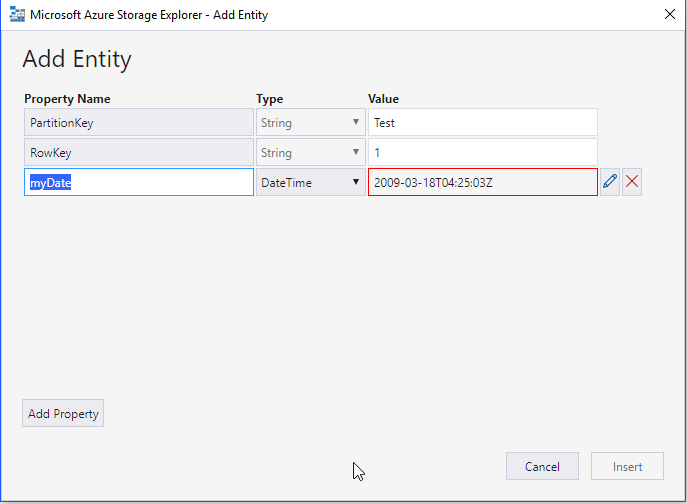
Add Property and change Type to DateTime and try to enter date
Expected Experience:
Date entered in ISO 8601 format to be allowed (as per https://docs.microsoft.com/en-us/rest/api/storageservices/formatting-datetime-property-values)
Actual Experience:
Red validation border stays in field no matter the format of the input, and the Insert button is disabled.
 sholman
All 3 comments
Add a milliseconds piece: 2009-03-18T04:25:03.000Z. We can make that more clear in the validation in future versions.
 craxal
on 12 Jun 2018
craxal
on 12 Jun 2018
I would guess this is a fairly low-priority product for Microsoft, but could this someday be updated to open a date-picker when editing a DateTime field?
 amullins83
on 17 Dec 2018
amullins83
on 17 Dec 2018
Date pickers are...problematic, we've found. We struggled for a while with data accuracy and integrity problems in the past, which is why we went with an ordinary text input. The built in ones also don't let you select milliseconds or time zones.
craxal
on 15 Jan 2019
Related issues
 niklas-e
·
4Comments
niklas-e
·
4Comments
 alaendle
·
5Comments
alaendle
·
5Comments
 kjoshi-rubikloud
·
3Comments
kjoshi-rubikloud
·
3Comments
 dfibuch
·
4Comments
dfibuch
·
4Comments
 euandekock
·
6Comments
euandekock
·
6Comments
Most helpful comment
Add a milliseconds piece:
2009-03-18T04:25:03.000Z. We can make that more clear in the validation in future versions.