Azurestorageexplorer: Poison queue messages should have option to requeue
Storage Explorer Version: 1.6.2
Platform/OS Version: Windows
Architecture: ia32
a requeue button would be nice when selecting a poison azure queue message !!

 HNeukermans
All 30 comments
Actually, the requeue idea could be even better. Highlight a message, click on the requeue button and add that message into the queue. It would be great for debugging a processes. Just click on a message to run the test case again.
 CurtMiller66
on 23 Feb 2019
CurtMiller66
on 23 Feb 2019
I am literally copying 500 messages from my email-poison queue as we speak... I'd love to see this feature. Thanks!
 ZombiesWithCoffee
on 24 May 2019
ZombiesWithCoffee
on 24 May 2019
Ok I did some looking into this, and what I thought y'all were asking for doesn't actually seem to be the case! Let me make sure I understand everything and get some thoughts from y'all on how to handle things.
It sounds like y'all have 2 queues, a main queue and a poison queue. Your poison queue is where all messages your app/service/etc. think are poisoned go. And y'all want to easily be able to add those back to your main queue. Right?
If yes, then do you expect Storage Explorer to know which queue is your main queue? It sounds like for Azure Functions the poison queue is always (?) called queuename-poison, but that may not be true for everyone. Would y'all be ok with a copy and paste esque feature? What would you expect the expiration of requeued messages to be?
 MRayermannMSFT
on 2 Jul 2019
MRayermannMSFT
on 2 Jul 2019
In my case, it is much simpler. Explorer is showing a record in the queue that I know I just processed and would be gone if I hit refresh. I would like a right mouse click on a message to have 2 options:
1) View Message
2) Add Message
where Add message would add the highlighted message message text as a new record in the queue.
CurtMiller66
on 2 Jul 2019
That's all I'm looking for. A copy/paste feature.
When I fix my problem, copy all of the 'poison' messages and paste them in the queue to retry.
ZombiesWithCoffee
on 2 Jul 2019
i am _not_ looking for a copy/paste feature. i am looking for a "move all of the messages from queue A to queue B feature.
When an automated process that processes a lot of msgs fails, they end up in another queue. might or might not be the poison one. might or might not be named "-poison". So this is basically queue A.
So after whatever broke has been fixed msgs need to be moved back to the original, which is B. Because there are a lot of msgs, copy/paste might help a little, but "move everything" is much less work in such a case.
 twoelfer
on 28 Jan 2020
twoelfer
on 28 Jan 2020
@HNeukermans @ZombiesWithCoffee @CurtMiller66 @HNeukermans,
Can y'all confirm whether or not the queue you want messages to be requeued in/queued in/moved to is the same queue or a different queue?
Or in other words, let's say the the messages you care about are in queue foo. Which of these are true:
- You want to take those messages and put them in queue foo again.
- You want to take those messages and put them in a different queue. (this is what @twoelfer wants)
Finally, @HNeukermans @ZombiesWithCoffee @CurtMiller66 @HNeukermans, and @twoelfer ,
If Storage Explorer is going to do anything to messages beyond the first 32, then messages will need to be dequeued before Storage Explorer can access them. In regards to that limitation, we've thought of three options:
- Only allow this feature to be done on the first 32 messages. So to process an entire queue: you use this feature on the first 32, you dequeue the first 32, refresh, repeat until queue is empty.
- Allow this feature to be done on an entire queue, and Storage Explorer will automatically process and then dequeue messages until the queue is empty.
- Combo of both 1 and 2. Let you select visible messages to do this feature on, or let you do it to the entire queue.
Let me know which of those options appeals most to you and your workflows.
Thanks!
MRayermannMSFT
on 20 Feb 2020
In my case, it is the same queue. I reprocess the same message (or group of messages) multiple times while developing and debugging. A can easily see the use for copying a selection of messages from one queue to another. It would be a workable answer for me just not as easy as resubmit.
P.S. I appreciate that you are actively looking at this.
CurtMiller66
on 20 Feb 2020
You want to take those messages and put them in a different queue.
This is what I wanted. To take messages out of the poison queue and put them back in the original queue once my problem is fixed.
ZombiesWithCoffee
on 20 Feb 2020
I want the msgs in a different queue. I totally don’t want anything manual, because we’re talking about a couple of thousand messages.
So my answer is 2 in both cases.
Am 20.02.2020 um 18:28 schrieb Matthew Rayermann notifications@github.com:
@HNeukermans @ZombiesWithCoffee @CurtMiller66 @HNeukermans,Can y'all confirm whether or not the queue you want messages to be requeued in/queued in/moved to is the same queue or a different queue?
Or in other words, let's say the the messages you care about are in queue foo. Which of these are true:
You want to take those messages and put them in queue foo again.
You want to take those messages and put them in a different queue.
Finally, @HNeukermans @ZombiesWithCoffee @CurtMiller66 @HNeukermans, and @twoelfer ,If Storage Explorer is going to do anything to messages beyond the first 32, then messages will need to be dequeued before Storage Explorer can access them. In regards to that limitation, we've though of three options:
Only allow this feature to be done on the first 32 messages. So to process an entire queue: you use this feature on the first 32, you dequeue the first 32, refresh, repeat until queue is empty.
Allow this feature to be done on an entire queue, and Storage Explorer will automatically process and then dequeue messages until the queue is empty.
Combo of both 1 and 2. Let you select visible messages to do this feature on, or let you do it to the entire queue.
Let me know which of those options appeals most to you and your workflows.Thanks!
—
You are receiving this because you were mentioned.
Reply to this email directly, view it on GitHub, or unsubscribe.
twoelfer
on 20 Feb 2020
@HNeukermans @ZombiesWithCoffee @CurtMiller66 @HNeukermans, and @twoelfer ,
I'd like to get y'all's feedback on what we're thinking.
So for the simple case of requeuing in the same queue, you'd be able to:
- Select any number of visible messages
- Via either the context menu or the toolbar, choose "Requeue"
- Storage Explorer would then add messages on the queue with the same message contents as the ones you selected, and their expiration length would be same as the original messages as well.
For the more complex case about moving messages to another queue, you'd be able to:
- Right click on a queue in the tree view
- Choose "Add poison queue"
- Dialog comes up where you give a SAS to the poison queue, click Ok
- The original queue now has a child node, the poison queue. The poison queue's icon is slightly different to help signify what it is. The addition of this poison queue is persistent across sessions as well.
- You open the poison queue. It has an additional action in the toolbar and context menu. "Move to main queue". Clicking that button reveals a sub menu with two options: "Move selected", "Move all". Move selected would only move the ones you have selected. Move all would move literally everything in the queue until it is empty. In both cases, moving means that Storage Explorer would be dequeuing the messages from the poison queue.
- After selecting either option, a dialog would appear asking you to confirm the move, and it would let you specify a expiration length for the messages.
- Assuming you confirm, Storage Explorer would then move messages from the poison queue to the main queue.
Let me know your thoughts on this. Also, if you need visual mockups to help understand what I'm saying, let me know. Thanks!
MRayermannMSFT
on 27 Feb 2020
I really don’t get it. My suggestion:
- right click on queue. Context menu has “move msgs”
- click “move msgs”.
- Dialog comes up. Has list of queues. All but source queue. Select one. Click ok.
- all msgs are moved.
I don’t get Why this is specific to “poison”. I don’t get why a sub tree node is needed. Don’t understand the “simple” case at all. Sorry....
Maybe my explanation isn’t good enough? (I’m on a boat right now, but I could write a more detailed explanation next week)
-thomas
WM_THX
Am 27.02.2020 um 19:08 schrieb Matthew Rayermann notifications@github.com:
@HNeukermans @ZombiesWithCoffee @CurtMiller66 @HNeukermans, and @twoelfer ,I'd like to get y'all's feedback on what we're thinking.
So for the simple case of requeuing in the same queue, you'd be able to:
Select any number of visible messages
Via either the context menu or the toolbar, choose "Requeue"
Storage Explorer would then add messages on the queue with the same message contents as the ones you selected, and their expiration length would be same as the original messages as well.
For the more complex case about moving messages to another queue, you'd be able to:Right click on a queue in the tree view
Choose "Add poison queue"
Dialog comes up where you give a SAS to the poison queue, click Ok
The original queue now has a child node, the poison queue. The poison queue's icon is slightly different to help signify what it is. The addition of this poison queue is persistent across sessions as well.
You open the poison queue. It has an additional action in the toolbar and context menu. "Move to main queue". Clicking that button reveals a sub menu with two options: "Move selected", "Move all". Move selected would only move the ones you have selected. Move all would move literally everything in the queue until it is empty. In both cases, moving means that Storage Explorer would be dequeuing the messages from the poison queue.
After selecting either option, a dialog would appear asking you to confirm the move, and it would let you specify a expiration length for the messages.
Assuming you confirm, Storage Explorer would then move messages from the poison queue to the main queue.
Let me know your thoughts on this. Also, if you need visual mockups to help understand what I'm saying, let me know. Thanks!—
You are receiving this because you were mentioned.
Reply to this email directly, view it on GitHub, or unsubscribe.
twoelfer
on 27 Feb 2020
@twoelfer, assuming you're on a boat for leisure purposes, no rush getting back to me. Enjoy your time away.
But since you replied, I'll go ahead and reply as well.
Creating a List of Queues
Unfortunately there isn't a great way for us to generate a thorough "list of queues". There's lots of different places a queue might be in Storage Explorer.
- Users can sign in with multiple accounts. For each of those accounts, there can be multiple subscriptions. For each of those subscriptions, there can be many storage accounts. For each of those storage accounts there can be many queues.
- Users can also attach storage accounts. And for each of those there can be many queues.
- Users can also attach any number of queues.
So to make a "list of queues" we'd either have to:
- Create UI to filter down each of those paths to eventually get to a list which was manageable. I don't think we would do this.
- Provide a very succinct list, such as, just other queues in the current Storage Account. I think we'd be open to doing this. If you like this idea let me know.
Something else we discussed, which was also similar to your idea, would be to let you just do move and you supply a SAS to the queue you want to move things to. No sub node/poison node creation. If you like this idea let me know.
Cut and Paste
We also talked about offering the ability to "cut" and "paste" from one queue to another. That way you could just open your two queues, no matter how they were exposed to Storage Explorer. But we thought "cut" would be confusing to see in the context of queues. If you like this idea let me know.
Why we had the idea to do the sub node
We liked this idea because it would recreate the main queue<->poison queue relationship in the context of you viewing your queues in Storage Explorer. More specifically, if Storage Explorer knows that "for this queue, it has a poison queue, and this is it" then it could expose common actions that involve both the poison queue and the main queue. Moving messages between them would be the 1st one we'd add, but maybe in the future there would be more.
The simple case
The simple case was for everyone else on the issue. So it's ok if you don't have any feedback about it.
MRayermannMSFT
on 27 Feb 2020
If you like this idea let me know.
Yes, i like this.
poison node creation. If you like this idea let me know
Like this to.
cut and Paste
Not so much. For me, it’s all about batches.
So the subnode idea, I get it now. However, if the subnode cannot be created automatically, this has very bad discoverability....
WM_MY0.02CENT
-thomas
Am 27.02.2020 um 22:53 schrieb Matthew Rayermann notifications@github.com:
@twoelfer, assuming you're on a boat for leisure purposes, no rush getting back to me. Enjoy your time away.But since you replied, I'll go ahead and reply as well.
Creating a List of Queues
Unfortunately there isn't a great way for us to generate a thorough "list of queues". There's lots of different places a queue might be in Storage Explorer.
Users can sign in with multiple accounts. For each of those accounts, there can be multiple subscriptions. For each of those subscriptions, there can be many storage accounts. For each of those storage accounts there can be many queues.
Users can also attach storage accounts. And for each of those there can be many queues.
Users can also attach any number of queues.
So to make a "list of queues" we'd either have to:Create UI to filter down each of those paths to eventually get to a list which was manageable. I don't think we would do this.
Provide a very succinct list, such as, just other queues in the current Storage Account. I think we'd be open to doing this. If you like this idea let me know.
Something else we discussed, which was also similar to your idea, would be to let you just do move and you supply a SAS to the queue you want to move things to. No sub node/poison node creation. If you like this idea let me know.Cut and Paste
We also talked about offering the ability to "cut" and "paste" from one queue to another. That way you could just open your two queues, no matter how they were exposed to Storage Explorer. But we thought "cut" would be confusing to see in the context of queues. If you like this idea let me know.
Why we had the idea to do the sub node
We liked this idea because it would recreate the main queue<->poison queue relationship in the context of you viewing your queues in Storage Explorer. More specifically, if Storage Explorer knows that "for this queue, it has a poison queue, and this is it" then it could expose common actions that involve both the poison queue and the main queue. Moving messages between them would be the 1st one we'd add, but maybe in the future there would be more.
The simple case
The simple case was for everyone else on the issue. So it's ok if you don't have any feedback about it.
—
You are receiving this because you were mentioned.
Reply to this email directly, view it on GitHub, or unsubscribe.
twoelfer
on 28 Feb 2020
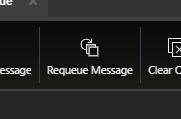
Requeue has been merged and will be included in 1.13.0. We'll be adding move messages in 1.14.0. You can track the estimated release date for that here: https://github.com/microsoft/AzureStorageExplorer/milestone/25
MRayermannMSFT
on 18 Mar 2020
Thank you. It works great.
CurtMiller66
on 6 May 2020
@MRayermannMSFT I'm quite late to the party here, but the 'move' function in our case is always in the same storage account, they're never across storage accounts. So the 'list of queues' would be pretty straightforward in this case, just the others in the same account.
It seems like you're probably further along in the implementation process, so this may not be helpful at this stage, but wanted to share.
Thanks for the work on this, exciting to see this feature coming!
 orofino
on 12 May 2020
orofino
on 12 May 2020
Hey y'all, unfortunately a bunch of other things came up for 1.14 and I was not able to get to this. We are still committed to getting this feature request resolved! Sorry for having to do so, but we're moving this to 1.15. Thanks for the patience.
MRayermannMSFT
on 8 Jun 2020
@orofino @twoelfer @ZombiesWithCoffee
The current plan is to simply let you pick from other queues in the storage account:
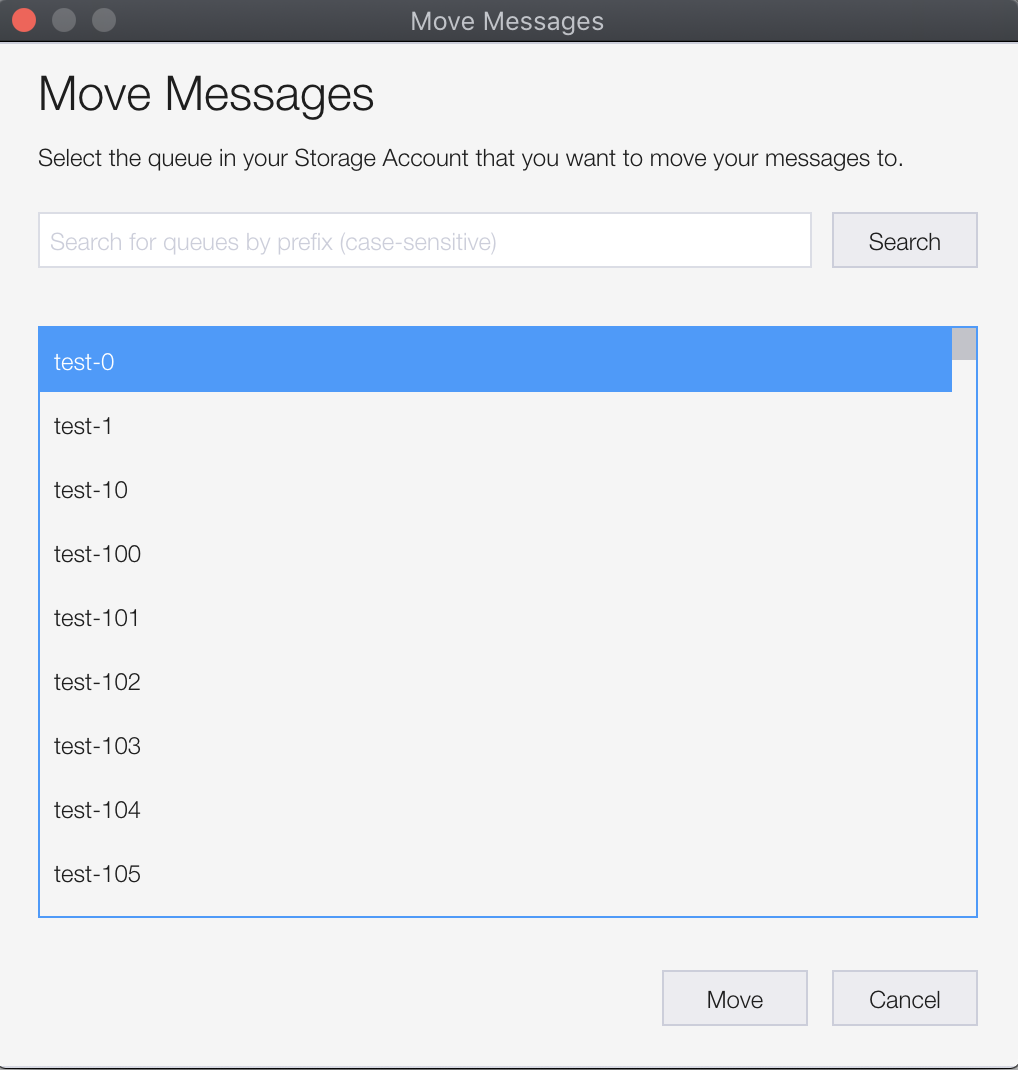
Is there a desire to be able to customize the new TTL of the moved messages, or is it ok to just use the same TTL as each message has on the original queue?
MRayermannMSFT
on 24 Jul 2020
The same TTL will be fine. The entire point of my desire is so that I can go to the poison queue, fix my bug, and retry. So this fulfills that need.
ZombiesWithCoffee
on 24 Jul 2020
Same TTL is fine.
twoelfer
on 24 Jul 2020
Awesome. Thanks for the fast replies. 🙂
MRayermannMSFT
on 24 Jul 2020
Same TTL good here as well. We try not to modify the messages in any way, so it is actually preferred.
Screenshot is amazing 😍
orofino
on 24 Jul 2020
@orofino @twoelfer @ZombiesWithCoffee
If y'all have time, it'd be great if you could give the new move messages feature a quick look. You can download a private build* of our upcoming release from the below URLs. You'll find move in the queue explorer toolbar. Let me know if y'all have any feedback. Also, do note that the move icon is likely to change before release.
- macOS: https://storageexplorerpublish.blob.core.windows.net/privatebuilds/1.15.0-MoveMessages/StorageExplorer-darwin-x64.zip
- Windows: https://storageexplorerpublish.blob.core.windows.net/privatebuilds/1.15.0-MoveMessages/StorageExplorer-ia32.exe
- Linux: https://storageexplorerpublish.blob.core.windows.net/privatebuilds/1.15.0-MoveMessages/StorageExplorer-linux-x64.tar.gz
Thanks!
* We do not recommend using private builds beyond the original purpose the build was given, nor do we recommend using private builds on sensitive/production/high importance data. It is recommended to return to using the latest public release ASAP.
MRayermannMSFT
on 5 Aug 2020
Well it’s 00:20 over here, but I’ll check this out tomorrow.
Am 05.08.2020 um 00:19 schrieb Matthew Rayermann notifications@github.com:
If y'all have time, it'd be great if you could give the new move messages feature. You can download a private build* of our upcoming release from the below URLs. You'll find move in the queue explorer toolbar. Let me know if y'all have any feedback. Also, do note that the move icon is likely to change before release.macOS: https://storageexplorerpublish.blob.core.windows.net/privatebuilds/1.15.0-MoveMessages/StorageExplorer-darwin-x64.zip
Windows: https://storageexplorerpublish.blob.core.windows.net/privatebuilds/1.15.0-MoveMessages/StorageExplorer-ia32.exe
Linux: https://storageexplorerpublish.blob.core.windows.net/privatebuilds/1.15.0-MoveMessages/StorageExplorer-linux-x64.tar.gz
Thanks!We do not recommend using private builds beyond the original purpose the build was given, nor do we recommend using private builds on sensitive/production/high importance data. It is recommended to return to using the latest public release ASAP.
—
You are receiving this because you were mentioned.
Reply to this email directly, view it on GitHub, or unsubscribe.
twoelfer
on 5 Aug 2020
Hi Matthew.
Looks good to me. I cannot test under “real” conditions, because I don’t have a way to actually generate these… I need to wait until one of the jobs actually break and tons of messages and up in “poison”. However, I did create some msgs manually and moved them, which worked just fine.
WM_THX
-thomas
Von: Matthew Rayermann notifications@github.com
Gesendet: Mittwoch, 5. August 2020 00:19
An: microsoft/AzureStorageExplorer AzureStorageExplorer@noreply.github.com
Cc: thomas woelfer tw@die.de; Mention mention@noreply.github.com
Betreff: Re: [microsoft/AzureStorageExplorer] Poison queue messages should have option to requeue (#1064)
If y'all have time, it'd be great if you could give the new move messages feature. You can download a private build* of our upcoming release from the below URLs. You'll find move in the queue explorer toolbar. Let me know if y'all have any feedback. Also, do note that the move icon is likely to change before release.
- macOS: https://storageexplorerpublish.blob.core.windows.net/privatebuilds/1.15.0-MoveMessages/StorageExplorer-darwin-x64.zip
- Windows: https://storageexplorerpublish.blob.core.windows.net/privatebuilds/1.15.0-MoveMessages/StorageExplorer-ia32.exe
- Linux: https://storageexplorerpublish.blob.core.windows.net/privatebuilds/1.15.0-MoveMessages/StorageExplorer-linux-x64.tar.gz
Thanks! - We do not recommend using private builds beyond the original purpose the build was given, nor do we recommend using private builds on sensitive/production/high importance data. It is recommended to return to using the latest public release ASAP.
—
You are receiving this because you were mentioned.
Reply to this email directly, view it on GitHub https://github.com/microsoft/AzureStorageExplorer/issues/1064#issuecomment-668852818 , or unsubscribe https://github.com/notifications/unsubscribe-auth/AJJNNNT6J6VZVD5G425YFHLR7CCOZANCNFSM4GPSZIWQ .
twoelfer
on 5 Aug 2020
This is really great. Does exactly what I was hoping for. I used the MacOS version.
Tested:
- moving single message
- moving arbitrary group of messages
- moving entire queue "Move All..." (with hundreds in there thanks to dev environments)
Would love to understand the cases for "When moving messages, the dequeue count of some messages in the source queue may go up, even if they are not being moved."? Is this impacting only the selected messages or possibly arbitrary messages that occur 'between' the selected messages or ???
Reasoning: Our systems are sensitive to the dequeue count to avoid re-processing certain items. As I understand it, this is somewhat antithetical to how queues should work, but still something I need to try to be mindful of.
orofino
on 5 Aug 2020
@orofino
Yes, as you guessed it will happen when moving "selected" messages. That feature is implemented by:
- you select messages you want to be moved
- Storage Explorer makes a note of those IDs
- Storage Explorer gets up to the first 32 messages
- messages which are supposed to be moved are moved, messages which are not to be moved are put back (visibility timeout reset to 0), but when those are put back, their dequeue count increases.
Here's some screenshots to help explain:
Seven messages in the queue, I'll move 1,3,5,7:
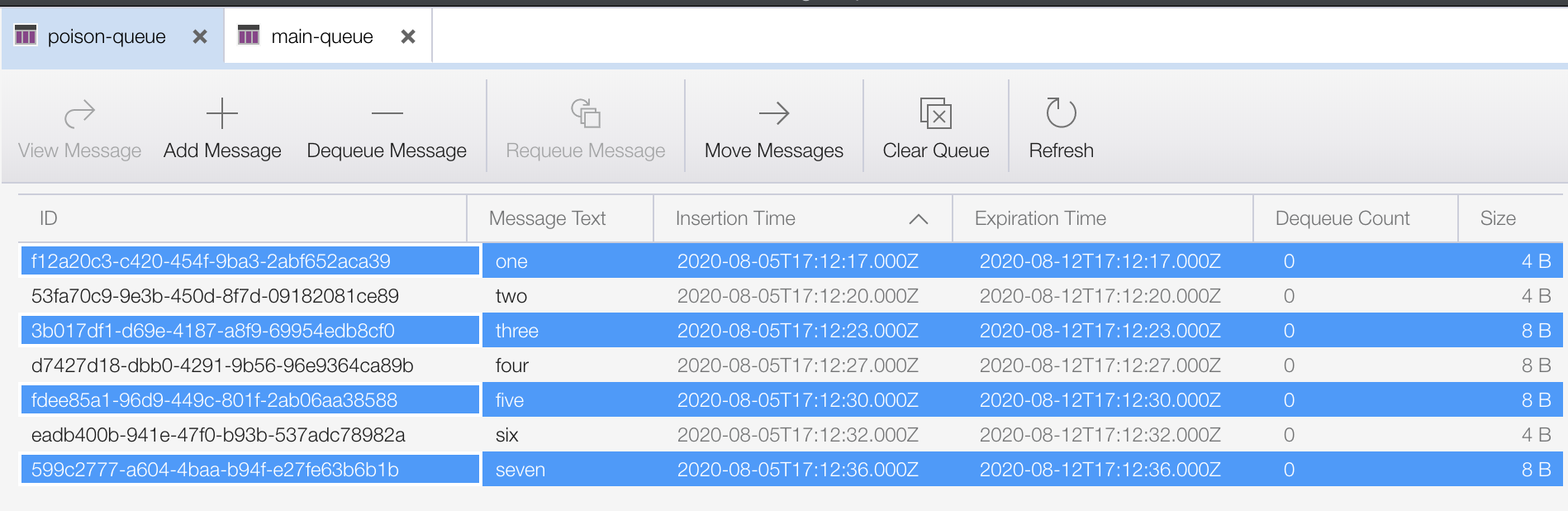
The messages I moved end up in the other queue, dequeue count of 0:
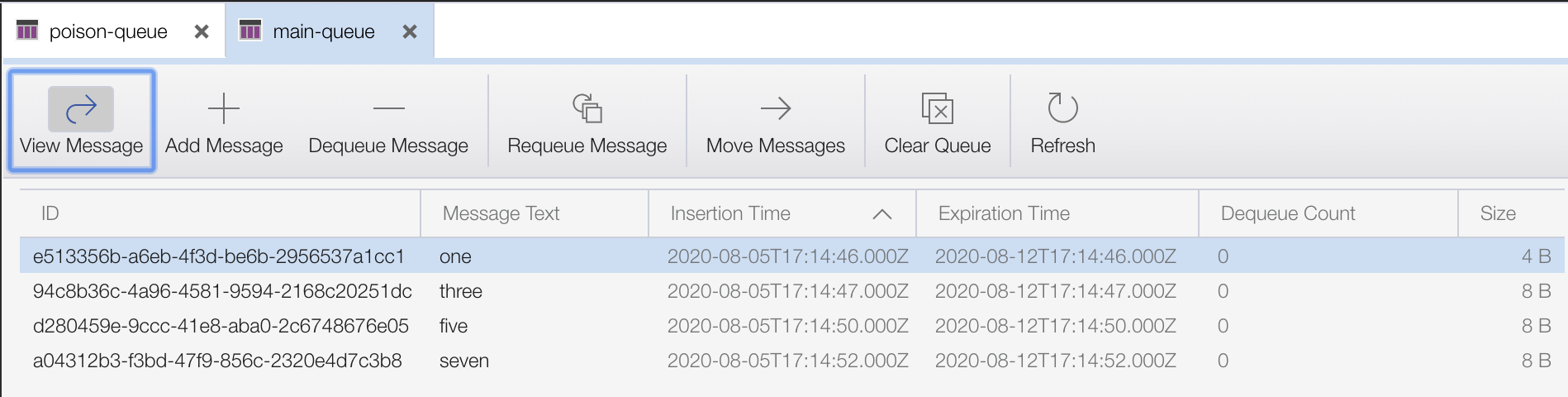
But the ones left behind had their dequeue count incremented since Storage Explorer got them in step 3:
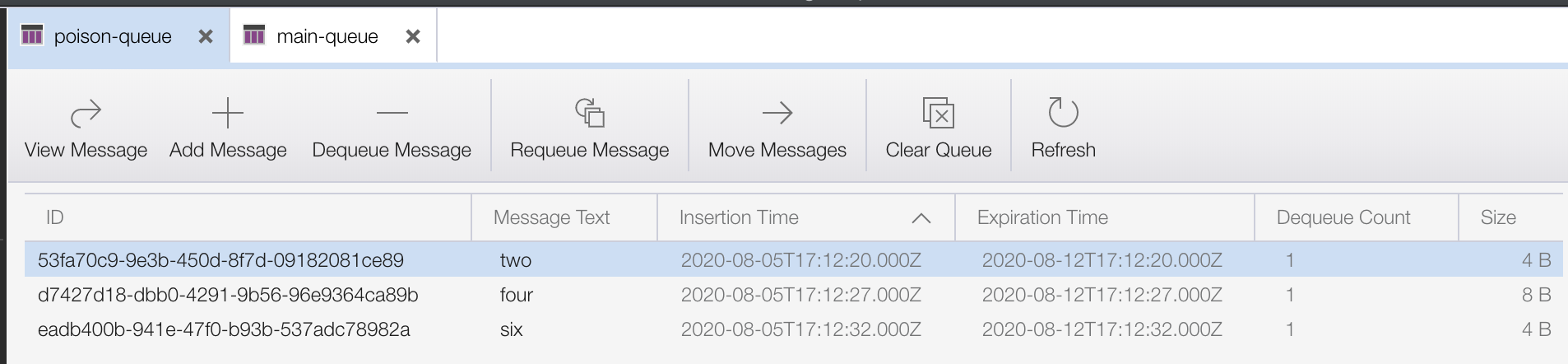
I could do an optimization where instead of getting the first 32 messages, we do a peek to figure out what is the minimum number of messages we need to "get" in order to get access to all of the messages you wanted moved. That way, if you selected first N messages in the queue, Storage Explorer isn't unnecessarily getting messages. But if your selection isn't a contiguous selection starting from the front message, then it'll be like it is in the version I gave you, you'll see the dequeue counts of messages left behind increment. Do you think you would want that?
MRayermannMSFT
on 5 Aug 2020
Thanks for the explanation. No, I don't think so. As you say, you'll still get some 'non-selected' incrementing of the dequeue count, which means there is little difference. This is the same as what we have to do today anyway. Generally we move all the messages out of the queue to a holding queue if we're working on live queues.
Thanks again for this great addition!
orofino
on 6 Aug 2020
Awesome. I'm going to go ahead and close this issue now. You'll see this feature come out in our 1.15.0 update. Thanks for all of the feedback and patience.
MRayermannMSFT
on 6 Aug 2020
Related issues
 timoklimmer
·
6Comments
timoklimmer
·
6Comments
 sholman
·
3Comments
CurtMiller66
·
6Comments
sholman
·
3Comments
CurtMiller66
·
6Comments
 euandekock
·
6Comments
euandekock
·
6Comments
 alaendle
·
5Comments
alaendle
·
5Comments
Most helpful comment
Awesome. I'm going to go ahead and close this issue now. You'll see this feature come out in our 1.15.0 update. Thanks for all of the feedback and patience.