Azurestorageexplorer: Cannot use Storage Explorer
Storage Explorer Version: 1.6.0
Platform/OS Version: Windows
Architecture:
Regression From:
Steps to Reproduce:
- When I log in my account for subscriptions, the problem happened
- The problem happened when click load more.
- The problem happened like "the requested action could not be completed." Details: Cannot read property 'connectionString' of undetfined. Then, the explorer unable to retrieve child resources. Details Cannot read property 'connectionString' of undefined.
EXPLORER part.
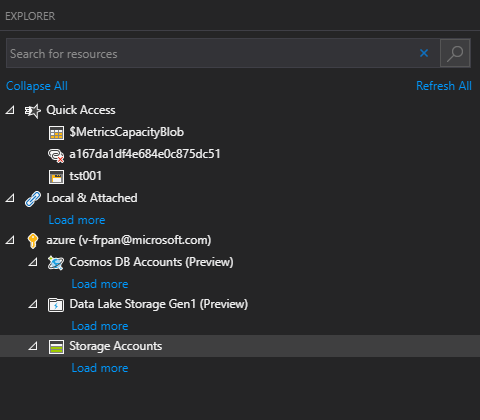
ERROR message
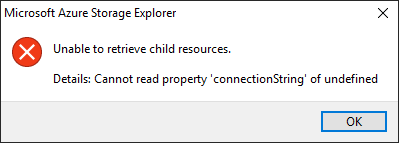

Expected Experience:
The Azure Storage Explorer should work and load all storage account.
Actual Experience:
The Azure storage explorer cannot load all storage account under my subscription.
 FrankPan1990
All 9 comments
I have this same issue, and I've had it for several versions now, and nobody seems to care. The workaround, if you're interested, is to click "File - New Window".
Since this has been complained about for so long, I'm assuming it's a config corruption or something rather than an actual bug. If that's the case, then TEAM, could you please update the readme, or the doc, or the Wiki, or something, to let us know how to fix it? I've even offered to share my session with a dev so they could see the repro - no response.
 bretthackermsft
on 6 Dec 2018
bretthackermsft
on 6 Dec 2018
Hi @bretthackermsft and @FrankPan1990 , can y'all try something for me? Note: doing this will remove all of your attached resources, though I think it should fix your issue.
Open dev tools (f12)
- Go to the Application tab
- Navigate to Local Storage -> file:// (see picture)
- Filter by CustomConnections
- For all results, double click on the Value cell, and replace the value with []
- Restart the app

If losing all of your attached resources is a big deal for you, let me know, and we can try to only get rid of the corrupted connection.
 MRayermannMSFT
on 7 Dec 2018
MRayermannMSFT
on 7 Dec 2018
!!!!
That worked, thanks very much. The string in that array was a since-removed manual connection. Since this is the fix, can't you trap that error, assuming it's throwing as you loop that array and setup each connection, and prompt to remove it? Alternatively, at least update the error message in the dialog?
bretthackermsft
on 10 Dec 2018
Yes! We should definitely do that. I've made a new issue to track that effort. https://github.com/Microsoft/AzureStorageExplorer/issues/985 We'll also be adding resetting custom connections to the Help -> Reset dialog soon.
MRayermannMSFT
on 10 Dec 2018
@FrankPan1990 , since the workaround unblocked Bret, I'll assume it'll work for you too so I'll close this issue. Please comment if that ends up being not the case.
MRayermannMSFT
on 10 Dec 2018
Sorry for the delay. the problem disappear after clear custom connection. Thank you.
FrankPan1990
on 12 Dec 2018
Hi @bretthackermsft and @FrankPan1990 , can y'all try something for me? Note: doing this will remove all of your attached resources, though I think it should fix your issue.
Open dev tools (f12)
- Go to the Application tab
- Navigate to Local Storage -> file:// (see picture)
- Filter by CustomConnections
- For all results, double click on the Value cell, and replace the value with []
- Restart the app
If losing all of your attached resources is a big deal for you, let me know, and we can try to only get rid of the corrupted connection.
Perfect!!!
 raphabritto
on 27 Aug 2019
raphabritto
on 27 Aug 2019
@MRayermannMSFT you're the best! Thanks!
 rustam-umarov
on 9 Sep 2019
rustam-umarov
on 9 Sep 2019
Thanks @rustam-umarov 😄 We try really hard to be the best! Sorry for the times we don't get quite there, and thanks for being patient when that happens.
MRayermannMSFT
on 10 Sep 2019
Related issues
 sholman
·
3Comments
sholman
·
3Comments
 ayon1911
·
5Comments
ayon1911
·
5Comments
 jorgklein
·
4Comments
jorgklein
·
4Comments
 euandekock
·
6Comments
euandekock
·
6Comments
 niklas-e
·
4Comments
niklas-e
·
4Comments
Most helpful comment
Hi @bretthackermsft and @FrankPan1990 , can y'all try something for me? Note: doing this will remove all of your attached resources, though I think it should fix your issue.
Open dev tools (f12)
If losing all of your attached resources is a big deal for you, let me know, and we can try to only get rid of the corrupted connection.