Azurestorageexplorer: Setting a custom proxy breaks access to local resources (Azure Storage Emulator)
Storage Explorer Version: 1.2.0
Platform/OS Version: Windows 10 Enterprise b1607
Architecture: ia32
Regression From: n/a
Steps to Reproduce:
- Set a custom proxy in Edit -> Configure Proxy
- Try to access Azure Storage Emulator storage account under "(Local and attached)"
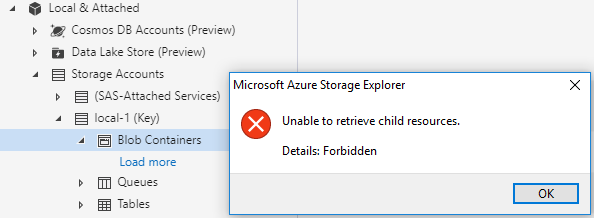
- You should get an error message:

- Disable custom proxy
- Access to local resources should now work again
Expected Experience:
The proxy should not be used for local resources
Actual Experience:
The proxy seems to be used to try and access local resources, which causes it to fail.
 oddeirik
All 12 comments
We've released 1.4.0 recently, which changes how we interact with emulators. Please update to 1.4.0 and use the following steps to connect to the emulator:
- Click the Add Account button (plug button on the left).
- Select "Attach to a local emulator" and click *Next.
- Enter the port numbers that the emulator services will listen on.
- Create the connection and start the emulator.
 craxal
on 3 Aug 2018
craxal
on 3 Aug 2018
I've now updated to 1.4.0 and added the local emulator by following your steps, but I'm still experiencing the exact same issue when a custom proxy is defined.
oddeirik
on 6 Aug 2018
Do you have actual Azure resources you can try to access through your proxy? Can you connect to them successfully?
Unfortunately, there does not appear to be a way to bypass proxy settings for local connections using the Azure client library we have at the moment. Perhaps, when the library makes HTTP requests for configurable, we can continue to look into this.
craxal
on 6 Aug 2018
Yes, I can access Azure resources with the custom proxy defined just fine. This is a corporate environment, so all external traffic has to go through the proxy.
It's not a big issue, it's just a matter of turning the proxy off in Storage Explorer when dealing with the storage emulator. A minor annoyance, that's all 😃
oddeirik
on 9 Aug 2018
@oddeirik , ok, sounds good. As @craxal said, we'll look into being more smart about when not to use proxy once the azure storage node library is able to provide us with some more complex behaviors. 😄
 MRayermannMSFT
on 10 Aug 2018
MRayermannMSFT
on 10 Aug 2018
How about adding a "Use System proxy" option? If it is not available with the current Azure storage library, can you please add it as and when available? Thanks!
 anmolbk
on 15 Nov 2018
anmolbk
on 15 Nov 2018
@anmolbk, thank you for your suggestion. That's actually been on our fix list for a very long time. We will definitely add it in when we're able.
craxal
on 15 Jan 2019
I don't know if you want a new issue or not, but I've found that while using Storage Explorer 1.6.2 to connect to Azure Stack on prem, I have to toggle from No Proxy to Use proxy and then back to No proxy to connect. Let me know if you want a separate issue for this.
 btshowers
on 4 Mar 2019
btshowers
on 4 Mar 2019
I don't know if you want a new issue or not, but I've found that while using Storage Explorer 1.6.2 to connect to Azure Stack on prem, I have to toggle from No Proxy to Use proxy and then back to No proxy to connect. Let me know if you want a separate issue for this.
Similar issue with Storage Explorer 1.7.0 - if proxy is set, it is being used to connect to the local emulator on 127.0.0.1 and that does not work. When I toggle to No Proxy and refresh the storage accounts, it shows the blob containers in the local emulator, but when trying to access any of them it still uses the old proxy settings. Restarting the application fixes the issue, but then I can't access my Azure storage accounts because that requires a proxy.
Seems like the proxy settings are not immediately applied everywhere when set.
Would it be possible to add an option to bypass the proxy when connecting to local emulators, or maybe add proxy settings per storage account?
 dterziev
on 13 Mar 2019
dterziev
on 13 Mar 2019
Related to #1534
MRayermannMSFT
on 23 Mar 2020
@craxal, please notify all commenters on this issue that this should be fixed in 1.16, after we ship.
MRayermannMSFT
on 6 Nov 2020
@oddeirik @btshowers @dterziev We have shipped a fix for this in 1.16.0. If you are still running into problems, please open a new issue instead. Thanks.
 JasonYeMSFT
on 16 Nov 2020
JasonYeMSFT
on 16 Nov 2020
Related issues
 niklas-e
·
4Comments
niklas-e
·
4Comments
 sholman
·
3Comments
sholman
·
3Comments
 ayon1911
·
5Comments
ayon1911
·
5Comments
 kjoshi-rubikloud
·
3Comments
kjoshi-rubikloud
·
3Comments
 fforcen
·
3Comments
fforcen
·
3Comments