Azurestorageexplorer: Cannot sign in on Ubuntu 1804
Storage Explorer Version: 1.3.1
Platform/OS Version: Linux Ubuntu 18.04
Architecture: x64
Steps to Reproduce:
- ./StorageExplorer
- Add an account, sign in
- Enter password; 2FA phone auth
- Multi-factor auth is successful; "waiting for authentication" exits as if it's successful
- No account information appears in the side bar
Expected Experience:
Subscriptions to be loaded in the side bar after successful MFA.
PS: Tried running with sudo, deleting the config cache, ignoring cert errors, etc. Not sure what else there is to do from the TSG.
 ehotinger
All 21 comments
We haven't moved support up to 18.04 just yet, so we don't have any guarantees that everything should work.
That said, do you get any error messages in the F12 console window? If you launch Storage Explorer from the command line, do you get any error messages from the output?
 craxal
on 13 Jul 2018
craxal
on 13 Jul 2018
No to both, output seems happy:
...
Received message 'dialog-execute-operation'
Received message 'did-execute-operation'
Received message 'did-get-dialog-result'
Received message 'closed'
Also:
$ gnome-keyring version
gnome-keyring: 3.28.0.2
$ dotnet --version
2.1.302
Tell me more about your network/environment. Are you running in a Docker container? Working behind a proxy? Using alternate certificates?
craxal
on 13 Jul 2018
None of the above. Just MSFT corpnet. Anywho, I think this is a gnome-keyring issue. Tried reinstalling it completely to no avail for now.
ehotinger
on 14 Jul 2018
Hi @ehotinger, I am having the exact same issue. Did you perhaps find a solution, or workaround?
 NjengaSaruni
on 14 Jul 2018
NjengaSaruni
on 14 Jul 2018
Hello, I have the exact same issue on Linux Mint 19 (Ubuntu 18.04).
The login windows stays on after entering my password to "Waiting for authentication" and nothing happens.
At first, it was asking for my credentials every time but I could just continue use the app.
Then I decided to follow the troubleshooting guide and deleted the cache and identity folder and now I cannot log in anymore. (it was working on Linux Mint 18.3 (Ubuntu 16.04)).
Nothing in the debug console.
 rnsc
on 31 Jul 2018
rnsc
on 31 Jul 2018
Storage Explorer Version: 1.4.2 (installed from this AUR)
Platform/OS Version: Arch Linux (current)
Architecture: x64
Same steps to reproduce, same outcome.
$ gnome-keyring version
gnome-keyring: 3.28.2
I get this error upon startup:
Debug.js:39 Unexpected end of JSON input
error @ Debug.js:39
 pviotti
on 3 Oct 2018
pviotti
on 3 Oct 2018
It's still an issue with 1.4.2 release on Ubuntu 18.04 for me.
rnsc
on 4 Oct 2018
See #600 for possible workaround.
craxal
on 15 Oct 2018
See #600 for possible workaround.
It is highly unpractical when dealing with more than a couple storage accounts :(
rnsc
on 16 Oct 2018
@rnsc, not really sure what you're referring to. If you look a little further in the conversation, @oh54 suggests running the following on the command line:
sudo apt install libgnome-keyring-common libgnome-keyring-dev
Again, please keep in mind that we do not officially support Linux 18.* as of yet.
craxal
on 17 Oct 2018
Hey @craxal, those packages are installed on my system and still, it doesn't work.
I'm willing to help if you need more info.
rnsc
on 18 Oct 2018
I observe the same issue with the latest release of Azure Storage Explorer (1.6.1) on the following platforms:
- ArchLabs (Arch Linux with Openbox WM) - with latest Dotnet Core (2.2.101) from AUR; ASE from AUR or tarball from from Microsoft, regardless.
- Debian 9 - clean install with only Dotnet Core 2.2.101, Azure CLI and ASE;
- Mint 18.3 xfce (based on Ubuntu 16.04) - clean install with only Dotnet Core 2.2.101, Azure CLI and ASE;
Installing keyring packages doesn't make any difference.
ASE works fine for me on Windows 7 and on Windows 10.
 fontmaniac
on 26 Dec 2018
fontmaniac
on 26 Dec 2018
Could you please make sure you have the following dependencies installed? Quoted from the Troubleshooting guide:
For Linux distros other than Ubuntu 16.04, you may need to manually install some dependencies. In general, the following packages are required:
.NET Core 2.x
libsecret
libgconf-2-4
Up-to-date GCC
Depending on your distro, there may be other packages you need to install. The Storage Explorer Release Notes contain specific steps for some distros.
 jinglouMSFT
on 3 Jan 2019
jinglouMSFT
on 3 Jan 2019
Hello @jinglouMSFT
Here are the deps I have installed on U 18.04:
Package: aspnetcore-runtime-2.1
Status: install ok installed
Priority: standard
Section: devel
Installed-Size: 70803
Maintainer: Microsoft <[email protected]>
Architecture: amd64
Version: 2.1.6-1
Package: libgconf2-4
Status: install ok installed
Priority: optional
Section: oldlibs
Installed-Size: 364
Maintainer: Ubuntu Desktop Team <[email protected]>
Architecture: amd64
Multi-Arch: same
Source: gconf
Version: 3.2.6-4ubuntu1
Package: libsecret-1-0
Status: install ok installed
Priority: optional
Section: libs
Installed-Size: 347
Maintainer: Ubuntu Developers <[email protected]>
Architecture: amd64
Multi-Arch: same
Source: libsecret
Version: 0.18.6-1
Package: gcc
Status: install ok installed
Priority: optional
Section: devel
Installed-Size: 50
Maintainer: Ubuntu Developers <[email protected]>
Architecture: amd64
Source: gcc-defaults (1.176ubuntu2.1)
Version: 4:7.3.0-3ubuntu2.1
And still, it doesn't work.
rnsc
on 4 Jan 2019
I have the same issue here. all deps are installed. I get the following output on terminal
Received message 'get-dialog-result'
Received message 'dialog-ready'
Received message 'dialog-execute-operation'
Received message 'did-execute-operation'
Received message 'dialog-execute-operation'
Received message 'did-execute-operation'
Received message 'dialog-execute-operation'
Received message 'did-execute-operation'
Received message 'dialog-execute-operation'
Received message 'did-execute-operation'
Received message 'dialog-execute-operation'
Received message 'did-execute-operation'
Received message 'dialog-execute-operation'
Received message 'did-execute-operation'
Received message 'dialog-did-init'
Received message 'dialog-execute-operation'
Received message 'did-execute-operation'
Received message 'dialog-execute-operation'
Received message 'did-execute-operation'
Received message 'dialog-execute-operation'
Received message 'did-execute-operation'
Received message 'dialog-execute-operation'
Received message 'did-execute-operation'
Received message 'did-get-dialog-result'
Received message 'closed'
 diegodgs
on 9 Jan 2019
diegodgs
on 9 Jan 2019
@rnsc, it says you have ASP.NET Core installed. That's not the same as .NET Core.
craxal
on 15 Jan 2019
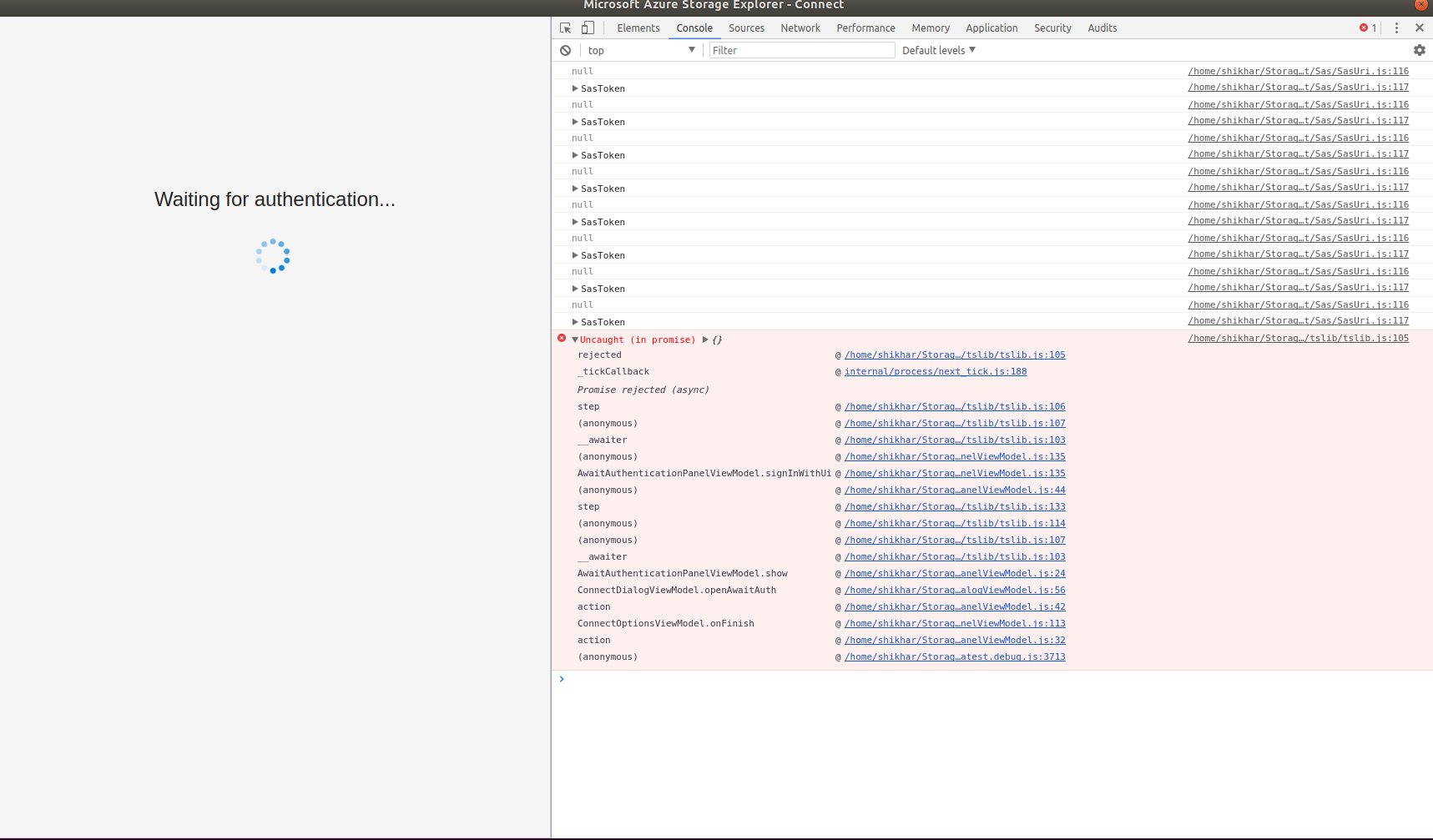
Am running in to same issue: asks me to sign in, then "Waiting for Authentication", then that screen disappears and no account details appear in the explorer. Here is a screenshot of the console error:
 shikharsg
on 28 Mar 2019
shikharsg
on 28 Mar 2019
@shikharsg Could you please try the workaround outlined in #1142? Thanks.
jinglouMSFT
on 28 Mar 2019
@jinglouMSFT, thank you for that link, it works now
shikharsg
on 30 Mar 2019
Been a while since this issue had any comments.
With regards to Ubuntu 18 support here's where we stand:
- we now have a storage explorer snap, it is the recommended way of installing storage explorer on linux, please use it!
- we still have the .tar.gz, but you need to install the dependencies manually
If anyone is still having ubuntu 18 problems, please open a new issue. Thanks!
 MRayermannMSFT
on 16 Mar 2020
MRayermannMSFT
on 16 Mar 2020
Related issues
 alaendle
·
5Comments
alaendle
·
5Comments
 riazjahangir
·
4Comments
riazjahangir
·
4Comments
 CurtMiller66
·
6Comments
CurtMiller66
·
6Comments
 OffColour
·
4Comments
OffColour
·
4Comments
 eosho
·
3Comments
eosho
·
3Comments
Most helpful comment
@shikharsg Could you please try the workaround outlined in #1142? Thanks.