Azuredatastudio: Not able to configure Python to run PowerShell kernel
Issue Type: Bug
I have been using the Insiders edition for months and running PowerShell Notebooks. Suddenly after the most recent update I have the configure Python again to run the PowerShell kernel
- Open a PowerShell Notebook.
- It opens a wizard called "Configure Python to run PowerShell kernel". Click "Next"

- Click on "Install"
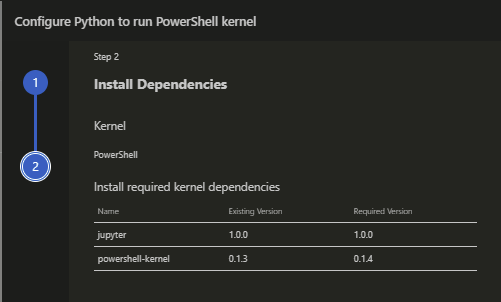
- You get the error message

The full error message
Could not start session: Cannot overwrite an existing Python installation while python is running. Please close any active notebooks before proceeding.
The problem is that this wizard only appears when I open a PowerShell Notebook, but I can't close the opened Notebook when the wizard appears.
Also like I said before, I have been running PowerShell Notebooks for months and months and now I have to reconfigure it again?
Azure Data Studio version: azuredatastudio-insiders 1.24.0-insider (3ec1f7cc2bd11879830fb5f8e25592e547bc622a, 2020-11-04T06:33:22.225Z)
OS version: Windows_NT x64 10.0.18363
System Info
|Item|Value|
|---|---|
|CPUs|Intel(R) Core(TM) i7-8850H CPU @ 2.60GHz (12 x 2592)|
|GPU Status|2d_canvas: enabled
flash_3d: enabled
flash_stage3d: enabled
flash_stage3d_baseline: enabled
gpu_compositing: enabled
multiple_raster_threads: enabled_on
oop_rasterization: disabled_off
opengl: enabled_on
protected_video_decode: unavailable_off
rasterization: enabled
skia_renderer: disabled_off_ok
video_decode: enabled
vulkan: disabled_off
webgl: enabled
webgl2: enabled|
|Load (avg)|undefined|
|Memory (System)|31.76GB (11.37GB free)|
|Process Argv|--folder-uri file:///c%3A/Users/sstad/source/repos/Databases/Waypoint%20Analytical/NotebooksArchive|
|Screen Reader|no|
|VM|0%|
Extensions (14)
Extension|Author (truncated)|Version
---|---|---
sqlops-combine-scripts|Bat|2.0.1
admin-pack|Mic|0.0.2
admin-tool-ext-win|Mic|0.0.2
agent|Mic|0.47.0
dacpac|Mic|1.6.0
import|Mic|1.1.0
powershell|ms-|2020.4.0
profiler|Mic|0.11.0
schema-compare|Mic|1.6.0
sql-database-projects|Mic|0.3.0
azdata-sanddance|msr|3.1.0
sql-prompt|Red|0.2.3
tsqlt-test-generator|taz|0.0.5
poor-sql-formatter|WSR|0.1.0
 sanderstad
All 7 comments
@VasuBhog can you work with folks on the team (@corivera or @pensivebrian) to determine how we can make this more seamless?
 chlafreniere
on 6 Nov 2020
chlafreniere
on 6 Nov 2020
@VasuBhog we only needed to do a package upgrade here, so we can probably skip throwing that error in this case. This error is meant to prevent file permission failures thrown when trying to overwrite python files that are currently in use, like when reinstalling the entire python instance.
 corivera
on 6 Nov 2020
corivera
on 6 Nov 2020
Is there any progress on this because both the stable client as the insiders edition have this problem and I can't work with my notebooks anymore.
Is there some sort of workaround that I can just run a command that updates the package?
sanderstad
on 19 Nov 2020
Fixed it by using the current python installation.
The notebooks gave me another problem because suddenly it gave me errors with Authorization Manager check failed
Apparently I have to set the execution policy for the current user every time I run a PowerShell Notebook?
sanderstad
on 19 Nov 2020
@sanderstad we are currently looking to address this issue. @corivera do you have any workaround suggestions regarding the new issue Sander is experiencing: Authorization Manager check failed?
 VasuBhog
on 19 Nov 2020
VasuBhog
on 19 Nov 2020
That's news to me, I'm not familiar with an error like that. @sanderstad Could you open a separate issue with the errors you're getting related to Authorization Manager?
corivera
on 19 Nov 2020
@sanderstad let us know if you have any other problems with the PowerShell kernel. Thanks, @corivera for helping on this!
VasuBhog
on 22 Jan 2021
Related issues
 mayurrumal1
·
3Comments
mayurrumal1
·
3Comments
 jsmith8858
·
3Comments
jsmith8858
·
3Comments
 kburtram
·
3Comments
kburtram
·
3Comments
 sandermvanvliet
·
3Comments
sandermvanvliet
·
3Comments
 squillace
·
3Comments
squillace
·
3Comments