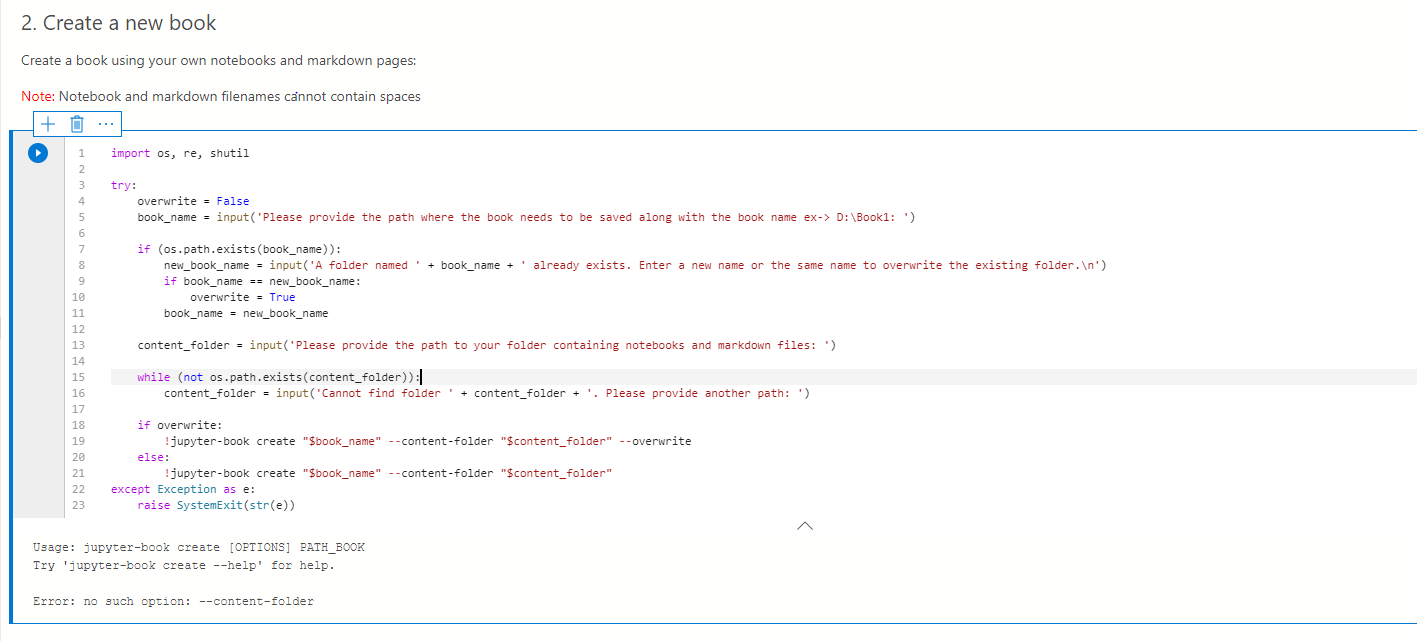
Azuredatastudio: Get 'Error: no such option: --content-folder' when create book(Preview)
- Azure Data Studio Version:
1.19.0
Steps to Reproduce:
- Create Book(Preview)
- When Running 'Create a new book' Cell, after input the book name and content folder I will get such error.
 pengyuehaha
All 7 comments
Thanks for submitting this issue. Please also check if it is already covered by an existing one, like:
![adsbot[bot] picture](https://avatars.githubusercontent.com/in/25741?v=4&s=40) adsbot[bot]
on 30 Jun 2020
adsbot[bot]
on 30 Jun 2020
@pengyuehaha What values did you provide on destination and source input prompts?
 MaddyDev
on 30 Jun 2020
MaddyDev
on 30 Jun 2020
I put C:\Book1 and C:\OSS\Spark\content. And the markdown files and notebooks are all under C:\OSS\Spark\content
pengyuehaha
on 30 Jun 2020
Can you open Manage Packages (the last icon the notebook toolbar located at the top right corner) and in your installed packages list, can you scroll and check the version of jupyter-book installed.
MaddyDev
on 30 Jun 2020
It is 0.7.0
pengyuehaha
on 30 Jun 2020
Ah, this is almost certainly because jupyter-book 0.7.0 has a breaking change with the folder structure, which we don't support yet. @MaddyDev can we change the notebook to ensure that version 0.6.4 is installed on users' machines?
 chlafreniere
on 30 Jun 2020
chlafreniere
on 30 Jun 2020
As an alternative until we roll our changes to fix this, Please make sure to install jupyter-book version <= 0.6.4 before running/using this notebook to create a book. (You can install using the manage packages and selecting the version 0.6.4)
MaddyDev
on 1 Jul 2020
Related issues
 mrdenny
·
27Comments
mrdenny
·
27Comments
 samirbehara
·
34Comments
samirbehara
·
34Comments
 nnnax
·
29Comments
nnnax
·
29Comments
 ben-moore
·
31Comments
ben-moore
·
31Comments
 jakodev
·
26Comments
jakodev
·
26Comments