Azuredatastudio: Unable to change Account Password
- Azure Data Studio Version:
Steps to Reproduce:
- Changed Azure AD Password
- Unable to connect to Azure SQL database because it does not prompt for new password
- Cannot Add a new Account
So I have no way to use this product anymore until I can get it to recognize a new password is needed.
 spartan27244
All 20 comments
Thanks for submitting this issue. Please also check if it is already covered by an existing one, like:
![adsbot[bot] picture](https://avatars.githubusercontent.com/in/25741?v=4&s=40) adsbot[bot]
on 25 Jun 2020
adsbot[bot]
on 25 Jun 2020
What operating system are you using?
 aaomidi
on 1 Jul 2020
aaomidi
on 1 Jul 2020
Windows Server 2016
Sent from my Samsung Galaxy smartphone.
-------- Original message --------
From: Amir Omidi notifications@github.com
Date: 6/30/20 8:42 PM (GMT-05:00)
To: microsoft/azuredatastudio azuredatastudio@noreply.github.com
Cc: Lee Taylor ltaylor@taylorcomputing.com, Author author@noreply.github.com
Subject: Re: [microsoft/azuredatastudio] Unable to change Account Password (#11098)
What operating system are you using?
—
You are receiving this because you authored the thread.
Reply to this email directly, view it on GitHubhttps://github.com/microsoft/azuredatastudio/issues/11098#issuecomment-652120590, or unsubscribehttps://github.com/notifications/unsubscribe-auth/AKZSNDOHP4DR4DMP2TKMUKLRZKA7VANCNFSM4OIPEW5A.
spartan27244
on 1 Jul 2020
@spartan27244 have you tried removing and re-adding the account in the Account Manager dialog as a workaround for this bug?
 kburtram
on 2 Jul 2020
kburtram
on 2 Jul 2020
There is no account management option in the app.
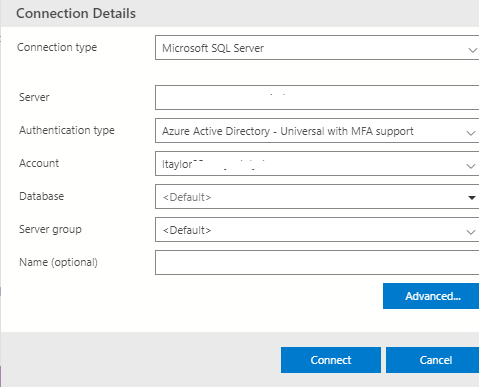
spartan27244
on 2 Jul 2020
If you login with the new & correct password, it should just accept it and work fine.
If that's not working, open Credential Manager on windows. Go to Windows Credentials. Delete entries that start with Microsoft.SqlTools. This will delete your credentials associated with ADS.
We are in the process of revamping how we do credential storing so we don't have to go through this awkward UI to get credentials removed when an issue happens.
aaomidi
on 2 Jul 2020
It does not ask me to login, login to what?
spartan27244
on 2 Jul 2020
@spartan27244 What I meant was pressing "New Connection" and then entering the server details, username, and password (Assuming you're using SqlLogin) and pressing connect. That should overwrite whatever is currently stored.
aaomidi
on 2 Jul 2020
I have tried deleting the connection and re-adding it. It remembers the account information and does not give me the opportunity to log in or change a password. It simply tri3es to connect and errors out.
spartan27244
on 2 Jul 2020
Alright let's try to do the credential manager route then :)
aaomidi
on 2 Jul 2020
And that would be?
spartan27244
on 2 Jul 2020
https://github.com/microsoft/azuredatastudio/issues/11098#issuecomment-653178559
If that's not working, open Credential Manager on windows. Go to Windows Credentials. Delete entries that start with Microsoft.SqlTools. This will delete your credentials associated with ADS.
aaomidi
on 2 Jul 2020
There is nothing in credential manager that even resembles that entry
spartan27244
on 2 Jul 2020
So you don't have any entries that resemble:
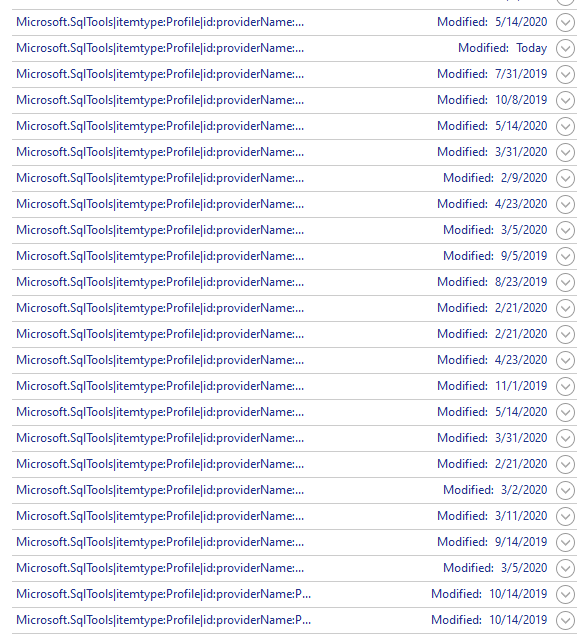
?
If that's the case whats the error you get when connecting to a server?
aaomidi
on 2 Jul 2020
Not a single one
spartan27244
on 2 Jul 2020

spartan27244
on 2 Jul 2020
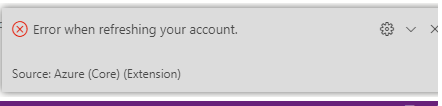
spartan27244
on 2 Jul 2020
Thanks!
Can you press the +
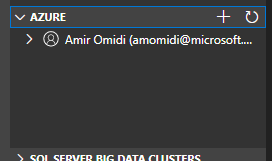 here, and add your account again?
You can also press Help -> Toggle Developer Tools to get more context on what the error is when failing to refresh your account.
aaomidi
on 2 Jul 2020
I see where you are pointing to and I see my credential there, I deleted it, and upon a reconnect attempt it now goes to a browser to get credential information. i.e. it works. Seems a lot to go through if you had a lot of connections and just needed to update your password.
Thanks.
spartan27244
on 2 Jul 2020
Thanks! I mainly misunderstood your problem as being that you changed your SqlLogin password initially. Sorry about that!
aaomidi
on 2 Jul 2020
Related issues
 fabich
·
30Comments
fabich
·
30Comments
 ben-moore
·
31Comments
ben-moore
·
31Comments
 jakodev
·
26Comments
jakodev
·
26Comments
 borgdylan
·
30Comments
borgdylan
·
30Comments
 anand348
·
24Comments
anand348
·
24Comments