Azuredatastudio: Markdown relative links on edit mode are not working correctly
We have written the needed d
Issue Type: Bug
When I use the link syntax its not opening the notebook. If I use an tag (i.e. FAB Parameters) it is getting the relative link locations as "Unable to open 'FABParameters.ipynb': Unable to read file 'c:\C:\Users\mml63\AppData\Local\Programs\Azure Data Studio\resources\app\out\vs\code\electron-browser\workbench\FABParameters.ipynb' (Error: Unable to resolve non-existing file 'c:\C:\Users\mml63\AppData\Local\Programs\Azure Data Studio\resources\app\out\vs\code\electron-browser\workbench\FABParameters.ipynb')."
This is not the relative link to the project files.
This started last update.
Azure Data Studio version: azuredatastudio 1.18.1 (5b3b97f4a34018f3b37b0fce30e32f2af7ad78fa, 2020-05-26T21:14:29.147Z)
OS version: Windows_NT x64 10.0.19041
System Info
|Item|Value|
|---|---|
|CPUs|Intel(R) Core(TM) i5-6200U CPU @ 2.30GHz (4 x 2400)|
|GPU Status|2d_canvas: enabled
flash_3d: enabled
flash_stage3d: enabled
flash_stage3d_baseline: enabled
gpu_compositing: enabled
multiple_raster_threads: enabled_on
oop_rasterization: disabled_off
protected_video_decode: unavailable_off
rasterization: enabled
skia_renderer: disabled_off_ok
video_decode: enabled
viz_display_compositor: enabled_on
viz_hit_test_surface_layer: disabled_off_ok
webgl: enabled
webgl2: enabled|
|Load (avg)|undefined|
|Memory (System)|11.87GB (3.71GB free)|
|Process Argv||
|Screen Reader|no|
|VM|0%|
Extensions (1)
Extension|Author (truncated)|Version
---|---|---
powershell|ms-|2020.4.0
ata into your clipboard because it was too large to send. Please paste.
 mikelawell
All 10 comments
@barbaravaldez can you work with @mikelawell to repro this issue?
 chlafreniere
on 13 Jun 2020
chlafreniere
on 13 Jun 2020
Hi @mikelawell, are you trying to use markdown links?
 barbaravaldez
on 27 Jul 2020
barbaravaldez
on 27 Jul 2020
Sorry, been awhile... this is using markdown links... I converted to an A tag to work around this. I need to try to repro to see if it got fixed in the past couple of releases.
mikelawell
on 27 Jul 2020
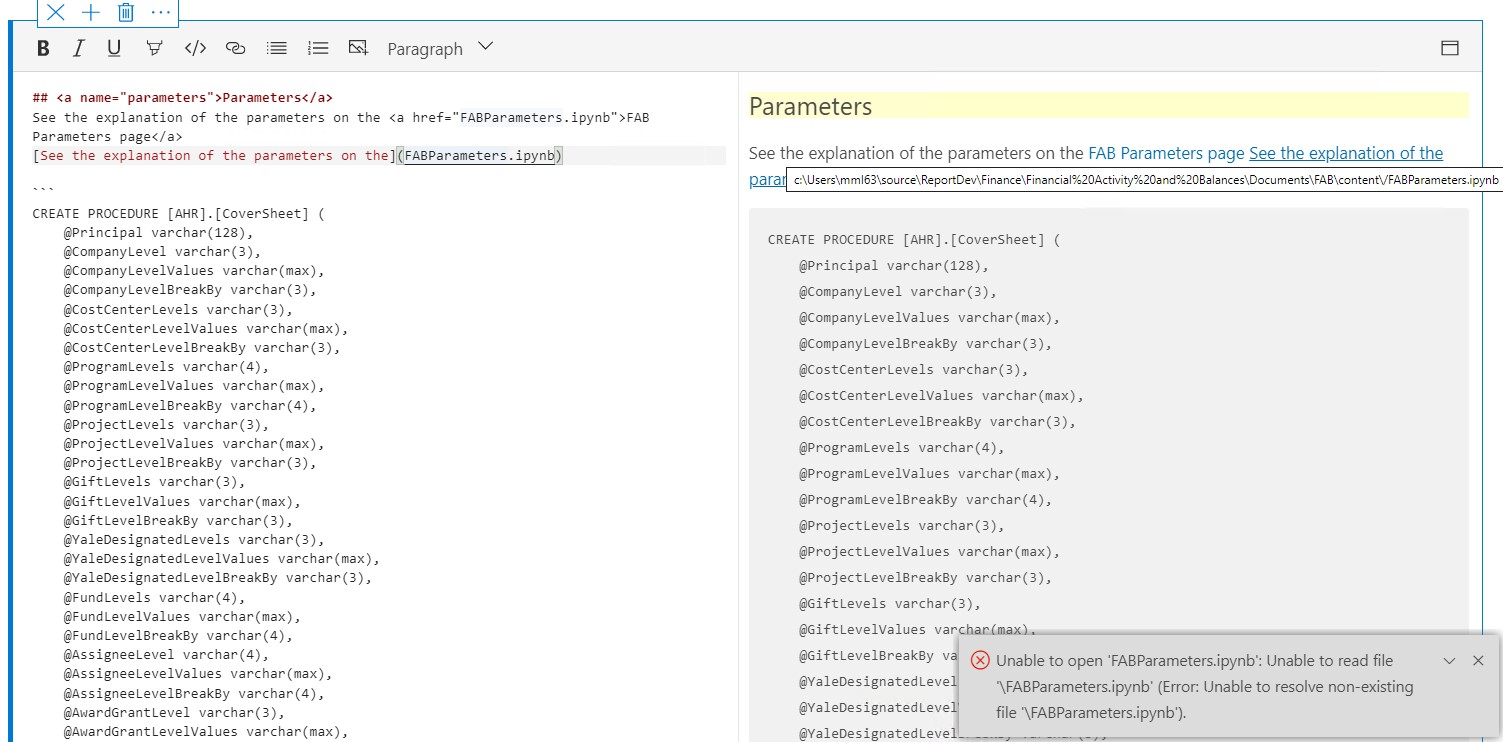
There is still some weirdness. It looks like it is still adding a front slash to the link. I'm now using 1.20.1
mikelawell
on 27 Jul 2020
Thank you for the screenshot 😄 Yeah, it seems that something weird is happening when it's trying to convert the relative link into an absolute path. I'll take a look at this. Thank you!! 😄
barbaravaldez
on 27 Jul 2020
Hi @mikelawell, I tried to repro this issue using markdown relative links in Notebooks but it seems to be working fine. So, I just wanted to clarify does this issue happens in Notebooks or Books?
barbaravaldez
on 5 Aug 2020
Closing this one as a duplicate of #11657
 Charles-Gagnon
on 5 Aug 2020
Charles-Gagnon
on 5 Aug 2020
I was incorrect here; this affects text cells instead of markdown files, which use slightly different code paths. Reopening.
chlafreniere
on 5 Aug 2020
@mikelawell @barbaravaldez - I'm using v1.25.1 right now and am unable to repro. Perhaps we can close this if it's no longer an issue?
I do notice that there is "\/" in front of the beginning of the relative link. But this seems to be harmless on Windows. @barbaravaldez - what's the behavior on Mac or LInux?
A friendly reminder: link sometimes does not work is that if a user forgets to mark their notebook as Trusted.
 MsSQLGirl
on 14 Dec 2020
MsSQLGirl
on 14 Dec 2020
@mikelawell @barbaravaldez - I'm using v1.25.1 right now and am unable to repro. Perhaps we can close this if it's no longer an issue?
I do notice that there is "/" in front of the beginning of the relative link. But this seems to be harmless on Windows. @barbaravaldez - what's the behavior on Mac or LInux?
A friendly reminder: link sometimes does not work is that if a user forgets to mark their notebook as Trusted.
@MsSQLGirl - I was not able to repro on Mac, as well.
barbaravaldez
on 15 Dec 2020
Related issues
 vnachimu
·
24Comments
vnachimu
·
24Comments
 anand348
·
24Comments
anand348
·
24Comments
 joshbooker
·
34Comments
joshbooker
·
34Comments
 orofino
·
58Comments
orofino
·
58Comments
 nnnax
·
29Comments
nnnax
·
29Comments