Azuredatastudio: Query Results don't render - later appear in another tab incorrectly
- Azure Data Version: 1.7.0 (system setup)
Commit: e1280022d69b651cfff04b30e830904575c8acda
Date: 2019-05-08T00:55:40.928Z
VS Code 1.33.1
Electron: 3.1.8
Chrome: 66.0.3359.181
Node.js: 10.2.0
V8: 6.6.346.32
OS: Windows_NT x64 6.1.7601
Steps to Reproduce:
- Open two queries in separate files such as:
SELECT 'Query1' AS Query1, GETDATE() AS Stamp
and
SELECT 'Query3' AS Query3, GETDATE() AS Stamp - Run each using same connection
- Eventually one of them fails to render results
- not sure why or how to repeat 100%
- appears to being long running but profile shows completed
- cancel doesn't do anything
- Now close and reopen the same files and run with same connection.
- Boom - get mix of results from execution in step #3.
- notice date stamps appear as though data did come back properly step#3
- notice column names and row results are from different executions.

I will post a gif in a bit.
Josh
 joshbooker
All 10 comments
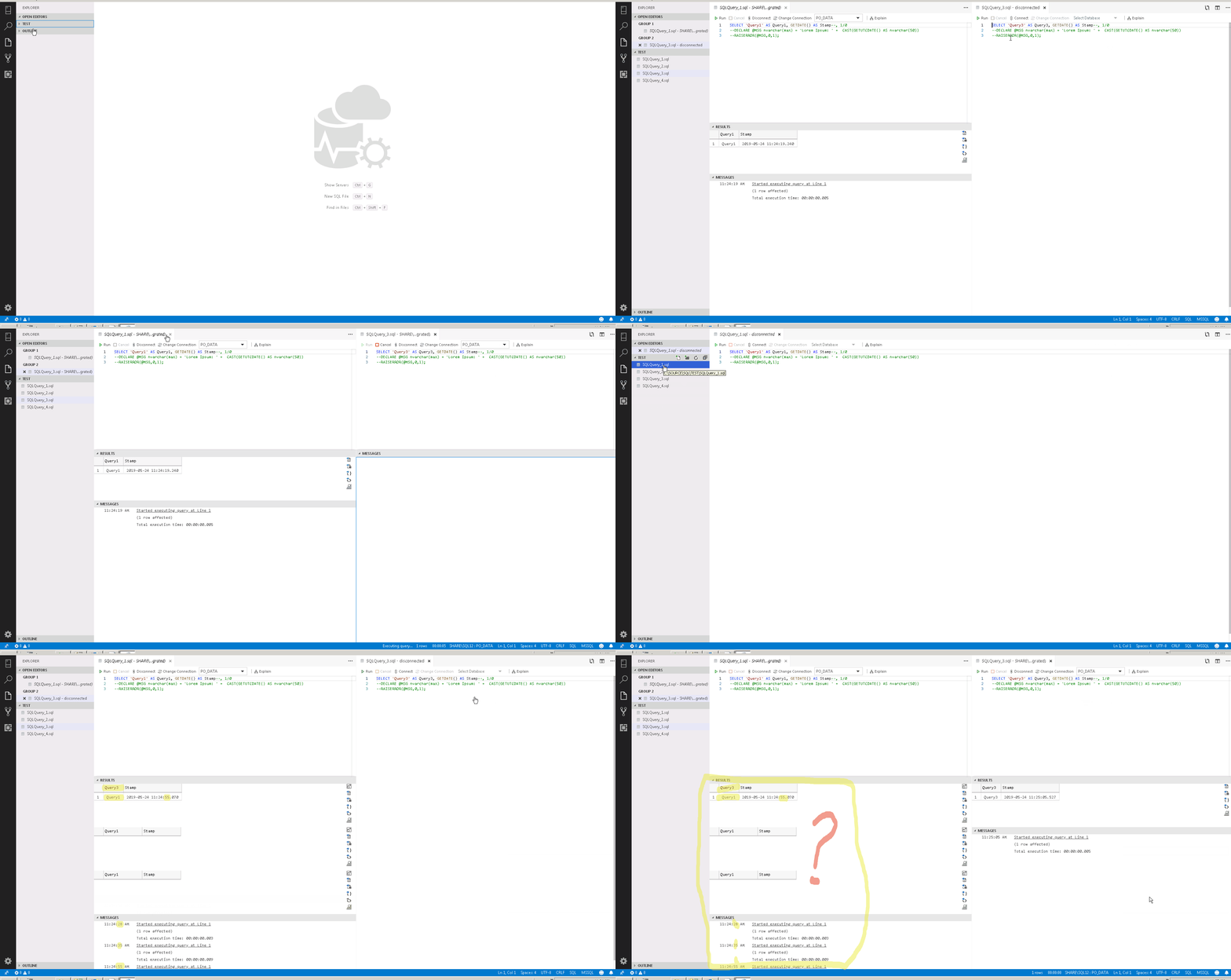
joshbooker
on 24 May 2019
@joshbooker thanks for the GIF! That really helps understand the issue better.
 kburtram
on 24 May 2019
kburtram
on 24 May 2019
perhaps related:
2694
3868
3627
3653
5606
joshbooker
on 24 May 2019
More info: the behavior starts by looking like a like a long running query - Run btn disabled, Cancel does nothing, no results ever render - sometimes the the execution timer is still running but Profiler shows successful completion. Disconnect and change connect works, but the weird part is when you close the file and open another file and execute with same connection. You get rows from current execute in columns from prior execution. It's like the results that never rendered before are rendered now except in columns from current exec. It gets really funky when the column counts don't match.
The results never rendering is common but the only way I can repeat the funky results is when I reopen a file.
joshbooker
on 24 May 2019
@kburtram You're welcome - spent half day on this repro and issue post...high hopes you'll fix asap so I can stop reverting to SSMS ;).
joshbooker
on 24 May 2019
I was unable to repro this with the latest code on master.
 aaomidi
on 2 Aug 2019
aaomidi
on 2 Aug 2019
@aaomidi This is still happening for me:

Version: 1.10.0-insider (system setup)
Commit: c4ab7f64e6ccf4d3c8571eef691cc7a2d42f243a
Date: 2019-08-02T07:46:26.791Z
VS Code 1.37.0
Electron: 4.2.7
Chrome: 69.0.3497.128
Node.js: 10.11.0
V8: 6.9.427.31-electron.0
OS: Windows_NT x64 10.0.17763
joshbooker
on 2 Aug 2019
Same repro steps. Trick is to get one query to 'hang' somehow(?) - that query appears to run 'Executing query...' status indefinitely with timer running forever. Then close and reopen a different .sql file and execute to get the 'hung' query results in the other query pane. The only way I can repro this is after closing and reopening a .sql file from disk.
joshbooker
on 2 Aug 2019
Thank you! Will look into this again!
aaomidi
on 2 Aug 2019
Has anyone been able to reproduce this? Still plagues me daily.
joshbooker
on 11 Jan 2020
Related issues
 Ungerfall
·
3Comments
Ungerfall
·
3Comments
 haydnlj
·
3Comments
haydnlj
·
3Comments
 blackTay
·
3Comments
blackTay
·
3Comments
 squillace
·
3Comments
squillace
·
3Comments
 jacobzed
·
3Comments
jacobzed
·
3Comments