Azuredatastudio: Show Details no longer working
Issue Type: Bug
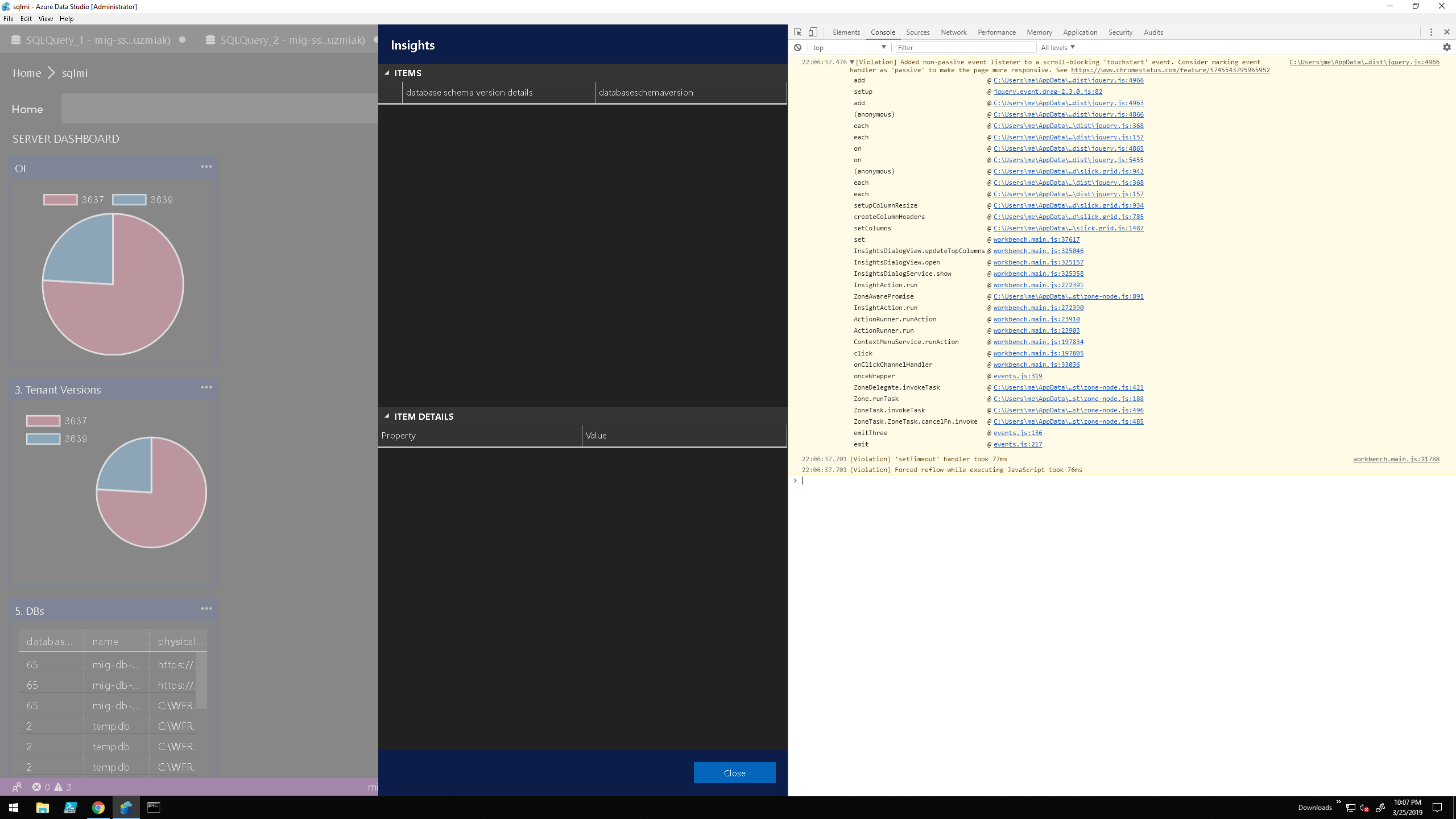
right click show details on custom widgets no longer returns any details, grid is blank on all off them.
it worked couple of days ago on previous version.
Azure Data Studio version: azuredatastudio 1.5.2 (f74080c96310354bc92211f1826c0fdce78ca2f6, 2019-03-22T06:25:26.627Z)
OS version: Windows_NT x64 10.0.17763
System Info
|Item|Value|
|---|---|
|CPUs|Intel(R) Xeon(R) CPU E5-2673 v3 @ 2.40GHz (8 x 2394)|
|GPU Status|2d_canvas: unavailable_software
checker_imaging: disabled_off
flash_3d: unavailable_software
flash_stage3d: unavailable_software
flash_stage3d_baseline: unavailable_software
gpu_compositing: unavailable_software
multiple_raster_threads: enabled_on
native_gpu_memory_buffers: disabled_software
rasterization: unavailable_software
video_decode: unavailable_software
video_encode: unavailable_software
webgl: enabled_readback
webgl2: unavailable_off|
|Memory (System)|28.00GB (21.45GB free)|
|Process Argv||
|Screen Reader|no|
|VM|0%|
Extensions (2)
Extension|Author (truncated)|Version
---|---|---
azuredatastudio-postgresql|Mic|0.1.0
PowerShell|ms-|1.11.0
 databull
All 9 comments
Thanks for submitting this issue. Please also check if it is already covered by an existing one, like:
![adsbot[bot] picture](https://avatars.githubusercontent.com/in/25741?v=4&s=40) adsbot[bot]
on 25 Mar 2019
adsbot[bot]
on 25 Mar 2019
Not really, its bben working a week ago, now they are blank no matter how i
try to access it.
On Mon, 25 Mar 2019, 16:50 adsbot[bot], notifications@github.com wrote:
Thanks for submitting this issue. Please also check if it is already
covered by an existing one, like:
- Custom widget show details does not have item details. (#3200)
https://www.github.com/Microsoft/azuredatastudio/issues/3200—
You are receiving this because you authored the thread.
Reply to this email directly, view it on GitHub
https://github.com/Microsoft/azuredatastudio/issues/4684#issuecomment-476284822,
or mute the thread
https://github.com/notifications/unsubscribe-auth/AVxGI566jHsj9tuBwgvb2H5YjA36Jca1ks5vaP5DgaJpZM4cHXfY
.
databull
on 25 Mar 2019
Thanks for opening the issue @databull. Could you please share what the application console says when you toggle developer tools (Ctrl + Shift + I)? Thanks!
 abist
on 25 Mar 2019
abist
on 25 Mar 2019
Hi, i have reinstalled and its now partially working items are populated
but individual items do not show item details when clicked - console prints
"[Violation] Forced reflow while executing JavaScript took 108ms"
but content is always showing first row.
On Mon, Mar 25, 2019 at 6:11 PM Aditya Bist notifications@github.com
wrote:
Thanks for opening the issue @databull https://github.com/databull.
Could you please share what the application console says when you toggle
developer tools (Ctrl + Shift + I)? Thanks!—
You are receiving this because you were mentioned.
Reply to this email directly, view it on GitHub
https://github.com/Microsoft/azuredatastudio/issues/4684#issuecomment-476316530,
or mute the thread
https://github.com/notifications/unsubscribe-auth/AVxGI3NgahHOhVAZG7Jq8yKQ7iC848SYks5vaRE8gaJpZM4cHXfY
.
databull
on 25 Mar 2019
issue is back again :(
databull
on 25 Mar 2019
Thanks for reporting the details! We'll look into this issue. Look out for the insider builds for possible fixes.
abist
on 25 Mar 2019
@alanrenmsft did you fix this in May release?
 kburtram
on 14 May 2019
kburtram
on 14 May 2019
@alanrenmsft did you fix this in May release?
just tried it it works again
databull
on 14 May 2019
fixed in May release. closing the issue
 alanrenmsft
on 14 May 2019
alanrenmsft
on 14 May 2019
Related issues
 nnnax
·
29Comments
nnnax
·
29Comments
 ben-moore
·
31Comments
ben-moore
·
31Comments
 samirbehara
·
34Comments
samirbehara
·
34Comments
 anand348
·
24Comments
anand348
·
24Comments
 joelvega
·
26Comments
joelvega
·
26Comments