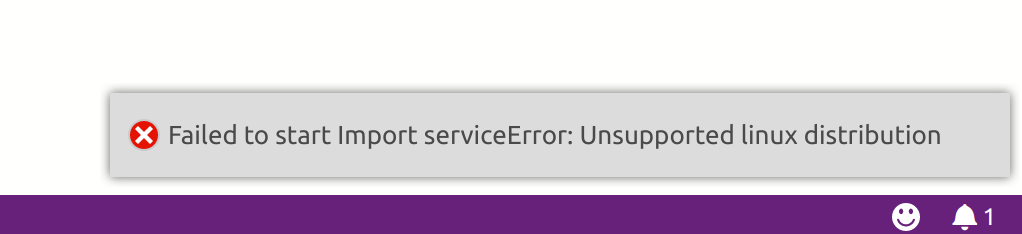
Azuredatastudio: Unsupported linux distribution
Issue Type: Bug
search for extension,
click link to download,
install vsix via command palette,
reload,
error message pops up
SQL Operations Studio version: sqlops 0.31.4 (e026ab85a72c190cc4ccc834503aa9fe36dd6407, 2018-07-18T01:56:25.508Z)
OS version: Linux x64 4.15.0-33-generic
System Info
|Item|Value|
|---|---|
|CPUs|Intel(R) Core(TM) i5-5200U CPU @ 2.20GHz (4 x 2038)|
|GPU Status|2d_canvas: enabled
flash_3d: enabled
flash_stage3d: enabled
flash_stage3d_baseline: enabled
gpu_compositing: enabled
multiple_raster_threads: enabled_on
native_gpu_memory_buffers: disabled_software
rasterization: disabled_software
video_decode: unavailable_software
video_encode: enabled
vpx_decode: unavailable_software
webgl: enabled
webgl2: enabled|
|Load (avg)|1, 1, 1|
|Memory (System)|7.70GB (0.31GB free)|
|Process Argv|/usr/share/sqlops/sqlops --unity-launch|
|Screen Reader|no|
|VM|0%|
 trendoid
All 21 comments
trendoid
on 31 Aug 2018
[2018-08-31 14:10:35.403] [exthost1] [info] extension host started
[2018-08-31 14:10:35.473] [exthost1] [info] ExtensionService#_doActivateExtension Microsoft.account-provider-azure {"startup":true,"activationEvent":""}
[2018-08-31 14:10:35.474] [exthost1] [info] ExtensionService#loadCommonJSModule /usr/share/sqlops/resources/app/extensions/account-provider-azure/out/main
[2018-08-31 14:10:36.324] [exthost1] [info] ExtensionService#_doActivateExtension vscode.git {"startup":true,"activationEvent":""}
[2018-08-31 14:10:36.324] [exthost1] [info] ExtensionService#loadCommonJSModule /usr/share/sqlops/resources/app/extensions/git/out/main
[2018-08-31 14:10:36.660] [exthost1] [info] ExtensionService#_doActivateExtension vscode.merge-conflict {"startup":true,"activationEvent":""}
[2018-08-31 14:10:36.660] [exthost1] [info] ExtensionService#loadCommonJSModule /usr/share/sqlops/resources/app/extensions/merge-conflict/out/extension
[2018-08-31 14:10:36.677] [exthost1] [info] ExtensionService#_doActivateExtension Microsoft.server-report {"startup":true,"activationEvent":""}
[2018-08-31 14:10:36.677] [exthost1] [info] ExtensionService#loadCommonJSModule /home/trendoid/.sqlops/extensions/Microsoft.server-report-0.1.3/out/src/extension
[2018-08-31 14:10:36.684] [exthost1] [info] ExtensionService#_doActivateExtension Microsoft.whoisactive {"startup":true,"activationEvent":""}
[2018-08-31 14:10:36.684] [exthost1] [info] ExtensionService#loadCommonJSModule /home/trendoid/.sqlops/extensions/Microsoft.whoisactive-0.1.1/out/src/extension
[2018-08-31 14:10:36.787] [exthost1] [info] eager extensions activated
[2018-08-31 14:10:36.794] [exthost1] [info] ExtensionService#_doActivateExtension vscode.configuration-editing {"startup":false,"activationEvent":"onLanguage:jsonc"}
[2018-08-31 14:10:36.794] [exthost1] [info] ExtensionService#loadCommonJSModule /usr/share/sqlops/resources/app/extensions/configuration-editing/out/extension
[2018-08-31 14:10:36.806] [exthost1] [info] ExtensionService#_doActivateExtension vscode.json-language-features {"startup":false,"activationEvent":"onLanguage:jsonc"}
[2018-08-31 14:10:36.806] [exthost1] [info] ExtensionService#loadCommonJSModule /usr/share/sqlops/resources/app/extensions/json-language-features/client/out/jsonMain
[2018-08-31 14:10:36.961] [exthost1] [info] ExtensionService#_doActivateExtension Microsoft.mssql {"startup":true,"activationEvent":""}
[2018-08-31 14:10:36.961] [exthost1] [info] ExtensionService#loadCommonJSModule /usr/share/sqlops/resources/app/extensions/mssql/out/main
[2018-08-31 14:10:37.286] [exthost1] [info] ExtensionService#_doActivateExtension Microsoft.agent {"startup":true,"activationEvent":""}
[2018-08-31 14:10:37.286] [exthost1] [info] ExtensionService#loadCommonJSModule /home/trendoid/.sqlops/extensions/Microsoft.agent-0.32.7/out/main
[2018-08-31 14:10:37.313] [exthost1] [info] ExtensionService#_doActivateExtension Microsoft.import {"startup":true,"activationEvent":""}
[2018-08-31 14:10:37.313] [exthost1] [info] ExtensionService#loadCommonJSModule /home/trendoid/.sqlops/extensions/Microsoft.import-0.1.0/out/main
[2018-08-31 14:10:37.558] [exthost1] [info] ExtensionService#_doActivateExtension Microsoft.profiler {"startup":true,"activationEvent":"*"}
[2018-08-31 14:10:37.558] [exthost1] [info] ExtensionService#loadCommonJSModule /home/trendoid/.sqlops/extensions/Microsoft.profiler-0.1.5/client/out/main
trendoid
on 31 Aug 2018
I believe the system information for free memory in this ticket is off. I would be out of memory if it was accurate.

trendoid
on 31 Aug 2018
@trendoid which Linux distro are you using? We have some limitations based on what .Net Core 2.1 supports (details available at https://docs.microsoft.com/en-us/dotnet/core/linux-prerequisites?tabs=netcore2x).
 kburtram
on 31 Aug 2018
kburtram
on 31 Aug 2018
Ubuntu 18.04
trendoid
on 31 Aug 2018
Do you need more exact version information? I'm running a Dell XPS 13 from 2015 with Broadcom on it, so the kernel is built from a repo that allows for that driver. I didn't get deep in the code to see how you check for version. I apologize.
trendoid
on 31 Aug 2018
I just made sure my dotnet was up to date but still getting same error notification in sqlops.
trendoid@trendoid-XPS-13-9343:~$ dotnet --info
.NET Core SDK (reflecting any global.json):
Version: 2.1.401
Commit: 91b1c13032
Runtime Environment:
OS Name: ubuntu
OS Version: 18.04
OS Platform: Linux
RID: ubuntu.18.04-x64
Base Path: /usr/share/dotnet/sdk/2.1.401/
Host (useful for support):
Version: 2.1.3
Commit: 124038c13e
.NET Core SDKs installed:
2.1.401 [/usr/share/dotnet/sdk]
.NET Core runtimes installed:
Microsoft.AspNetCore.All 2.1.3 [/usr/share/dotnet/shared/Microsoft.AspNetCore.All]
Microsoft.AspNetCore.App 2.1.3 [/usr/share/dotnet/shared/Microsoft.AspNetCore.App]
Microsoft.NETCore.App 2.1.3 [/usr/share/dotnet/shared/Microsoft.NETCore.App]
trendoid
on 31 Aug 2018
Is this an issue?
in: /home/trendoid/.sqlops/extensions/Microsoft.import-0.1.0/node_modules/service-downloader/out/platform.js
There is:
case 'ubuntu':
if (distributionVersion.startsWith('14')) {
// This also works for Linux Mint
return Runtime.Ubuntu_14;
}
else if (distributionVersion.startsWith('16')) {
return Runtime.Ubuntu_16;
}
break;
trendoid
on 31 Aug 2018
Thanks for tracking this down. service-downloader was updated recently to support Ubuntu 18 but maybe there's a bug.
@trendoid If you look down a bit further in that platform.js file (around line 60), does the end of that case statement look like this?
        default:
            // Default to Ubuntu_16 to try to support other Linux distributions
            return Runtime.Ubuntu_16;
    }
    return Runtime.Ubuntu_16;
or like this?
        default:
            return Runtime.Unknown;
    }
    return Runtime.Unknown;
 MattIrv
on 31 Aug 2018
MattIrv
on 31 Aug 2018
/home/trendoid/.sqlops/extensions/Microsoft.import-0.1.0/node_modules/service-downloader/out/platform.js at around like 56 says:
    default:
        // Default to Ubuntu_16 to try to support other Linux distributions
        return Runtime.Ubuntu_16;
}
return Runtime.Ubuntu_16;
Thanks for the quick response. That code is supposed to take care of things for Ubuntu 18 but apparently isn't. I'll take a look and see if I can find a workaround
MattIrv
on 31 Aug 2018
@trendoid does the rest of SQL Ops Studio work correctly for you? Are you able to connect to servers and execute queries?
MattIrv
on 31 Aug 2018
Yep. Works. Just this one new extension. I saw the release notes and got all giddy, but no go for me :-(
trendoid
on 31 Aug 2018
I'll have a PR out shortly to fix this.
@trendoid if you need a workaround you should be able to edit a config file to get everything working. The file will be ~/.sqlops/extensions/Microsoft.import-0.1.0/out/services/config.json and you need to change "Linux_64" to "Ubuntu_16" on line 9, delete the folder at ~/.sqlops/extensions/Microsoft.import-0.1.0/flatfileimportservice/Linux/0.0.1 and then restart SQL Ops Studio.
I've also linked a version of the config.json file below that you can replace the old one with and it should work (make sure to rename the attachment from config.json.txt to config.json), even for anyone who runs into this error who isn't on Ubuntu.
Let me know if you have any trouble with it, and thanks again for all your help tracking this down.
MattIrv
on 1 Sep 2018
Thanks. I'll update and try out the extension as soon as I can. You guys are awesome as usual.
trendoid
on 1 Sep 2018
I may have spoken too soon... on Ubuntu the patched config file gets past that error and downloads the service but then runs into an error when trying to run it. I'm looking into that now
MattIrv
on 1 Sep 2018
The second error was because we were accidentally uploading the Mac binaries as the Linux version. I've fixed that bug now and uploaded a new version of config.json above. If you replace your config.json file as described above then it should work now
MattIrv
on 1 Sep 2018
Thanks for all your help. I'm testing the fix and it's downloading the linux version. All seems well. Thanks again.
trendoid
on 2 Sep 2018
[2018-09-02 09:19:16.805] [renderer1] [error] Cannot read property 'connectionProfile' of null: TypeError: Cannot read property 'connectionProfile' of null
at FlatFileWizard.
at Generator.next (
at /home/trendoid/.sqlops/extensions/Microsoft.import-0.1.0/out/wizard/flatFileWizard.js:11:71
at Promise (
at __awaiter (/home/trendoid/.sqlops/extensions/Microsoft.import-0.1.0/out/wizard/flatFileWizard.js:7:12)
at FlatFileWizard.start (/home/trendoid/.sqlops/extensions/Microsoft.import-0.1.0/out/wizard/flatFileWizard.js:29:16)
at sqlops.tasks.registerTask.args (/home/trendoid/.sqlops/extensions/Microsoft.import-0.1.0/out/controllers/mainController.js:34:127)
at ExtHostTasks.$executeContributedTask (/usr/share/sqlops/resources/app/out/vs/workbench/node/extensionHostProcess.js:37664:39)
at RPCProtocol._doInvokeHandler (/usr/share/sqlops/resources/app/out/vs/workbench/node/extensionHostProcess.js:41137:27)
at RPCProtocol._invokeHandler (/usr/share/sqlops/resources/app/out/vs/workbench/node/extensionHostProcess.js:41122:54)
at RPCProtocol._receiveRequest (/usr/share/sqlops/resources/app/out/vs/workbench/node/extensionHostProcess.js:41077:50)
at RPCProtocol._receiveOneMessage (/usr/share/sqlops/resources/app/out/vs/workbench/node/extensionHostProcess.js:41060:26)
at /usr/share/sqlops/resources/app/out/vs/workbench/node/extensionHostProcess.js:40997:92
at /usr/share/sqlops/resources/app/out/vs/workbench/node/extensionHostProcess.js:41170:21
at /usr/share/sqlops/resources/app/out/vs/workbench/node/extensionHostProcess.js:8327:70
at Emitter.fire (/usr/share/sqlops/resources/app/out/vs/workbench/node/extensionHostProcess.js:8089:38)
at Socket.
at emitOne (events.js:96:13)
at Socket.emit (events.js:191:7)
at readableAddChunk (_stream_readable.js:178:18)
at Socket.Readable.push (_stream_readable.js:136:10)
at Pipe.onread (net.js:560:20)
trendoid
on 2 Sep 2018
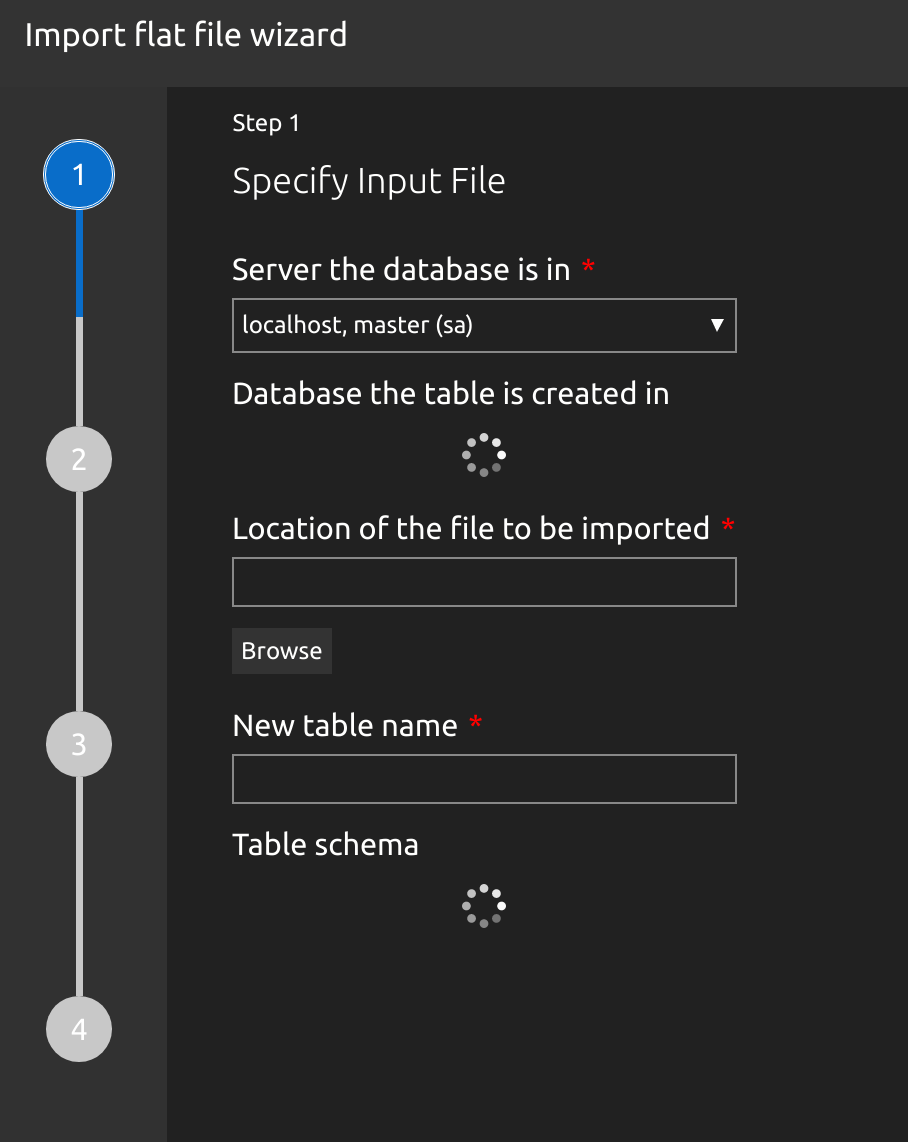
I'm not sure what is going on now. Does the connection have to be built a certain way to use the wizard? I'm connected or the import menu wouldn't be there.
trendoid
on 2 Sep 2018
@trendoid the stack trace you put there is from issue #2282. To work around it you can open the Import extension by right clicking on a database in Object Explorer and choosing "Import wizard". If it still doesn't work when you do that let me know
MattIrv
on 4 Sep 2018
Related issues
 samirbehara
·
34Comments
samirbehara
·
34Comments
 atrauzzi
·
67Comments
atrauzzi
·
67Comments
 jakodev
·
26Comments
jakodev
·
26Comments
 capnsue
·
48Comments
capnsue
·
48Comments
 SvenAelterman
·
52Comments
SvenAelterman
·
52Comments