Azuredatastudio: Incorrect Client Process IDs passed to SQL Engine
- SQL Operations Studio Version:
Version 0.29.3
Commit 7099922c35bc3b3e223228c972cc03cee5abbe25
Date 2018-05-04T05:46:24.032Z
Shell 1.7.12
Renderer 58.0.3029.110
Node 7.9.0
Architecture x64
Steps to Reproduce:
SQLOps Studio related connection properties in SQL Server Engine are showing up with incorrect PIDs, Since the PIDs are populated from Client side this needs to be fixed.
This is helpful when we are tracing any application related issues from SQL Engine perspective.
I have filed a product defect for this to be considered for triaging
select program_name,hostprocess,spid from sys.sysprocesses where program_name like ('sql%')
program_name hostprocess spid
SQLAgent - Email Logger 4116 51
SQLAgent - Generic Refresher 4116 52
SQLServerCEIP 4112 53
sqlops-languageService 639830521 54
sqlops-languageService 639830521 55
sqlops-ObjectExplorer 639830521 56
SQL Server Profiler - ffa6a36a-b047-4bb7-96e0-a87a82d4bcf6 20212 58
sqlops-languageService 1994165037 59
sqlops-ObjectExplorer 1994165037 61
sqlops-Query 1994165037 63
select program_name,host_process_id,session_id from sys.dm_exec_sessions where program_name like ('sql%')
program_name host_process_id session_id
SQLAgent - Email Logger 4116 51
SQLAgent - Generic Refresher 4116 52
SQLServerCEIP 4112 53
sqlops-languageService 639830521 54
sqlops-languageService 639830521 55
sqlops-ObjectExplorer 639830521 56
SQL Server Profiler - ffa6a36a-b047-4bb7-96e0-a87a82d4bcf6 20212 58
sqlops-languageService 1994165037 59
sqlops-ObjectExplorer 1994165037 61
sqlops-Query 1994165037 63
[root@rhltst ~]# ps -eaf | grep 'PPID\|sql'
UID PID PPID C STIME TTY TIME CMD
root 29043 3094 0 14:18 pts/0 00:00:07 /usr/share/sqlops/sqlops
root 29045 29043 0 14:19 pts/0 00:00:00 /usr/share/sqlops/sqlops --type=zygote --no-sandbox
root 29080 29043 0 14:19 pts/0 00:00:00 /usr/share/sqlops/sqlops --type=gpu-process --no-sandbox --supports-dual-gpus=false*
root 29095 29045 1 14:19 pts/0 00:00:17 /usr/share/sqlops/sqlops --type=renderer --js-flags=--nolazy --no-sandbox
root 29107 29045 0 14:19 pts/0 00:00:06 /usr/share/sqlops/sqlops --type=renderer --js-flags=--nolazy --no-sandbox **
root 29261 29095 0 14:19 pts/0 00:00:02 /usr/share/sqlops/sqlops /usr/share/sqlops/resources/app/out/bootstrap --type=extensionHost
root 29426 29261 0 14:19 pts/0 00:00:05 /usr/share/sqlops/resources/app/extensions/mssql/sqltoolsservice/Linux/1.4.0-alpha.30/MicrosoftSqlToolsServiceLayer --log-dir /root/.config/sqlops/mssql
root 29429 29261 0 14:19 pts/0 00:00:01 /usr/share/sqlops/resources/app/extensions/mssql/sqltoolsservice/Linux/1.4.0-alpha.30/MicrosoftSqlToolsCredentials --log-dir /root/.config/sqlops/mssql
root 29435 29261 0 14:19 pts/0 00:00:00 /usr/share/sqlops/resources/app/extensions/mssql/sqltoolsservice/Linux/1.4.0-alpha.30/SqlToolsResourceProviderService --log-dir /root/.config/sqlops/mssql

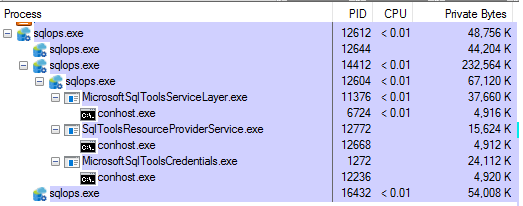
 pradm
pradm
All 7 comments
@saurabh500 is this a bug in SQlClient or SQlToolsService, do you know?
 llali
on 14 May 2018
llali
on 14 May 2018
SQLClient
Ref issue https://github.com/dotnet/corefx/issues/29609
 saurabh500
on 14 May 2018
saurabh500
on 14 May 2018
@llali @saurabh500 Is there a way to test locally build SqlClient with SQL Ops Studio ?
I tried replacing the SqlClient DLLs and other dependent DLLs in the location below, however it seems to throw an error Could not load file or assembly 'System.Runtime.CompilerServices.Unsafe while connecting to the database.
<Installation_Directory>\SQL Operations Studio\resources\app\extensions\mssql\sqltoolsservice\Windows\1.4.0-alpha.30
Could you kindly point me to the location where this DLL needs to be replaced ?
System.IO.FileNotFoundException: Could not load file or assembly 'System.Runtime.CompilerServices.Unsafe, Version=4.0.5.0, Culture=neutral, PublicKeyToken=b03f5f7f11d50a3a'. The system cannot find the file specified.
File name: 'System.Runtime.CompilerServices.Unsafe, Version=4.0.5.0, Culture=neutral, PublicKeyToken=b03f5f7f11d50a3a'
   at System.Text.SBCSCodePageEncoding.LoadManagedCodePage()
   at System.Text.CodePagesEncodingProvider.GetEncoding(Int32 codepage)
   at System.Text.EncodingProvider.GetEncodingFromProvider(Int32 codepage)
   at System.Text.Encoding.GetEncoding(Int32 codepage)
   at System.Data.SqlClient.TdsParser.TryProcessEnvChange(Int32 tokenLength, TdsParserStateObject stateObj, SqlEnvChange[]& sqlEnvChange)
   at System.Data.SqlClient.TdsParser.TryRun(RunBehavior runBehavior, SqlCommand cmdHandler, SqlDataReader dataStream, BulkCopySimpleResultSet bulkCopyHandler, TdsParserStateObject stateObj, Boolean& dataReady)
   at System.Data.SqlClient.TdsParser.Run(RunBehavior runBehavior, SqlCommand cmdHandler, SqlDataReader dataStream, BulkCopySimpleResultSet bulkCopyHandler, TdsParserStateObject stateObj)
   at System.Data.SqlClient.SqlInternalConnectionTds.CompleteLogin(Boolean enlistOK)
   at System.Data.SqlClient.SqlInternalConnectionTds.AttemptOneLogin(ServerInfo serverInfo, String newPassword, SecureString newSecurePassword, Boolean ignoreSniOpenTimeout, TimeoutTimer timeout, Boolean withFailover)
   at System.Data.SqlClient.SqlInternalConnectionTds.LoginNoFailover(ServerInfo serverInfo, String newPassword, SecureString newSecurePassword, Boolean redirectedUserInstance, SqlConnectionString connectionOptions, SqlCredential credential, TimeoutTimer timeout)
   at System.Data.SqlClient.SqlInternalConnectionTds.OpenLoginEnlist(TimeoutTimer timeout, SqlConnectionString connectionOptions, SqlCredential credential, String newPassword, SecureString newSecurePassword, Boolean redirectedUserInstance)
   at System.Data.SqlClient.SqlInternalConnectionTds..ctor(DbConnectionPoolIdentity identity, SqlConnectionString connectionOptions, SqlCredential credential, Object providerInfo, String newPassword, SecureString newSecurePassword, Boolean redirectedUserInstance, SqlConnectionString userConnectionOptions, SessionData reconnectSessionData, Boolean applyTransientFaultHandling)
   at System.Data.SqlClient.SqlConnectionFactory.CreateConnection(DbConnectionOptions options, DbConnectionPoolKey poolKey, Object poolGroupProviderInfo, DbConnectionPool pool, DbConnection owningConnection, DbConnectionOptions userOptions)
   at System.Data.ProviderBase.DbConnectionFactory.CreateNonPooledConnection(DbConnection owningConnection, DbConnectionPoolGroup poolGroup, DbConnectionOptions userOptions)
   at System.Data.ProviderBase.DbConnectionFactory.<>c__DisplayClass40_0.<TryGetConnection>b__1(Task`1 _)
   at System.Threading.Tasks.ContinuationResultTaskFromResultTask`2.InnerInvoke()
   at System.Threading.ExecutionContext.RunInternal(ExecutionContext executionContext, ContextCallback callback, Object state)
--- End of stack trace from previous location where exception was thrown ---
   at System.Threading.Tasks.Task.ExecuteWithThreadLocal(Task& currentTaskSlot)
--- End of stack trace from previous location where exception was thrown ---
   at Microsoft.SqlTools.ServiceLayer.Connection.ReliableConnection.ReliableSqlConnection.<>c__DisplayClass28_0.<<OpenAsync>b__0>d.MoveNext() in D:\a\1\s\src\Microsoft.SqlTools.ServiceLayer\Connection\ReliableConnection\ReliableSqlConnection.cs:line 298
--- End of stack trace from previous location where exception was thrown ---
   at Microsoft.SqlTools.ServiceLayer.Connection.ConnectionService.TryOpenConnection(ConnectionInfo connectionInfo, ConnectParams connectionParams) in D:\a\1\s\src\Microsoft.SqlTools.ServiceLayer\Connection\ConnectionService.cs:line 542
 keeratsingh
on 12 Jun 2018
keeratsingh
on 12 Jun 2018
@keeratsingh You can test this from SqlClient tests itself.
Find the process id of the test process and check if the query above select program_name,hostprocess,spid from sys.sysprocesses where program_name like ('sql%')
returns the process id of the test.
saurabh500
on 12 Jun 2018
Of course, your Program_name will have to change to reflect the process name of the test process
saurabh500
on 12 Jun 2018
keeratsingh
on 13 Jun 2018
@keeratsingh thanks! Do you know which .Net Core release the fix will be available in?
 kburtram
on 24 Jul 2018
kburtram
on 24 Jul 2018
Related issues
 kfrajtak
·
3Comments
kfrajtak
·
3Comments
 blackTay
·
3Comments
blackTay
·
3Comments
 RobLW
·
3Comments
RobLW
·
3Comments
 jacobzed
·
3Comments
jacobzed
·
3Comments
 carloscfcortez
·
3Comments
carloscfcortez
·
3Comments