Azuredatastudio: Table constraints are not shown when expanding a table, neither are the included in generated sql.
- SQL Operations Studio Version: sqlops 0.24.1 (dbb421f5033405236bb43a14fc2ac1dd87a36b43, 2017-12-19T08:48:53.957Z)
- OS Version: Darwin x64 17.3.0
I am connecting to a sql server linux docker image (on a nonstandard port, 1434) running inside a local Mac Docker (17.12.0-ce-mac45 (21669) ).
When I expand tables to inspect constraints, no constraints are shown (Keys, Triggers, Indexes, and Statistics all work)
If I right-click a table, and select "Script as Create", the generated SQL does not contain contstraints as well.
 stroiman
All 8 comments
of course, I have no idea if this is an sql operations studio bug, or sql server for linux bug.
stroiman
on 16 Jan 2018
@abist could you please confirm if this is intended behavior or bug? And if it is by design, should have an option to include the constraints when scripting?
 kburtram
on 16 Jan 2018
kburtram
on 16 Jan 2018
@kburtram The scripting behavior seems to be by design, with scripting for constraints set to false. I can switch it on if we want it. However, I'm not sure about the OE behavior. Perhaps @llali knows more about that.
 abist
on 22 Jan 2018
abist
on 22 Jan 2018
@stroiman I fixed the issue with script didn't include indexes, triggers ... in my PR in the sqltoolsservice but I cannot repro the other issue you're talking about. When I expand the table node in the object explorer, I can see the indexes and keys, constraints and everything else. can you please confirm if you still see the issue and if you can then please send me the script to create the table (including all the keys and indexes ...) Thanks
 llali
on 6 Feb 2018
llali
on 6 Feb 2018
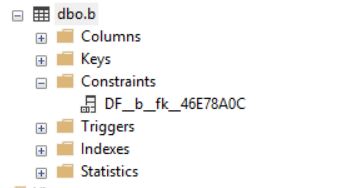
I'm seeing the same behavior
- Microsoft SQL Server 2016 (SP1) (KB3182545) - 13.0.4001.0 (X64) Developer on Windows 10
- SQL Operations Studio 0.25.4
After I run
DROP TABLE IF EXISTS b
CREATE TABLE b
(
    id INT IDENTITY(1,1) PRIMARY KEY
    ,value INT
    ,fk INT  NOT NULL DEFAULT 0
)
the Constraints branch is empty. In SSMS I can see the constraint.

 bciesielski
on 6 Feb 2018
bciesielski
on 6 Feb 2018
@llali I just downloaded the latest SQL Operations Studio, 0.25.4 - and I am still seeing this issue, easily reproducible with the script @bciesielski provided.
stroiman
on 7 Feb 2018
@stroiman yes I was able to repro it. DEFAULT Constraints are not loaded correctly for table when expanding Constraints. I'll create a separate bug for it
llali
on 7 Feb 2018
627
llali
on 7 Feb 2018
Related issues
 SvenAelterman
·
52Comments
SvenAelterman
·
52Comments
 marcwied
·
24Comments
marcwied
·
24Comments
 borgdylan
·
30Comments
borgdylan
·
30Comments
 anand348
·
24Comments
anand348
·
24Comments
 yualan
·
28Comments
yualan
·
28Comments