Azure-pipelines-agent: Issue with colors on logs and character escapes
Agent Version and Platform
Windows
Azure DevOps Type and Version
Hosted VS
https://microsoft.visualstudio.com
What's not working?
- We are running
yarn jest --colorsand while we do see colors, we also see a number of characters not being unescaped.
Actual output:
[packagename]/build-scripts: ================================================================================
[packagename]/build-scripts: Snapshot Summary
[packagename]/build-scripts: › 1 snapshot failed from 1 test suite. Inspect your code changes or run `yarn run jest -u` to update them.
[packagename]/build-scripts: Test Suites: 1 failed, 3 passed, 4 total
[packagename]/build-scripts: Tests: 1 failed, 1 skipped, 11 passed, 13 total
[packagename]/build-scripts: Snapshots: 1 failed, 5 passed, 6 total
[packagename]/build-scripts: Time: 57.322s
[packagename]/build-scripts: error Command failed with exit code 1.
[packagename]/build-scripts: info Visit https://yarnpkg.com/en/docs/cli/run for documentation about this command.
[packagename]/build-scripts: error Command failed with exit code 1.
[packagename]/build-scripts: info Visit https://yarnpkg.com/en/docs/cli/run for documentation about this command.
[packagename]/cli: PASS __tests__/utils.test.ts (91.044s)
[packagename]/cli: PASS __tests__/validation-helpers.test.ts (6.074s)
Related: #1569
 konpikwastaken
All 6 comments
@konpikwastaken the agent just redirect STDOUT/STDERR from whatever tool you invoke, so this might be a UI problem.
@yaananth FYI,
 TingluoHuang
on 7 Mar 2019
TingluoHuang
on 7 Mar 2019
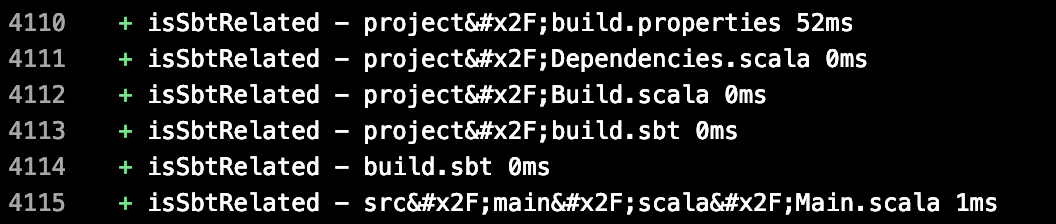
I am experiencing the same issue, colors render correctly but / characters render as /. The screenshot below is from the following public build https://dev.azure.com/olafurpg/Metals/_build/results?buildId=51
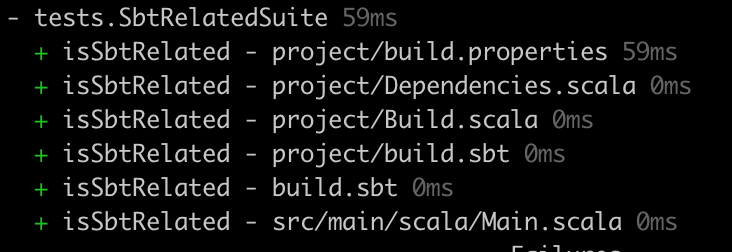
In my iTerm macOS console, the / characters render as expected
 olafurpg
on 9 Mar 2019
olafurpg
on 9 Mar 2019
This a known limitation with escape codes, we have a replacement view that will address this and is in internal preview, will be out soon.
Sorry for the limitations here with ansii code support.
 yaananth
on 9 Mar 2019
yaananth
on 9 Mar 2019
Thanks. For what it's worth the console output locally in vscode prints colors correctly, with escaped characters shown as expected.
Can this issue be kept open and closed when the new view is released?
konpikwastaken
on 22 Mar 2019
this isn't agent issue, you can submit feedback https://developercommunity.visualstudio.com/topics/Azure+DevOps.html if you would like to track.
yaananth
on 22 Mar 2019
Today I noticed that if you enable the "Multi-stage pipelines" preview feature, then colors are displayed properly. (In Azure DevOps, click your profile --> "..." --> "Preview features".)
Lack of colors support was a major annoyance for Azure DevOps (compared to other CI systems), so it's really awesome that this is finally getting solved!
 octogonz
on 4 Sep 2019
octogonz
on 4 Sep 2019
Related issues
 gdavocap
·
60Comments
gdavocap
·
60Comments
 JamesNK
·
84Comments
JamesNK
·
84Comments
 gregpakes
·
43Comments
gregpakes
·
43Comments
 michaelschufi
·
32Comments
michaelschufi
·
32Comments
 jhmoy
·
36Comments
jhmoy
·
36Comments
Most helpful comment
Today I noticed that if you enable the "Multi-stage pipelines" preview feature, then colors are displayed properly. (In Azure DevOps, click your profile --> "..." --> "Preview features".)
Lack of colors support was a major annoyance for Azure DevOps (compared to other CI systems), so it's really awesome that this is finally getting solved!