Azure-pipelines-agent: Artifact Publishing disproportionately slow for large number of small files
I have published this over here too, I'll delete whichever one is not appropriate.
https://github.com/Microsoft/vsts-tasks/issues/6830
I am using VSTS with the hosted agent.
Artifact publishing is very slow. Cloning the repo, which is much larger than the artifacts that need publishing takes about 3-4 mins. Publishing the artifacts is taking 23 minutes.
Here are the details:
- 23k files in the final artifacts that need publishing
- I've seen that people suggest zipping it up, then publishing. We have tried this before, but the zipping process takes longer than the publishing. Then I also need to unzip them in the release process.
- I am publishing to the Server, not to a file share.
- I am using a hosted agent.
I've read on some forums that it takes a long time because it only does 4 files at a time.
Is there any way to speed this up?
 gregpakes
All 43 comments
I've figured a decent work around for this. The publish now takes 28 seconds.
I use the following task Artifact Compressor which allows you to create a zip file with no compression. This obviously solves the problem described above where the compression takes too long.
Publishing the single zip archive is much faster.
This has taken 30 mins off my build time, halving it!
gregpakes
on 29 Mar 2018
@madhurig - cpu bound on large number of small files? I think it's more about the target machine than the task??
 bryanmacfarlane
on 29 Mar 2018
bryanmacfarlane
on 29 Mar 2018
@bryanmacfarlane
Why do you think it’s CPU bound? Also I have no control over the machines. This is hosted build agent publishing to VSTS container
gregpakes
on 29 Mar 2018
I read your statement as it's faster with no compression. But I see now that you're saying the fact that you went to one file (without spending cycles on compressing) you're faster.
If that's correct, then very likely it's because it's not writing metadata to the backend for each file (we support browsing a drop in the web UI). Just one metadata row. It's also taking the overhead of connecting and starting a stream for each file down to one. That's especially true for a very large number of small files where the metadata writes and overhead per file dominates the time.
Upside is for one zip is (for large drops) it's faster. Downside, you can't browse the drop and download portions of the drop as a zip (UI supports browsing to a sub folder and downloading). If you just care about downloading the whole artifact and then not browsing individual files from the drop via the web, then a zip / package is a better solution.
The best solution would be file and metadata de dupe. You still get the benefits of individual files in a drop but only upload / write what changes (long story)
Side note that if you want to try your dataset on a VM where you do have access and control, the hosted agent is a DS2V2 or DS2V3 azure VM - nothing magical :) We also do offer options where you do have control over the machines (deploy your own agent on VM you acquire): https://docs.microsoft.com/en-us/vsts/build-release/actions/agents/v2-windows?view=vsts
bryanmacfarlane
on 29 Mar 2018
@bryanmacfarlane
I think the biggest indicator of an issue is that the git clone takes about 3 mins. Yet the artifact publish takes 23-25 minutes.
Also in the release pipeline I use the Azure File Copy task to copy the same artifacts to blob storage. That takes about 5 mins.
So my thought is that the publish artifacts task is abnormally slow. I understand there will be overhead with the meta data etc, but should it be 5 times slower than Azure File Copy to blob storage?
gregpakes
on 29 Mar 2018
Yes, I understand. I added @madhurig because there's investment going on in this area to rework artifacts. Her team is driving it. I was trying to outline where I think it's blocking :)
bryanmacfarlane
on 29 Mar 2018
Can you confirm whether it's a large number of small files?
bryanmacfarlane
on 29 Mar 2018
@bryanmacfarlane
Its 23K files with a total size of 400MB.
gregpakes
on 29 Mar 2018
Yeah, that's pretty much the worst case for that task that's bound by metadata writes. Zipping up and then publishing that one zip is much better for that case.
bryanmacfarlane
on 29 Mar 2018
We also have this same issue with our ASP.NET site which we build and publish using VSTS. We tried compressing the files but it made it so that we couldn't select which artifacts to download in our release (our website and our automated UI tests are in the artifacts). We at one point setup multiple artifacts but it became to complicated to follow so we simply stopped using compression. It also made it so that we couldn't select files from the artifacts using the release file pickers.
It would be nice to have the option to compress artifacts in the Publish Build Artifacts task, and have VSTS simply know how to handle compressed artifacts. Even if the compression level is set to "Store" it makes a huge speed improvement. It's more about lowering the amount of files that are getting uploaded to VSTS than the size of the files.
 ChristopherHaws
on 2 May 2018
ChristopherHaws
on 2 May 2018
@ChristopherHaws - I have this working very well by compressing artifacts separately and publishing them separately. I can then select which artifacts to download (and decompress) in RM. This works well and has reduced build/release time by 50%.
gregpakes
on 2 May 2018
@gregpakes, I am trying to use Artifact Compressor but it gives me an error saying that "[error]Microsoft.PowerShell.Commands.WriteErrorException: Failed to move D:\a\1\a[projename]-readme.txt to D:\a\1\a\file.deploy-readme.txt.zip"
Any suggestions?
 Gold14388
on 11 Jul 2018
Gold14388
on 11 Jul 2018
@Gold14388
I assume you are using the Artifacts Compressor task. I did not write this task and sadly the source is not on github. I have asked the author to put the source on GitHub, but he doesn't want to. If it was, I would be able to diagnose the issue easily.
I have asked him about it here: https://marketplace.visualstudio.com/items?itemName=roshkovski.2B9619D5-7BE9-4ED7-BF10-707CB17F657A#qna
I recommend you ask him a Q&A question on the link above and then also ask him to put the source on github.
gregpakes
on 12 Jul 2018
@Gold14388 could you please try again and share results?
 odministrator
on 12 Jul 2018
odministrator
on 12 Jul 2018
We suddenly have the same issue on our builds....
gregpakes
on 12 Jul 2018
@gregpakes Thanks for acknowledging my question. You too get the same error now? That's interesting. I wonder if it matters to have $(Build.ArtifactStagingDirectory) as source and destination for the task
Gold14388
on 12 Jul 2018
I guess that the problem can occur if you have file path instead of directory paths in source\destination. The idea of the task is to pack everything in zip files in build "a" directory and revert changes later during deployment. If you need something to archive file - there are Archive\Extract tasks by Microsoft which provide even better functionality and support tar\rar\7z also.
In my case everything works pretty fine and archives directories\files on build and expand on release side.
odministrator
on 12 Jul 2018
@oadministrator
I understand what you’re saying, but you have changed the functionality and broken a number of people. Could this have been released as a v2 and still allow is to use v1?
So are you saying that you’re not going to fix it?
Also the Microsoft tasks don’t work for me as they don’t support zero compression (as far as I know), which is my use case.
gregpakes
on 13 Jul 2018
Looks like the easiest way to manage the issue is create new version, as I haven't seen build logs and can't reproduce it.
I moved new script and task to v2 version and rolled-back changes to previous version in v1. So, old builds should be good now.
Please check v2 and in case of issues send me build logs in debug mode or at least describe scenario to reproduce.
odministrator
on 13 Jul 2018
@odministrator
Much appreciated.
gregpakes
on 13 Jul 2018
@odministrator
This still isn't working for me. The task version is:
Version : 1.3.2
gregpakes
on 13 Jul 2018
@gregpakes Sorry, my fault. I committed minor version lower than it had been published yesterday.
Should be fixed in a minute (publish build is running).
odministrator
on 13 Jul 2018
@odministrator, @gregpakes, I used this link https://marketplace.visualstudio.com/items?itemName=roshkovski.2B9619D5-7BE9-4ED7-BF10-707CB17F657A#overview to get the latest version and I can only see version 1.2.1. Where can i find the latest version?
Gold14388
on 13 Jul 2018
@Gold14388 You are looking in a wrong place :) You check extension version, but we are talking about compress task version which is actually 1.5.0 for v1 and 2.0.0 for v2.
odministrator
on 16 Jul 2018
I have the same issue but with one file (about 80 MB). It takes about 20 minutes to publish it.
 alexey-belous
on 28 Aug 2018
alexey-belous
on 28 Aug 2018
Is this something that can be improved? I don't like the compress/decompress method. Could it be multithreaded or something to speed it up?
 MichelZ
on 30 Nov 2018
MichelZ
on 30 Nov 2018
I am having a similar issue, where but on the unzipping part of the deployment. In the build process of a node.js project the npm install process takes 20s, the zip Archive Files process takes 11s and the publish artifact 16s, but in the release pipeline in the deployment to the webapp the unzipping process takes unreasonably long, i.e. almost 20mins, but only after I removed the web.config as described here: azure-app-service-deploy-problem.html. I guess it´sbecause of all the node_modules being unpacked
 Sebs030
on 9 Jan 2019
Sebs030
on 9 Jan 2019
Hmm.. it sounds weird.
From my side, I can say that expand task uses standard .net library
System.IO.Compression.FileSystem, so it shouldn't be task specific issue.
node_modules could be a problem because usually this folder contains
thousands of files and I especially has built the extension to make
upload\download artifact process faster. For me archive operations also
take time, but in general build and release work much faster.
Anyway, if compress task works 11 seconds, expand shouldn't take 20min.
Maybe it depends on build server which is running release and things like
server IOPS, CPU, antivirus, etc.
Thanks,
Piotr
On Thu, Jan 10, 2019 at 12:18 AM Sebs030 notifications@github.com wrote:
I am having a similar issue, where but on the unzipping part of the
deployment. In the build process of a node.js project the npm install
process takes 20s, the zip Archive Files process takes 11s and the publish
artifact 16s, but in the release pipeline in the deployment to the webapp
the unzipping process takes unreasonably long, i.e. almost 20mins, but only
after I removed the web.config as described here:
azure-app-service-deploy-problem.html
https://developercommunity.visualstudio.com/content/problem/416229/azure-app-service-deploy-problem.html.
I guess it´sbecause of all the node_modules being unpacked—
You are receiving this because you were mentioned.
Reply to this email directly, view it on GitHub
https://github.com/Microsoft/azure-pipelines-agent/issues/1480#issuecomment-452843226,
or mute the thread
https://github.com/notifications/unsubscribe-auth/AKWYWgWYG3V8-M0-eXLq1ad3nnyxnNzHks5vBlyngaJpZM4S_e9t
.
--
Best regards,
Piotr Roshkovski
GSM: +37529 - 55 868 11
e-mail: [email protected]
odministrator
on 10 Jan 2019
Hi Piotr,
yes agree, it´s weird, I used a predefined azure template for build process (Node+Gulp), but removed the gulp task, since i don´t use it. Please find attached screenshot of the build log and deploy log. Build Process:
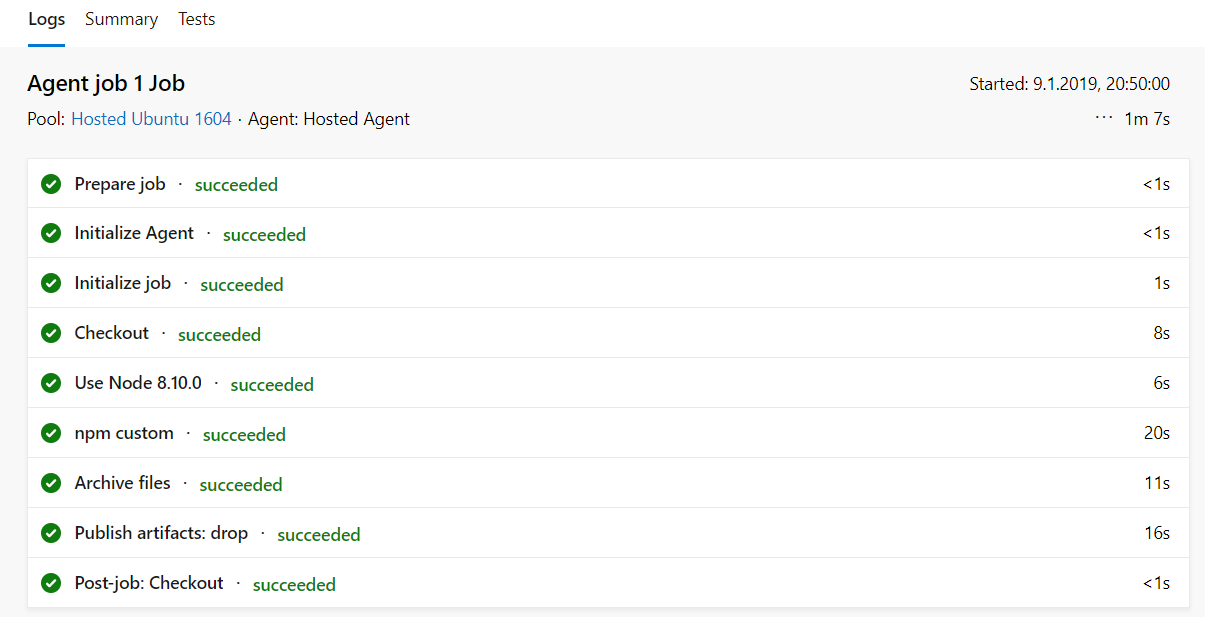
Deploy Process:

By just looking at it i realize that the build process is hosted on Ubuntu but, the release process on Hosted VS2017, maybe thats the reason?
Sebs030
on 10 Jan 2019
Hi Piotr,
yes agree, it´s weird, I used a predefined azure template for build process (Node+Gulp), but removed the gulp task, since i don´t use it. Please find attached screenshot of the build log and deploy log. Build Process:
Deploy Process:
By just looking at it i realize that the build process is hosted on Ubuntu but, the release process on Hosted VS2017, maybe thats the reason?
Hey,
Looking on tasks list I realize that you are using another build step (not created by myself) "Archive files". deploy step is also something created by other guys. It's hard to say why they are working this way.
Just FYI, my tasks are Powershell based and can work on Linux only if you have Powershell installed there.
odministrator
on 13 Jan 2019
I've had a lot of problems with this too, with the deployment of an Angular web app sometimes taking up to an hour. I've also tried to install the node_modules as part of the deployment stage by using npm ci --only=production as part of a deployment script, but this can take a long time (locally, npm ci takes 1m20s to run, on the web app it will take up to 25m) and will regularly fail with file access errors.
I'd welcome anything that would improve deployment performance for Node apps. Currently I'm testing using WEBSITE_LOCAL_CACHE_OPTION as Always because I had seen some suggestion that a lot of latency in the file transfer was due to the caching structure.
 rollercoasterdigital
on 11 Feb 2019
rollercoasterdigital
on 11 Feb 2019
I experienced this same issue using a Microsoft ubuntu hosted pipeline in azure devops.
I resolved my problem by altering my azure-pipelines.yml with replacing the following:
- task: PublishBuildArtifacts@1
  displayName: 'PublishBuildArtifacts'
  inputs:
    pathtoPublish: '$(Build.ArtifactStagingDirectory)'
    artifactName: 'drop'
with the new PublishPipelineArtifact@0 (documentation: https://docs.microsoft.com/en-us/azure/devops/pipelines/artifacts/pipeline-artifacts?view=azure-devops&tabs=yaml )
- task: PublishPipelineArtifact@0
  displayName: 'Publish pipeline artifact'
  inputs:
    artifactName: 'new'
    targetPath: '$(Build.ArtifactStagingDirectory)'
After this adjustment my build time went from ~15 minutes to ~2 minutes.
 Moke
on 17 Apr 2019
Moke
on 17 Apr 2019
@Moke Your recommendation also works for on-prem builds.
My build times dropped from 14m to sub 2m builds.
 3bdNKocY
on 5 Jun 2019
3bdNKocY
on 5 Jun 2019
Having the same issue here. I don't think it should matter how many files are part of artifacts, uploading should be fast. We now need to add a workaround by compressing it first, which shouldn't be necessary
 PaulVrugt
on 25 Jun 2019
PaulVrugt
on 25 Jun 2019
@PaulVrugt Have you tried the new Pipeline Artifact Publish task as discussed above?
gregpakes
on 25 Jun 2019
@gregpakes
Yes I have, and it does speed up the process, but I believe it should not be necessary to do this. This should be handled correctly by azure devops itself. Now we are forced to create a workaround in each pipeline.
PaulVrugt
on 25 Jun 2019
@PaulVrugt
How is it a workaround? This new task replaces the old one. I think this task does exactly what you’re saying. Azure Devops have fixed the issue by creating a new publish task.
Am I missing something?
gregpakes
on 25 Jun 2019
I am going to close this issue as I feel the new Publish Pipeline Artifact task resolves this issue.
Summary
The Publish Build Artifact has been replaced with the Publish Pipeline Artifact which does not exhibit this issue.
- task: PublishPipelineArtifact@0
displayName: 'Publish pipeline artifact'
inputs:
artifactName: 'new'
targetPath: '$(Build.ArtifactStagingDirectory)'
@gregpakes
@moke
I completely misread the last part of this thread. I thought you were talking about the compress/decompress tasks. If the new publish task fixes this, then I agree that fixes the issue. I'll try it later today.
Sorry for the confusion
PaulVrugt
on 26 Jun 2019
I experienced this same issue using a Microsoft ubuntu hosted pipeline in azure devops.
I resolved my problem by altering my azure-pipelines.yml with replacing the following:
- task: PublishBuildArtifacts@1
  displayName: 'PublishBuildArtifacts'
  inputs:
    pathtoPublish: '$(Build.ArtifactStagingDirectory)'
    artifactName: 'drop'
with the new PublishPipelineArtifact@0 (documentation: https://docs.microsoft.com/en-us/azure/devops/pipelines/artifacts/pipeline-artifacts?view=azure-devops&tabs=yaml )
- task: PublishPipelineArtifact@0
  displayName: 'Publish pipeline artifact'
  inputs:
    artifactName: 'new'
    targetPath: '$(Build.ArtifactStagingDirectory)'
After this adjustment my build time went from ~15 minutes to ~2 minutes.
Saved the day for me, thank you very much.
Dropped from 15 minutes to 1m 35 sec.
- task: PublishPipelineArtifact@1
inputs:
targetPath: '$(build.artifactstagingdirectory)'
artifact: 'dropLikeitsHot'
publishLocation: 'pipeline'
 nbandi413
on 21 Nov 2019
nbandi413
on 21 Nov 2019
can anyone confirm that
- task: PublishPipelineArtifact@0
  displayName: 'Publish pipeline artifact'
  inputs:
    artifactName: 'new'
    targetPath: '$(Build.ArtifactStagingDirectory)'
is equivalent to
- publish: '$(Build.ArtifactStagingDirectory)'
  artifact: 'new'
in the main yaml reference doc they say to use the publish abstraction:
The publish keyword is a shortcut for the Publish Pipeline Artifact task. The task publishes (uploads) a file or folder as a pipeline artifact that other jobs and pipelines can consume.
but when i use this i get path does not exist
 the-vampiire
on 8 May 2020
the-vampiire
on 8 May 2020
and as a followup it seems it always zips the output dir (even without the zip directive set to true). why arent we required to set the target path as $(Build.StagingDirectory)/<project name>.zip?
the-vampiire
on 8 May 2020
Why is there no PublishBuildArtifacts@0? PublishBuildArtifacts@1 is slow as cuss.
What's the difference between PublishBuildArtifacts and PublishPuildArtifacts??
 cawoodm
on 9 Jun 2020
cawoodm
on 9 Jun 2020
Related issues
 toolboc
·
51Comments
toolboc
·
51Comments
 carvalho-oak
·
31Comments
carvalho-oak
·
31Comments
 gdavocap
·
60Comments
gdavocap
·
60Comments
 rusergeev
·
48Comments
rusergeev
·
48Comments
 letmaik
·
35Comments
letmaik
·
35Comments
Most helpful comment
I experienced this same issue using a Microsoft ubuntu hosted pipeline in azure devops.
I resolved my problem by altering my azure-pipelines.yml with replacing the following:
with the new PublishPipelineArtifact@0 (documentation: https://docs.microsoft.com/en-us/azure/devops/pipelines/artifacts/pipeline-artifacts?view=azure-devops&tabs=yaml )
After this adjustment my build time went from ~15 minutes to ~2 minutes.